
How to Transition from OneDrive to Papermark

Ready to upgrade from OneDrive's basic file storage to a professional document sharing platform? This guide will walk you through migrating to Papermark, ensuring proper handling of your local OneDrive sync settings and files.
Learn why businesses are switching from OneDrive's limited capabilities to Papermark's comprehensive document management features.
What you need to know about migrating from OneDrive
- OneDrive files can be downloaded in bulk or individually
- Local copies of files should be secured before migration
- All file versions and sharing settings should be reviewed
- Papermark supports all major file formats that OneDrive does
- Links will need to be updated after migration
Step 1: Download your OneDrive content
-
Ensure all files are downloaded locally:
- Right-click the OneDrive icon in the taskbar
- Select "Settings"
- Go to "Sync and Backup" > "Manage Backup"
- Click "Advanced settings"
- Select "Download all files"
-
Verify local storage:
- Check your OneDrive folder at
C:\Users\[Your Username]\OneDrive - Ensure all files are available offline
- Look for any sync issues or pending downloads
- Check your OneDrive folder at
Step 2: Prepare your files for Papermark
Before uploading to Papermark, organize your files. Papermark supports:
- PDF documents (.pdf)
- Microsoft Office files (.doc, .docx, .xls, .xlsx, .ppt, .pptx)
- Spreadsheets (.csv, .ods)
- Images (.png, .jpg, .jpeg)
- Videos (.mp4, .mov, .avi, .webm)
- CAD files (.dwg, .dxf)
- Compressed files (.zip)
- And more
Step 3: Upload to Papermark
- Log in to your Papermark account
- Navigate to "Documents" in the sidebar
- Click "Add Document" in the top right corner
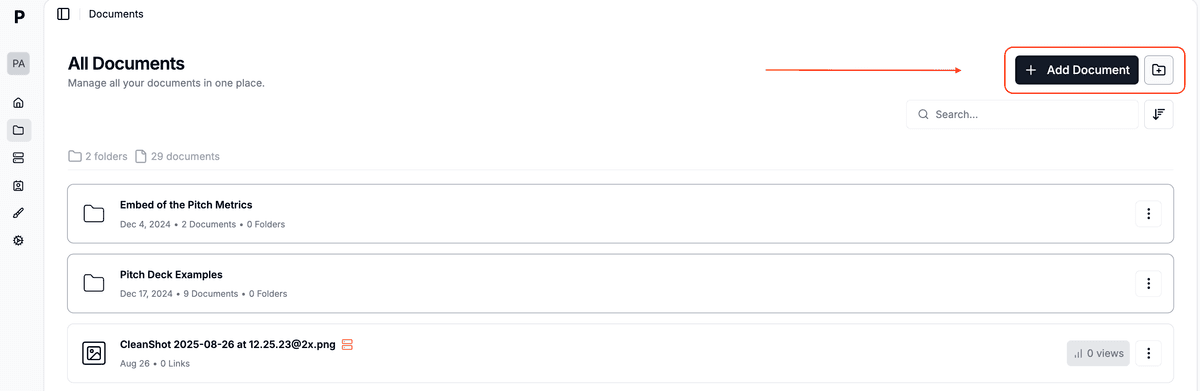
- You can then:
- Upload individual files by clicking or dragging
- Create folders to organize your documents
- Upload multiple files simultaneously
- Maintain folder structure when dragging folders
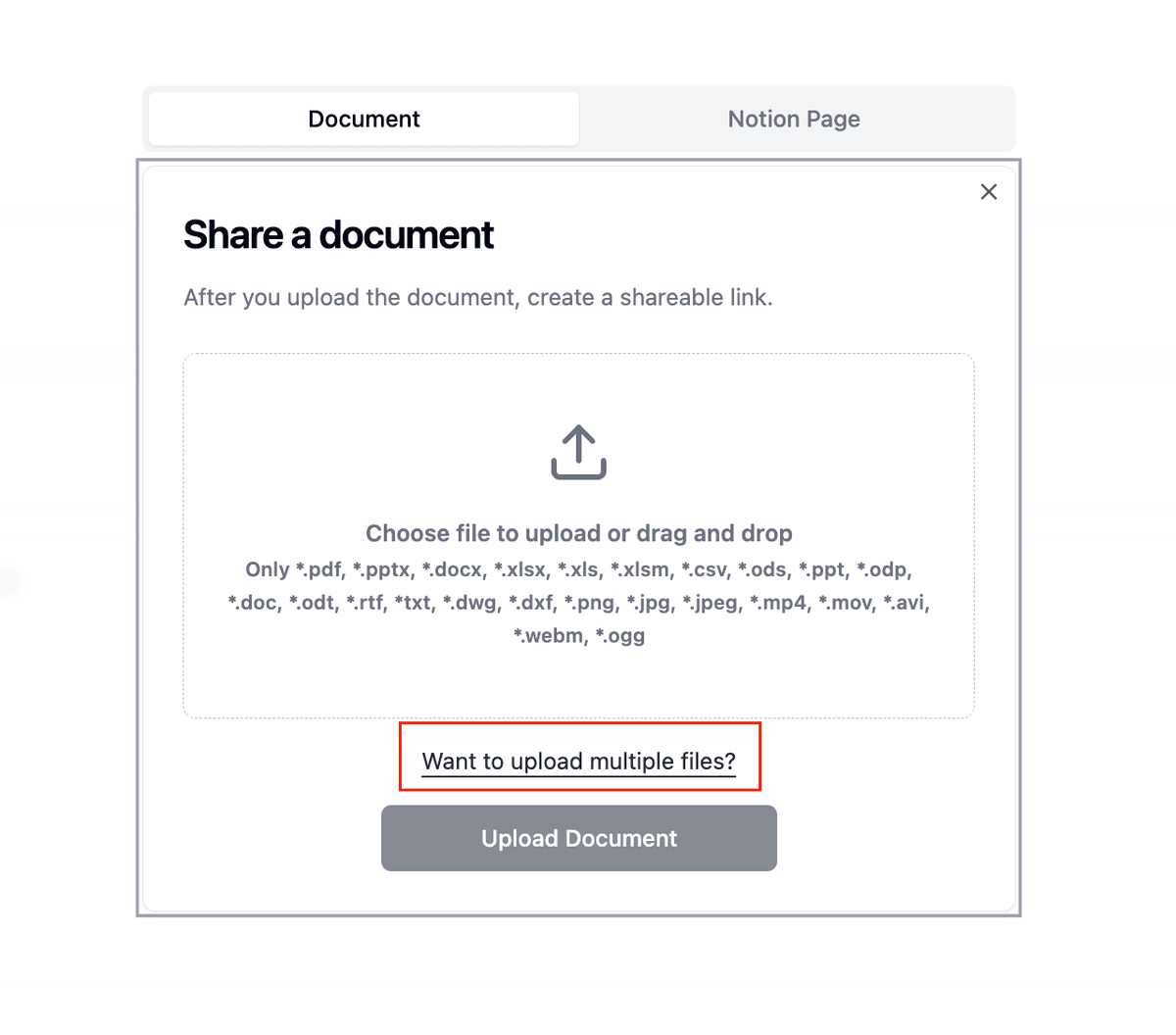
The Documents page shows you all your files in one place, with details like:
- Number of folders and documents
- Creation dates
- View counts
- Quick access to sharing options
Step 4: Set up secure sharing
-
Configure document settings:
- Set up viewing permissions
- Enable watermarking if needed
- Configure access controls
- Set expiration dates
-
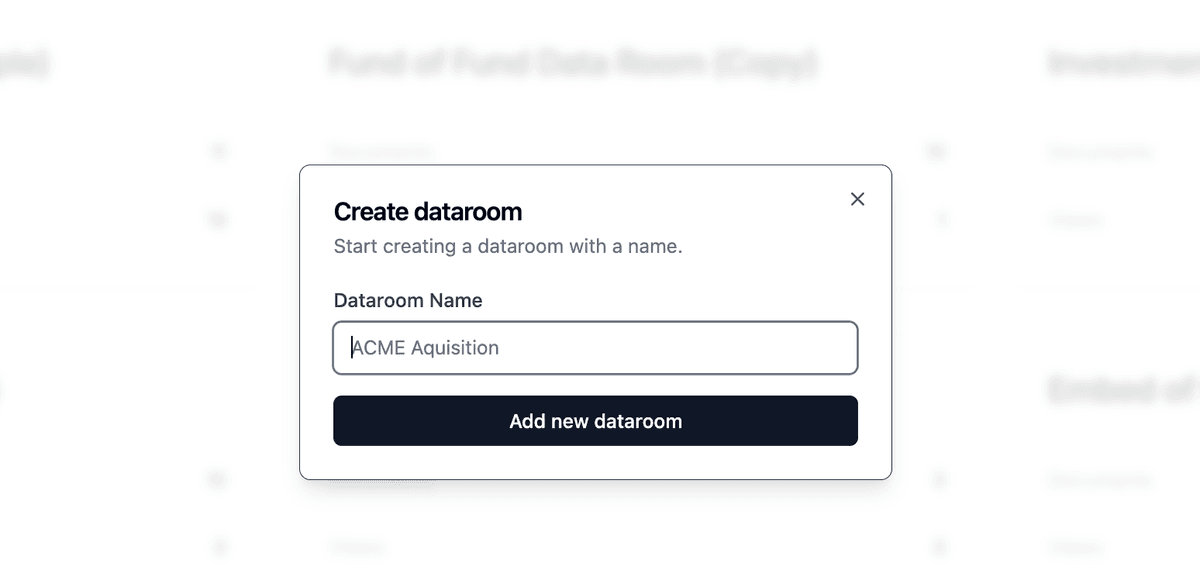
Create data rooms (if needed):
- Click "New Data Room"
- Organize documents into folders
- Set granular permissions
- Enable NDA requirements
OneDrive vs Papermark comparison
| Feature | OneDrive | Papermark |
|---|---|---|
| Free storage | 5GB free storage | Unlimited document storage on all plans |
| Starting price | $1.99/month (100GB) | Free, with paid plans available |
| Document analytics | Basic version history only | Comprehensive analytics on all plans |
| Security features | Basic password protection | Dynamic watermarking, NDA, granular permissions |
| Viewer tracking | Not available | Detailed viewer analytics and engagement tracking |
| Data rooms | Not available | Available on Business plans |
| Access control | Basic sharing permissions | Advanced access controls and expiration settings |
| Self-hosting option | Not available | Available (open-source) |
| White labeling | Not available | Available on Business plans |
| Document engagement | No engagement tracking | Real-time engagement analytics |

Use cases for migration
- Startups: Share pitch decks and company documents with enhanced tracking
- Sales teams: Track document engagement and viewer behavior
- Legal teams: Secure sensitive documents with watermarking and NDAs
- Marketing teams: Share and track marketing materials with analytics
- Consultants: Professionally present and track client deliverables
FAQ
Conclusion
Transitioning from OneDrive to Papermark opens up new possibilities for secure document sharing and analytics. While OneDrive excels at file storage and basic sharing, Papermark provides specialized features for professional document sharing, tracking, and security. The migration process is straightforward, and the benefits of enhanced document control and analytics make it a worthwhile upgrade for businesses and professionals.