
Using AI agent for documents
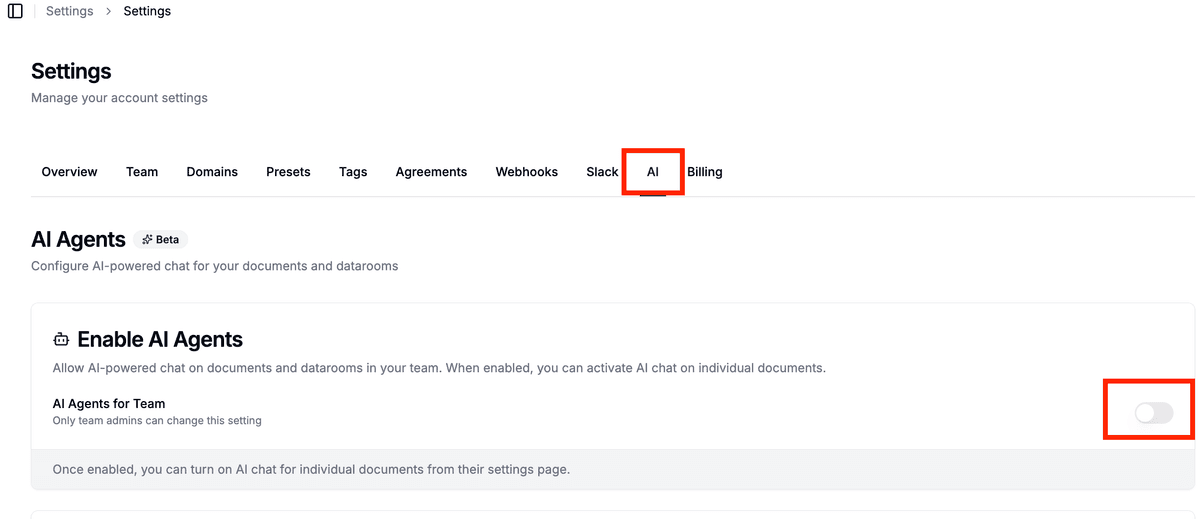
Note: You can enable Papermark AI in settings at https://app.papermark.com/settings/ai.
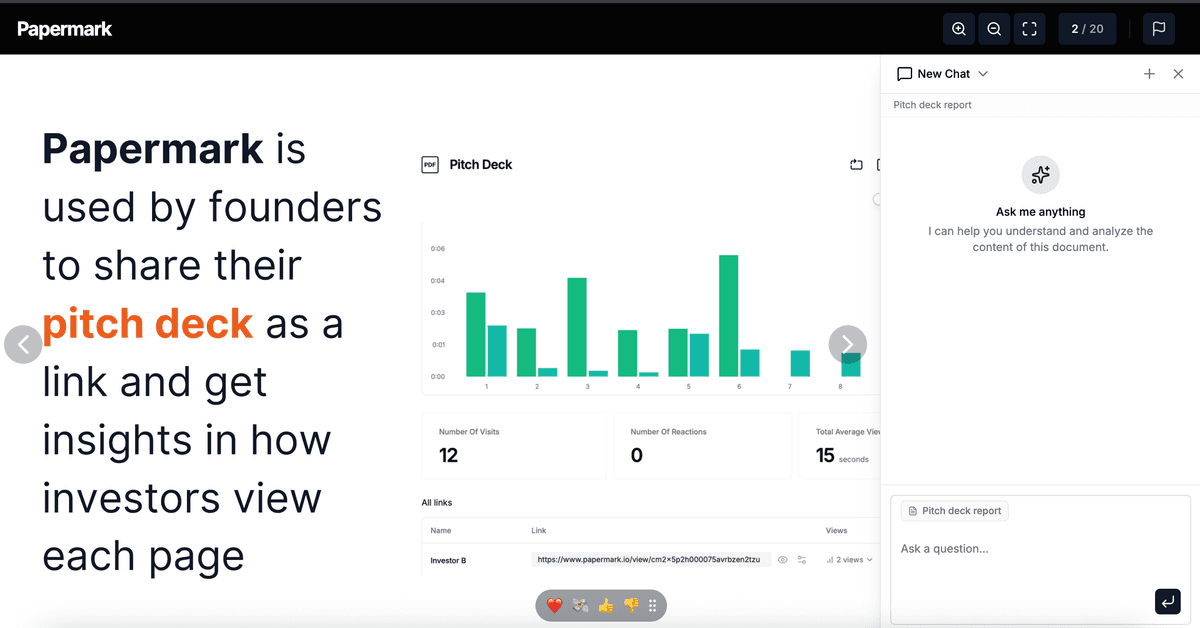
Papermark AI provides a powerful AI agent for individual documents that lets you interact directly with any document you share or receive. Instead of manually searching through an entire document, you can ask questions, request summaries, and extract key information instantly.
What is an AI agent for documents?
An AI agent for documents is a specialized assistant that accesses a single document you've shared or received in Papermark. You can ask questions about that specific document and receive answers based on the actual content.
How to enable the AI agent for documents
- Go to settings – Navigate to https://app.papermark.com/settings/ai in your Papermark account.
- Enable Papermark AI – Make sure Papermark AI is enabled for your workspace.
- Open a document – Navigate to a document link you want to analyze.
- Open the AI sidebar – Click the AI icon next to the document to open the chat assistant.
Recent improvements
The Papermark AI agent has been significantly upgraded for faster, more accurate responses:
- Faster responses: reduced latency for every query, so answers arrive within seconds instead of tens of seconds
- Better context understanding: improved accuracy when answering questions that reference earlier parts of the conversation
- Enhanced citation: more precise source references, including page numbers and section anchors
- Expanded document support: better handling of complex PDFs with tables, embedded images, and multi-column layouts
- Improved spreadsheet analysis: the AI agent now reads Excel cells, formulas, and named ranges more accurately
These improvements apply automatically. You don't need to change any settings to benefit from them.
Main features of the AI agent for documents
Summarize documents
Ask the AI agent to summarize a document:
- "Summarize this document" – Get a concise overview of the key points.
- "Create an executive summary" – Generate a summary for stakeholders.
- "What are the key takeaways?" – Identify the core messages of the document.
Ask specific questions
Ask targeted questions about content in the document:
- "What are the renewal terms?" – Find specific clauses in contracts.
- "What is the business model?" – Extract information from pitch decks.
- "Where is liability capped?" – Search for important legal terms.
Convert documents to memos
Convert documents into structured formats:
- "Create a memo from this pitch deck" – Turn pitch decks into investment memos.
- "Create a due diligence summary" – Generate structured analyses from CIMs.
- "Create review notes" – Generate checklists and notes for contract reviews.
See Papermark AI agent for documents in action
Use cases
| Team | Use case | Description |
|---|---|---|
| Founders and fundraising teams | Optimize pitch decks | Have the AI agent analyze your pitch deck and identify gaps or suggest improvements. |
| Founders and fundraising teams | Craft investor narratives | Use AI insights to create tailored outreach messages. |
| Investors | Quickly analyze pitch decks | Get instant summaries and key metrics from pitch decks without reading the entire document. |
| Investors | Generate investment memos | Automatically convert pitch decks into structured investment memos. |
| Legal teams | Summarize contracts | Have the AI agent summarize NDAs, MSAs, and other contracts and highlight key clauses. |
| Legal teams | Compare clauses | Compare contract language against your standard playbooks. |
| Legal teams | Create review notes | Generate structured notes with open questions and unusual terms. |
| Compliance teams | Analyze policies | Have the AI agent analyze compliance policies and map them to frameworks. |
| Compliance teams | Answer audit questions | Ask questions about specific controls and get answers with citations to relevant sections. |
Tips for using the AI agent for documents
-
Use starter commands – Begin with simple commands like "Summarize this document" or "What are the key points?"
-
Ask specific questions – The more specific your question, the more precise the answer. Instead of asking "Explain this," try "Explain the renewal terms in section 3."
-
Verify citations – Every AI answer includes citations back to specific pages in the document. Review these to ensure the information is accurate.
-
Ask multiple questions – The AI agent can maintain context across multiple questions. Ask follow-up questions to dive deeper into specific topics.
-
Try different document types – The AI agent works with PDFs, pitch decks, contracts, CIMs, and other document types.
Next steps
Want to dive deeper? Explore these resources:
- Using AI agent for data rooms – Learn how to use the AI agent for multiple documents in data rooms.
- Visit our help center for more guides on document sharing, analytics, and more.
For additional help, contact support@papermark.com.