Papermark vs DocSend: Complete Comparison in September 2026
·12 min read
Marc Seitz
Choosing the right document sharing platform can make or break your workflow. Whether you're sharing pitch decks with investors, managing data rooms for due diligence, or tracking document engagement, the platform you choose impacts everything from security to cost.
This comprehensive comparison breaks down Papermark and DocSend across the parameters that matter most: pricing, features, security, user experience, customization, and support. We've gathered real user feedback and tested both platforms to give you an honest, actionable comparison.
Quick recap of comparison parameters
We compare Papermark and DocSend across these key areas:
Pricing and value - Cost structure, included features, and overall value
Papermark team listens to their users and build what they need. Thanks for solving a big pain point. Docsend monopoly will end soon!
Jaski
Founder
Pricing and value comparison
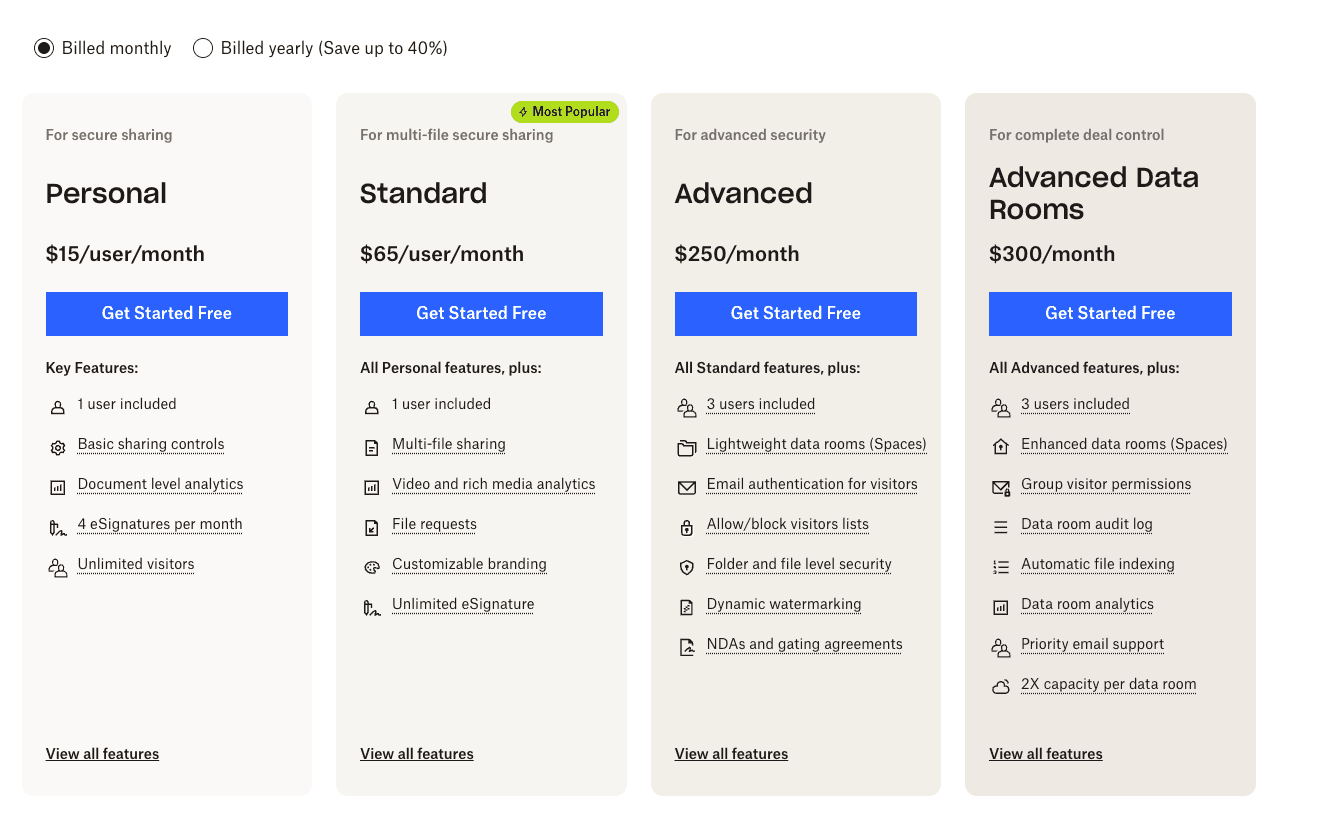
When it comes to pricing, the difference between Papermark and DocSend is significant. Papermark offers a forever-free plan with unlimited documents, while DocSend requires a paid subscription after a 14-day trial.
Advanced Data Rooms: $300/month ($180 annual) - 3 users, enhanced data rooms, priority support
The key difference: Papermark includes 3 users in business plans, while DocSend charges per user. For a team of 3, DocSend costs $195/month vs Papermark's €45/month - that's over 4x more expensive.
Read case study →
We saved 70% by transitioning to Papermark. And managed to scale our sales. Our team loves this modern data rooms.
Alonso Benavides Panizo
SVP of Finance at Yuno | Founding team
Document management and storage
Papermark offers unlimited document storage across all plans, while DocSend limits free tier users to 10GB per user. Papermark also supports drag-and-drop uploads and bulk file uploads, features that DocSend doesn't offer.
Papermark advantages:
Unlimited documents on all plans
Drag-and-drop interface for easy uploads
Bulk upload capabilities
Unlimited subfolder levels for organization
No per-page or storage charges
DocSend limitations:
10GB storage limit on entry-level plans
No drag-and-drop upload
No bulk upload feature
Limited folder structure
Read case study →
Papermark made our fundraising process seamless, providing a clean interface and document analytics we loved.
Lewis Carhart
Founder of CompAI
Analytics and tracking
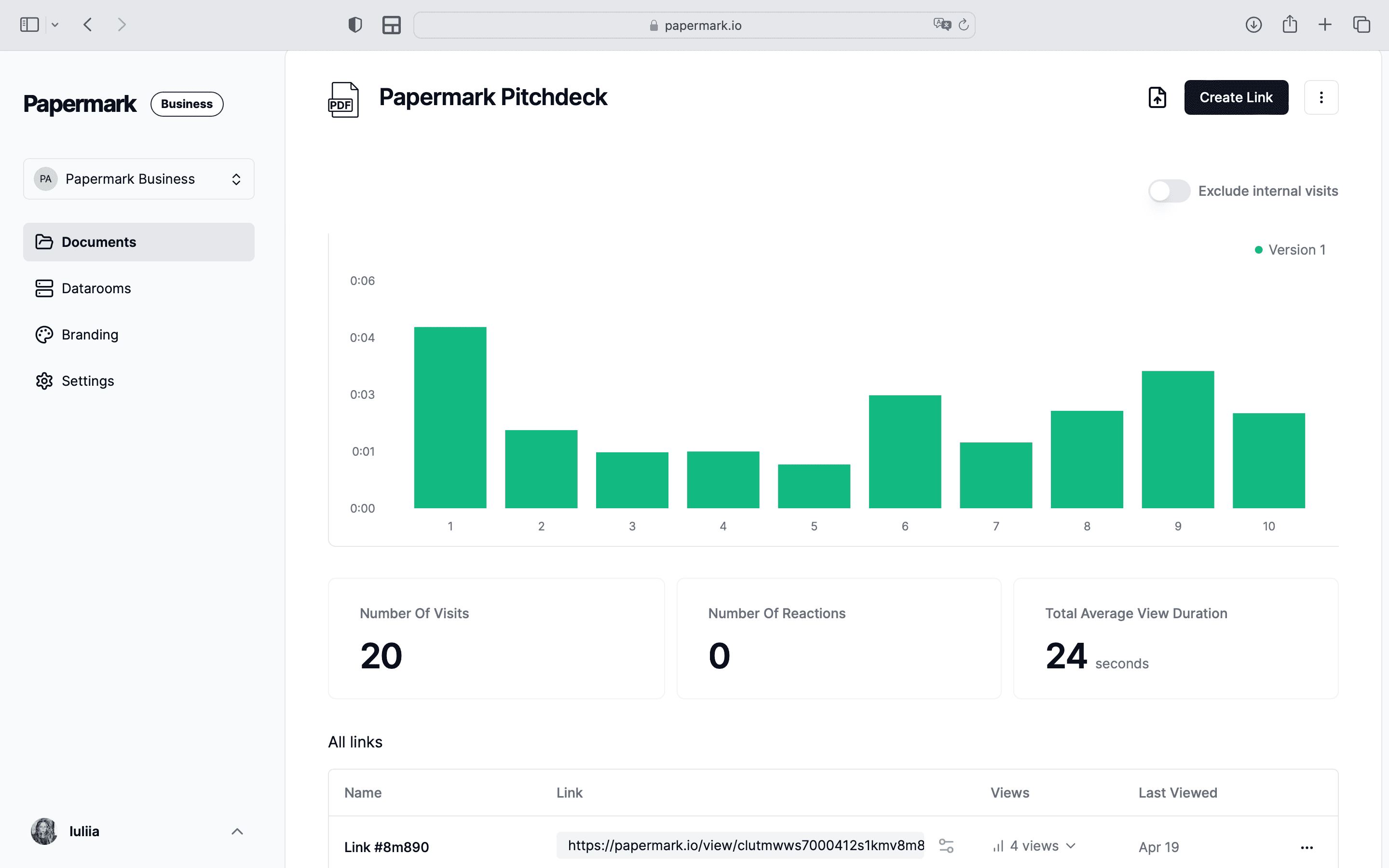
Both platforms offer page-by-page analytics, but Papermark provides more granular insights and better tracking capabilities.
Papermark analytics:
Real-time page-by-page tracking
Time spent on each page
Viewer email capture
Geographic location tracking
Device and browser information
Screenshot attempt detection
Print attempt monitoring
DocSend analytics:
Page view counting
Time spent on document (overall)
Basic visitor information
Simple engagement metrics
While both track engagement, Papermark's analytics are more detailed and actionable, especially for understanding which pages resonate most with viewers.
Security features comparison
Security is where Papermark truly stands out. While DocSend offers basic security features, Papermark provides advanced protection that's especially important for sensitive documents.
Papermark security:
Dynamic watermarking with viewer email
Active screenshot prevention
Screenshot attempt notifications
Protection from download tools (different API target, page-by-page loading)
Email verification
Allow/block visitor lists
One-click NDA agreements
Context menu restrictions
DocSend security:
Basic watermarking
Password protection
Link expiration
Email verification (advanced plan only)
No screenshot protection
Vulnerable to third-party download tools
The screenshot protection alone makes Papermark a better choice for sensitive pitch decks and confidential documents. DocSend's vulnerability to download tools is a significant security concern that many users don't realize until it's too late.
The best document sharing platform we've used. Simple, secure, and powerful.
Maia Iva
Head of Product
Customization and branding
Customization is another area where Papermark excels. While DocSend offers limited branding options, Papermark provides full white-labeling with new data room layouts, so every room can match your brand and the way you want investors or buyers to navigate it.
Papermark customization:
Custom domains for documents and data rooms
Full white-labeling with custom logos, brand colors, and layouts
New data room layouts to control how documents are presented and navigated
Custom social media cards
Unlimited branded data rooms
Complete control over link appearance
DocSend customization:
Limited branding options
No custom domains
No white-labeling
Branded sharing limited to logo upload
For businesses that need to maintain brand consistency, Papermark's customization options are essential. Custom domains are particularly valuable for maintaining professional appearance and ensuring links never break.
Read case study →
Papermark customization and domain is what stood out for me. Really helped us during raising our $35M Fund.
David Citron
Partner at TBD VC
Data room capabilities
Both platforms offer data room functionality, but Papermark provides more flexibility and better value.
Papermark data rooms:
Unlimited data rooms on business plan and above
Custom domains for each data room
Full white-labeling
Q&A module built-in
Granular permissions
Folder-level security
AI chat coming soon
DocSend data rooms:
Limited data rooms based on plan
No custom domains
Limited branding
No Q&A module
Basic permissions
Papermark's unlimited data rooms on the business plan (€45/month) vs DocSend's requirement for the advanced plan ($250/month) represents significant cost savings for teams managing multiple deals or projects.
User experience and interface
User experience is where Papermark's modern approach shines. Built by founders who prioritize UX, Papermark offers an intuitive interface that requires zero training, with new data room layouts that let you control exactly how investors and buyers see and move through your documents.
Papermark UX:
Modern, clean interface
New, configurable data room layouts and navigation
Google Drive-like familiarity
Drag-and-drop everywhere
Zero learning curve
Mobile-responsive design
Fast page loads
DocSend UX:
Interface hasn't significantly changed in 10 years
Steeper learning curve
Less intuitive navigation
Some users find it confusing
Many users switch from DocSend specifically because of the improved user experience. The interface matters when you're sharing documents with investors or clients - first impressions count.
Read case study →
I love Papermark, it's the best fundraising tool I've ever used.
Aleksander Dahlberg
Founder of Sahha.ai
Open source and self-hosting
This is a fundamental difference: Papermark is open source, while DocSend is proprietary. This matters for several reasons.
Papermark open source benefits:
Community-audited code for security
Full transparency
Self-hosting option for complete data control
No vendor lock-in
Customizable to your needs
Active community contributions
DocSend limitations:
Proprietary code (no transparency)
No self-hosting option
Vendor lock-in
Limited customization
Must rely on Dropbox's infrastructure
For organizations with strict data sovereignty requirements or those wanting complete control, Papermark's open-source nature and self-hosting option are game-changers.
Made our fundraising more effective. I love sharing my pitch deck with Papermark, and see if investors view it.
Georgi
Founder of Taita
Customer support comparison
Support quality and response times vary significantly between the two platforms.
Papermark support:
48-hour response on free and business plans
24-hour response on data room plan
Migration assistance included
Average response time: 1.5 hours (based on user reports)
Active community support
DocSend support:
Response times vary, often 1-2 weeks
Limited support on lower tiers
No migration assistance
Support quality declined after Dropbox acquisition
User testimonials consistently highlight Papermark's responsive support as a key differentiator. When you need help, waiting weeks for a response isn't acceptable.
Integration, API, CLI, and MCP
This is the clearest structural gap between the two tools. Papermark is the only one of the two with a fully transparent public API, a CLI, and a Model Context Protocol (MCP) server - DocSend offers only limited, mostly read-only integrations.
The Papermark API lives at https://api.papermark.com/v1 and exposes 43 operations across 6 resources (datarooms, documents, folders, links, views, and visitors), with Bearer-token auth and scoped tokens. The CLI (npm install -g papermark) scripts data room setup from the terminal, and the MCP server (@papermark/mcp-server) lets AI agents like Claude and Cursor create rooms, set permissions, and pull analytics directly. The dashboard, CLI, and MCP server all call the same endpoints. See the data room developer reference for the full docs.
Papermark integrations:
Full public API (43 operations, scoped tokens)
CLI to script data rooms from the terminal
MCP server for AI-agent control (Claude, Cursor)
Webhook support and custom integrations
Self-hosting enables any integration
DocSend integrations:
Limited API access (no public CLI or MCP server)
Salesforce integration
Dropbox integration (since acquisition)
Limited customization options
For teams that need to automate workflows, build on top, or hand data room control to an AI agent, Papermark's API, CLI, and MCP server are a decisive advantage.
When to choose Papermark
Choose Papermark if you need:
Free plan with unlimited documents
Custom domains and white-labeling
Screenshot protection
Open source and self-hosting options
Better value for teams (3 users included)
Modern, intuitive interface
Responsive customer support
Unlimited data rooms
Advanced security features
When DocSend might work
DocSend could work if:
You're already heavily invested in Dropbox ecosystem
You need enterprise-level support contracts
You prefer proprietary solutions
You don't need custom domains or white-labeling
Budget isn't a primary concern
Use-case decision matrix: which one fits your workflow?
Different workflows favor different tools. The matrix below maps the seven most common Papermark vs DocSend use cases.
Use case
Best fit
Why
Sending a single pitch deck to 5 investors
Either
Both handle the basics; Papermark Free plan wins on cost
VC fundraise (Seed-Series A) with 30+ investors
Papermark
Free plan, page analytics, unlimited viewers, no per-user fee
Sales collateral with team of 5-10
Papermark
Custom domain on Pro €24/month vs DocSend $15-$65/user
Multi-document data room for M&A
Papermark
DocSend Spaces is limited; Papermark Data Rooms €99/month is purpose-built
The numbers below come from each provider's published pricing page in September 2026. Papermark uses flat-rate pricing in EUR; DocSend uses per-user pricing in USD.
Migration is faster than most teams expect. Five steps cover the typical workflow.
1. Export your DocSend documents. DocSend supports per-document download; bulk export requires API access on Advanced plans. Budget 1-2 hours for a typical sales team library.
2. Recreate folder structure in Papermark. Papermark's data room mirrors typical folder hierarchies. Use the bulk upload to drag-and-drop the entire folder structure.
3. Re-apply security settings. NDA enforcement, dynamic watermarking, password gating, and link expiration are configured at the link level on Papermark. Each document or folder can have multiple links with different settings.
4. Issue new sharing links. External investors and counterparties get new Papermark links. Use the custom domain feature so the URL stays on your brand, not a vendor URL.
5. Preserve the audit trail. Export DocSend's view log before cancellation. Papermark's audit log starts on day one of the new room. The two together give continuous accountability.
For migration assistance on the Data Rooms plan, Papermark includes onboarding support. For larger libraries (1,000+ documents), enterprise customers can request a hands-on migration call.
Real-world ROI: what teams save by switching
Based on customer interviews from teams who moved from DocSend to Papermark in 2025-2026:
Cost savings. Teams typically save 50-70% on annual subscription cost. A 5-person sales team paying $325/month on DocSend Standard moves to ~€89/month on Papermark Business. Annual savings: ~$2,800.
Feature gain. Custom domain (Papermark Pro €24/month vs DocSend Advanced $150+/month). Screenshot protection (Papermark, not DocSend). Unlimited data rooms (Papermark Data Rooms vs DocSend per-room contracts). Self-hosted option (Papermark AGPL, not DocSend).
Faster deal-velocity signals. Page-by-page analytics with viewer-level engagement scoring helps sales and fundraising teams prioritize follow-up. Multiple customers report 2-3x faster qualification of warm investor leads.
Reduced procurement friction. Papermark publishes a public DPA, sub-processor list, and SOC 2 Type II report under NDA. Faster vendor security review than legacy SaaS workflows.
DocSend and Papermark take different approaches: DocSend was an early entrant in document sharing, while Papermark is open source with a free plan and is priced as a flat monthly subscription rather than per-user.
For teams that need multiple data rooms, custom domains, screenshot protection, or open-source self-hosting, Papermark covers those use cases on its included plans. Teams that already standardize on DocSend for individual link tracking and don't need data-room workflows may find DocSend sufficient.
On pricing, Papermark includes 3 users on its base plan; DocSend charges per user. Concrete cost differences will depend on team size and feature mix.