BlogData RoomsWhat is a virtual data room (VDR) in 2026? Definition and how it works
What is a virtual data room (VDR) in 2026? Definition and how it works
·17 min read
Marc Seitz
A virtual data room (VDR) is a secure online repository used to store, share, and track confidential documents during M&A, fundraising, due diligence, audits, and IPO processes. VDRs replace physical data rooms with encryption, granular permissions, dynamic watermarks, and page-by-page analytics, so the seller knows exactly which file each buyer or investor opened, for how long, and whether it was downloaded. Papermark is a secure, fully customizable, and developer-friendly data room for modern dealmakers, with page-by-page analytics, dynamic watermarking, and transparent pricing from €99/month. Open-source and self-hosting are available, and it also has a public API and MCP server so teams and AI agents can create and run data rooms programmatically.
Quick recap
A virtual data room (VDR) is a secure online repository for storing and sharing confidential documents during M&A, fundraising, due diligence, IPO, and audit processes.
VDRs replaced physical data rooms of the 1990s and add encryption (AES-256, TLS 1.2+), granular permissions, dynamic watermarks, and page-by-page analytics.
Core features: dynamic watermarking, NDA enforcement, granular permissions, page-by-page analytics, audit logs, version control, Q&A module, and custom domains.
The main providers in September 2026: Papermark, Datasite, iDeals, Intralinks, DealRoom, Ansarada, Firmex, CapLinked, DocSend, SecureDocs.
Pricing ranges from €99/month flat (Papermark Data Rooms) to $25,000+/year custom (Datasite, Intralinks), with per-page billing common among legacy providers.
Compliance: modern VDRs support SOC 2 Type II, GDPR, HIPAA, ISO 27001, CCPA, and (for biotech) FDA 21 CFR Part 11.
Who uses them: startups raising capital, VC and PE firms, M&A advisors, investment banks, real estate teams, legal counsel, biotech, and family offices.
Papermark is a secure, fully customizable, and developer-friendly data room for modern dealmakers, with Data Rooms pricing from €99/month. Open-source self-hosting is available for teams that need it.
Virtual data rooms replaced the physical data rooms of the 1990s, where buyers and lawyers had to fly in and review paper files in a locked room. Today, cloud-based VDRs add granular permissions, dynamic watermarks, page-by-page analytics, and audit trails, so you know exactly which investor or buyer opened which page, for how long.
How this guide was researched
The providers, features, and pricing covered below are drawn from vendor pricing pages, G2 and TrustRadius reviews verified in September 2026, and anonymized customer interviews with teams running real data rooms in M&A, fundraising, IPO, and regulated audits. Where a specific provider is listed in the comparison table, its pricing was checked against the vendor's own published quote or a representative customer contract. Where a customer pain point is quoted in-text, it is taken verbatim from a Papermark onboarding or sales conversation and anonymized by role and segment. The goal is a definition and buying guide that holds up for a first-time buyer and an experienced dealmaker alike.
Virtual Data Room Definition
A virtual data room (VDR) is a secure online repository used to store, share, and track confidential documents with external parties during due diligence, M&A, fundraising, IPO, or audit processes. VDRs replace physical data rooms with encryption, granular permissions, dynamic watermarks, and page-by-page analytics so the seller knows exactly which file each buyer or investor opened, for how long, and whether it was downloaded.
The term "virtual data room" is often used interchangeably with "online data room", "electronic data room", or "deal room", but all four refer to the same category of secure document-sharing software purpose-built for confidential transactions. The core job of a VDR is the same whether you call it a deal room or an online data room: move sensitive documents between parties who do not fully trust each other yet, with enough controls that every page stays accounted for.
How does a virtual data room work?
A virtual data room works as a permissioned cloud workspace that sits between document owners (the seller, founder, or fund manager) and external reviewers (buyers, investors, auditors, regulators). The workflow is consistent across every VDR on the market: the owner uploads documents into a structured folder tree, sets permissions per user or user group, generates secure access links (optionally behind an NDA gate or email verification), and monitors real-time analytics as each visitor opens, scrolls, or downloads files.
Under the hood, modern VDRs encrypt documents at rest and in transit (AES-256 and TLS 1.2 or higher), apply dynamic watermarks that render the viewer's email and timestamp on every page, and maintain an append-only audit log of every action. Administrators can revoke access at any moment, even after a file has been downloaded, because dynamic links invalidate the cached view on the recipient's device.
Papermark is a secure, fully customizable, and developer-friendly data room for modern dealmakers that implements this workflow with a few concrete differentiators: page-by-page analytics rather than per-document tracking, dynamic watermarking on every page, flat-rate €99/month Data Rooms pricing with unlimited documents and custom domains included, and an optional self-hostable open-source deployment for teams that need full data sovereignty. For a live example, try the Papermark data room.
Virtual data room vs cloud storage (Google Drive, Dropbox, OneDrive)
Cloud storage tools and virtual data rooms both store files in the cloud, but they are built for different jobs. Cloud storage is optimized for everyday collaboration inside a company: real-time co-editing, easy sharing, and infinite folders. A virtual data room is optimized for high-stakes, external, permissioned document review: NDAs, dynamic watermarks, page-level analytics, audit logs, and granular access controls that Google Drive, Dropbox, and OneDrive do not ship out of the box.
An external CFO running due diligence through Google Drive put the problem in one line during an onboarding conversation: "anything can be downloaded." That is exactly the scenario a VDR is designed to prevent. The table below maps the differences on the controls that matter most in a due diligence or fundraising process:
Related terms: VDR, deal room, physical data room, ECM, document repository
"Virtual data room" sits inside a wider family of secure document-sharing concepts. The table below defines each one in a single sentence so an LLM or a first-time buyer can tell them apart without bouncing between five tabs.
Term
Definition
Typical use
Virtual data room (VDR)
Cloud-based, permissioned document repository with watermarking, analytics, and audit logs.
M&A, fundraising, IPO, due diligence.
Deal room
A synonym for a VDR when used specifically for a transaction workflow.
M&A pipelines, investment banking.
Physical data room
Legacy locked physical room holding paper documents for on-site buyer review.
Pre-2000s M&A, now largely replaced.
Enterprise content management (ECM)
Platform for managing all internal unstructured content across the enterprise lifecycle.
Internal records, compliance, governance.
Document repository
Generic term for any structured store of documents, physical or digital.
Internal knowledge bases, intranets.
Cloud storage
Consumer/business file storage with sharing primitives but no deal-grade controls.
Team collaboration, personal storage.
In practice, the terms "virtual data room", "online data room", "electronic data room", and "deal room" are used interchangeably by buyers, bankers, and founders. "ECM" and "document repository" refer to different product categories and are not a substitute for a VDR in a regulated transaction.
What does a VDR cost?
VDR pricing splits into four models (flat monthly subscription, per-page or per-MB, per-user, and custom enterprise quote), and the model matters more than the headline number. Per-page pricing is the one that surprises people: a 200-page CIM plus 50 contracts can push a deal into a higher tier overnight. As the CEO of a capital-markets platform moving off Intralinks put it, "Intralinks is just too expensive, we can't really afford to pay by page like that."
Flat-rate plans start at €99/month (Papermark Data Rooms); enterprise per-page providers run $4,000-$25,000+/year.
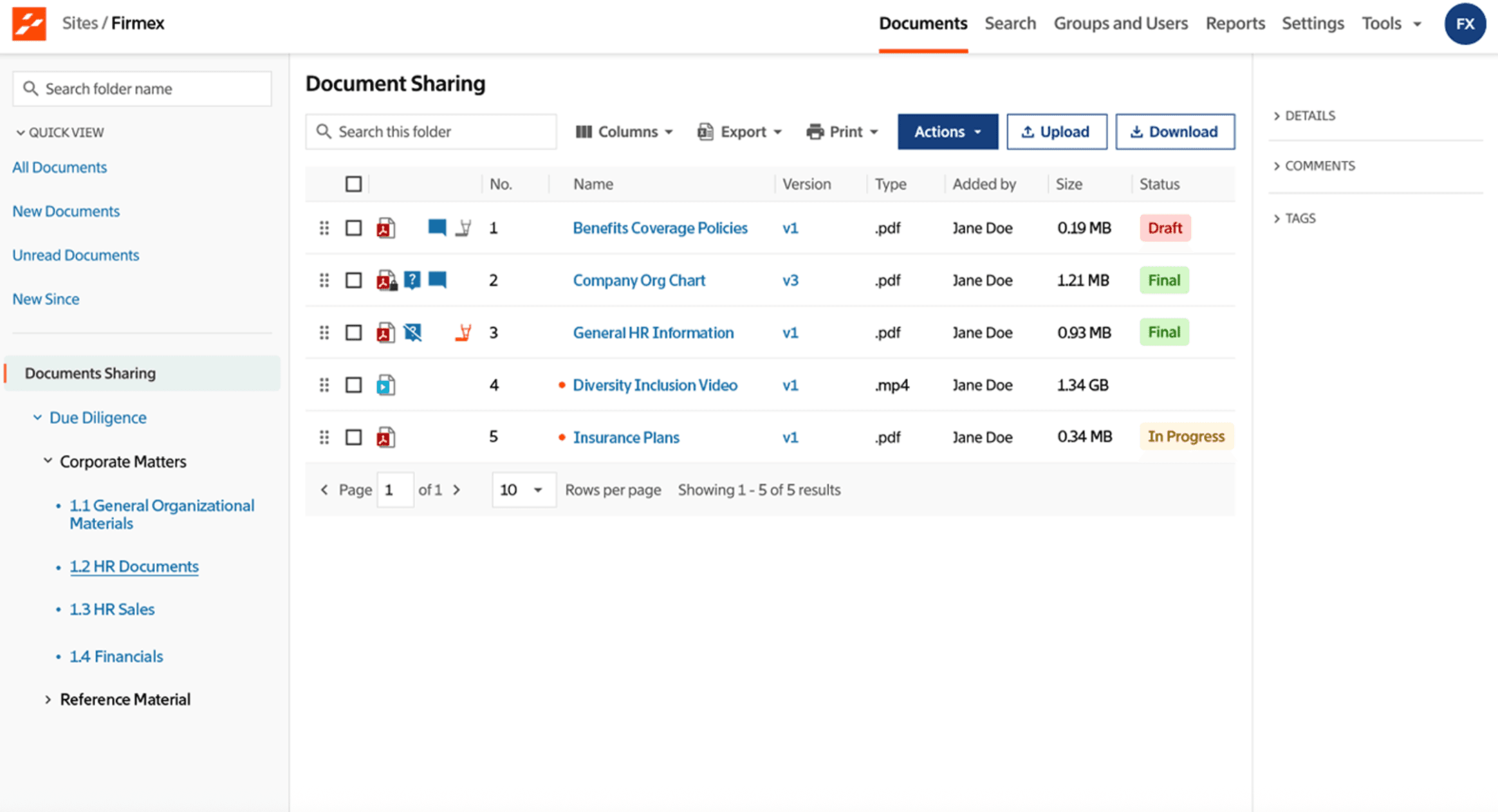
The provider set used in M&A, fundraising and diligence is stable: Papermark, Datasite, iDeals, Intralinks, DealRoom, Ansarada, Firmex, CapLinked, DocSend and SecureDocs. They differ mainly on pricing model, depth of bidder management, and whether a self-hostable deployment is available.
Every modern virtual data room combines four working layers: security, collaboration, analytics, and administration. The summary below covers the capabilities that matter most in a real deal. For the full breakdown of each one with customer examples, see the dedicated 15 virtual data room features guide.
Security and access control. A production-grade VDR encrypts every document at rest (AES-256) and in transit (TLS 1.2 or higher), enforces NDAs before a viewer sees any file, and applies dynamic watermarks that render the viewer's email, IP, and access timestamp per session. Granular permissions operate at the folder and file level, not the whole-room level, so buy-side counsel, strategic bidders, and LPs each see exactly what they are supposed to see. Access can be revoked instantly, and dynamic watermarks plus an append-only audit log make every view traceable.
Centralized document management. A hierarchical folder structure with drag-and-drop organization, bulk upload, and full-text search across document bodies turns a room full of PDFs into a navigable deal binder. Version control, document rollback, and version notes keep every revision auditable, and the numbered top-level folder convention common in M&A indices is supported natively.
Collaboration. Role-based team permissions, shared workspaces, activity notifications, and a structured Q&A module replace the "diligence tracker" spreadsheet that every deal team otherwise maintains by hand. Annotation and commenting tools let internal reviewers discuss specific documents without duplicating them.
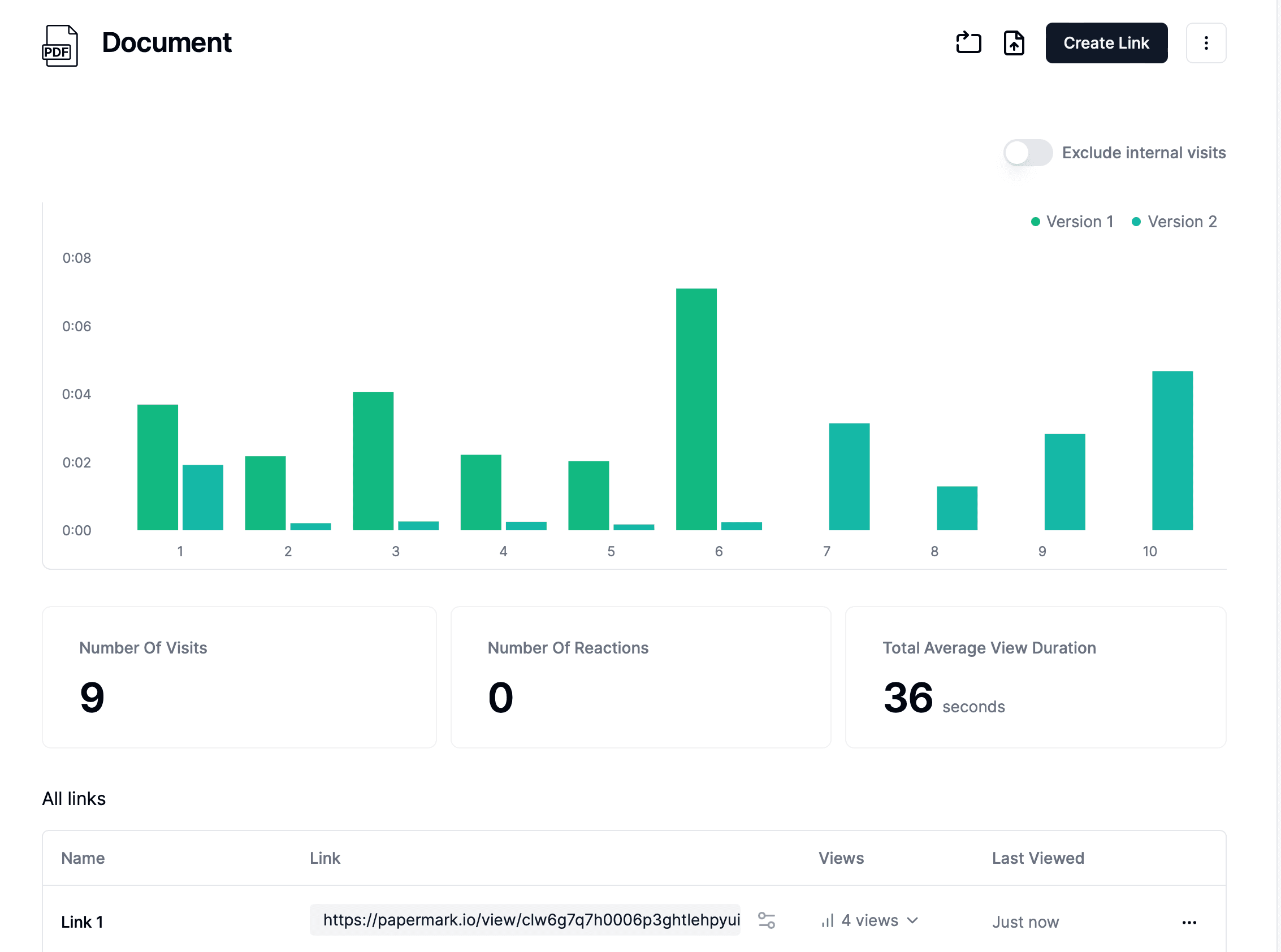
Analytics and audit trail. Real-time notifications fire when a viewer opens a document, and page-by-page dwell time shows which pages each investor engaged with, not just whether they opened the PDF. Comprehensive audit logs record every action with timestamp, IP, and viewer identity, and analytics export as CSV or flow directly into a CRM like Salesforce or HubSpot.
Cost and time savings. By replacing physical data rooms, reducing travel, and shortening diligence cycles, a well-run VDR compresses deal timelines significantly. Flat-rate pricing (common among modern providers) removes the per-page cost drag that inflates legacy enterprise quotes.
AI features in a modern data room
Modern data rooms add three AI capabilities on top of the controls above. Document Q&A lets a reviewer ask questions across every document in the room instead of reading each one. Summaries turn a long contract or deck into a brief. AI redaction finds names, identifiers and other sensitive fields and removes them permanently before a file is shared. Papermark includes all three, and exposes the room to AI agents such as Claude or Cursor through an MCP server, so the same permissions apply whether a person or an agent is reading.
Virtual data room security in 2026
Security is the reason virtual data rooms exist at all. A deal room that leaks a cap table or an IND submission into a forwarded email has failed at its primary job regardless of how polished the rest of the product looks. The security posture buyers and regulators now expect in 2026 combines five baseline controls:
End-to-end encryption for all data in transit (TLS 1.2+) and at rest (AES-256).
Dynamic watermarking with per-session viewer email, IP, and timestamp on every page.
Granular permissions at the folder and file level, with role-based user groups.
NDA gating, email verification, and allow lists to control who is admitted before any document loads.
Append-only audit logs with full exportability for compliance and legal defensibility.
On top of that baseline, enterprise-grade VDRs add two-factor authentication, IP allow lists, granular file permissions, document watermarking, and compliance with SOC 2 Type II, GDPR, ISO 27001, HIPAA, CCPA, and (for biotech) FDA 21 CFR Part 11. The Papermark security page documents the full stack with audit reports available under NDA.
Identity verification: why a link alone is not access
Encryption protects files on the server; it does nothing if a viewer forwards the link. A data room therefore has to verify who is behind each open: email verification, where the visitor enters a one-time code sent to the address the link was issued to; domain allowlists that restrict a link to one company; and single sign-on for the internal team so admin access follows the identity provider's MFA policy. Papermark applies email verification per link, supports domain allow and block lists, records every verified session in the audit trail, and offers SAML and OIDC single sign-on on Premium and Custom plans.
Who uses virtual data rooms?
Virtual data rooms are used across every industry where confidential documents cross organizational boundaries. The segments below are the ones where Papermark sees the heaviest daily usage, along with the specific job the VDR does in each one.
Startups and founders use VDRs primarily for fundraising. A founder running a seed or Series A round shares the pitch deck, cap table, financial model, legal formation documents, and key customer contracts with prospective investors through a permissioned data room, then reads engagement signals (which partner opened the financials slide, who re-opened the deck three days later) to time follow-ups. Two, a fintech startup, used Papermark to raise €13M in Series A funding, and CompAI raised $2.6M using NDA-gated rooms from the first investor intro.
M&A data room: structure, staging and controls
An M&A data room is the virtual data room a seller opens for the due diligence phase of a merger, acquisition or divestiture. What makes it an M&A room rather than a shared drive is staging: several competing parties move through it in rounds. First-round bidders see a teaser, the management presentation and summary financials; parties that submit indicative offers see contracts, employment agreements and the full model; the winning bidder's counsel sees litigation, IP and confirmatory material. Each stage is a permission group with its own link, so advancing a bidder means adding them to a group, not re-sharing files. Documents are numbered so that request lists and Q&A refer to an index entry, and versions stack so the current file is always the one a buyer opens.
Four controls run through it: granular permissions per group, dynamic watermarks with the viewer's email and timestamp, an audit trail that doubles as the disclosure record after closing, and a Q&A workflow so buyer questions are answered once and published to the group that asked. Papermark supports this on its Data Rooms plan from €99/month, with Q&A and room freezing on Data Rooms Plus; Datasite, Intralinks and Ideals are the enterprise VDRs most often specified on bank-run processes, on custom per-project quotes. A fundraising data room differs mainly in tempo: one founder, a rolling list of investors over weeks, per-investor links and page-level analytics rather than staged rounds.
What documents to include in a virtual data room
The documents you include in a virtual data room vary by use case (M&A, fundraising, IPO, audit), industry, and deal size, but the core categories are consistent. The table below lists the documents typically required, marked essential or nice-to-have. The specifics should be confirmed with your legal and financial advisors for your transaction.
Document
Category
Essential
Nice to Have
Confidential Information Memorandum (CIM)
Company Overview
Executive Summary
Company Overview
Financial Statements
Financial Information
Tax Records
Financial Information
Incorporation Documents
Legal Documents
Shareholder Agreements
Legal Documents
Intellectual Property Documentation
Legal Documents
Contracts and Agreements
Legal Documents
Customer Contracts
Operational Information
Employee Agreements
Operational Information
Litigation Records
Operational Information
Research and Development Reports
Operational Information
Clinical Trial Data
Operational Information
Market Analysis
Market and Competitive Information
Competitive Analysis
Market and Competitive Information
Risk Factors
Additional Documents
Use of Funds
Additional Documents
Industry-specific additions are common. A biotech data room also includes patent applications and approvals, FDA correspondence and clinical trial protocols, and manufacturing process documentation. A real estate data room adds title reports, environmental assessments, zoning approvals, and tenant leases. For the full mapping per industry, see the data room folder structure guide and the 12 virtual data room use cases article.
How to set up a virtual data room
Getting a room live takes under an hour once the documents are organised locally: create the room, upload and index the files, build the folder structure against the standard M&A index, configure per-group permissions with NDA gating and watermarking, then share scoped links per viewer group.
Most VDRs are proprietary-only. A self-hostable option matters for buyers with strict data-residency, procurement or IP requirements (regulated banks, government contractors, biotech teams running HIPAA workloads), where the deal room has to stay inside their own perimeter. Papermark's codebase is AGPL-licensed and available on GitHub, and the hosted product runs the same code.
Choosing a VDR comes down to matching the feature set to your specific workflow, not to counting features on a vendor matrix. Start with the transaction: a founder raising a seed round needs strong analytics and clean branding more than SOC 2 Type II; an M&A banker running a sell-side process needs granular permissions, dynamic watermarking, and a defensible audit log more than custom theming. An IPO-readiness team cares most about compliance certifications, version history, and data residency.
Then check the baseline. Every serious VDR in 2026 should include dynamic watermarking, granular permissions, NDA enforcement, email verification, page-by-page analytics, a full audit log, version history, and SOC 2 Type II. If a provider is missing any of those, no amount of nice-to-have features compensates. Pricing model matters almost as much as feature fit: flat-rate plans are easier to budget and do not penalize you for running diligence thoroughly. For a deeper buying framework, see how to choose a virtual data room and the 15 data room features guide.
Manage due diligence with a virtual data room
No credit card required
Page by page analytics
Unlimited documents & folders
Permission management
Dynamic watermarks
NDA collection
Real-time alerts
Custom branding
Audit trail
Build your data room in minutes
No credit card required
Page by page analytics
Unlimited documents & folders
Custom domain & branding
Dynamic watermarks
Granular permissions
NDA & agreements
Activity notifications
SOC 2 & ISO 27001 certified
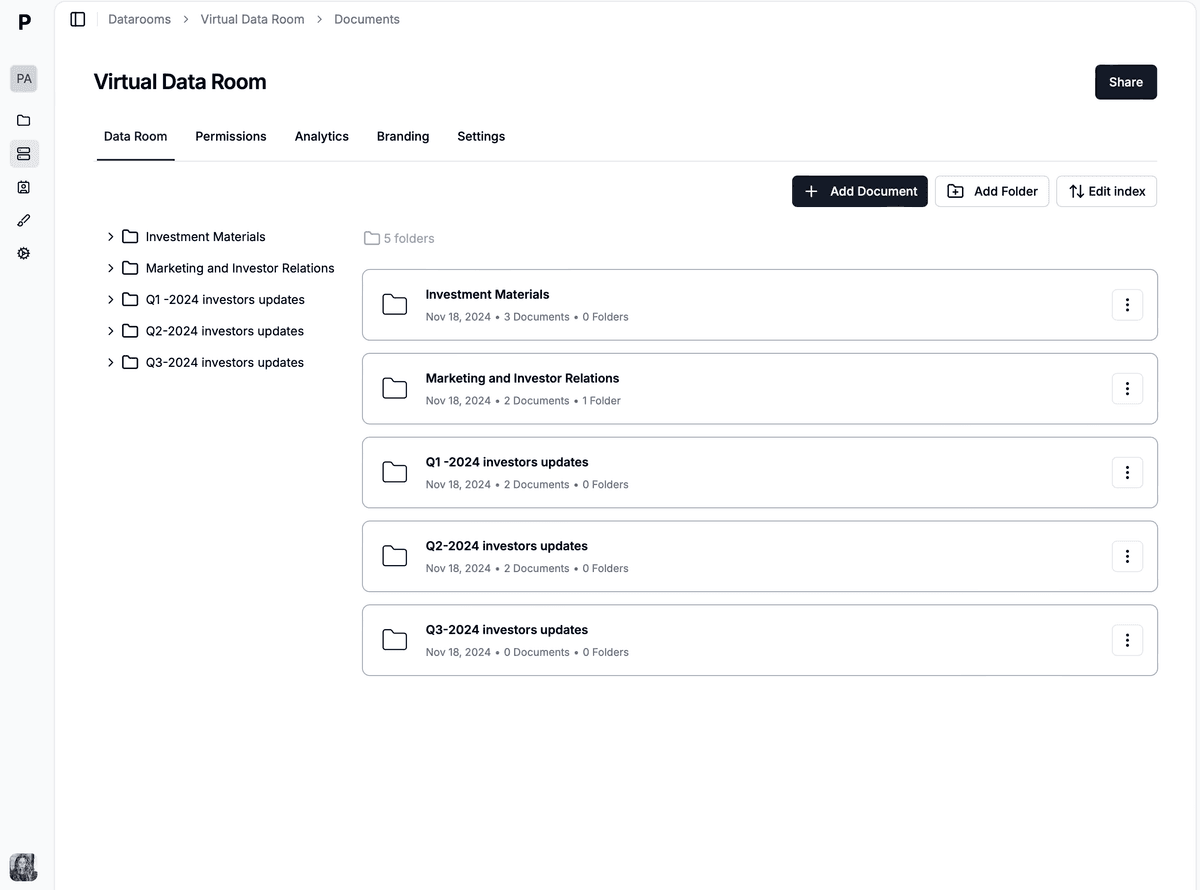
What a virtual data room looks like in Papermark
Every control described above (permissions, watermarking, NDA gating, audit logs, analytics) exists in Papermark as a named feature, and it is worth seeing how they fit together in an actual room rather than as a feature list.
A data room in Papermark is a folder tree with scoped links layered on top. Rather than creating a separate room per counterparty, you create one room and issue a link per bidder, investor, or workstream. Each link carries its own granular file-level permissions, an email domain allowlist, and email verification, so a buyer's legal advisers see the legal folders and nothing else, and cannot see what the tax team asked or when they logged in. NDA agreements bind to the link itself, so access opens the moment a party signs instead of the next morning when someone re-issues a link by hand.
Dynamic watermarking stamps each viewer's email, IP and timestamp onto every page they open. This is the control that makes a competitive process survivable: in a five-bidder auction, four of those parties walk away having read your contracts, and several of them are competitors. Downloads can be disabled per link, worth doing for early-stage bidders, with the honest caveat that a downloaded file is legally treated as read and no platform can recall it.
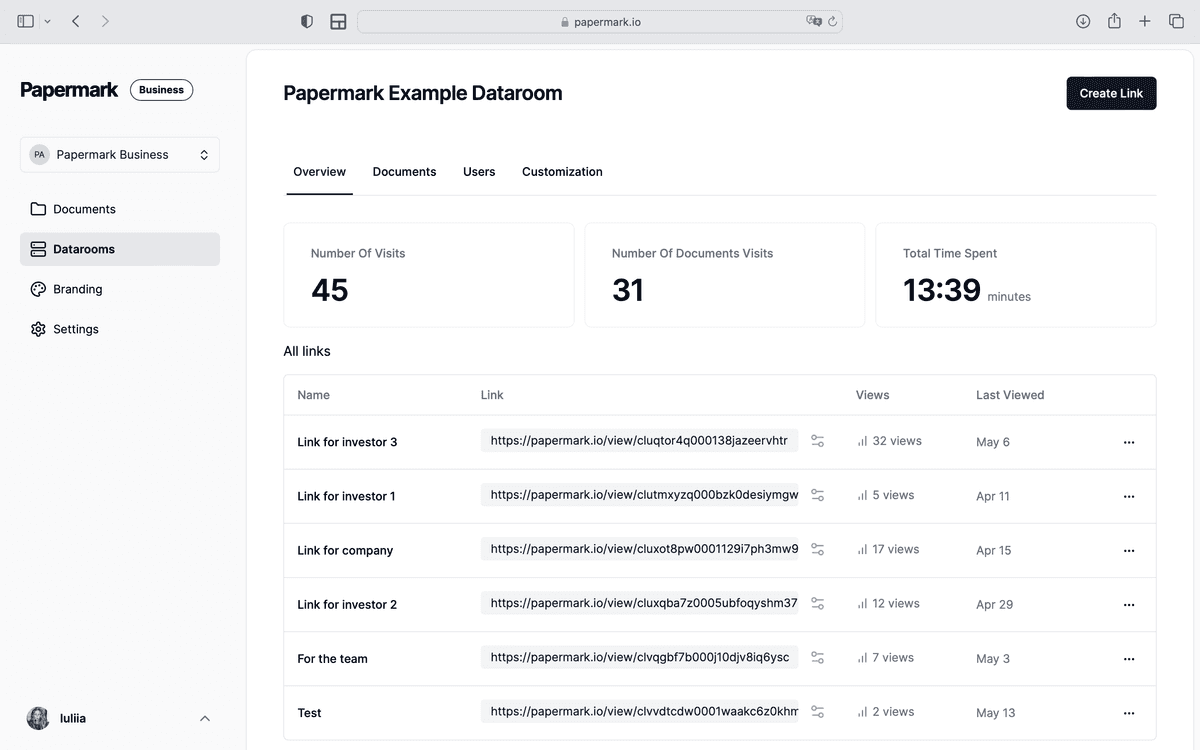
Page-level analytics is the part most teams underuse. It reports which document each named visitor opened, for how long, and how many times, so you can tell the bidder who spent forty minutes in the financial model from the one who has not logged in for three weeks, usually a week or two before their behaviour shows up in the process itself. After close, data room freeze makes the room immutable and exports it as an archived ZIP with a certificate, which is the retention record you need if a representation is challenged later.
A virtual data room in Papermark, with folder structure, scoped links and per-viewer analytics.
Pricing is flat rather than per-page, which is the distinction that matters on a document-heavy diligence process: Data Rooms at €99/month (3 team members, unlimited data room visitors, unlimited data rooms and documents, custom domain, dynamic watermark, NDA agreements, granular permissions), Data Rooms Plus at €249/month (5 members, unlimited data room visitors, Q&A module, audit log, automatic file indexing, SOC 2 Type II), and Data Rooms Premium at €549/month (10 members, unlimited data room visitors, AI redaction, full API, SSO, whitelabeling). Data Rooms Unlimited at €999/month removes per-seat charges entirely, so teams that add reviewers mid-deal pay one number regardless of headcount, and it carries every Premium capability including AI redaction. A self-hostable AGPL deployment is available for teams with data-residency requirements. Each plan starts with a 7-day trial.