

Replace the diligence spreadsheet
Open your data room and click Request List in the sidebar. Every request is a row with a title, a short description, a status, assignees and a due date, grouped into categories such as Financial or Legal so a long list stays easy to scan.
- •Title and description for every requested item
- •Categories keep financial, legal and other items grouped
- •Several lists per data room, one dropdown to switch
- •Lives next to the documents, Q&A and permissions
Request List
Track outstanding requests and assign them to data room visitors.
Financial
Last 3 years of financials
Audited statements as PDF
Monthly revenue by customer
Excel, last 24 months
Legal
Customer contracts over $50k
Signed versions
Cap table and option plan
Fully diluted
One status everyone can trust
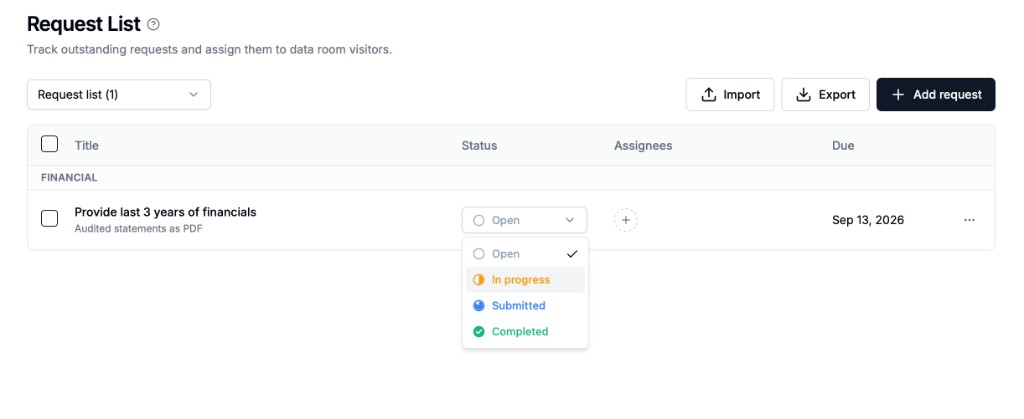
Move each request through Open, In progress, Submitted and Completed. Both sides work from the same source of truth, so there is no back-and-forth over which version of the checklist is current.
- •Open: requested, not started yet
- •In progress: the other side is working on it
- •Submitted: provided for review
- •Completed: reviewed and closed
Every request has an owner and a deadline
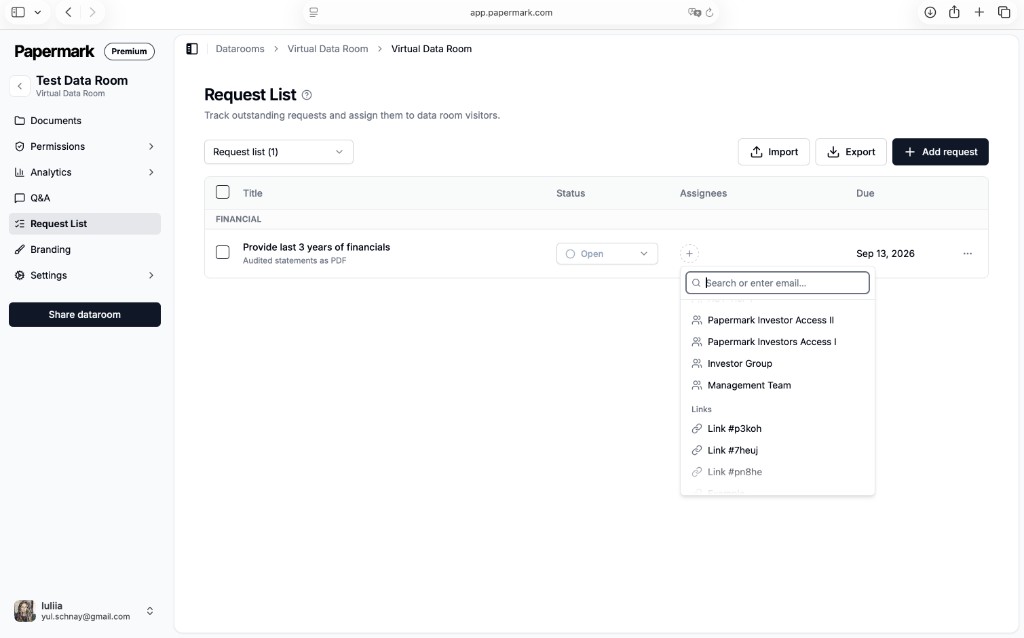
Click the plus in the Assignees column to give a request to a visitor group or a specific data room link, then set a due date. You can split one list across buyers, advisors and your own team, and see at a glance which items are slipping.
- •Assign to visitor groups or individual links
- •Due dates visible to both sides
- •Import a standard checklist instead of typing it out
- •Export the list with statuses for your records
Assign request
Visitor groups
- Investor access groupAssigned
- Management team
Links
- Buyer A – data room link
- Legal counsel link
Set up a request list in minutes
Six steps, one data room
- 1
Open the data room
Click Request List in the sidebar, between Q&A and Branding.
- 2
Add or import requests
Use Add request for single items, or Import an existing diligence checklist.
- 3
Organize by category
Group financial, legal and other items so the list stays scannable.
- 4
Set due dates
Give each request a date so deadlines are visible to both sides.
- 5
Assign owners
Assign each request to a visitor group or a data room link.
- 6
Track progress
Update statuses as documents come in, and export the list when you need a record.
What the request list covers
Included on Papermark Data Rooms
- Diligence checklist
- Every requested document as a row with a title and description, inside the data room.
- Four statuses
- Open, In progress, Submitted and Completed keep both sides on the same page.
- Assignees
- Give each request to a visitor group or a specific data room link.
- Due dates
- Deadlines on every item show which requests are slipping.
- Categories and multiple lists
- Group requests by workstream and keep separate lists per buyer or investor.
- Import and export
- Load a standard checklist into every new deal and export progress for your records.