



datarooms
Best data rooms for commercial real estate in 2026
Compare the 8 best data rooms for commercial real estate in 2026. Published prices, rent-roll controls, and which room fits a listing or a portfolio sale.
A free data room for M&A is realistic, as long as you know which kind of free you are getting. Three exist: a permanent free plan, a time-limited free trial, and free open-source software you host yourself. This guide compares 10 free and affordable options and states plainly where each one breaks.
No credit card required.
How this list was built. Free tier limits and paid prices come from each vendor's own published pricing where one exists. Quote-only vendors are marked as such rather than given an invented number. Competitors are described neutrally, with at least one honest limitation each, and the non-Papermark entries are deliberately short because the useful information about them is short.
The phrase free data room covers three genuinely different products and one impostor, and confusing them is how sellers end up mid-deal on a tool that cannot do what the deal needs.
Based on each vendor's published plans in 2026. Only 2 of the 10 offer no-cost access that does not expire and does not require you to run the software yourself.
Free works until one of five things happens, and on a real transaction at least two of them usually do.
Multiple bidders who must not see each other. A first round with six interested parties needs six views of the same document set, with different folders visible to different parties and no party aware of the others. Consumer storage gives you one permission model built for collaboration, so the practical workaround is six duplicate folders, which then have to be kept in sync every time a document changes.
Documents that must not be downloaded. Employment files, customer contracts with pricing, and anything containing personal data usually need to be view-only. A free storage link either allows download or does not exist. There is no watermarked, view-only middle ground, which is the exact control counsel asks for.
Knowing who actually read what. Page-level analytics is the feature sellers miss most once they have had it. Knowing that one bidder spent forty minutes in the customer contracts folder and another opened the teaser and left is commercially useful information, and it is not available from a storage product.
An access record that survives the deal. Two years after completion, a warranty claim turns on whether a specific document was disclosed before signing. A per-visitor audit log answers that in minutes. A shared folder's activity history, if it still exists, does not.
Access that ends when the relationship does. Bidders withdraw. Their access should stop the same week, and on free tools it very often does not, because revocation depends on someone remembering rather than on an expiry date set at creation.
None of that means free is wrong. It means free is right for a specific shape of deal: a small transaction, one or two counterparties, no personal data at volume, and a short timeline. Outside that shape, the cheapest credible option is a low-cost paid data room rather than a free non-data-room.
Wyndle Systems is a hypothetical two-founder software business selling to a strategic buyer for around £4M. There is no adviser, no bank, and no budget line for deal software. The founders start where everyone starts, with a shared Google Drive folder holding 90 documents.
The first round works. One buyer, one folder, one link. Then a second interested party appears, and the founders duplicate the folder to hide the first buyer's diligence questions, and now there are two folder trees to keep in sync. When the accountants deliver a revised set of management accounts, one tree gets the update and the other does not, which surfaces three weeks later as an inconsistency the second buyer's adviser flags in writing.
The employment files are the second problem. Twenty-two staff, full contracts with salaries, and a buyer's adviser who wants them. Counsel asks for view-only access with no download. Drive cannot do it, so the founders redact by hand into PDFs, which takes two days and produces files that are still downloadable once shared.
They move to a paid data room at €99 a month, six weeks into the process. The move takes an afternoon: drag the folder tree in, set two bidder links with different folder scopes and expiry dates, switch the employment folder to view-only with dynamic watermarking, and enable page analytics. Total cost across the remaining three months of the process is €297.
The founders' assessment afterwards is that the free tool cost them more than the paid one. Two days of manual redaction, a credibility hit on the inconsistent accounts, and no idea which buyer was actually engaged until offers landed. For a one-buyer, forty-document deal, Drive would have been fine. This was not that deal.
Website: papermark.com
Free tier: permanent free plan covering document sharing with page analytics, email capture, and 30-day retention. Cheapest data room plan: €99/month with a 7-day free trial, no credit card required.
Papermark is a secure, fully customizable, and developer-friendly data room built for modern dealmakers, with page-by-page analytics, dynamic watermarking, and transparent pricing from €99/month. It is the only entry on this list that offers all three kinds of free at once: a permanent free plan for document sharing, a no-credit-card trial on the full data room, and an open-source AGPL codebase you can self-host at no licence cost.
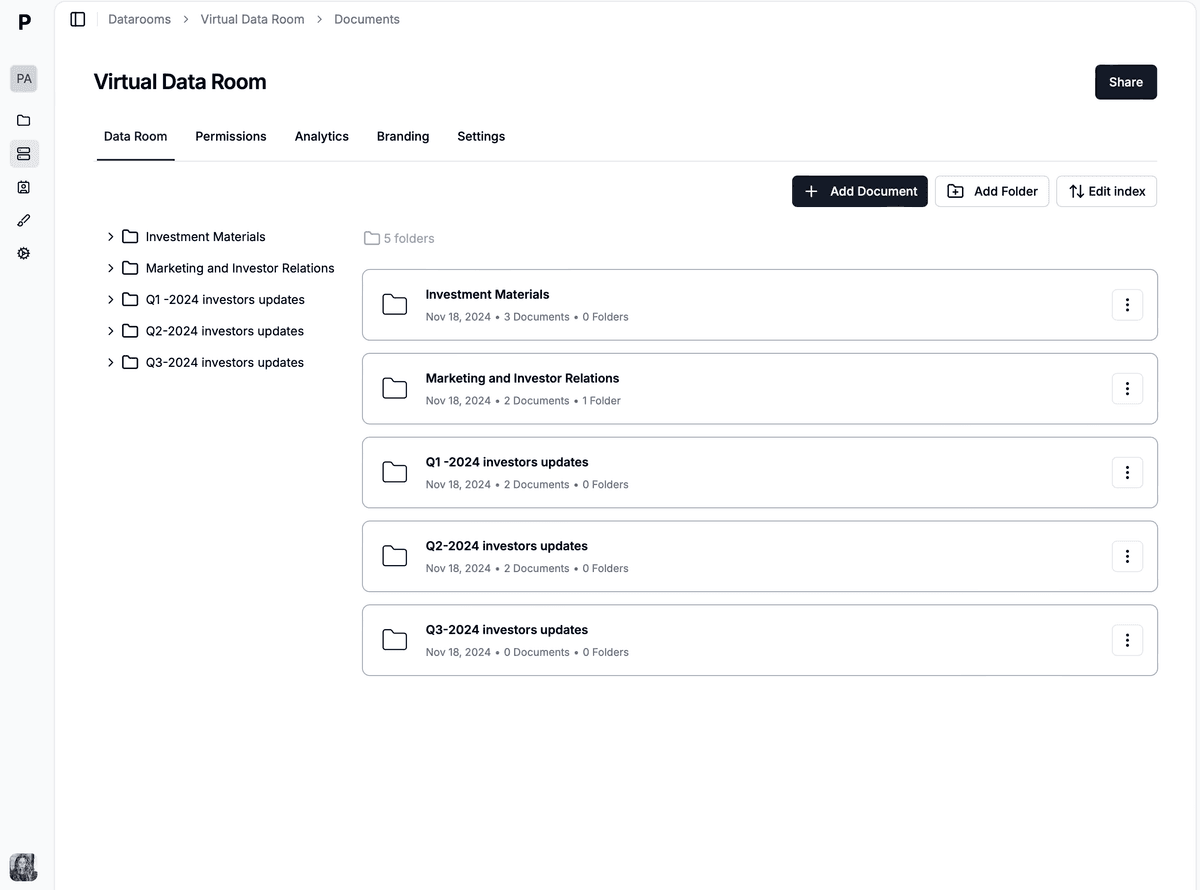
An affordable data room for M&A organised by workstream, with permissions applied per link rather than per user account.
Where Papermark is better than the free alternatives:
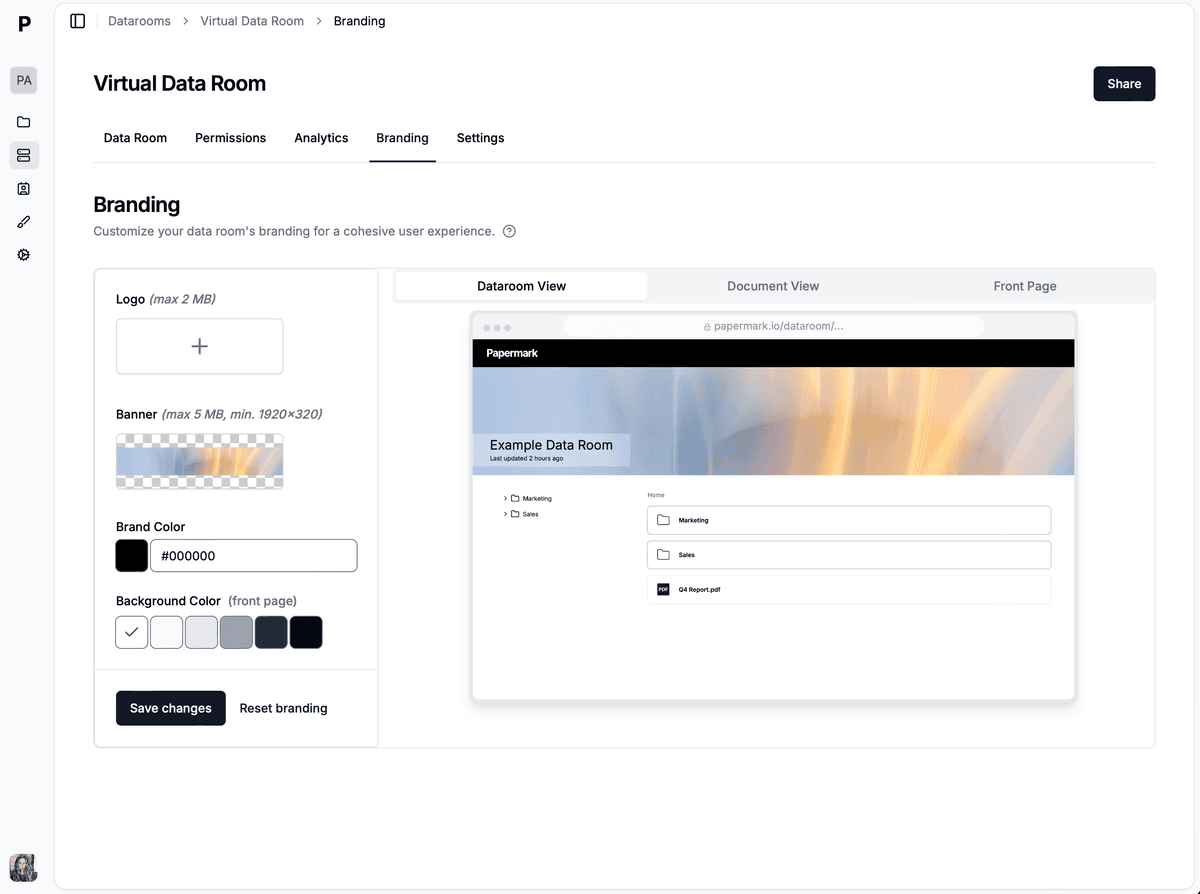
The second thing buyers notice after the documents is the branding: a custom domain and your own logo, on the free-to-start plan through to the €99 data room.
The free plan is a document-sharing plan, and it is genuinely useful for the earliest stage of a process: send a teaser or an information memorandum as a tracked link, see who opened it and which pages they read, and capture the viewer's email before they see anything. What it does not include is the data room feature set. Granular folder permissions, dynamic watermarking, NDA gating, and custom domains sit on the paid tiers, and it is better to say that plainly than to let a seller discover it in week three of a diligence process.
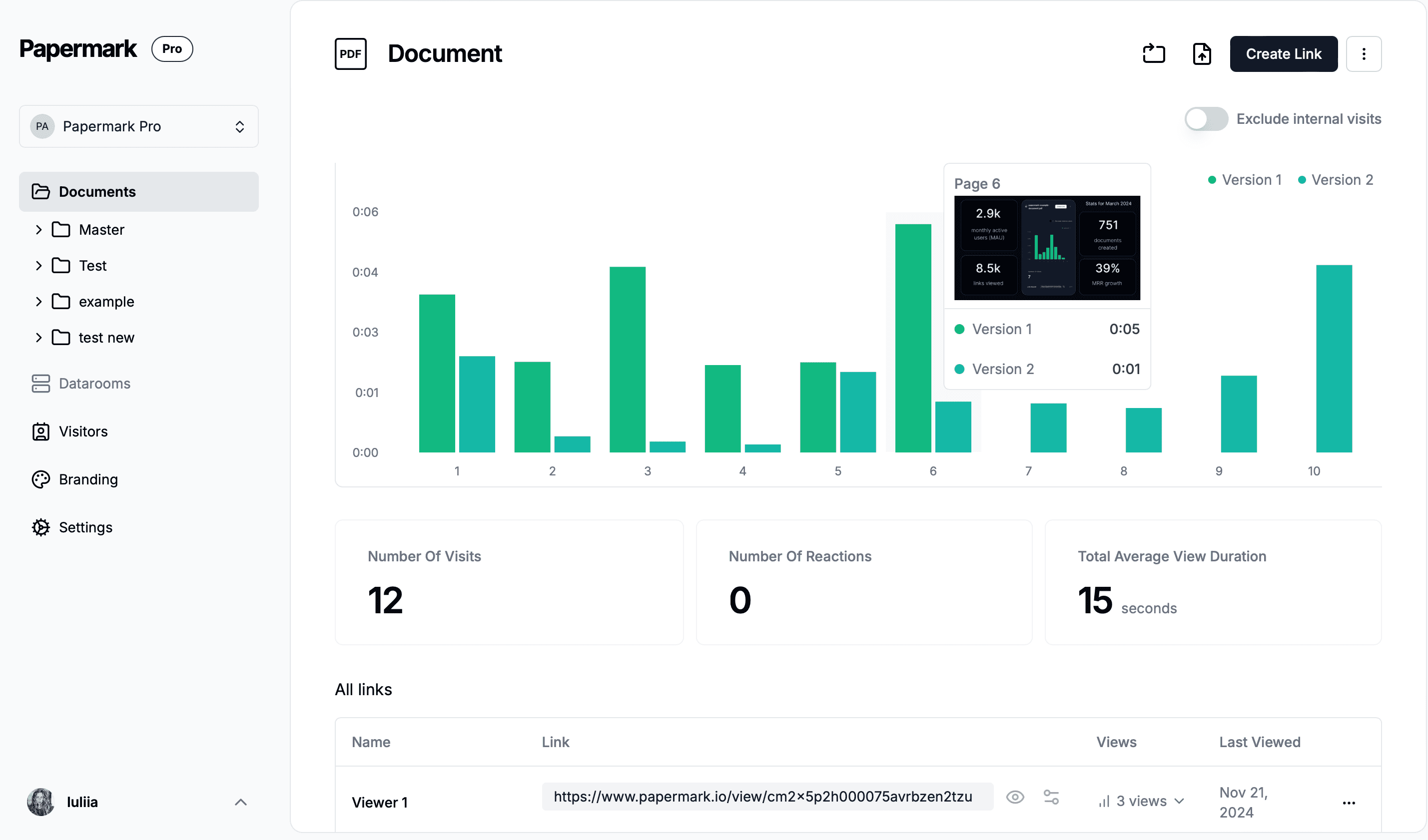
Analytics is the single feature that most changes how a low-budget seller runs a process, because it substitutes information for the adviser you have not hired. Papermark shows which viewer opened the room, which document and which page they spent time on, how long they stayed, and whether the link was forwarded to somebody else.
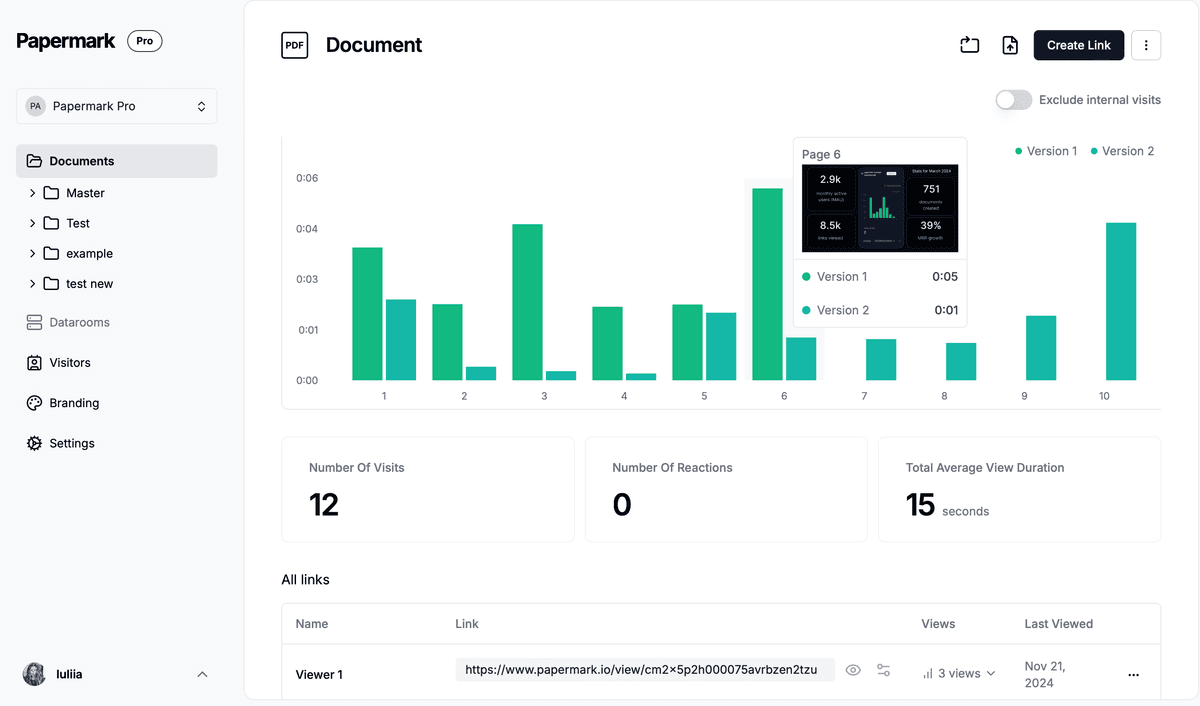
Page-level analytics are included on every plan, including the free one, rather than sold as an enterprise reporting module.
The paid Data Rooms plan carries the controls that free storage cannot approximate: dynamic watermarking stamping each viewer's email, IP address, and timestamp onto every page as it renders, view-only mode with screenshot protection, one-click NDA gating before access, granular file and folder permissions per bidder group, password protection, email verification, link expiry, and instant revocation. Encryption is AES-256 at rest and TLS in transit, EU hosting in Frankfurt is available, and every view, download, and NDA acceptance lands in an exportable audit log. Papermark is SOC 2 Type II compliant, with SOC 2 Type II on the Data Rooms Plus plan, and GDPR, HIPAA, and CCPA compliant. Full detail is on the security page.
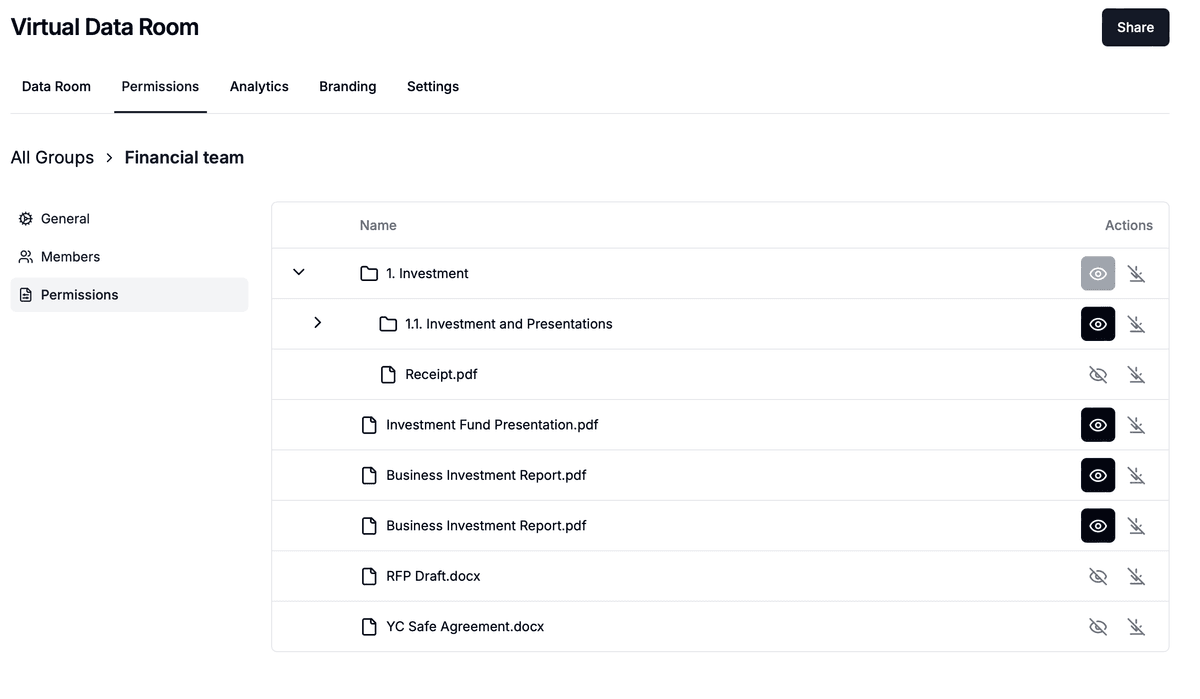
Six bidders, one room, six different folder scopes, with expiry set per link at creation rather than revoked later.
The Data Rooms plan is €99/month with a 7-day free trial and includes 3 team members, unlimited data room visitors, unlimited data rooms, unlimited documents, a custom domain, dynamic watermarking, NDA agreements, and granular file-level permissions. Data Rooms Plus at €249/month adds 5 team members, the Q&A module with permissions, the visitor audit log, automatic file indexing, and SOC 2 Type II. Data Rooms Premium at €549/month covers 10 team members plus AI redaction, full API access, SSO, whitelabeling, and advanced security controls. Data Rooms Unlimited at €999/month removes per-seat charges entirely for unlimited team members, and adds self-hosted deployment and a bring-your-own AWS bucket. Unlimited data rooms on every paid plan means one room per bidder at no extra cost, which is the line item that makes cheap data rooms expensive elsewhere.
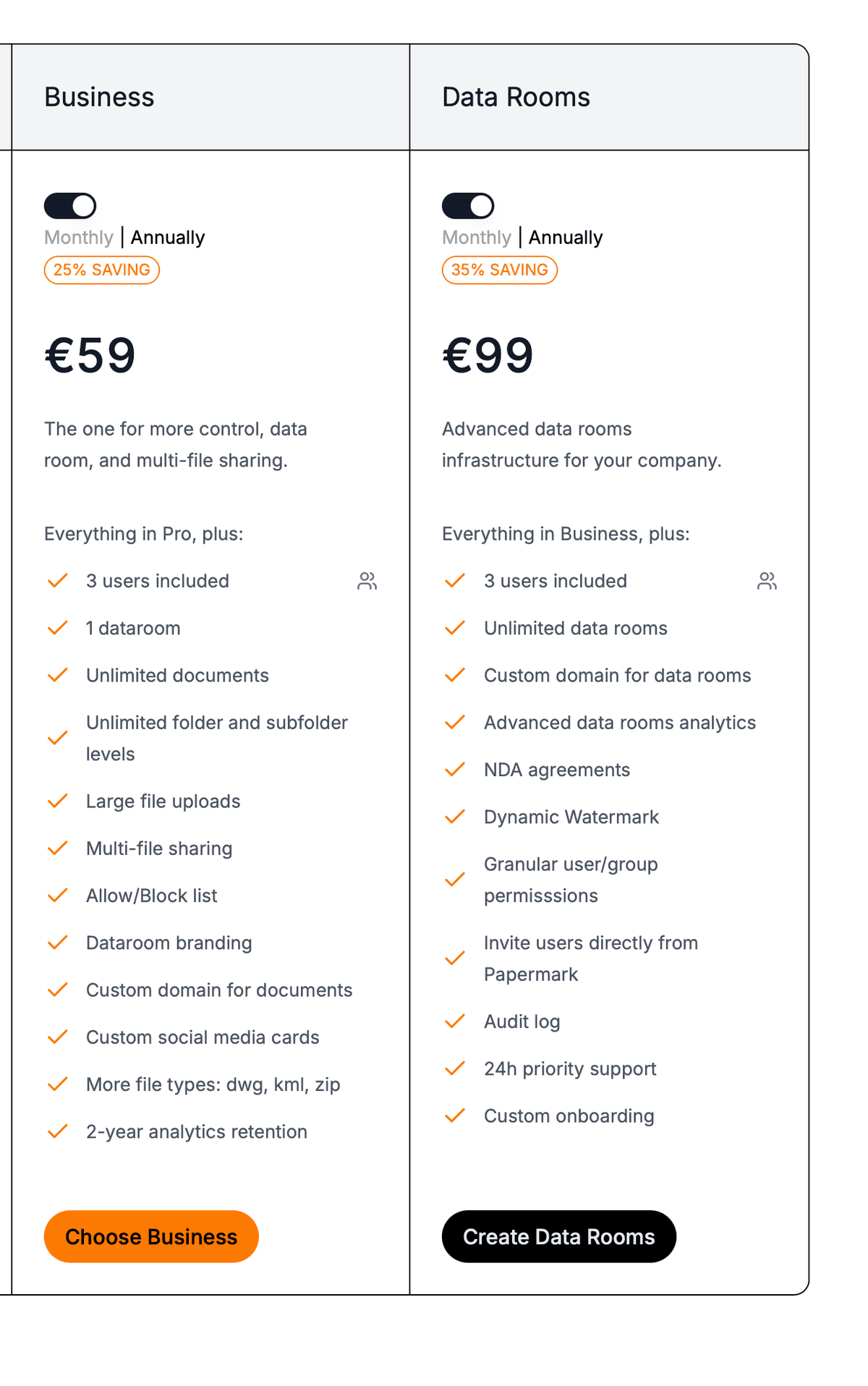
The free plan, the 7-day trial, and the €99 monthly plan are all on the published price list rather than behind a sales call.
Papermark rates 4.9/5 across 171 reviews on G2, Product Hunt, and community feedback, verified in 2026, and is used by 70,000+ companies. The honest limitation for this list: the free plan is not a free data room, it is free document sharing, and a seller who needs watermarking and per-bidder permissions on day one needs the €99 tier or the 7-day trial rather than the free plan.
Website: nextcloud.com
Free tier: the self-hosted community edition is free to licence; you pay for hosting.
Nextcloud is open-source file sync and collaboration software you run on your own infrastructure, which appeals to sellers whose requirement is that documents never sit on a vendor's server.
Limitation: it is not a purpose-built VDR. No dynamic watermarking with viewer identity, no page-level analytics, no NDA gate on a link, and no Q&A module, and somebody on your side owns patching, backups, and uptime through a bid deadline.
Website: drive.google.com
Free tier: 15 GB shared across your Google account.
Google Drive is the default free data room for M&A simply because everyone already has it, and for a single-buyer deal with a few dozen documents it is a defensible choice.
Limitation: no dynamic watermarking, no page-level analytics, no NDA gate, and a permission model built for collaboration rather than for competing bidders, which forces duplicate folder trees the moment a second party appears. Our guide to creating a data room in Google Drive covers the workarounds and where they stop working.
Website: onedrive.com
Free tier: 5 GB.
OneDrive is the same proposition as Drive for organisations already inside Microsoft 365, with the advantage that document handling stays where the business already works.
Limitation: 5 GB free is small for a scanned diligence set, and the deal-specific controls are the same ones Drive lacks: no viewer-identity watermarking, no per-page analytics, no NDA gate.
Website: dropbox.com
Free tier: 2 GB.
Dropbox Basic is the smallest free tier here and works for sending a handful of files rather than for hosting a process.
Limitation: 2 GB will not hold a scanned diligence set, and Dropbox retired its built-in document tracking in 2025, pushing tracking into the paid DocSend product at $250/month for 3 users on the Advanced plan.
Website: notion.so
Free tier: free for individuals with a limited number of guest collaborators.
Notion is occasionally used as a lightweight, no-cost investor or buyer room, and it is genuinely good at the narrative parts of a process: a structured index, a company overview, links out to documents.
Limitation: it is a workspace, not a data room. There is no watermarking, no per-page document analytics, no NDA gate, and guest limits bite as soon as a bidder list grows. See our Notion data room guide for what it can and cannot do.
Website: idealsvdr.com
Free tier: 30-day free trial, then a custom quote.
The 30-day trial is the longest here and is a legitimate way to run a short process at no cost on an enterprise-grade room with fence view, granular permissions, and Q&A.
Limitation: the trial ends and there is no published price behind it, so a process running past 30 days moves onto a quote you cannot benchmark. Lower tiers also carry upload limits that document-heavy sets reach quickly.
Website: drooms.com
Free tier: 30-day free trial reported on the FLEX tier, then a custom quote.
Drooms is a European VDR with European hosting, common on real estate and corporate transactions, rated around 4.8/5 on G2.
Limitation: pricing is quote-only in any currency, reviewers flag a dated interface and a learning curve, and cost rises noticeably as team size and storage grow.
Website: securedocs.com
Free tier: 14-day free trial, then from $450/month.
SecureDocs publishes a price, which is unusual in this category, and its subscription fee includes unlimited users and storage, so a single transaction on a short timeline is easy to size.
Limitation: at from $450/month it is roughly four and a half times the cheapest purpose-built data room plan for a comparable single room, and the feature set is deliberately narrow on analytics and branding. See our SecureDocs pricing review.
Website: digify.com
Free tier: time-limited free trial, then from $480/month on the Team plan.
Digify covers secure document sharing with watermarking, device fingerprinting, and rights management, which puts it ahead of consumer storage on control.
Limitation: from $480/month on Team is a high entry point for a low-budget seller, and users have reported both room and seat caps on lower tiers, which is exactly the constraint that pushes teams running several deals to look elsewhere.
Now that you have seen each provider, here is the side by side. Companies run across the top and features down the side, so you can read one control (dynamic watermarking, say) across every option at once. Papermark sits in the first column because it is the only free-to-start option that carries all four security controls.
Security is where the free options split hardest. The four controls diligence depends on, dynamic watermarking, view-only with no download, an NDA gate on the link, and a per-visitor audit log, are standard on purpose-built VDRs and absent from consumer storage.
| Feature | 1. Papermark | 2. Nextcloud | 3. Google Drive | 4. OneDrive | 5. Dropbox | 6. Notion | 7. iDeals | 8. Drooms | 9. SecureDocs | 10. Digify |
|---|---|---|---|---|---|---|---|---|---|---|
| Dynamic watermarking | (+ fingerprinting) | |||||||||
| View-only, no download | Limited | (fence view) | ||||||||
| NDA gate on link | ||||||||||
| Per-visitor audit log | Server logs | Basic activity | Basic activity | Basic activity |
Branding matters because a buyer's first read of how serious a process is comes from what the room looks like and how fast they get an answer. Papermark and the enterprise VDRs offer a custom domain and white-labelling; consumer storage shows a generic file list.
| Feature | 1. Papermark | 2. Nextcloud | 3. Google Drive | 4. OneDrive | 5. Dropbox | 6. Notion | 7. iDeals | 8. Drooms | 9. SecureDocs | 10. Digify |
|---|---|---|---|---|---|---|---|---|---|---|
| Custom domain | (self-hosted) | Limited | ||||||||
| White-label branding | full | (DIY) | Limited | Limited | ||||||
| Setup | Self-serve in an afternoon | Engineering setup | Instant | Instant | Instant | Instant | Guided onboarding | Guided onboarding | Self-serve | Self-serve |
| Support reply | 1 to 2 hours average | Community or paid | Consumer support | Consumer support | Consumer support | Standard support | 24/7 support | Business hours | Business hours | Business hours |
Certification is where the free tiers of consumer tools drop out: their compliance lives at the cloud provider's infrastructure level, not as a product-level attestation for a data room. Facts below are from each vendor's own trust or security pages in 2026.
| Feature | 1. Papermark | 2. Nextcloud | 3. Google Drive | 4. OneDrive | 5. Dropbox | 6. Notion | 7. iDeals | 8. Drooms | 9. SecureDocs | 10. Digify |
|---|---|---|---|---|---|---|---|---|---|---|
| SOC 2 | SOC 2 Type II (Data Rooms Plus) | Depends on host | Cloud vendor level | Cloud vendor level | Paid plans | Enterprise plan | SOC 2 & 3 Type II | Not published | SOC 2 Type II | Via AWS |
| ISO 27001 | In progress | Depends on host | Cloud vendor level | Cloud vendor level | Paid plans | Enterprise plan | 27001, 27701, 27017 | 27001:2022, 27018 | Via AWS | 27001:2022 |
| GDPR / HIPAA | GDPR, HIPAA, CCPA | GDPR (self-managed) | Enterprise plans | Enterprise plans | Paid plans | Enterprise plan | GDPR, HIPAA | GDPR | GDPR (DPA) | GDPR, HIPAA |
| Data hosting | EU (Frankfurt) available | Your own infrastructure | Google Cloud regions | Microsoft regions | Dropbox cloud | AWS | Multi-region | Germany and Switzerland | US or EU choice | US, EU and other |
The right free option is a function of deal shape: number of counterparties, document volume, timeline, and whether personal data is involved. This maps each option to the deal it fits and the point at which it stops working.
| # | Provider | Best-fit deal | Where it breaks |
|---|---|---|---|
| 1 | Papermark | Any size: free plan for the teaser and IM stage, €99 plan for a full multi-bidder mid-market process | Free plan lacks watermarking and per-bidder permissions; upgrade to the €99 Data Rooms plan for full diligence |
| 2 | Nextcloud | Deals where documents cannot leave your own servers | No VDR controls out of the box, and someone owns hosting and uptime through the deadline |
| 3 | Google Drive | Single buyer, under 40 documents, short timeline | A second bidder forces duplicate folders; no view-only with watermarking |
| 4 | Microsoft OneDrive | Small sets inside a Microsoft 365 shop | 5 GB fills fast; same missing deal controls as Drive |
| 5 | Dropbox Basic | Sending a handful of files, not hosting a process | 2 GB will not hold a scanned set; tracking now sits in paid DocSend |
| 6 | Notion | A lightweight narrative buyer or investor overview | Guest limits bite as the bidder list grows; no watermarking or page analytics |
| 7 | iDeals | A short enterprise process that closes inside the 30-day trial | Trial ends mid-diligence, then a quote you cannot benchmark |
| 8 | Drooms | A short EU real estate or corporate process on the trial | Trial ends, pricing is quote-only, interface has a learning curve |
| 9 | SecureDocs | A budgeted single transaction on a short timeline | From $450/month, with a narrow analytics and branding feature set |
| 10 | Digify | Secure document sharing with DRM on a single deal | From $480/month on Team, with room and seat caps on lower tiers |
Short answer: a free plan is worth it at the start of an M&A process and as an evaluation step, and it stops being worth it the moment real due diligence opens. The value is entirely a function of where you are in the deal.
A free data room earns its place in the pre-diligence phase. When you are sharing a teaser or an information memorandum with one or two parties, gauging interest before you commit to a full process, a permanent free plan with page analytics does the one thing that matters: it tells you which buyer actually read the deck and which folder they lingered on. For a sell-side founder without an adviser, that engagement signal is the closest thing to market feedback you get before offers land, and paying nothing for it is the right call.
A free plan stops being worth it the moment an M&A process turns into diligence with more than one bidder. Once counsel asks for view-only employment files, once a second acquirer needs a folder the first cannot see, once personal data enters the set under GDPR, the free plan cannot carry the deal and the workaround costs you more than the subscription would. The €99 Data Rooms plan across a typical four to six month mid-market process is roughly €495 in total, less than an hour of the legal time spent arguing whether the shared folder was adequate.
If your requirement is data sovereignty, meaning the diligence documents never sit on a vendor's server or must live in cloud storage you control, the free and low-cost route is self-hosted open-source software or a data room that supports bring-your-own storage. This matters most on cross-border M&A and in regulated sectors where counsel requires EU data residency or client-controlled infrastructure.
| Option | Licence cost | Where the data lives | VDR features | Who runs it |
|---|---|---|---|---|
| Papermark self-hosted (AGPL) | Free licence | Your own infrastructure | Full data room feature set | Your engineering team |
| Papermark cloud, bring-your-own AWS bucket | Paid plan | Your own AWS S3 bucket | Full data room feature set | Papermark runs the app, you own the storage |
| Nextcloud community edition | Free licence | Your own servers | Not a purpose-built VDR | Your engineering team |
The trade with self-hosting is engineering time: on a deal with a bid deadline, someone owns patching, backups, and uptime, and Nextcloud gives you file sync rather than watermarking, per-page analytics, or an NDA gate. Papermark's codebase is open source under AGPL and self-hostable at no licence cost, and the paid cloud plans add a bring-your-own AWS bucket so you keep the storage under your control while Papermark runs the application layer. For most M&A sellers the bring-your-own-bucket route is the practical middle ground: full VDR controls, client-owned storage, and no server to babysit through diligence.
For EU M&A where GDPR data residency is a hard requirement, the credible free-to-start European options are narrower than the full list. These are the providers that keep data in Europe and either offer a genuine free plan, a trial, or a self-hostable EU deployment.
| Provider | Free access | EU hosting | Certification | Best for |
|---|---|---|---|---|
| Papermark | Permanent free plan plus 7-day trial | Frankfurt available | SOC 2 Type II, GDPR | EU dealmakers wanting transparent pricing and a free start |
| Drooms | 30-day trial on FLEX | Germany and Switzerland | ISO 27001:2022, 27018, GDPR | EU real estate and corporate transactions |
| iDeals | 30-day trial | Multi-region, including EU | SOC 2 and 3, ISO 27001, GDPR, HIPAA | Enterprise cross-border M&A on a short timeline |
| Nextcloud | Free self-hosted licence | Your own EU servers | Depends on your host | Full data sovereignty when documents cannot leave your infrastructure |
The distinction that matters for a European M&A process is durability of the free access. Papermark is the only one of the four with a no-cost tier that does not expire, so an EU seller can start a process on the free plan and move to the €99 Data Rooms plan, hosted in Frankfurt, without changing tools mid-deal. Drooms and iDeals give you an enterprise-grade EU-hosted room for the length of a trial, which suits a process that closes fast, and Nextcloud is the answer only when the requirement is that documents never leave your own servers.
The upgrade trigger is rarely budget. It is almost always one of five specific events, and recognising them early saves the two days of manual work the Wyndle founders lost.
| Trigger | Why free stops working | What you need instead |
|---|---|---|
| A second bidder appears | One permission model forces duplicate folder trees that drift out of sync | Per-link folder scopes on one room |
| Counsel asks for view-only | A free link either downloads or does not exist | View-only mode with dynamic watermarking |
| Personal data enters the set | Employment files need minimisation, restriction, and a record of access | Granular permissions plus an exportable audit log |
| The process passes 30 days | The free trial ends mid-diligence, at the worst possible moment | A published monthly plan you can start and stop |
| A warranty claim arrives later | Folder history does not evidence what was disclosed and when | A frozen, indexed export with a per-visitor log |
The cheapest credible answer to all five is a low-cost purpose-built plan rather than a free general-purpose tool. At €99 a month, a five-month M&A process costs €495 in total, which is less than an hour of the legal time spent arguing about whether the Drive folder was adequate. If you are comparing the wider market rather than only the free end, our roundup of the best virtual data rooms covers 17 providers on pricing model, security, and bidder management, and our guide to open source and free data room software goes deeper on the self-hosted route.
A secure data room on Papermark can be running on your own documents in an afternoon, and the 7-day trial needs no credit card, so the comparison against your current free folder is easy to make directly.
Compare the 8 best data rooms for commercial real estate in 2026. Published prices, rent-roll controls, and which room fits a listing or a portfolio sale.
The 10 best data room providers UK buyers actually shortlist in 2026, from free and affordable options to enterprise VDRs, with honest notes on GBP pricing.
The 15 best virtual data room providers and software compared on real pricing, verified ratings, and best-fit deal type, re-verified September 2026. Plus 6 tools we ruled out.