BlogData Rooms15 Virtual Data Room Features That Actually Matter in 2026
15 Virtual Data Room Features That Actually Matter in 2026
·20 min read
Marc Seitz
Virtual data room features are the security, access, analytics, and collaboration controls that separate a purpose-built VDR from ordinary cloud storage. The essential ones include dynamic watermarking, granular permissions, NDA enforcement, audit logging, and page-by-page document analytics: the baseline required for M&A, fundraising, IPO readiness, and regulated diligence in 2026.
Quick recap
Here is the full feature set covered in this guide, grouped by category. Each one is expanded below with how it works and where it matters most.
Self-hosting - Open-source deployment with SSO and regional data residency
How we evaluated these features
The 15 features below are not a marketing checklist. They are the ones that actually get tested in real deal rooms, and the ones that show up repeatedly in customer conversations when teams move away from DocSend, Intralinks, Digify, iDeals, Box, or SharePoint to a purpose-built virtual data room.
Each feature was evaluated against four criteria. First, legal defensibility: does the feature produce evidence that stands up in litigation or post-close dispute (audit log, NDA acceptance record, version history)? Second, deal fit: does it match the working patterns of M&A, fundraising, IPO readiness, and regulated audits, rather than generic "file sharing"? Third, real customer demand: is it mentioned in onboarding and sales conversations as a must-have, not a nice-to-have? Fourth, compliance posture: does it map to SOC 2 Type II, GDPR, ISO 27001, HIPAA, or CCPA requirements that enterprise buyers check before signing.
Features that pass all four make the list. Features that only look good in a screenshot do not. The anonymized customer quotes in this guide are pulled directly from Papermark's own customer interviews, and the named customers (Icebreaker.vc, G.P. Loree & Co., TBD VC, Orbotix, CompAI) are verifiable from their live case studies.
What are virtual data room features?
A virtual data room is a secure online repository used to exchange confidential documents during high-stakes transactions: mergers and acquisitions, investor due diligence, IPO readiness (both US S-1 filings and EU prospectus work), and regulated audits. Its features are what turn a folder of PDFs into a deal room that buyers, legal counsel, and regulators can trust.
A modern VDR is defined by four things ordinary file sharing cannot do: it proves who accessed each file and when, it restricts what each viewer is allowed to do with the content, it generates a legally defensible audit trail, and it is built to hold up under frameworks like SOC 2 Type II, GDPR, HIPAA, ISO 27001, CCPA, and (for biotech) FDA 21 CFR Part 11. Everything below is an expression of those four properties.
Data room features fall into four working categories: security (features 1-5: watermarking, NDA enforcement, granular permissions, access controls, allow lists), collaboration (6-8: folder organization, link settings, team collaboration and Q&A), analytics (9-11: page-level tracking, version history, reporting), and administration (12-15: branding, custom domains, document viewer, self-hosting). The rest of this guide walks through each category, starting with the features that matter most in a real transaction.
Must-have vs nice-to-have data room features
Not every VDR feature carries the same weight. When you are choosing a provider for an M&A deal, a Series B raise, or an external audit, a small number of controls do almost all of the work. The rest of the feature matrix (branding colors, mobile polish, theming) matters for the buying experience but rarely changes the outcome of the deal.
The decision test is simple: if removing a feature would expose a document to the wrong viewer, break an audit trail, or fail a compliance review, it is a must-have. If removing it would only change how the data room looks or feels, it is a nice-to-have. The table below is the working shortlist I use when evaluating virtual data room providers, and it is the baseline Papermark is built against.
SOC 2 Type II, GDPR alignment, data residency options
HIPAA BAA, ISO 27001, 21 CFR Part 11
Treat the must-have column as the bar. If a VDR is missing any of those, it is not ready for a real deal regardless of how polished the rest of the product looks.
How Papermark compares to DocSend, Datasite, iDeals, and Intralinks on core features
If you are shortlisting providers, the following matrix is the compressed version of the long comparison. It focuses on the features that teams repeatedly flag when they move from a legacy VDR or a cloud-storage workaround to a purpose-built data room. Deeper head-to-head breakdowns live at Papermark vs DocSend, Papermark vs Intralinks, and Papermark vs iDeals.
Feature
Papermark
DocSend
Datasite
iDeals
Intralinks
Dynamic watermarking
Yes
Partial
Yes
Yes
Yes
NDA enforcement before access
Yes
Yes
Yes
Yes
Yes
Granular folder and file permissions
Yes
Limited
Yes
Yes
Yes
Page-by-page analytics
Yes
Yes
Yes
Yes
Partial
Q&A module
Yes
No
Yes
Yes
Yes
Custom domains
Yes
Partial
Yes
Yes
Yes
Self-hosted / open-source option
Yes
No
No
No
No
Flat-rate pricing (no per-page billing)
Yes
No
No
No
No
SOC 2 Type II
Yes
Yes
Yes
Yes
Yes
GDPR + EU data residency
Yes
Partial
Yes
Yes
Yes
The two rows most buyers underweight are self-hosting and flat-rate pricing. The first is the only way to run a VDR entirely inside your own infrastructure for regulated, government, or IP-sensitive workloads. The second matters because per-page or per-MB billing (the Intralinks and Datasite model) creates a perverse incentive to trim the deal room rather than run diligence thoroughly.
Security features in a virtual data room
Security is the reason virtual data rooms exist. A deal room that leaks a cap table, an IND submission, or a due diligence appendix into a forwarded email has failed at its primary job, no matter how good the rest of the product is. The security layer of a VDR is what lets legal counsel, bankers, and boards actually trust the platform with material non-public information.
A strong virtual data room security model combines four controls: it watermarks every page so exfiltrated copies can be traced, it enforces NDAs before a viewer ever sees a document, it applies granular permissions per folder and per file, and it locks access down to verified identities. Papermark's security features are designed around that stack, and the subsections below break down each one.
1. Dynamic watermarking
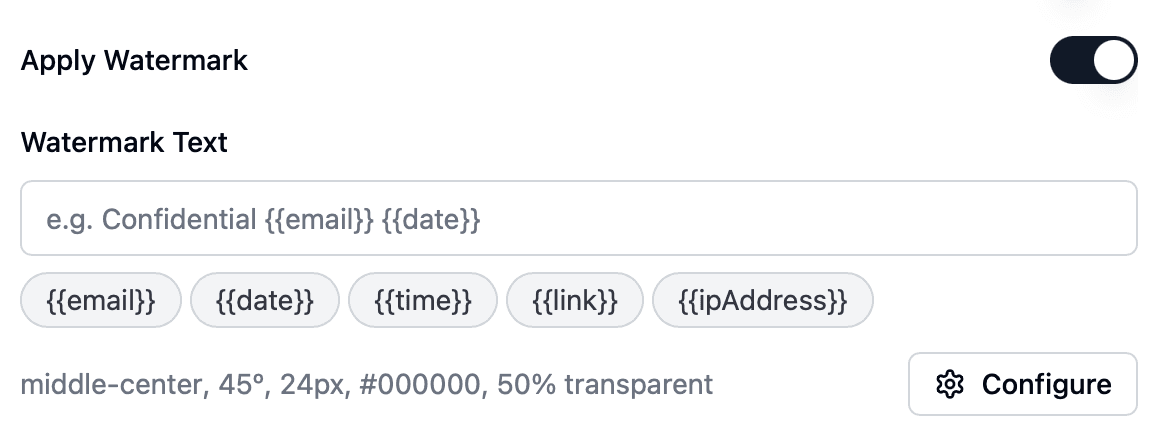
Dynamic watermarking stamps every page of every document with the viewer's email, IP, and access timestamp at the moment they open it. Unlike static watermarks, the stamp is generated per session, which means a screenshot posted in a competitor's Slack channel or a PDF saved to an investor's local disk can be traced back to the exact account that leaked it. For M&A sell-side processes and venture due diligence, dynamic watermarking is the single strongest deterrent against document leakage.
Session-level viewer email and IP
Configurable text variables, opacity, tiling, and color
Applied automatically to every PDF, Word, and PowerPoint file
Visible in screenshots, printouts, and downloaded copies
A government IT manager running a document portal for a cabinet of 18 elected officials summed up the business case in one line during onboarding: "Two documents already leaked with no way to trace." That is exactly the scenario dynamic watermarking converts from unsolved into forensically resolvable.
2. NDA enforcement before access
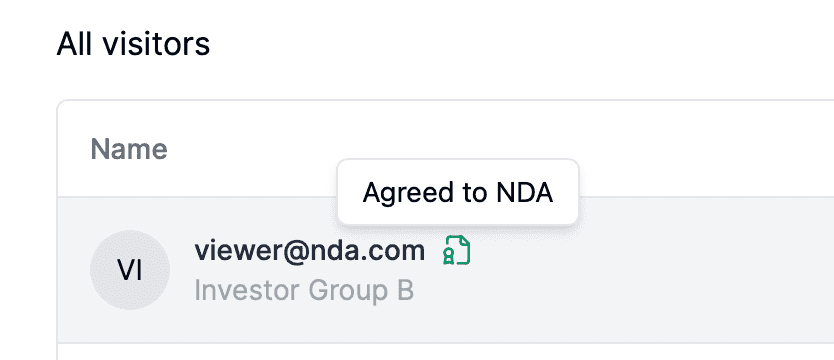
A VDR that cannot enforce an NDA is not fit for fundraising, licensing, or M&A. Papermark lets you require that every viewer accept a non-disclosure agreement, either your own custom PDF or a standard template, before any document in the data room becomes visible. Acceptance is logged with timestamp, IP, and email, which means the NDA is not a polite gesture, it is an evidentiary record that stands up during litigation or a post-close dispute.
Upload a custom NDA or link to an online agreement
Mandatory acceptance gate before viewers see any file
Full acceptance trail captured in the audit log
Tied into viewer analytics so you know who signed and who never returned
CompAI, which raised $2.6M to automate compliance workflows, used NDA-gated rooms from the first investor intro, which is table stakes when your product is literally sold into compliance teams. And a Southeast Asia VC captured the operational pain behind the feature request: "If you're talking about giving access to 10 people, I don't want to have 10 NDAs." One-click NDA gating solves that.
3. Granular permissions
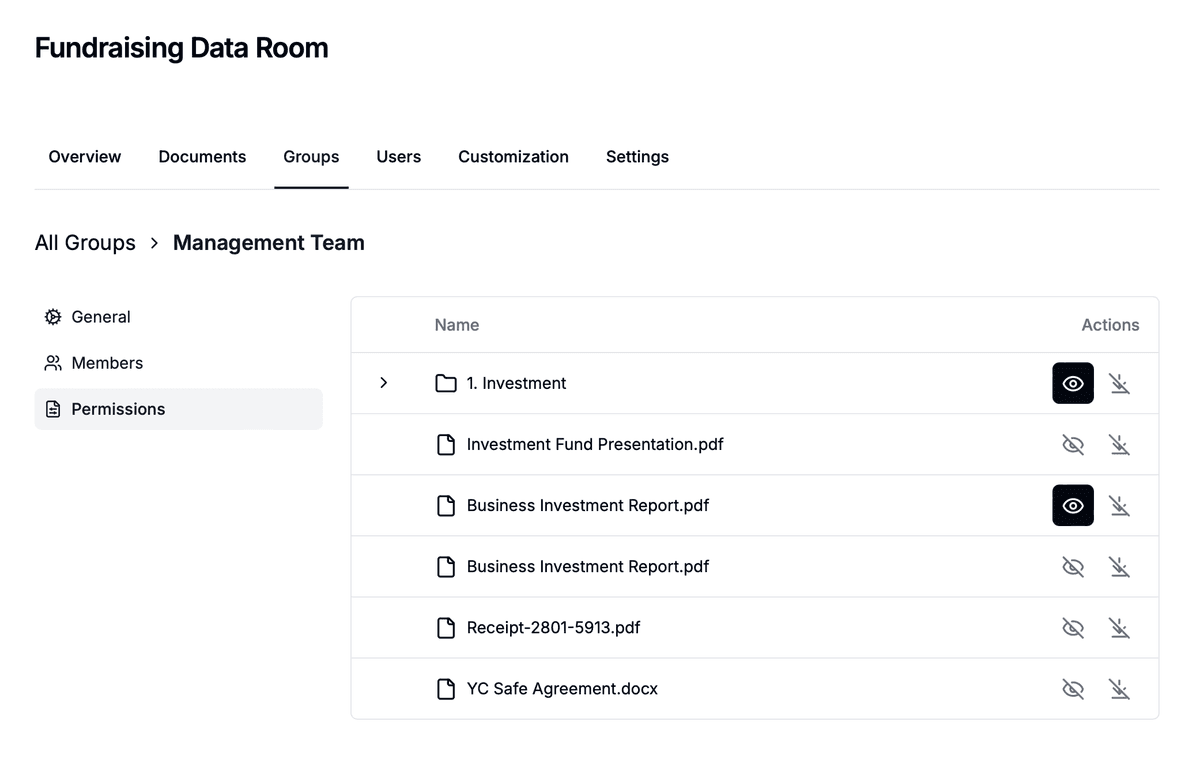
In a real deal room, different audiences see different documents. Buy-side counsel needs the full diligence binder; a strategic bidder might see only stage-one materials; an LP might see fund performance but not portfolio company financials. Granular permissions let you control that at the folder and file level, not the whole-room level. This is the feature that makes a VDR usable for staged diligence, competitive M&A processes (both sell-side and buy-side), and LP reporting where information asymmetry is part of the design.
Group-based access with folder and file granularity
Permission inheritance from parent folders, with per-file overrides
This is the mechanic that lets a family office like G.P. Loree & Co. run diligence on several institutional investments in parallel: each deal lives in its own room, with Financials, Legal, and Operational folders scoped per advisor, so an attorney reviewing one mandate never sees documents from another. A sell-side M&A advisor in India running a 500-document, 4-6 month transaction across legal, tax, and business buy-side teams described the same requirement from the opposite side of the table: each DD team gets its own scoped link into a single data room, so legal cannot see tax team's activity.
4. Access controls
Access controls decide what a viewer is allowed to do once they are inside the room. Papermark lets you toggle downloads, printing, and screenshots on or off per link, apply IP-based restrictions for sensitive bidders, require two-factor authentication, and set manual or automatic link expiration. Together, these controls turn the VDR from a viewer into a policy engine.
Download and print restrictions applied per link
Screenshot blocking with dynamic watermark fallback
A frequent pain with consumer tools is the opposite of this: an external CFO running due diligence through Google Drive described the problem as "anything can be downloaded," with no way to stop sharing once an investor stopped engaging. That single sentence is the reason purpose-built VDRs exist. If you are evaluating DocSend for a deal, the inverse comparison is covered in Papermark vs DocSend.
5. Allow list
Where access controls govern what a viewer can do, the allow list governs who is admitted in the first place. Papermark supports both individual-email and domain-level allow lists, so you can open a room to a single investor, a specific partner's firm domain, or a curated list of bidders. Combined with email verification, it is what prevents a forwarded link from becoming an open door.
Email verification with magic-link confirmation
Individual email allow list for closed rooms
Domain allow list (for example, only @sequoiacap.com addresses can view)
Bulk email addition for large bidder lists
Real-time access notifications when a new viewer joins
Orbotix, a Polish autonomous-defense startup that raised €6.5M, ran its investor round with domain-scoped allow lists so that only verified partners at named funds could open the data room at each stage of the raise. At the enterprise end of the spectrum, an IR team at a ~£20B AUM PE fund (moving off Intralinks) flagged the anti-pattern on the other side: an SMS verification step "disincentivizes anyone from ever looking at a data room." Email-plus-magic-link verification is the sweet spot between security and friction.
Collaboration features in a virtual data room
Security keeps the wrong people out; collaboration gets the right people through diligence without bleeding into fifty email threads. In a live M&A process, buyers ask questions, sellers upload rolling updates, and bankers reorganize the folder tree three times before close. A virtual data room collaboration layer is what keeps all of that coordinated inside the room instead of in chat apps and attachments.
The three collaboration features that matter most are folder organization that matches a real data room folder structure, link-level settings that let you control each external share independently, and a structured Q&A or comment workflow so questions do not get lost. Each of those directly shortens deal timelines, which is the number most executives care about.
6. Folder organization and data room structure
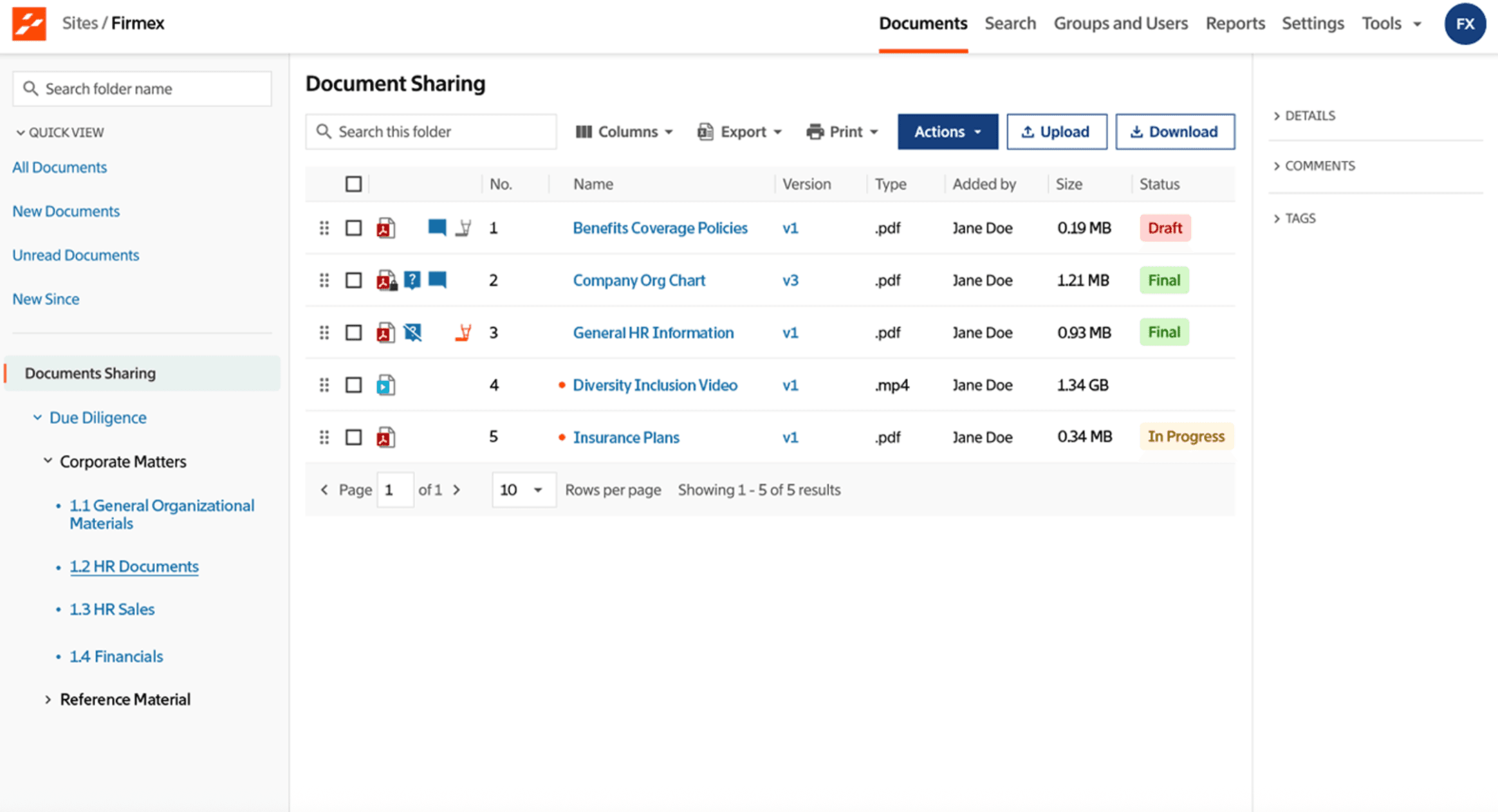
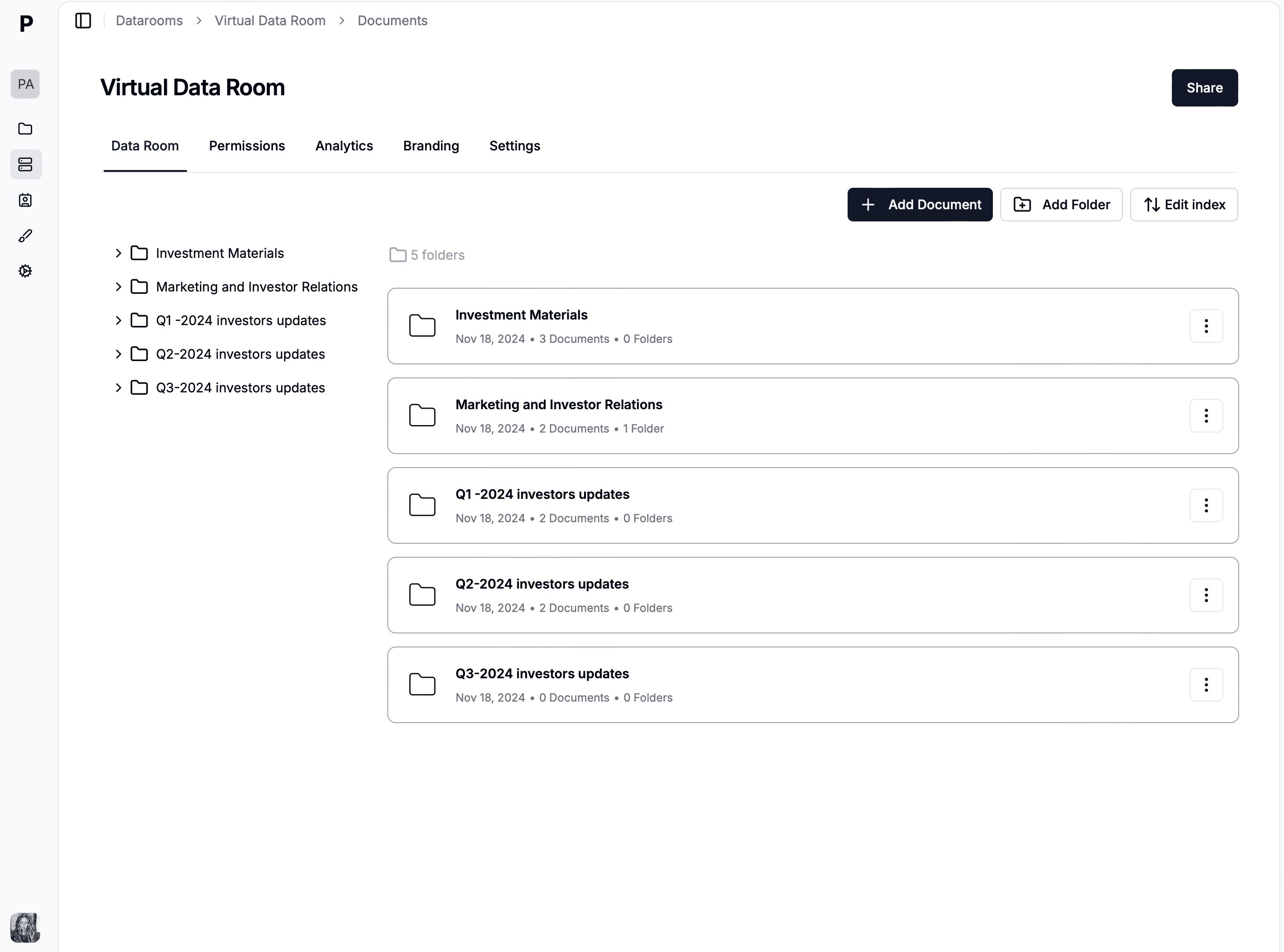
A VDR that lets you dump files into a single list is not a deal room, it is Dropbox with extra branding. Papermark is built around hierarchical folders with drag-and-drop organization, bulk upload, in-room search, and the option to apply numbered top-level folders matching the standard M&A index. This lets sellers publish a room that buyers' counsel can navigate on day one without asking for a map.
Hierarchical folders with drag-and-drop reorganization
Bulk file upload and cross-folder moves
Full-text search across document bodies, not just filenames
Numbered top-level folder convention compatible with standard M&A indices
A Latin American M&A advisor running VDRs as the core of their corporate finance practice described the operational requirement bluntly: unlimited data rooms per subscription, drag-and-drop directory upload, and folder reordering with index rebuilding. For legal firms running real estate transactions (one anonymized Dutch advisor was managing 125 apartments across 3 buyers), the folder structure is the contract structure.
7. Link settings and controlled sharing
Every share from a virtual data room should be scoped to the specific audience, deal stage, and time window it is meant for. Link-level settings in Papermark let you set expiration dates, view limits, and password protection per recipient, and revoke access the moment a bidder drops out of the process. This is how you run a competitive round without accidentally leaving stale links open to a former counterparty six months later.
For internal teams, collaboration features decide whether the deal room becomes a shared workspace or a dumping ground for a single admin. Role-based team permissions, comment threads on individual documents, and activity notifications let bankers, legal, and founders all work in the same room without stepping on each other. Combined with a structured Q&A module, they replace the "diligence tracker" spreadsheet that every deal team otherwise ends up maintaining by hand.
Role-based permissions for internal users (admin, editor, viewer)
Shared workspaces with team member management
Comment threads and activity notifications
Q&A module with threaded questions tied to specific documents
Task assignments tied to specific folders or files
An independent UK corporate finance advisor handling growth-capital deals described the gap the Q&A module closes: managing deals via Excel, tracking NDA signatures and question threads manually, and juggling multiple concurrent transactions across a team of three. A structured Q&A with per-link scoping converts that workflow into a system of record.
Analytics and tracking features in a virtual data room
Security and collaboration decide whether a deal can happen; analytics decide whether you can read the room while it is happening. A virtual data room that cannot tell you which investor opened the pitch deck, how long they spent on the cap table page, and whether they came back three days later is leaving the single most valuable signal of the whole process on the table. For founders running a raise, analytics are often more decisive than the document content itself.
The analytics layer breaks into three practical pieces: page-level document tracking (who looked at what, for how long), version control and audit history (what was the file yesterday versus today, and who approved the change), and reporting and exports (how to take those signals back to your team or your board). Each is covered below.
9. Document analytics and page-by-page tracking
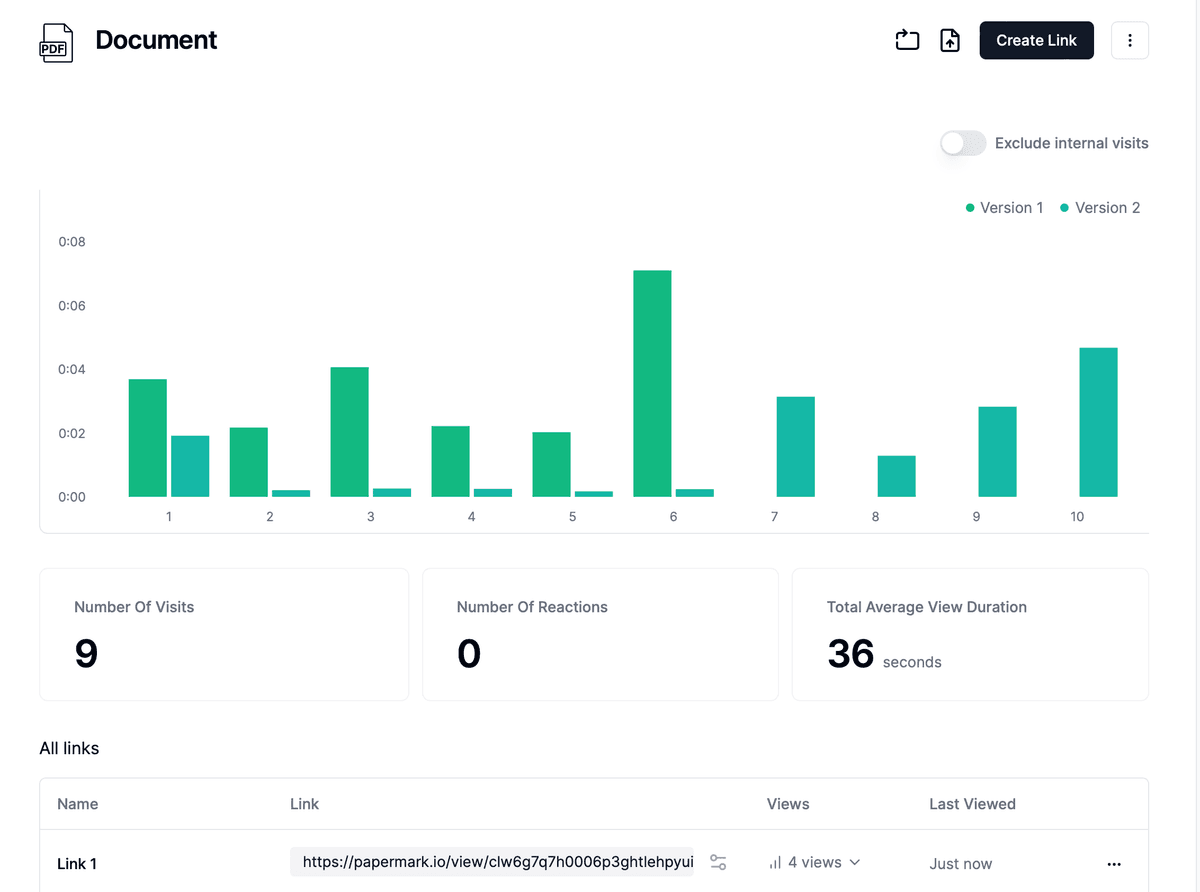
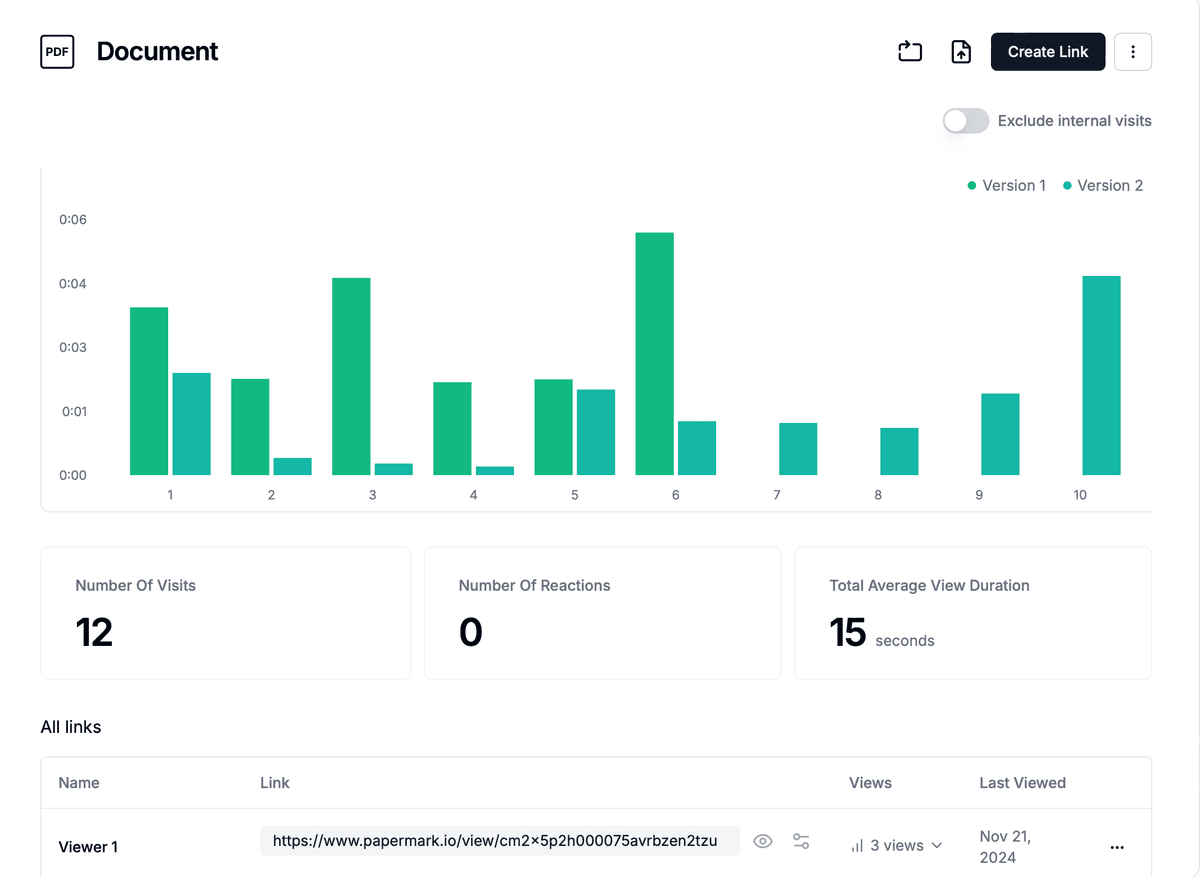
Page-by-page analytics show you exactly which pages of a pitch deck, CIM, or diligence binder a viewer engaged with, not just whether they opened the PDF. For founders, this is how you know a term-sheet conversation is about to happen: a partner opened the deck, skipped straight to the financials slide, and re-opened the deck the next morning. For sellers in M&A, the same signal tells you which bidder is actually working the data versus going through the motions.
Real-time notifications when a viewer opens a document
For Icebreaker.vc, a leading early-stage VC across Finland, Sweden, and Estonia, page-by-page analytics were the deciding feature when they chose Papermark to run LP communications for their Fund III raise. They needed visibility into which LPs were actually engaging with fundraising materials and which had gone quiet, and the granular engagement data let the partners follow up at exactly the right moment instead of chasing everyone in parallel.
Papermark is probably the best VC-focused product we have ever used.
Lasse Lehtinen
General Partner at Icebreaker.vc
A VC analyst moving off DocSend named the same gap from the opposite side: DocSend analytics were insufficient, "can't extract detailed data on who viewed what pages." That is the capability this feature adds.
10. Version control and audit logs
Version control is the part of the VDR that keeps disputes out of your inbox. If a buyer claims they never saw the updated financials, the audit log shows whether the latest version was published before or after their access window, who uploaded it, and whether the viewer opened it. For regulated industries (biotech under HIPAA and FDA 21 CFR Part 11, financial services under SOC 2 Type II and ISO 27001), this audit trail is not optional; it is the evidentiary layer that makes the entire workflow compliant.
Automatic version history per document
Change logs with uploader, timestamp, and version notes
An IR team at a ~£20B AUM PE fund described the enterprise use case precisely: one person downloads everything for a 15-person team, works locally for 3-9 months, and periodically needs historical versions from 2022, 2023, and 2024 for comparison. Without version history baked into the VDR, that workflow depends on someone remembering to save copies.
11. Advanced analytics and reporting
Beyond page-level tracking, a mature VDR should give you room-level analytics: which folders are busiest, which viewers are trending up, and which documents are never opened. Papermark's advanced analytics roll up individual sessions into patterns you can take to a partner meeting or a board update, and export the underlying data for your own modeling or CRM sync.
Engagement metrics aggregated per room and per viewer group
Heatmaps of folder and document activity
Custom reports for investor updates or M&A status reviews
CSV export and direct API access to analytics events
CRM integration (Salesforce, HubSpot) for closed-loop reporting
The same IR team at the £20B PE fund put the business case directly: "We spend an awful lot of time creating an awful lot of content that probably never gets read." Slide-level engagement analytics, fed back into the CRM, change the next investor meeting from a monologue into a targeted conversation. That is the strategic upgrade this feature unlocks, and it is what often tips a buyer from Intralinks or iDeals to a modern, analytics-first VDR.
Admin and branding features in a virtual data room
The admin and branding layer of a virtual data room is easy to dismiss as cosmetic, but in practice it is where trust gets built. A data room hosted on a generic subdomain with a stock logo looks like a weekend project; the same room served from your own domain with your logo, colors, and email templates looks like an institutional process. For founders pitching top-tier VCs and for bankers running sell-side M&A, that difference is not vanity, it is signal.
Admin features also determine how the room operates behind the scenes: who in your team can do what, whether the platform can be hosted on your own infrastructure, and how the document viewer behaves for recipients on mobile or slow networks. The four features below are the ones most customers care about when they move from a trial to a paid plan.
12. Custom branding
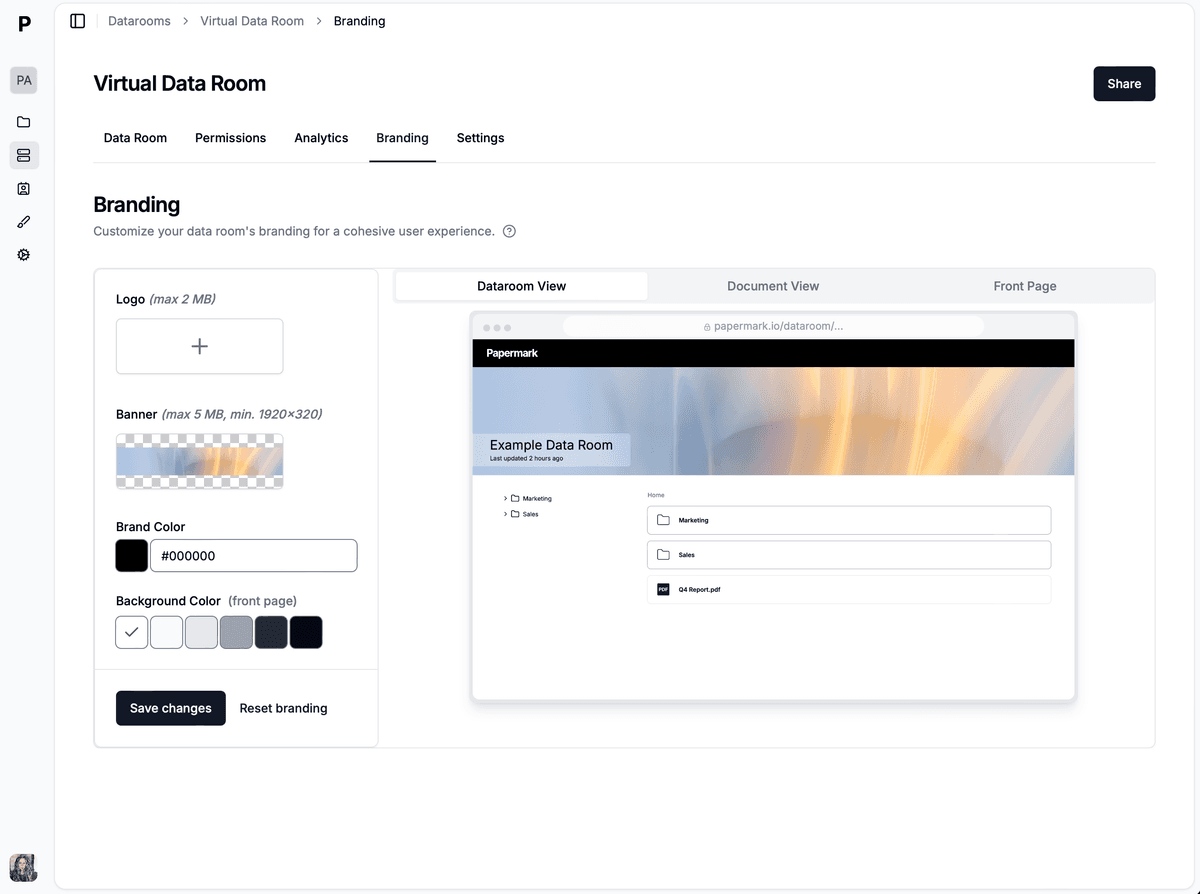
Custom branding lets you skin the data room with your own logo, color palette, email templates, and welcome copy so that every viewer touchpoint (from the first email to the open-viewer screen) carries your identity rather than the VDR vendor's. For agencies, investment banks, and advisory firms reselling the VDR to their own clients, white-label support also makes the whole platform brandable as an internal product.
Logo and color customization
Branded email templates and welcome messages
Multiple theme configurations for different client engagements
Optional full white-label for resellers and advisory firms
A middle-market M&A advisor described the operational reason white-label matters: the firm needs a single branded portal where each client lands automatically in their own data room, with full removal of the vendor's branding. Custom branding plus custom domains (next section) is what closes that requirement.
13. Custom domains
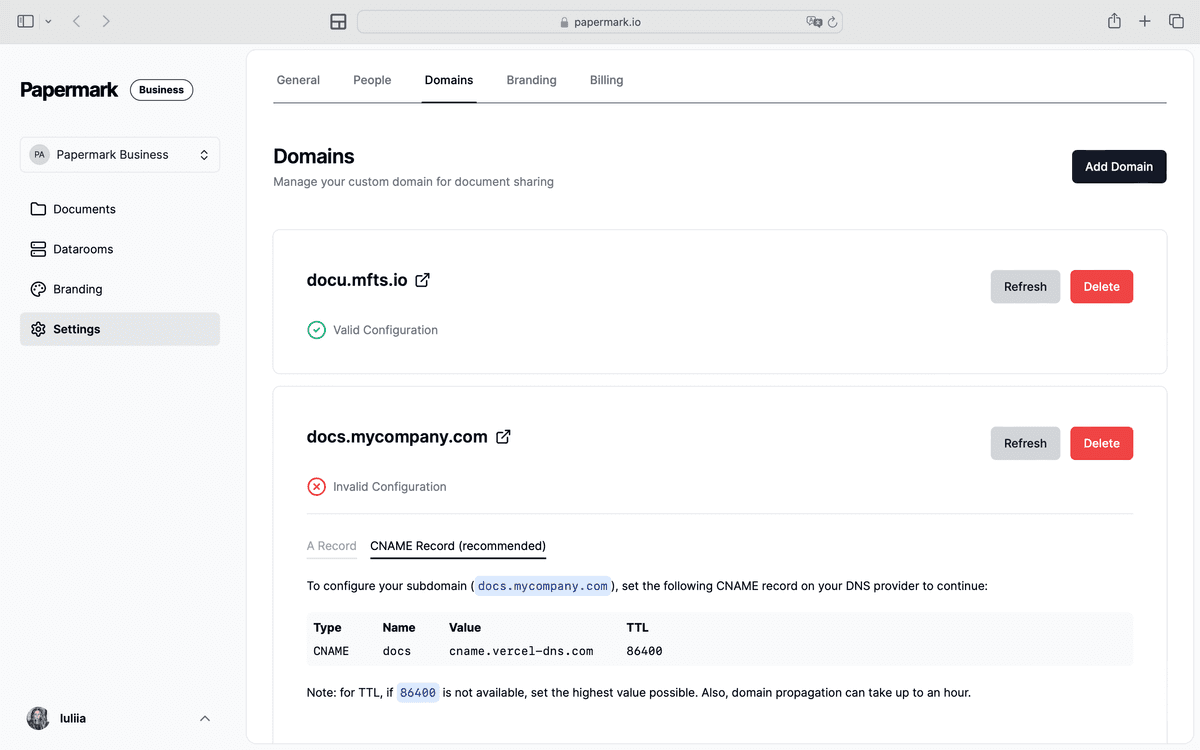
Custom domains let you serve the data room from a URL like deals.yourcompany.com or vdr.yourcompany.com with automatic SSL, DNS configuration assistance, and branded sharing links. It is the lightest-weight feature on this list and also one of the most visible: every viewer sees it the moment they click the link, and it is what signals "institutional process" versus "Dropbox folder."
Custom domain and subdomain support with SSL
DNS configuration assistance
Branded sharing links end-to-end
Multiple domain support for agencies and holding structures
TBD VC, an Israeli pre-seed fund, served its entire $35M Fund II LP data room from a branded subdomain via Papermark's custom domain support, a difference in perceived polish that matters for a first-time fund raising from institutional LPs.
14. Document viewer and mobile experience
The document viewer is where the VDR actually meets the viewer, and a weak viewer undoes every other feature on this page. Papermark's viewer supports all common office formats (PDF, Word, Excel, PowerPoint, Keynote), renders cleanly on mobile, and includes zoom, thumbnail navigation, and in-document search, so a partner skimming a 200-page diligence binder on an iPad during a flight can actually use it.
Native support for PDF, DOCX, XLSX, PPTX, Keynote, Pages
Mobile-responsive layout with touch controls
Zoom, thumbnail navigation, and full-screen mode
Search across document bodies without downloading the file
The "no forced account creation" line above is not decorative. A tax advisor at a boutique wealth management firm (handling $10-20M asset purchases) described why they moved off Box: forced account creation frustrated wealthy clients and killed deal momentum. A link-based viewer that renders without friction is a surprisingly large commercial differentiator.
15. Self-hosting and enterprise deployment
For enterprises with strict data residency or procurement requirements (government contractors, regulated banks, biotech companies running HIPAA workloads, EU firms requiring Frankfurt hosting), a cloud-only VDR is a non-starter. Papermark ships as both a hosted cloud product and an open-source, self-hostable deployment you can run on your own infrastructure. That gives security teams the option to keep every byte of the deal room inside their own perimeter without giving up the features above.
Open-source, self-hostable deployment (AGPL)
Docker and managed cloud options
Single sign-on (SSO via Okta, Azure AD) for internal users
Regional hosting for GDPR, EU data residency, and CCPA compliance
Bring-your-own S3 storage for zero-knowledge deployments
A cybersecurity startup handling patient and payment data described the procurement-level requirement directly: bring-your-own AWS S3 storage with client-side encryption, so even the VDR vendor cannot decrypt customer files. That posture is only possible with self-hosting, which is why it is on this list despite being invisible to most buyers.
Real customer pains these features solve
The table below maps anonymized pain points from customer onboarding conversations to the features that solve them. Each row is a direct paraphrase from a real customer meeting. The point is to show that the features are not theoretical: each one exists because a real team asked for it after a real deal.
Pain point
Feature that solves it
Segment
"Two documents already leaked with no way to trace"
Dynamic watermarking (#1)
Government / public sector
"If I give access to 10 people, I don't want to sign 10 NDAs"
One-click NDA gating (#2)
VC fund (Southeast Asia)
DocSend analytics insufficient, can't extract who viewed what pages
Page-by-page analytics (#9)
VC analyst (DocSend replacement)
Intralinks SMS step "disincentivizes anyone from ever looking at a data room"
"We need historical versions of 2022, 2023, 2024 for comparison"
Version history (#10)
IR team, £20B AUM PE fund
"Intralinks pricing is just too expensive, we can't afford to pay by page"
Flat-rate pricing + self-hosting (#15)
Capital markets platform
Pain-to-feature mapping is also the cleanest way to brief a procurement team. If you are replacing a specific tool, scan the table for your segment and pull the features that solve your exact pain.
How to choose the right virtual data room features
There is no universal VDR feature checklist, because the right feature set depends on what transaction you are running. A founder raising a seed round needs strong analytics and clean branding more than they need SOC 2 Type II; an M&A banker running a sell-side process needs watermarking, permissions, and a defensible audit log far more than they need custom theming. The useful question is not "which VDR has the most features," it is "which VDR has the features that map to my specific workflow."
Start with the transaction. For fundraising data rooms, prioritize analytics and NDA enforcement: you need to read investor intent and protect confidential financials. For M&A data rooms, prioritize granular permissions and watermarking: you are managing multiple sell-side and buy-side bidders in parallel and every leak is a liability. For IPO data rooms (S-1 readiness in the US, prospectus work in the EU) and regulated audits, prioritize compliance certifications, version history, and a clean audit trail: the underwriters and regulators will audit the audit.
Then check the basics. Every serious virtual data room should include the must-have column from the table above. If a provider is missing any of those, no amount of nice-to-have features makes up for it. And if a provider cannot demonstrate SOC 2 Type II plus GDPR alignment at a minimum (with ISO 27001, CCPA, and HIPAA as industry-specific additions), it does not belong in a short-list conversation.
Getting started with Papermark
Papermark offers three ways to adopt the feature set above:
Cloud: start immediately on the hosted product, no infrastructure setup required.
Self-hosted: deploy the open-source version on your own infrastructure for full data residency control.
Enterprise: custom deployment with SSO, dedicated support, and procurement-friendly contracting for larger organizations.