BlogData RoomsWhat Is Firmex VDR in 2026: Features, Pricing, Datasite Acquisition, and How to Transition to Papermark
What Is Firmex VDR in 2026: Features, Pricing, Datasite Acquisition, and How to Transition to Papermark
·8 min read
Marc Seitz
Curious about how Firmex Virtual Data Room can help you manage your M&A, legal diligence, or fundraising project using a virtual data room?
Wondering what changed since Datasite acquired Firmex in 2021, what it costs in 2026, and whether it's still the right call for your team?
We answer all of those questions in this guide. We dive deep into Firmex's features, use cases, pros and cons, current 2026 pricing, the post-acquisition product reality, and finish with a step-by-step playbook for transitioning from Firmex to Papermark, and why dealmakers are making the switch.
Let's dive in.
We transitioned from Firmex after the Datasite acquisition. Papermark had transparent pricing for unlimited projects, data rooms, and visitors, plus advanced features like redaction.
A Papermark customer - M&A broker in US
M&A firm (anonymized)
Are you transitioning from Firmex?
If the Datasite acquisition left your mid-market shop on a product built for large-cap M&A, talk to Marc. He helps brokerages the same size as yours move data rooms without a two-week sales onboarding.
Why teams leave Firmex after Datasite
Five reasons come up again and again with mid-market brokers.
The Datasite switch was not optional. Teams were moved toward Datasite without a real choice. The acquisition was the trigger, not a missing feature.
The product left the mid-market. Datasite is built for large-cap M&A firms. An 8-person brokerage is no longer the customer.
Legacy pricing will not hold. One shop was paying $2,000 a year. Their long-time Firmex rep called that freeze "part of the deal," then could not say for how long.
They had recommended Firmex to peers. Firms that presented Firmex to their network now have to tell those same people not to buy it.
The workflow got too heavy. 200-folder diligences still need folders built by hand, and adding a buyer team can take dozens of steps. Counterparties drop off when the room is hard.
What is Firmex VDR (Firmex Virtual Data Room) overview and features
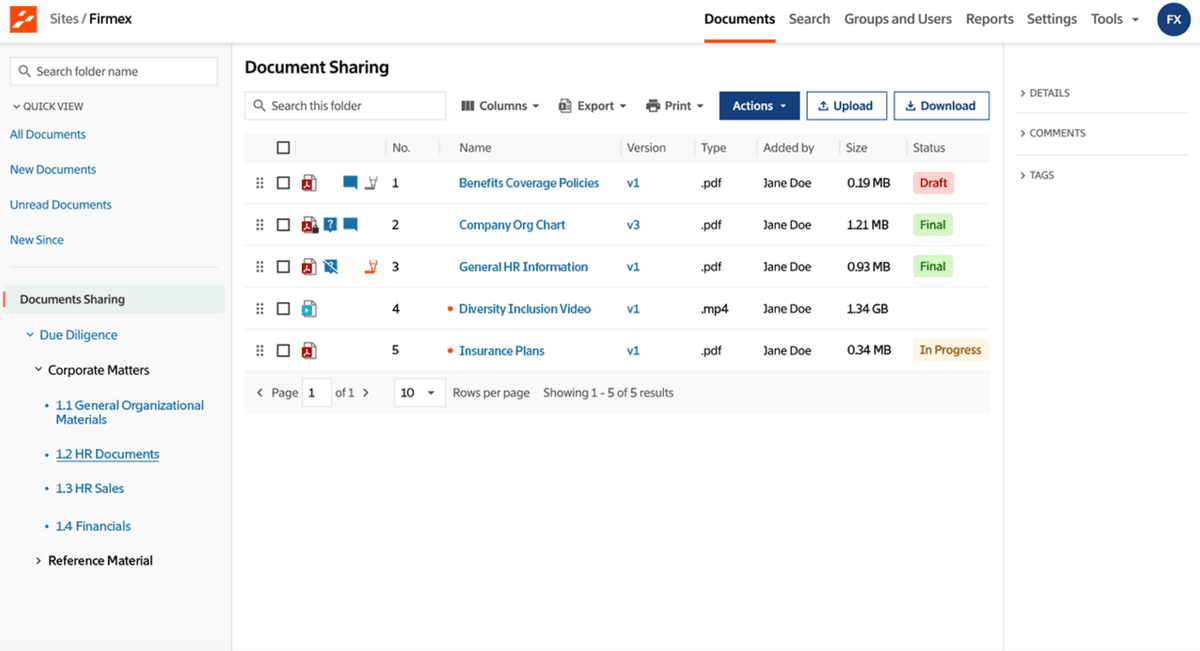
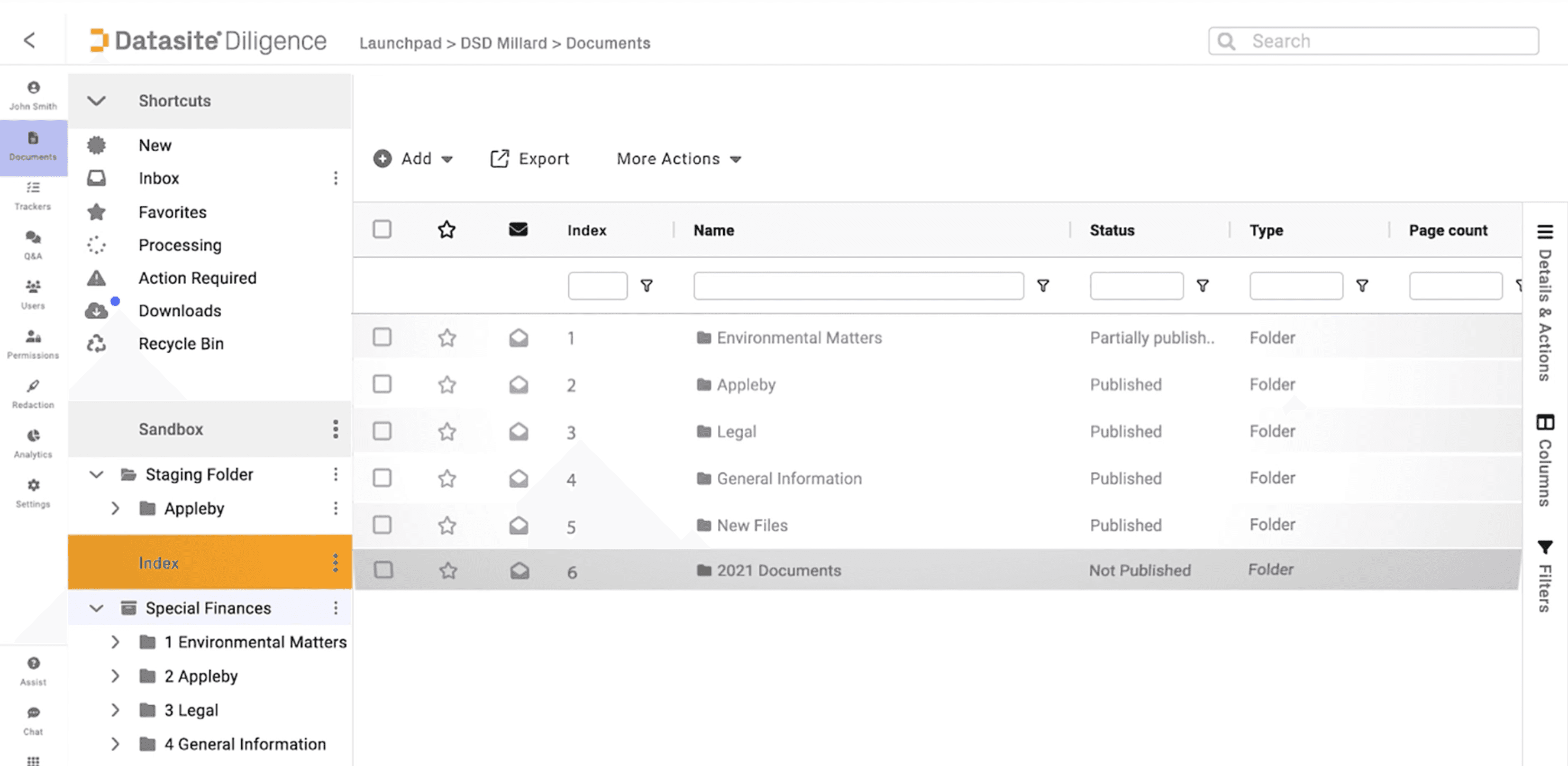
Firmex VDR, sometimes called Firmex Virtual Data Room or simply Firmex Data Room, is a secure online repository and project-based collaboration platform used by mid-market M&A advisors, law firms, corporate development teams, biotech and life-sciences companies, and lenders to run due diligence, document sharing, fundraising, licensing, and litigation workflows.
Some key functionalities offered by Firmex include:
Project-based data rooms: A clean "open the room, run diligence, archive at close" workflow scoped to a defined deal window.
Granular document permissions: Folder- and file-level access control with role-based user groups.
Structured Q&A module: Question routing with role-based answer assignment and per-bidder scoping.
Dynamic watermarking: Per-session watermarks with viewer email, IP, and timestamp on every page.
24/7 customer support: Round-the-clock support included on all paid plans.
Strong audit trail: Complete activity log per user and per document, exportable for the deal record.
While Firmex is a mature product with a strong track record in mid-market M&A, the acquisition by Datasite in 2021, sales-led pricing, project-based billing, and lack of self-hosting or page-by-page analytics push many teams to evaluate alternatives. Modern platforms like Papermark offer flat-rate pricing, unlimited data rooms, custom domains, page-by-page analytics, and an optional self-hostable open-source deployment.
If you want to see how Papermark Data Rooms can help your organization, set up an instant data room trial in 3 clicks here.
What is Firmex Virtual Data Room?
Firmex Virtual Data Room is a secure document management and collaboration platform that lets users store, share, and collaborate on confidential documents for time-boxed deals. Founded in 2006 in Toronto, Canada, Firmex has processed over 200,000 deals across 120+ countries and is particularly strong in Canadian and US mid-market M&A, legal diligence, and life-sciences licensing workflows.
The product's value proposition is the project model: you open a data room, run diligence for a defined period (usually three to six months), and archive the room when the deal closes. Firmex is widely used by M&A boutiques, AmLaw 200 firms, corporate development teams, and life-sciences licensing teams that want a clean, structured tool without the legacy UX of older enterprise platforms.
Since the 2021 acquisition by Datasite, Firmex has continued to operate as a standalone business unit, but its strategic position has shifted: it now sits inside the Datasite portfolio as the lower-middle-market entry point, with Datasite serving the large-cap enterprise segment above it.
What is Firmex?
Firmex is a Canadian virtual data room company headquartered in Toronto, founded in 2006 by Joel Lessem and an early team focused on building a structured, project-based document-sharing tool for mid-market M&A and legal diligence. The company has since grown into one of the most widely used VDR platforms in North America, processing 200,000+ deals across 120+ countries for 120,000+ organizations in its history.
Firmex maintains three regional offices:
Toronto, Canada (global HQ) — 110 Spadina Avenue, Suite 700
London, UK — The Leather Market, Weston Street
San José, Costa Rica — America Free Zone, Heredia (24/7 support hub)
The company sits in the lower-middle-market segment of the VDR space — between modern self-serve platforms like Papermark at the bottom of the market and large-cap enterprise platforms like Datasite and Intralinks at the top.
Firmex VDR services for financial transactions
Firmex is built around financial-transaction workflows where confidential documents need to be shared with a defined external audience for a defined period of time. The core financial-transaction services Firmex supports:
Document review, audit trail, structured Q&A back to seller
Loan syndication
Distributing credit documents to lender groups
Lender-specific data rooms, audit trail, watermarking
Restructuring & insolvency
Sharing financial and operational data with creditors
Time-boxed access, granular permissions, full activity log
IPO and capital raising
Pre-IPO documentation for underwriters and counsel
Compliance-ready audit trail, SOC 2 Type II, role-based access
Private equity fundraising
Sharing fund documents with prospective LPs
Investor groups, NDA enforcement, watermarking
Investor reporting
Ongoing distribution of fund and portfolio updates
Recurring access, branded portals (higher tier)
Licensing & joint ventures
Sharing IP, clinical, or commercial data
HIPAA-ready workflows for life sciences, redaction
Procurement & bid management
Vendor selection with structured Q&A
Bidder isolation, formal Q&A routing
Litigation support & audits
Regulator and counsel document distribution
Exportable audit trail, retention controls
Firmex's structural strength is time-boxed transactional services. For services that run continuously (open-ended LP portals, ongoing IR, rolling diligence pipelines), the per-project pricing model becomes friction — see the Drawbacks section below.
Firmex revenue
Firmex is privately held as part of Datasite (which is itself owned by CapVest), so financial statements are not public.
What is publicly known about Firmex's commercial scale:
200,000+ deals processed since founding in 2006
120,000+ organizations served historically
Datasite group revenue grew 37% between FY2019 and FY2021 (per the Datasite acquisition announcement) — Firmex was acquired into a fast-growing parent
Acquisition price not disclosed when Datasite acquired Firmex from Vertu Capital and BDC in July 2021
Industry estimates place Firmex's standalone annual revenue in the $40–80M range as of 2024–2025, based on third-party data and ARR multiples typical for SaaS VDR providers in its segment (these are estimates, not official figures)
~150–200 employees globally across the three regional offices
Firmex does not break out financials separately from Datasite in any public disclosure. For procurement teams that need vendor financial diligence, request the latest SOC 2 Type II report and parent-company financial summary from Firmex sales under NDA.
Who owns Firmex?
Firmex is owned by Datasite, which acquired the company on July 26, 2021 from majority owners Vertu Capital (a Toronto-based private equity firm specializing in Canadian-headquartered global technology companies) and BDC Growth Equity Partners Fund I (managed by BDC Capital, the investment arm of the Business Development Bank of Canada).
Datasite itself is owned by CapVest, an international private equity firm that acquired Datasite in 2020.
Firmex ownership history
Period
Owner
Notes
2006–2019
Founder-led / private
Founded by Joel Lessem in Toronto
2019–2021
Vertu Capital (majority) + BDC Growth Equity Partners Fund I
Vertu acquired majority ownership in 2019
July 26, 2021 – present
Datasite (parent: CapVest)
Acquired as a strategic business unit; Joel Lessem remained CEO at the time of the deal
So the full 2026 ownership chain is: Firmex → Datasite → CapVest.
For the strategic implications of this ownership chain (pricing pressure, roadmap convergence with Datasite, procurement complexity), see the next section.
Datasite acquires Firmex
On July 26, 2021, Datasite announced the strategic acquisition of Firmex from Vertu Capital and BDC. The deal was positioned by Datasite as a move into the lower middle-market, complementing Datasite's large-cap M&A focus. Financial terms were not disclosed.
Per the official announcement, Firmex continues to operate as a strategic business unit within Datasite as a standalone entity — keeping its own brand, leadership, product, and 24/7 support team while gaining the backing of Datasite's broader infrastructure and investment capacity.
For the full timeline and what the acquisition has meant for customers in 2026 (pricing pressure, roadmap convergence, procurement implications), see the detailed section below.
The Datasite acquisition: what happened and what it means in 2026
A critical part of understanding Firmex in 2026 is understanding its ownership.
Timeline of Firmex ownership
2006: Firmex founded in Toronto by Joel Lessem and team.
2019: Vertu Capital (Toronto-based PE) acquires majority ownership alongside BDC Growth Equity Partners Fund I.
July 26, 2021: Datasite announces the acquisition of Firmex from Vertu Capital and BDC. Financial terms were not disclosed. (source: Firmex announcement)
2021–present: Firmex operates as a "strategic business unit within Datasite" and continues as a standalone entity. Joel Lessem remained CEO at the time of the deal.
2026: Both brands continue to ship. Firmex serves lower middle-market deals; Datasite serves large-cap enterprise M&A.
What Datasite said at the time
"The acquisition of Firmex supports our aggressive growth strategy into new markets, including supporting a wider range of use cases." — Rusty Wiley, CEO of Datasite
"Datasite's investment will help us further expand our growing subscription-based business within the lower middle-market, as well as pursue new opportunities." — Joel Lessem, CEO of Firmex
What this means for Firmex customers in 2026
The acquisition itself was a clean, strategic combination — but the consolidation has practical implications customers feel five years in:
Two products under one parent. Datasite (the per-page large-cap VDR) and Firmex (the project-based mid-market VDR) are now sister products, both ultimately owned by CapVest (the international PE firm that acquired Datasite in 2020). Sales motions, pricing reviews, and roadmap priorities are coordinated at the portfolio level.
Pricing pressure upward. Customers and analysts have reported steady annual price increases on Firmex renewals since the acquisition, particularly on multi-room and enterprise tiers, as the product is repositioned within the broader Datasite portfolio.
Roadmap convergence with Datasite. AI features, advanced analytics, and enterprise compliance work tend to land in Datasite first, then trickle down to Firmex on a longer cadence.
Procurement complexity. Buyers running a "Firmex vs Datasite" RFP are now technically running an internal comparison, which can feel less competitive at the negotiation table.
No structural change to product or support — yet. As of 2026, Firmex still operates with its own product team, its own UX, and its own 24/7 support organization.
For mid-market brokers, the acquisition is often the reason they start looking. Combined with project-based pricing, sales-led quoting, and a product now aimed at large-cap M&A, it is a frequent trigger to evaluate alternatives at renewal.
What is Firmex VDR used for?
Firmex Virtual Data Room can be used for a wide range of confidential document workflows, but it's optimized for time-boxed projects with a defined close date. The primary use cases:
Mid-market M&A diligence — sell-side and buy-side data rooms scoped to a 3–6 month deal window.
Legal due diligence — corporate, litigation support, and regulatory diligence run by AmLaw firms and boutique counsel.
Life-sciences licensing and partnering — biotech and pharma deals with HIPAA-aligned workflows for clinical and IP documentation.
Loan syndication and credit workflows — secure document distribution to lender groups.
Private equity fundraising and LP communications — fund-level document distribution and investor reporting (though the project model fits this awkwardly; see below).
Procurement, RFP, and bid management — structured Q&A and timed access for vendor selection.
Firmex Data Room's main use case: secure document sharing
A cornerstone of Firmex VDR is secure document sharing for transactional workflows. For M&A, legal diligence, and licensing deals that require utmost confidentiality, Firmex offers:
Drag-and-drop upload with bulk folder management. Upload thousands of files in a single operation; Firmex handles indexing and previews.
Granular permissions. Folder- and file-level controls let administrators decide exactly who sees what. User groups (legal counsel, bidders, internal team, advisors) make repeated permission patterns reusable.
Dynamic watermarking on every page. Every viewed page is watermarked with the viewer's email, IP, and timestamp. Customizable variables let you tune the watermark to your firm's standards.
Document version control. Replace a document and all permissions, links, and Q&A history persist on the new version.
Multi-format support. PDF, DOCX, XLSX, PPTX, and common image formats render natively in the viewer.
Print and download restrictions. Per-link and per-folder controls for download, print, and view-only access.
Note: Firmex tracks document-level engagement (who opened what, who downloaded what), but does not offer page-by-page analytics — a meaningful gap for fundraising and investor-facing deals where understanding which pages the reader actually focused on matters. This is one of the primary reasons teams move to Papermark, which provides per-page dwell-time analytics out of the box. See the page-by-page analytics breakdown for the full picture.
Audit trail and reporting
Firmex's audit trail is one of the most mature in the mid-market category:
Complete activity log per user and per document
Exportable audit trail for the deal record and post-close documentation
Detailed engagement reports by user, document, folder, and Q&A throughput
Compliance reporting structured around SOC 2 Type II and GDPR
For legal practitioners and corporate development teams running structured diligence with a hand-off to closing counsel, the audit trail is one of Firmex's strongest selling points.
Firmex Virtual Data Room's main use case: permission management
Firmex places strong emphasis on permission management and user roles, which is essential in M&A and legal proceedings. The platform offers a comprehensive set of document-level controls and a clean group-based permission model.
Document permission controls
Firmex permissions are structured around four broad access levels per file or folder:
No access: User does not see the document or folder exists.
View: User can view the document in the secure viewer with watermark applied.
Print / Download as PDF: User can print or download a watermarked PDF copy.
Download original: User can download the source file (rarely granted in M&A).
Each permission can be applied to individual files, folders, or entire data room sections. Permissions inherit from parent folders by default, with overrides per file. The interface supports bulk permission editing for managing 50+ user groups across thousands of documents.
User roles and group permissions
Firmex offers three primary user role types, each tuned to a transactional context:
Administrator
Full access to all documents, users, and permissions
Manages project settings, archiving, and reports
Controls Q&A routing and answer publishing
Typical: deal lead at the M&A boutique, partner at the law firm
Standard user
Access to permitted documents only
Can view their own activity and group activity
Submits Q&A questions, receives answers
Typical: bidder, external counsel, advisor
Custom roles
Flexible permissions for specific project needs
Common configurations: "Q&A admin", "audit reader", "biotech R&D reviewer"
This hierarchical structure ensures that competing bidders never see each other's questions, that internal team members see more than external counterparties, and that the audit trail captures exactly who saw what — critical for post-close documentation.
Firmex Data Room's main use case: due diligence & collaboration
For most users, Firmex Virtual Data Room is the go-to platform for due diligence, which often involves multiple stakeholders reviewing documents, asking questions, and clarifying details:
Q&A module: Firmex includes a dedicated Q&A section with role-based answer routing, per-bidder scoping (so competing bidders cannot see each other's questions), question threads tied to specific documents, Q&A export for the deal record, and notification rules for new questions and answers.
Real-time updates and notifications: Administrators and participants receive notifications when new documents are uploaded or when questions are answered.
Integration with Outlook and email: Firmex supports email-based document sharing and notifications.
24/7 support: Included on all paid plans, available by phone, email, and chat.
The Q&A workflow is one of Firmex's strongest features and a frequent reason mid-market M&A teams choose it over flat-rate alternatives. If your workflow depends on structured per-bidder Q&A with formal answer routing, Firmex remains a strong choice. If your workflow is closer to founder-investor fundraising or ongoing investor reporting, the Q&A module is more than you need and the per-project pricing model becomes friction.
Firmex API
Firmex offers an API for programmatic data room management, primarily targeted at enterprise customers and partners running document-heavy or repeat-deal workflows. The API is not exposed on entry-tier subscriptions — it is available on higher-tier and enterprise plans, with documentation provided through Firmex sales and support.
Capabilities typically available through the Firmex API:
Document upload and management — programmatic upload, folder creation, version control
User and group provisioning — create, update, and deactivate users and groups
Permission management — apply role-based and folder-level permissions at scale
Audit log export — pull activity data for SIEM, compliance, or BI pipelines
Q&A export — extract questions and answers for post-close documentation
Webhooks — event notifications for uploads, downloads, and Q&A activity
Real-time dashboard embedding — the API is engineered for batch operations, not low-latency UI integration
Self-serve developer onboarding — API access requires sales-mediated provisioning, not a public developer portal with self-issued keys
Granular per-page analytics — Firmex tracks document-level events, not per-page dwell time, so analytics integrations are limited to file-level signals
For teams that need a modern, self-serve API with webhooks, page-by-page analytics, and a public developer portal, Papermark's API is included on standard Data Rooms plans without enterprise-tier gating.
Firmex support
Firmex's support is one of the strongest differentiators in the mid-market VDR category. The support model is built around the reality that M&A and legal deals frequently hit critical issues outside business hours — and a permission misconfiguration at 2 a.m. before a bid deadline is a real production incident.
Support channels and SLAs
24/7 customer support included on all paid plans — phone, email, and live chat
Three regional support hubs: Toronto (Americas), London (EMEA), San José Costa Rica (24/7 follow-the-sun coverage)
Multi-language support in English, French, German, Spanish, and Portuguese
Average response time under 30 minutes for paid plans (per Firmex marketing)
Dedicated project manager assigned on enterprise tiers and large per-project engagements
Onboarding and training
Onboarding session with the assigned project manager to set up the data room, configure permissions, and train the deal team
Live training for deal team and external counsel
Knowledge base with M&A-specific best practices, templates, and process guides
Recorded training library for self-serve user enablement
Setup-to-live timeline: typically 1–2 weeks for a sales-led onboarding (vs. under 1 hour self-serve on Papermark)
Compliance and security documentation support
Firmex's support team handles compliance documentation requests directly:
SOC 2 Type II report (under NDA)
DPA (Data Processing Agreement) for GDPR
HIPAA Business Associate Agreement (BAA) for life-sciences workflows
Penetration test reports (under NDA)
Subprocessor list and infrastructure documentation
For mid-market M&A and legal teams that prioritize white-glove support over self-serve speed, Firmex's support model is one of its strongest selling points. For founder-led teams, fundraising rounds with tight timelines, or technical teams that prefer to debug their own configuration, the sales-mediated, ticket-based model adds friction.
Firmex reviews
Firmex consistently scores in the 4.6–4.7/5 range across the major B2B SaaS review platforms, with 400+ reviews in aggregate as of 2026. The reviews paint a consistent picture: a mature, reliable product with strong support, where the most common criticisms are commercial (pricing, sales-led onboarding) rather than technical.
Firmex review summary by platform
Platform
Rating
Review count
Common themes
G2
4.7/5
400+
"Easy to use", "strong Q&A", "reliable support"
Capterra
4.6/5
200+
"Solid for legal diligence", "good audit trail", "expensive at renewal"
Software Advice
4.6/5
150+
"Professional UX", "secure", "support stands out"
GetApp
4.6/5
150+
"Good for mid-market M&A", "Q&A workflow strong"
TrustRadius
8.5/10
50+
"Mature product", "project pricing fits well"
What customers consistently praise
"Easy to use for our legal team" — frequent comment from law firm reviewers, particularly mid-sized AmLaw firms
"Strong Q&A workflow" — mid-market M&A advisors cite per-bidder scoping and role-based answer routing as deciding features
"Reliable 24/7 support" — appreciated during transaction-critical moments and across time zones
"Professional, structured interface" — clean UX without legacy-platform feel
"Strong compliance posture" — SOC 2 Type II, GDPR, HIPAA-readiness reassures regulated buyers
"Solid track record" — 20 years in market, 200,000+ deals processed
What customers consistently criticize
"Project-based pricing got expensive when our deal extended" — extension re-quoting commonly adds 25–50% to the original quote
"Custom branding required a higher-tier upgrade" — custom domain and white-label gated behind enterprise tiers
"Setup took longer than expected with sales-led onboarding" — typical 1–2 week timeline
"No flat monthly plan made budgeting harder for ongoing engagements" — per-project model awkward for rolling pipelines
"Pricing increases at renewal, particularly post-2021" — recurring theme since the Datasite acquisition
"No page-by-page analytics" — a meaningful gap for fundraising and investor-facing deals
For the deeper Firmex review with feature-by-feature breakdown and customer feedback themes, see the full Firmex review 2026.
How much does Firmex cost in 2026?
Firmex Virtual Data Room does not publish pricing on its website. Every quote starts with a sales call and is scoped against deal duration, storage, user count, and feature set.
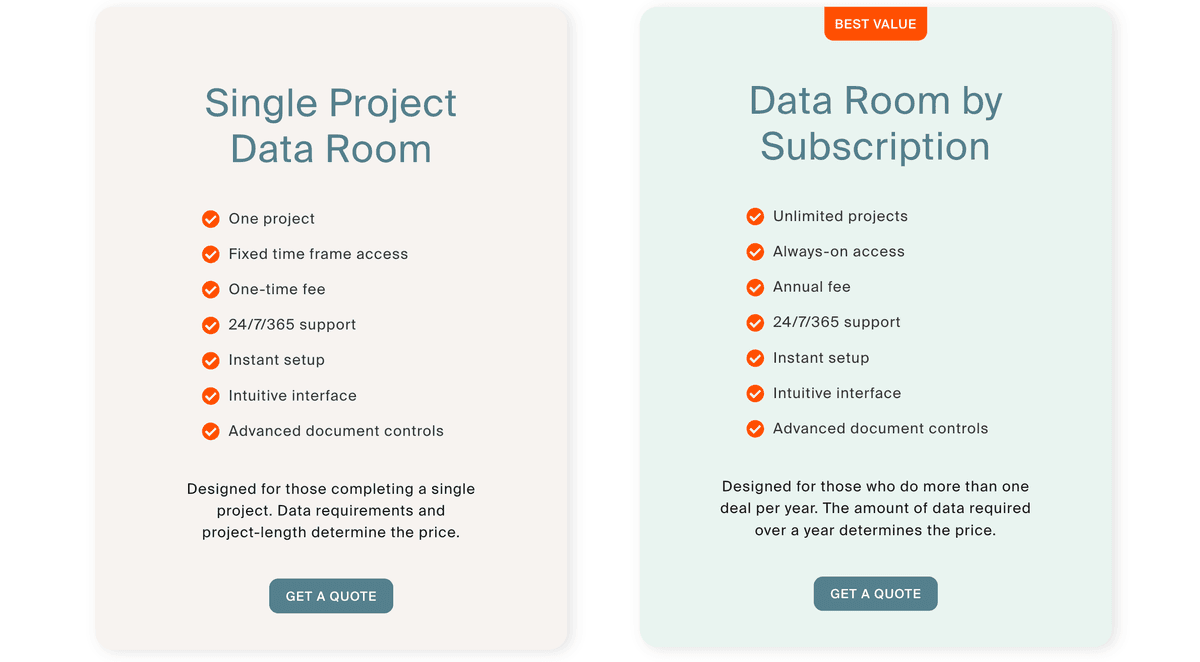
Based on third-party customer data points and customer reports verified in 2026, Firmex pricing falls into three shapes:
1. Subscription plans (monthly or annual)
Reported subscription rates cluster around $625–$995/month for entry tiers, depending on plan size. Subscriptions include the core Firmex feature set (role-based permissions, Q&A module, audit trail, dynamic watermarks, two-factor authentication) and are typically scoped to a single data room with limited users and storage.
2. Per-project / per-deal pricing
For Firmex's core mid-market customer, pricing is typically scoped per project. A representative engagement runs $5,000–$10,000 for a three-month project, including:
One or more data rooms scoped to the deal
Project-relevant user count (15–50 external + internal users typical)
Storage sized for the document set (often 5–50 GB)
Q&A module with project-specific routing
Audit trail and reporting bundled
3. Unlimited / Enterprise
Custom pricing for unlimited users, data rooms, and storage. Multi-data-room subscriptions for active deal teams typically land at $25,000+/year, with larger corporate development engagements running into six figures.
Firmex pricing tiers at a glance
Plan
Typical price (2026)
Best for
Key limits
Entry / Starter subscription
~$625–$995/month
Small deals, single data room
Limited users, limited storage
Professional / Mid-market
$5K–$10K per 3-month project
Mid-market M&A, legal diligence
Project-bounded; ongoing use re-quoted
Unlimited / Enterprise
Custom (often $25K+/year)
Multi-deal corporate development teams
Subject to fair-use clauses
Per-deal one-shot
Custom quote
Single-project sell-side or IPO support
One room, one engagement
For the full pricing breakdown, including hidden costs (project extensions, multi-room engagements, storage overages, renewal increases), see the dedicated Firmex pricing 2026 guide.
Note: Reviews referring to Firmex pricing consistently report that costs increase at renewal, particularly post-Datasite acquisition. Modeling two- and three-year total cost of ownership before signing is a recurring recommendation.
Looking for a transparent, flat-rate VDR alternative to Firmex?
Skip the sales call and try a VDR with published pricing.
Read case study →
We saved 70% by transitioning to Papermark. And managed to scale our sales. Our team loves this modern data rooms.
Here are some key pros that make Firmex VDR a credible choice for mid-market M&A and legal teams:
Strong Q&A workflow. Firmex's Q&A module is one of the most mature in the mid-market VDR category. Question routing, role-based answer assignment, and per-bidder scoping handle competitive M&A processes cleanly.
Project-based economics for time-boxed deals. A clean sell-side that closes in three months gets a clean price. No monthly subscription that runs past the deal close.
24/7 support included on all paid plans. Round-the-clock support matters when an LP or buyer hits a permission issue at 2 a.m. before a board meeting.
Strong compliance posture. SOC 2 Type II audited annually, GDPR-aligned, with HIPAA-ready workflows for life-sciences licensing.
Solid track record. Over 200,000 deals processed since 2006, particularly strong in Canadian and US mid-market M&A.
Professional, structured interface. Clean UX without the 2012-era legacy of Intralinks or Datasite.
G2 and Capterra ratings of 4.7/5 across 400+ reviews.
Drawbacks of using Firmex Data Room
Despite these strengths, there are meaningful cons of using Firmex Virtual Data Room — many of which have become more pronounced post-Datasite acquisition:
No public pricing. Every quote begins with a sales call. For a first-time fund manager or a founder running diligence in two weeks, the procurement cycle is friction.
Per-project pricing scales badly for ongoing workflows. Fund I raises that run 18 months across multiple closes, ongoing LP portals, and rolling diligence pipelines do not fit the project model. Each extension is re-quoted, and re-scoping commonly adds 25–50% on top of the original quote.
Limited custom branding on entry tiers. Custom domain (vdr.yourcompany.com) and white-label require higher-tier plans or paid add-ons. Modern alternatives like Papermark include these on the standard Data Rooms plan.
No self-hosted option. Firmex is cloud-only. For regulated industries (banks, government contractors, biotech with on-prem clinical data), self-hosting is often a procurement requirement.
File-level analytics, not page-by-page. Firmex tracks document opens and downloads, not per-page dwell time. For founders trying to read investor intent during fundraising, this is the largest functional gap.
Sales-led onboarding. Most Firmex engagements begin with a discovery call and a scoping conversation. Self-serve setup is not the path. Time from first contact to live data room is typically 1–2 weeks.
Multi-room subscriptions are re-quoted per room. Deal teams running multiple concurrent rooms (M&A advisory firms, corp dev teams) negotiate each one separately.
Strategic uncertainty under Datasite ownership. While Firmex continues to operate as a standalone unit, long-term roadmap priorities are coordinated at the Datasite portfolio level, where the focus is on enterprise customers.
Why an alternative is needed for Firmex Virtual Data Room
Firmex is a powerful platform, but there are common scenarios where an alternative is structurally better aligned:
Ongoing data rooms (6+ months). Fund I raises, LP portals, IR workflows, rolling pipelines — all break the project model.
Page-by-page analytics. Founders fundraising want to know which pages the investor read, not just which files they opened.
Transparent, flat-rate pricing. Procurement teams and bootstrapped founders want a price on the website, not a sales call.
Custom domain and white-label out of the box. Branded LP portals shouldn't require a higher tier.
Self-hosting and open source. Regulated industries and sovereignty-sensitive customers want to deploy on their own infrastructure.
Self-serve onboarding. First-time users want to be live in under an hour, not in two weeks.
If any of these describe your workflow, Firmex is structurally misaligned with what you need — and a modern flat-rate alternative will save you time, money, and procurement friction.
Papermark: A better alternative to Firmex Data Room
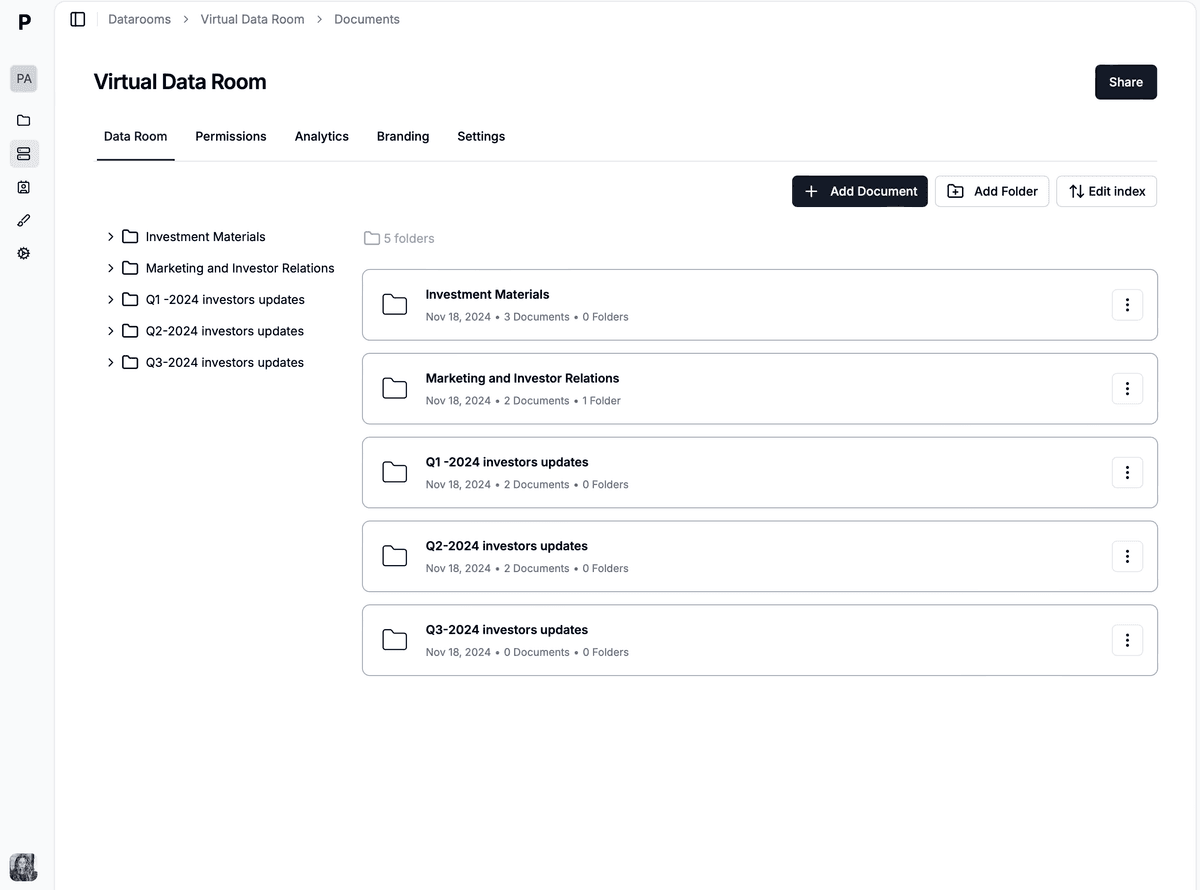
Now let's look at an alternative that addresses the gaps in Firmex VDR: Papermark. Papermark positions itself as an all-in-one, open-source virtual data room and document-sharing platform, designed for teams that want a simpler pricing model, advanced analytics, and modern collaboration tools without a sales-led onboarding process.
What sets Papermark apart is security through transparency: unlike traditional VDR providers, Papermark's codebase is publicly available for review. This transparency, combined with the option to either self-host the platform on your own infrastructure or use the cloud service, makes Papermark uniquely well-suited to procurement-sensitive, security-first organizations.
Key strengths of Papermark vs Firmex include:
Unlimited data rooms and storage — perfect for deal teams running multiple concurrent rooms.
Flat €99/month pricing — published, transparent, no sales call required.
Page-by-page analytics — see exactly which pages investors and bidders engaged with.
Custom domain and white-label included on the Data Rooms plan — no higher tier required.
Self-hostable open-source deployment — full data sovereignty for regulated industries.
7-day self-serve free trial — no credit card required, live in under an hour.
Papermark's main use case: secure document & data room sharing
Papermark combines enterprise-grade protection with detailed analytics and customization options, making it suitable for everything from simple file sharing to complex M&A transactions.
1. Unlimited data rooms and document storage
Papermark distinguishes itself from Firmex by offering unlimited data room creation and storage capacity on a single flat-rate plan. Where Firmex re-quotes for each additional room and applies overage pricing for storage that exceeds the included tier, Papermark lets you create as many data rooms as needed and upload as many documents as you want — without storage constraints or per-room upcharges.
This flexibility proves particularly valuable for:
Corporate development teams maintaining ongoing pipelines
PE/VC firms running parallel fundraising and portfolio company workflows
2. Link sharing and security controls
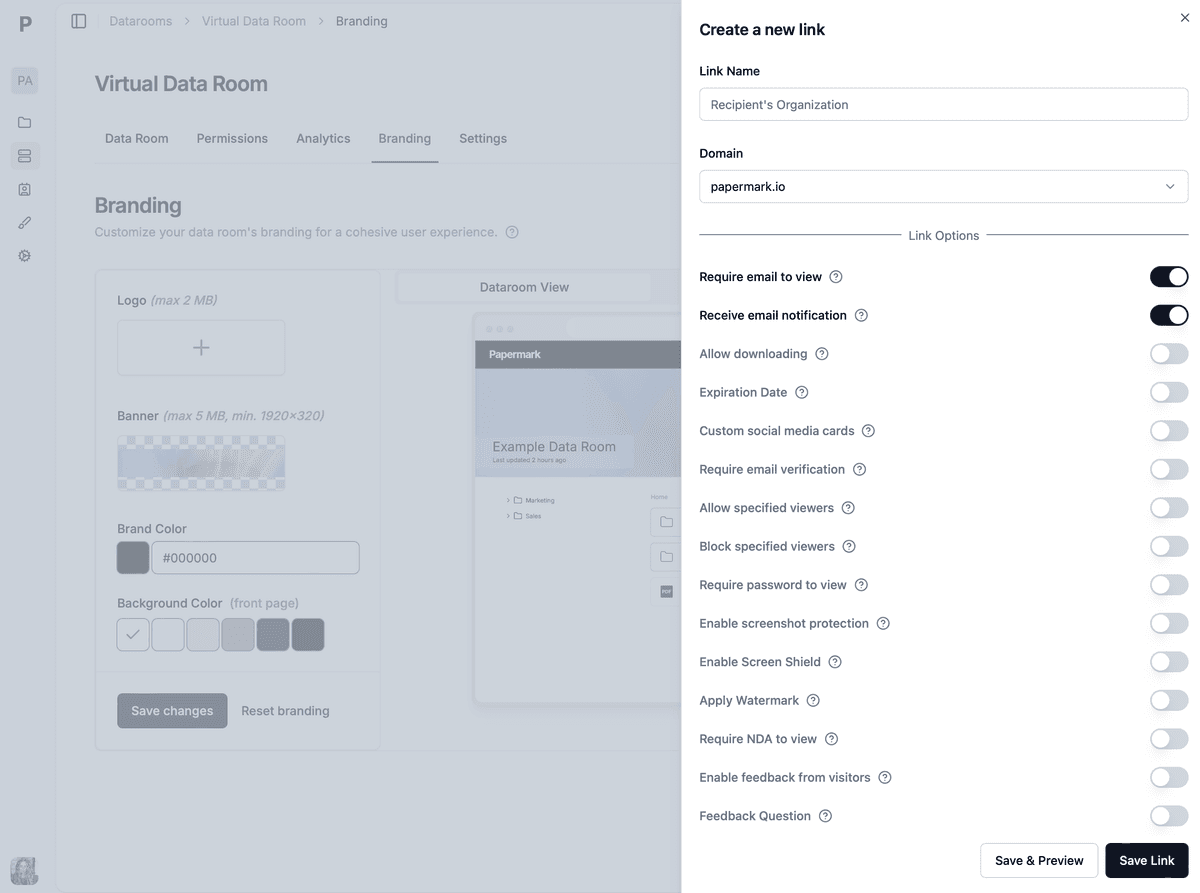
Papermark enhances document sharing through customizable link settings. When sharing documents, administrators can enable security measures that match or exceed Firmex's controls:
Dynamic watermarking with viewer email, IP, and timestamp
NDA acceptance requirements
Visitor feedback collection
Link expiration and password protection
Allow-list and block-list controls
3. Complete customization and full white-labeling
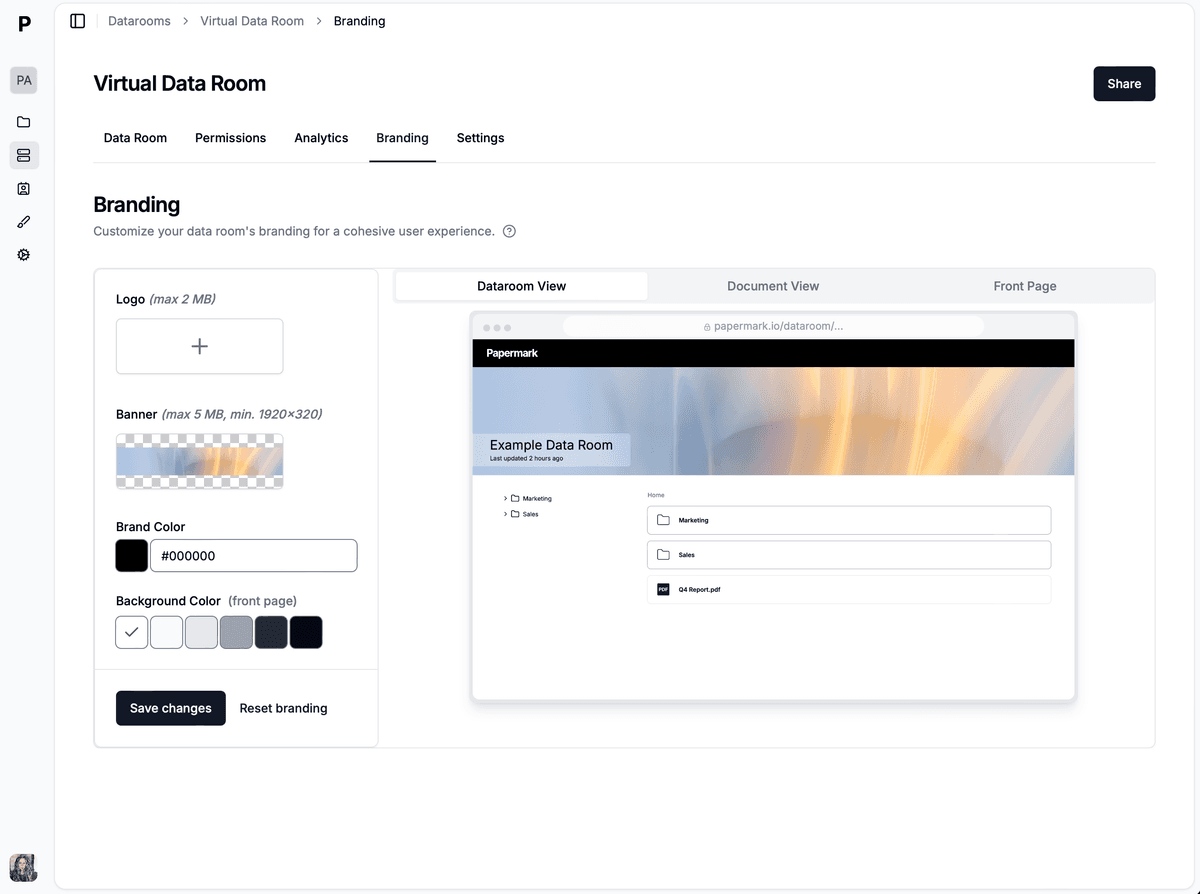
Papermark offers extensive customization options to ensure your data room reflects your brand identity. Beyond simple logo placement, users can adjust the entire interface to match their corporate colors, implement custom domains (vdr.yourcompany.com), and create a cohesive branded experience — on the standard Data Rooms plan, not a higher tier.
For Firmex customers, this is one of the most immediate quality-of-life improvements: branded LP portals and bidder rooms without an upcharge negotiation.
Papermark's main use case: self-hosted data room
For organizations with specific security requirements, data sovereignty needs, or regulatory constraints, Papermark provides a self-hosted open-source option — something Firmex (and Datasite) does not offer. This deployment model allows companies to:
Maintain complete control over data and infrastructure
Integrate the platform seamlessly with existing internal systems
Customize security protocols to match organizational standards
Scale resources according to specific usage patterns and needs
Meet sovereignty and on-premise procurement requirements
The self-hosted version delivers all the powerful features of Papermark while keeping sensitive data within your organization's security perimeter. This option particularly appeals to enterprises in regulated industries (banking, government, healthcare, biotech with on-prem clinical data) or those with strict data handling requirements.
Papermark's main use case: advanced documents analytics
While Firmex tracks document opens and downloads, Papermark provides page-by-page engagement insights — the single largest functional gap teams flag when moving away from Firmex.
1. Page-by-page tracking and analytics
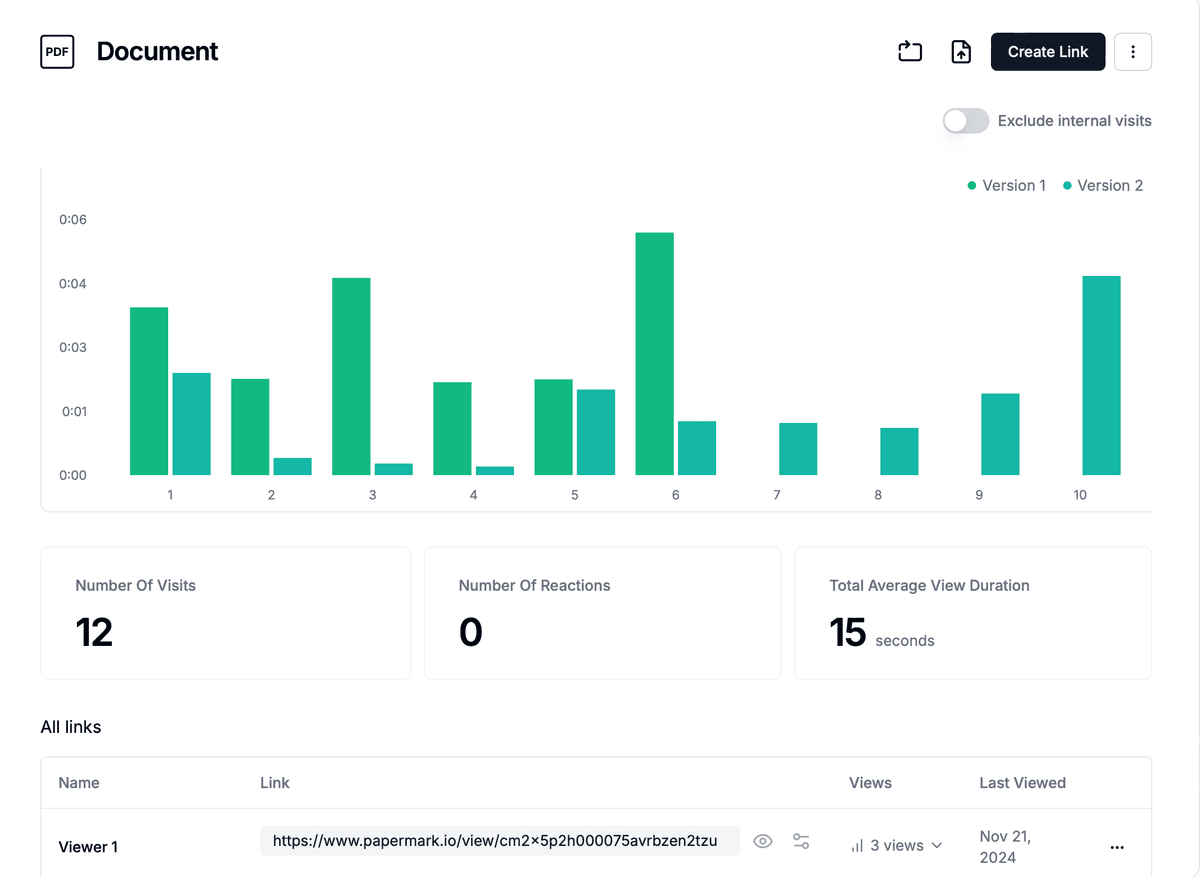
Papermark records dwell time per page, scroll depth, return visits, and engagement heatmaps across each document. This detailed tracking helps teams understand which sections of their materials are most impactful and where potential stakeholders focus their attention — invaluable for fundraising follow-up, sell-side investor positioning, and post-close conversation preparation.
2. Group management and granular permissions
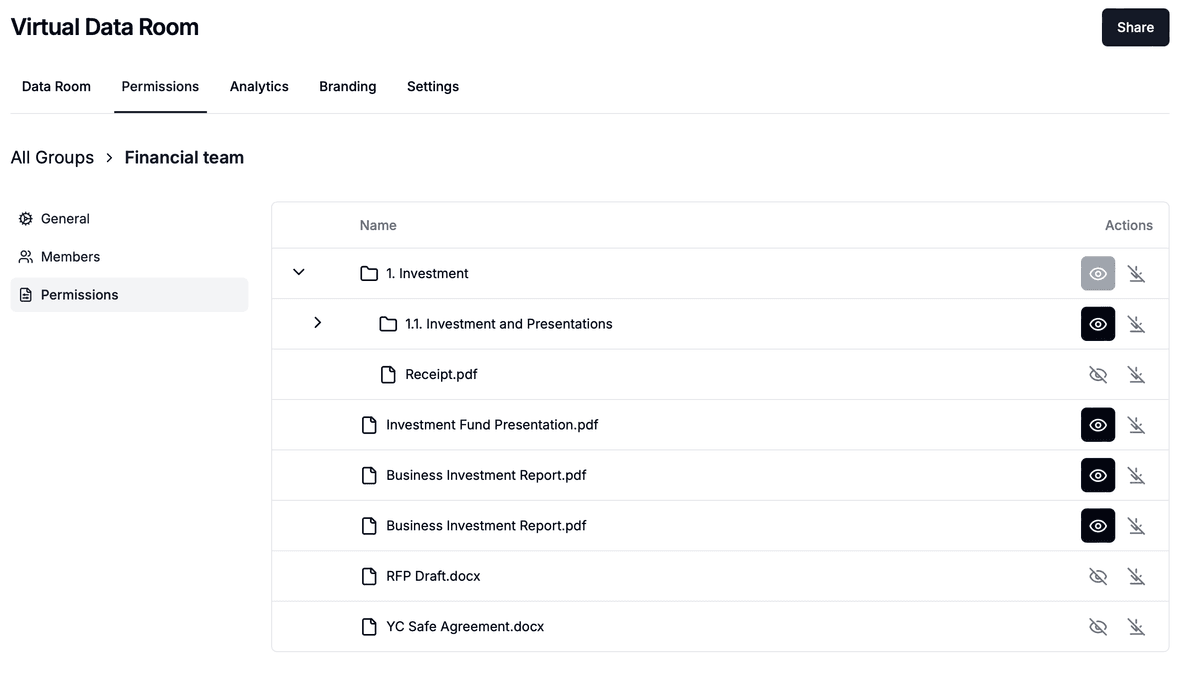
Papermark offers intuitive group management capabilities that balance security with ease of use. Teams can create custom groups with specific access levels, making it simple to manage permissions for different stakeholders like investors, advisors, bidders, or internal team members. The permission system includes options for email verification, download controls, and watermarking while maintaining an intuitive interface.
3. Audit log
Papermark provides a comprehensive audit log that tracks all user activities within a data room, including document uploads, downloads, deletions, and interactions with the data room interface. The log is timestamped and includes details about the user who performed the action, the action itself, and the date and time it occurred — exportable for the deal record, regulatory submission, or post-close documentation.
How much does Papermark cost?
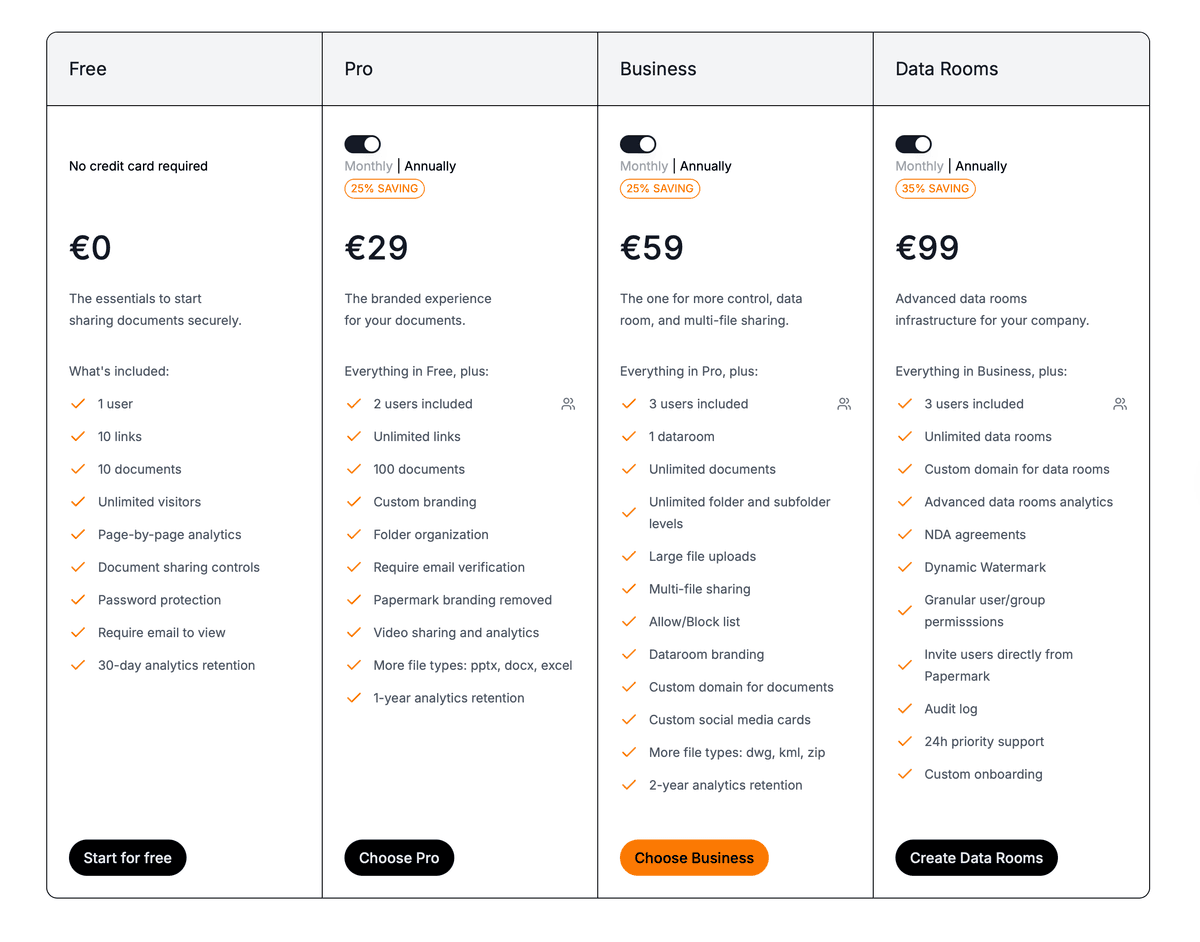
Papermark offers transparent pricing with two main tiers for data rooms and the ability to share separate documents securely for free, both available with monthly or annual billing options:
Business Plan
Price: €59/month (25% savings with annual billing)
Core Features:
3 users included
Unlimited viewers
1 data room
Unlimited documents
Unlimited folder and subfolder levels
Large file uploads
Multi-file sharing
Allow/Block list
Data Rooms Plan
Price: €99/month (35% savings with annual billing)
Advanced Features:
Everything in Business, plus:
3 users included
Unlimited viewers
Unlimited data rooms and storage
Custom domain for data rooms
Advanced data room analytics
NDA agreements
Dynamic watermark
Granular user/group permissions
Firmex vs Papermark: total cost for a typical 3-month deal
Pricing model
Firmex
Papermark
Pricing model
Per-project / subscription
Flat-rate monthly
Starting price
Sales-led: ~$625–$995/month or $5K–$10K project
€99/month flat (published)
3-month deal cost
$5,000–$10,000
~€297
Free trial
On request via sales
7-day, no card required
Multiple data rooms
Re-quoted per room
Unlimited included
Custom domain
Higher tier or add-on
Included on Data Rooms plan
White-label / branding
Higher tier or add-on
Included on Data Rooms plan
Self-hostable open-source
❌
✔️ (optional)
Page-by-page analytics
❌ (file-level only)
✔️
Pricing transparency
Sales call required
Published online
Onboarding
Sales-led, 1–2 weeks
Self-serve, under 1 hour
For a typical mid-market M&A engagement, Papermark is 15–35× cheaper than Firmex on a 3-month deal basis, with no procurement cycle and no surprise renewal pricing.
How to transition from Firmex to Papermark: step-by-step
If you've decided to move from Firmex to Papermark — whether at renewal, between deals, or mid-pipeline — the migration path is straightforward. Most teams complete it in under a day per active room.
Step 1 — Audit your active Firmex data rooms
Before exporting anything, take stock of:
Number of active rooms and total document volume
User groups and current permission structures
Open Q&A threads (resolved + in-flight)
Custom branding (logo, color, custom domain) currently in use
Renewal date — for the cleanest cutover, time the migration to land just before renewal
Step 2 — Export documents and the audit trail from Firmex
Firmex supports a full data export through the admin interface or via a request to your customer success manager:
Full document download (preserves folder structure)
Audit trail export (CSV) — keep this for the deal record and post-close documentation
Q&A export (CSV) — preserves the question/answer history per bidder
User list export with role and group assignments
For active deals, export at a clean checkpoint (end of week, after Q&A round, after a milestone) so the snapshot is consistent with what bidders saw.
Step 3 — Set up your Papermark account and Data Rooms plan
Sign up at papermark.com (no credit card required for the 7-day trial) and select the Data Rooms plan for unlimited rooms, custom domain, white-label, and advanced analytics. Configure:
Workspace name and team members
Custom domain (e.g., vdr.yourcompany.com)
Brand assets (logo, primary color, favicon)
NDA template (optional)
Setup takes about 15 minutes for a first-time admin.
Step 4 — Recreate folder structure and upload documents
In Papermark, create the new data room and replicate the folder structure from your Firmex export. Drag-and-drop the exported folders directly — Papermark preserves nested structure on bulk upload. For large document sets (5–50 GB), uploads run in the background while you continue configuration.
Step 5 — Recreate user groups and permissions
Map your Firmex user groups (bidders, counsel, internal, advisors) to Papermark groups, then apply group-level permissions to folders and files. Papermark supports the same conceptual model as Firmex (folder/file-level access with role inheritance), so the mental model carries over cleanly.
For bidder-scoped access in competitive M&A, create one group per bidder and apply distinct view/download permissions per group.
Step 6 — Configure security controls per link
For each shared link, configure:
Email verification (required for sensitive deals)
Dynamic watermarking with viewer email + IP + timestamp
Download/print restrictions per link
NDA acceptance requirement (optional)
Link expiration date
Password protection (optional)
Screenshot protection
Step 7 — Migrate Q&A history (optional)
For most teams, open Q&A threads either get resolved before the cutover or are closed and re-opened as fresh threads in Papermark. For deals with extensive Q&A history that must be preserved, attach the exported Q&A CSV as a reference document inside the data room.
Step 8 — Communicate the migration to viewers
Send a single email to bidders, counsel, and advisors with:
The new data room link (on your custom domain)
A note that login credentials will be re-issued
Confirmation that all permissions and document state has been preserved
Your support contact for any issues
For deal-critical migrations, run a 24-hour overlap where both rooms are live before fully switching.
Step 9 — Archive the Firmex room and confirm Papermark cutover
Once viewers have accessed the new room, archive the Firmex room (preserves audit trail per Firmex retention policy) and confirm cutover:
Total migration time for a typical mid-market M&A room: 3–6 hours of admin work, plus background upload time. For a corporate development team running 5–10 concurrent rooms, plan for a 1–2 week migration window with rooms cutover in batches.
Why teams move from Firmex to Papermark
The five reasons at the top of this guide are what we hear from mid-market brokers after the Datasite acquisition. Papermark is a secure, fully customizable, and developer-friendly data room for that segment: published Data Rooms pricing from €99/month, unlimited data room visitors on every plan, bulk folder upload, and permissions that do not take 42 steps.
A Papermark customer at an 8-person US M&A brokerage put the buying criterion plainly: vendor responsiveness beats a feature list.
"I've talked to a lot of your competition. That's why I wanted to talk to you, because you took it seriously."
Counterparties complete the room when it is easy, and they stop when it is a production. That is the job Papermark is built to do, with a public API, CLI, and MCP server for teams that want rooms created programmatically, and AI redaction.
Most rooms cut over in 3-6 hours of admin work. Talk to Marc if you want the migration walked, or start the 7-day trial and run the first room yourself.
Manage due diligence with a virtual data room
No credit card required
Page by page analytics
Unlimited documents & folders
Permission management
Dynamic watermarks
NDA collection
Real-time alerts
Custom branding
Audit trail
Benefits of using Papermark
Below are some standout advantages that make Papermark appealing as a Firmex alternative:
Unlimited data rooms and storage on a flat-rate plan — perfect for managing multiple deals or large document volumes simultaneously.
Page-by-page analytics — detailed insights into how users interact with documents, tracking engagement at a granular level.
Enhanced security through open source — Papermark's code is publicly available for security review and verification.
Self-hosting flexibility — deploy Papermark on your own infrastructure for complete control over data sovereignty.
Comprehensive security controls — email verification, watermarking, NDA requirements, screenshot protection, and link expiration on every share.
Full white-labeling capabilities — customize the entire platform with your branding, including logo, colors, and custom domain — on the standard Data Rooms plan.
User-friendly interface — intuitive design minimizes the learning curve while providing powerful features for document sharing and collaboration.
Transparent pricing — clear, straightforward pricing tiers with no hidden costs and no sales call required.
7-day self-serve free trial — no credit card required.
Drawbacks of using Papermark
While Papermark offers compelling advantages over Firmex, here are a few potential cons to be aware of:
Newer brand than Firmex. Firmex has 20 years of mid-market M&A history; Papermark is a newer entrant. For RFPs at large legal firms with strict vendor lists, Firmex (or Datasite) may have an institutional preference.
No mobile app. Papermark is web-based only and doesn't offer dedicated mobile applications for iOS or Android.
No freemium for data rooms. While document sharing has a free tier, full data room features require a paid subscription. The 7-day free trial covers evaluation.
Web-based platform. A stable internet connection is required to access and manage documents.
Q&A workflow is simpler than Firmex's. Firmex's per-bidder Q&A scoping with formal answer routing is more elaborate. For most teams the Papermark Q&A is sufficient; for the most structured competitive M&A processes, Firmex's Q&A remains best-in-class.
Conclusion
Firmex VDR is a credible, mature virtual data room — particularly for time-boxed mid-market M&A and legal diligence with a defined close date. Strong Q&A, dynamic watermarking, robust audit trail, and reliable 24/7 support make it a sensible default for AmLaw firms, M&A boutiques, and corporate development teams that have used it for years.
But the structural friction is real, and it has compounded since the 2021 Datasite acquisition. Sales-led pricing, per-project billing that punishes ongoing workflows, renewal price increases, no public pricing, no page-by-page analytics, no self-hosting, and custom branding behind upcharges are the recurring themes that drive teams to evaluate alternatives.
For deal teams that need:
Transparent flat-rate pricing (€99/month vs $5K–$10K per project)
Unlimited concurrent data rooms on a single plan
Page-by-page analytics to read investor and bidder intent
Custom domain and white-label out of the box
Self-hostable open-source deployment for regulated environments
Self-serve onboarding in under an hour, not 1–2 weeks
…Papermark is structurally better aligned. The migration path is straightforward (most rooms cut over in 3–6 hours of admin work), and the renewal economics flip in your favor permanently.
Bottom line: Evaluate how each tool aligns with your workflow. Firmex is a strong fit for clean, time-boxed mid-market deals where the Q&A workflow and 24/7 support justify the per-project cost. Papermark is the better choice for everything else — ongoing rooms, multiple parallel mandates, fundraising with analytics, branded LP portals, regulated/sovereign deployments, and any team that wants to avoid the sales-led procurement cycle.
Next step: Start a free Papermark trial, set up your first data room in under an hour, and see the difference for yourself.
Start for free with a better Firmex VDR alternative
If you want to see how Papermark Data Rooms can replace Firmex for your team, set up an instant data room trial in 3 clicks here.