BlogData RoomsHow to set up a real estate data room in 2026
How to set up a real estate data room in 2026
·11 min de lecture
Marc Seitz
Real estate teams now expect virtual data rooms, not email threads and random folders. In this guide, you will learn exactly how a real estate data room works, how to structure one for different deal types, and how to set up a secure, analytics-driven data room for real estate deals in Papermark without exposing sensitive files.
What is a real estate data room in 2026?
A real estate data room is a secure online workspace where you store, organize and share all documents related to a property, portfolio or transaction. Instead of forwarding PDFs by email, you upload everything once, invite the right parties with NDAs and granular permissions, and track how seriously each buyer or investor is engaging with the materials.
Modern real estate data rooms, like Papermark's data room plan, go beyond basic file sharing. They combine secure file hosting, fine-grained access control, and page-level analytics so you can see which leases, surveys or financials people actually read. This is crucial whether you are running a real estate deal data room for a single asset, a real estate investment data room for a broader portfolio, or an always-on commercial real estate data room for ongoing reporting.
Unlike generic cloud storage, a dedicated data room for real estate also enforces consistent workflows: NDAs before access, standard folder templates, watermarking on sensitive files, and exportable audit logs for compliance. That consistency is what reduces friction for real estate brokers, asset managers, transaction advisors and capital partners who may be working across multiple deals at once.
Quick recap: how to set up a real estate data room
If you are in a hurry, here is the process at a glance:
Define the use case: sale process, financing, asset management, investor portal or co-ownership / fintech workflows.
Pick a data room platform: ideally one with transparent pricing, white-labelled branding, and strong security controls.
Create your first room: name it by property or vehicle (for example, "123 Main Street – Phase I sale" or "Residential Fund LP portal").
Apply a folder template: standardize sections for title documents, leases, financials, technical reports, marketing materials and legal.
Upload and tag documents: keep file names clean, add short descriptions where needed, and avoid duplicates.
Configure security controls: NDAs, dynamic watermarking, email verification, link expiry, viewer permissions and audit logs.
Invite buyers, lenders or investors: group access by role (e.g. legal, credit, investment committee) and set limits on downloads.
Run Q&A inside the room: centralize questions about zoning, leases and financials instead of letting email chains fragment the process.
Monitor analytics and follow up: use page-level metrics to see who is genuinely active, and prioritize outreach accordingly.
The rest of this article walks through each step in more detail, with examples drawn from commercial sales, land deals, apartment developments and recurring investor reporting.
Comparison: email, generic file sharing and real estate data rooms
Before you invest more time, it helps to see why a dedicated real estate data room outperforms email and generic file-sharing tools. The same logic applies whether you search for a "data room real estate" solution, a "virtual data rooms for real estate" platform or a more specialized commercial real estate virtual data room.
If you just need to send one small brochure, email might be enough. But as soon as you are dealing with dozens of documents, multiple bidders and sensitive information, the trade-offs of email and cloud links start to hurt the process. That is where a focused solution like Papermark data rooms pays off as a real estate virtual data room that stays simple even compared to legacy, expensive real estate data room service providers.
A deal document portal is not a transaction management system
When a real estate team asks for a secure portal to manage deal documents, two different products answer. Transaction management systems such as Dotloop, SkySlope and DocuSign Rooms are built for agents and brokerages: listing-to-close checklists, e-signature routing, compliance review of the file, commission tracking. They manage the paperwork of a residential or commercial closing. A real estate data room is built for the diligence side of a transaction: giving buyers, lenders, investors and their advisers controlled access to the rent roll, leases, title and environmental reports, appraisals and financials, and proving who looked at what. Brokerages often run both; a fund, developer or asset manager selling or financing property usually needs the second.
The data room requirements are specific. One room per asset or portfolio, duplicated from a template so the folder structure is consistent across deals. A link per party, verified by email, so a forwarded URL does not open for a rival broker. Role-based permissions so a lender sees the financials and the appraisal but not the other bidders' correspondence. Dynamic watermarks on every page, download restrictions on the documents that matter most, and an audit trail that shows which buyer spent forty minutes in the leases folder and which never returned after the teaser.
A hypothetical example: Meridian Asset Partners is selling a portfolio of three logistics properties. The asset manager creates one Papermark room from the firm's template, uploads the leases, rent rolls, title reports, environmental assessments and three years of operating statements, and sets up four groups: two prospective buyers, the incumbent lender and the buyer's counsel once a preferred bidder is chosen. Every page is watermarked with the viewer's email and timestamp, appraisals are view-only, and the audit trail shows the asset manager which buyer's team is doing the work. Purchase agreements are signed in the firm's e-signature tool and the executed copies are uploaded to the room, where versions stack. The room costs €99/month on the Data Rooms plan, with unlimited visitors, and is duplicated for the next portfolio. Drooms and CapLinked are quote-based data rooms also used in property deals; investment management platforms such as Juniper Square handle investor reporting rather than deal document access.
Step-by-step: setting up a real estate data room in Papermark
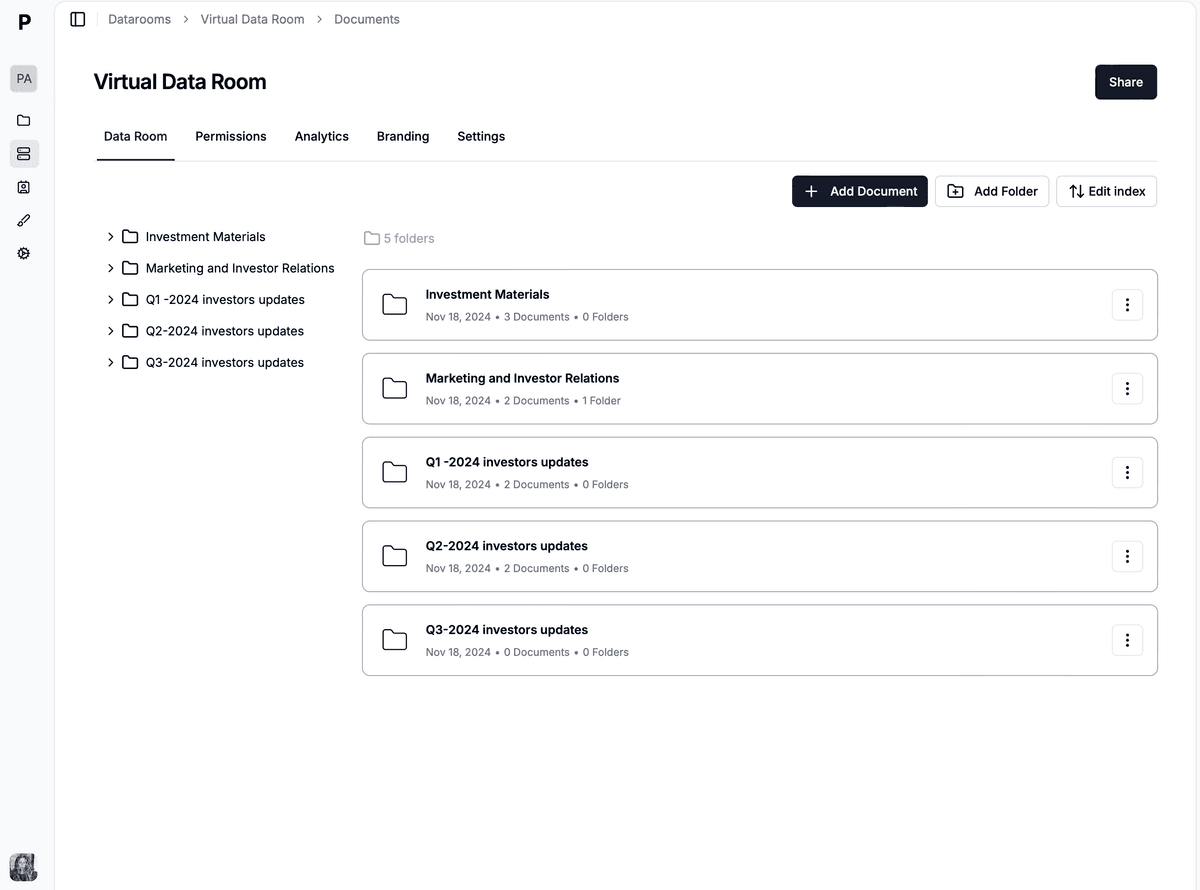
1. Create the room and name it clearly
Start by creating a new room in Papermark and giving it a clear, unambiguous name. Avoid internal shorthand that outside parties will not recognize. Good examples include:
"Downtown office tower – Phase I sale"
"Residential development – lender due diligence"
"Hospitality portfolio – LP reporting portal"
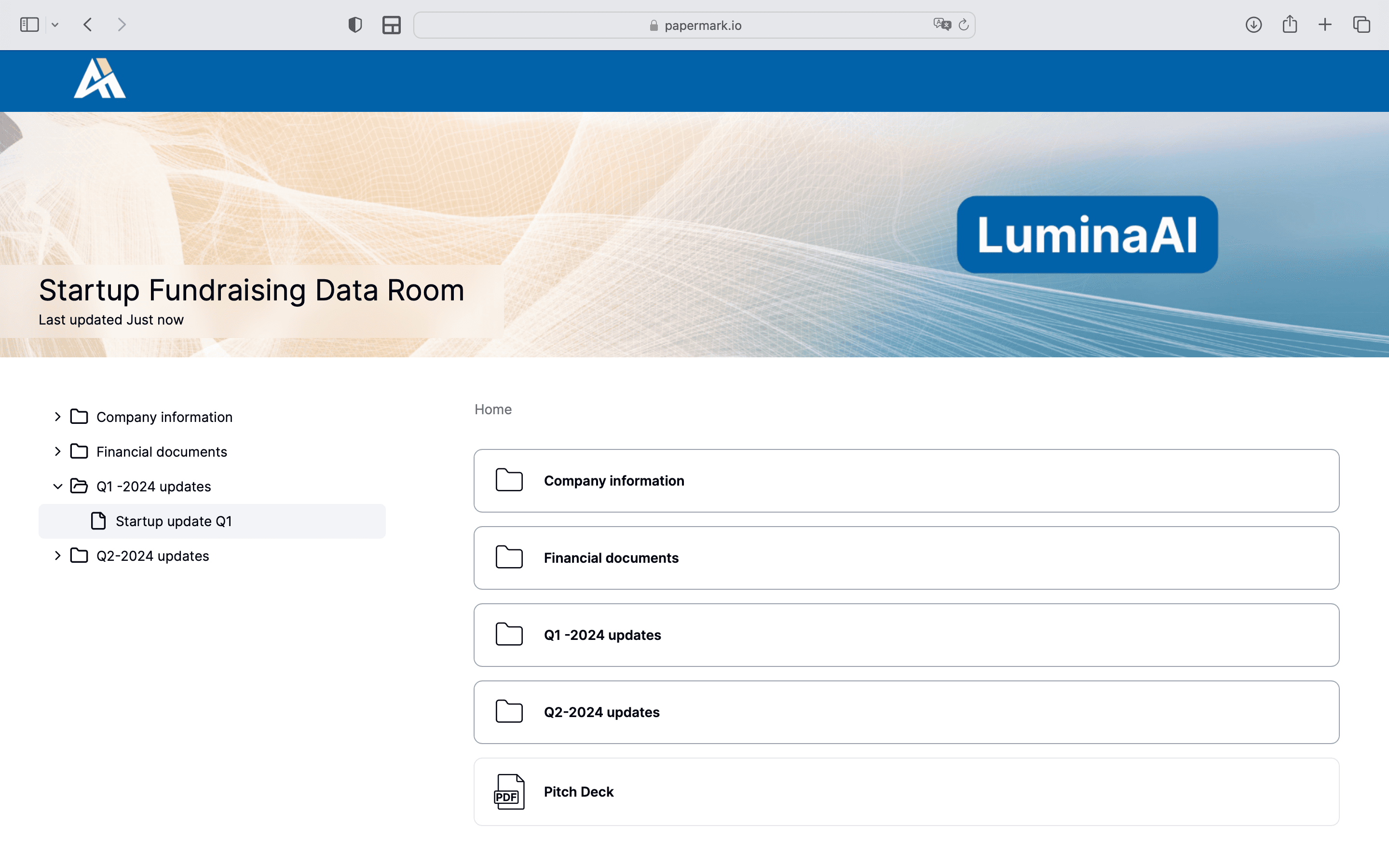
This name appears on invitations and in analytics, so choose something that makes sense for everyone involved in the transaction or reporting flow.
2. Apply a folder structure that matches your deal
Next, build a simple but robust folder tree. For a typical commercial real estate data room focused on a sale process, you might include:
For recurring LP or investor portals, swap in sections for fund-level documents, quarterly reports, capital calls, distribution notices and governance materials. The goal is to make the room intuitive for someone who has never seen your internal filing system.
3. Upload documents and keep versions clean
Once the structure is in place, upload your documents in bulk. A few best practices apply to any data room for real estate due diligence:
Use descriptive file names: "2024-12_rent-roll-level-14.pdf" is better than "RR_final_v3.pdf".
Avoid duplicates: if you must replace a file, update the existing item so viewers always hit the latest version.
Check for sensitive data: personal identifiers, banking details or internal commentary may need redaction or separate handling.
4. Configure NDAs, watermarking and access control
Security should be deliberate, not an afterthought. In Papermark, you can:
Require NDA acceptance before anyone sees the room.
Turn on dynamic watermarking so every page carries viewer-specific information.
Gate access behind email verification or passwords when appropriate.
Control whether visitors can download, print or forward specific files.
Set link expiry dates for time-limited processes like sealed bids.
These controls are especially important for real estate deals involving confidential leases, off-market pricing, or regulated investors. They also help you comply with internal risk policies, lender expectations and data protection rules, and they turn your setup into a true security data room for real estate, not just another shared drive.
5. Invite buyers, lenders and partners by role
Instead of inviting everyone one-by-one with identical access, group people by how they interact with the transaction:
Investment and acquisitions teams: broad view-only access across financials, leases and technical files.
Legal counsel: deeper access to contracts, title, zoning, historical correspondence.
Lenders and credit teams: focus on financials, rent rolls, coverage ratios and covenants.
Existing or prospective LPs: a curated subset of materials, often through a dedicated investor portal.
In Papermark, you can map these roles to permission sets and apply them consistently across data rooms. That way, every new deal uses the same security defaults instead of ad-hoc link settings.
6. Handle Q&A inside the data room
Questions are inevitable: about lease clauses, environmental findings, capital plans or local regulations. Handling Q&A by email quickly becomes chaotic and hard to audit.
A better approach is to use the Q&A module within your data room:
Bidders submit questions inside the room instead of emailing multiple people.
You can assign questions to subject-matter experts and track responses.
When appropriate, you can publish anonymized answers to all bidders at once.
At the end of the process, you can export the Q&A log as part of your legal record.
This workflow keeps your team aligned and ensures no critical question is lost in someone’s inbox.
7. Monitor analytics to understand who is serious
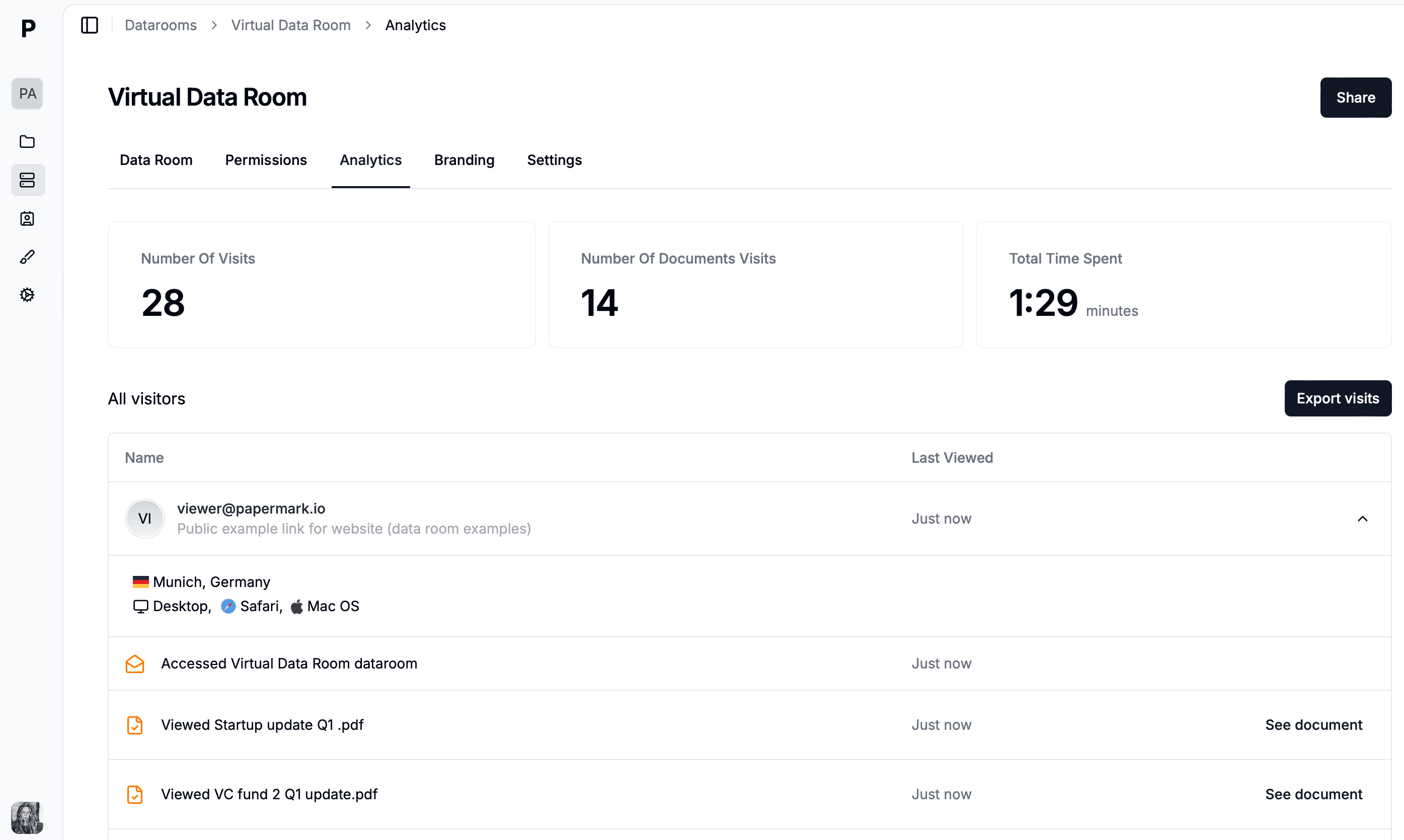
One of the biggest advantages of a real estate data room over generic file sharing is analytics. In Papermark, you can see:
Which visitors opened the room and when.
Which documents, pages or sections they spent the most time on.
How engagement changes after key events like price guidance or updated financials.
Combined with your CRM or deal-tracking tools, this helps you segment serious bidders from casual browsers, prioritize follow-ups and time your next information release. For ongoing investor portals, the same analytics show who regularly reviews reporting and who may need a nudge.
Verify who opens each link
Before sharing anything, turn on email verification for every link. A buyer, lender or broker then enters a one-time code sent to the address you shared with, so a link forwarded to a colleague or a rival does not open by itself. Restrict links to the counterparty's email domain where you can, set an expiry date for the bidding round, and switch a link off the moment a party drops out. Each verified session is recorded in the audit trail, which is your record of who saw the rent roll and when.
Connect the room to the tools you already use
A real estate team rarely wants another inbox. Papermark's Slack integration posts every view and upload into a deal channel, and webhooks connect to Zapier, Make or n8n so a new room can be created from a CRM stage or a buyer's first view can update the pipeline. The REST API and MCP server are there for teams that want to automate room creation per listing; none of it is required to get the first room live.
Best practices for real estate teams using data rooms
Standardize your templates
Create and reuse folder templates for common scenarios: single-asset sales, portfolios, refinancings, development projects and investor portals. A consistent structure speeds up internal preparation and makes life easier for counterparties who work with you across multiple deals.
Keep communication and files in sync
Align your data room updates with your communication cadence. When you upload a new lease, appraisal or report, notify the right groups and briefly explain what changed. Avoid sending attachments in parallel; always point people back to the room so there is a single source of truth.
Review security and compliance regularly
At least once per quarter, review:
Which data rooms are still active.
Who has access and whether former counterparties should be removed.
Whether any legacy rooms should be archived for compliance purposes.
Papermark's security and compliance controls are designed to support this kind of periodic review so your perimeter does not quietly expand over time.
How to choose a real estate data room provider
When comparing providers, focus on more than just storage limits:
Security and certifications: look for SOC 2, strong encryption, and clear documentation about data residency and privacy.
White-labelling and custom domains: your investors and counterparties should feel like they are dealing with your brand, not a generic link.
Pricing transparency: avoid per-page or per-user pricing surprises; Papermark’s data room plan offers a 7-day free trial and flat €99/month pricing for data rooms.
Analytics depth: does the platform give you page-by-page insight, or just basic link open tracking?
Ease of use: non-technical brokers, asset managers and investors should be able to use the room without onboarding friction.
Encryption and hosting to check before you sign
Ask any provider for two facts in writing: files are encrypted at rest with AES-256 and in transit with TLS 1.2 or 1.3. Then ask where the data is hosted and whether the vendor signs a data processing agreement, because rent rolls and tenant schedules contain personal data under GDPR. Papermark meets both encryption standards, hosts data in Frankfurt, signs a DPA, and is SOC 2 Type II and ISO 27001 certified.
Conclusion: make data rooms a standard part of every deal
Real estate data rooms are no longer a niche tool reserved for mega-deals. In 2026, they are a practical, affordable way to run cleaner processes for everything from small land sales to complex portfolios and recurring investor reporting. Teams that once made do with ad-hoc folders are now standardizing on virtual data room real estate workflows for every material transaction.
If you want a secure, modern setup with transparent real estate data room pricing, white-labelling and page-level analytics, Papermark is built for this and intentionally avoids the bloat of older, high-fee platforms so you do not have to choose between a full-featured room and a cheap real estate data room with weak controls.