

datarooms
500 Startups Data Room in 2026: 22 Documents and a €99 Setup
A 500 Startups data room in 2026: the 22 documents accelerator founders need, cross-border diligence, tiered investor links, and setup from €99/month.
You can build a data room in 2026 in under 30 minutes: create the room, apply a six-folder diligence structure, upload documents, set granular permissions, enable NDA gating and dynamic watermarking, then invite buyers on scoped links. The setup is quick. The decisions inside it — what to stage, who sees what, what you can prove afterwards — are what determine whether the room helps the deal or slows it down.
Setup time is not a vanity metric. In a live process the room is usually needed the week the teaser goes out, and a platform that requires a statement of work and a vendor onboarding call is a platform that delays your timetable by days you did not budget.
| # | Provider | Typical setup time | Flat-rate pricing | Page-level analytics |
|---|---|---|---|---|
| 1 | Papermark | 30–60 minutes | €99/month | Yes |
| 2 | FirmRoom | 1–3 hours | From $395/month | Yes |
| 3 | iDeals | 2–4 hours | Custom quote | Limited |
| 4 | Intralinks | 1–2 days (admin) | $4,000–$25,000+/year | Yes |
| 5 | Datasite | 2–5 days (enterprise) | $25,000+/year | Yes |
The platform decision follows the deal, not the other way around. For seed through Series C fundraising and mid-market M&A, a flat-rate VDR with transparent pricing and no per-page fees is almost always correct — the document count is in the hundreds, the viewer count is in the dozens, and the process moves faster than an enterprise procurement cycle.
Enterprise auctions running across three continents with dozens of bidders still often sit on Datasite or Intralinks, largely because the sell-side bank mandates it. If that is your situation the choice is made for you, but understand what you are buying: per-page pricing means a document-heavy diligence process directly inflates the invoice, and the UX cost is real. An IR team at a ~£20B AUM fund described their Intralinks experience bluntly — "such a hassle, you have to press it and then get an SMS and it just disincentivizes anyone from ever looking at a data room."
That last point is underrated. A data room nobody opens is worse than no data room, because you lose both the security and the signal.
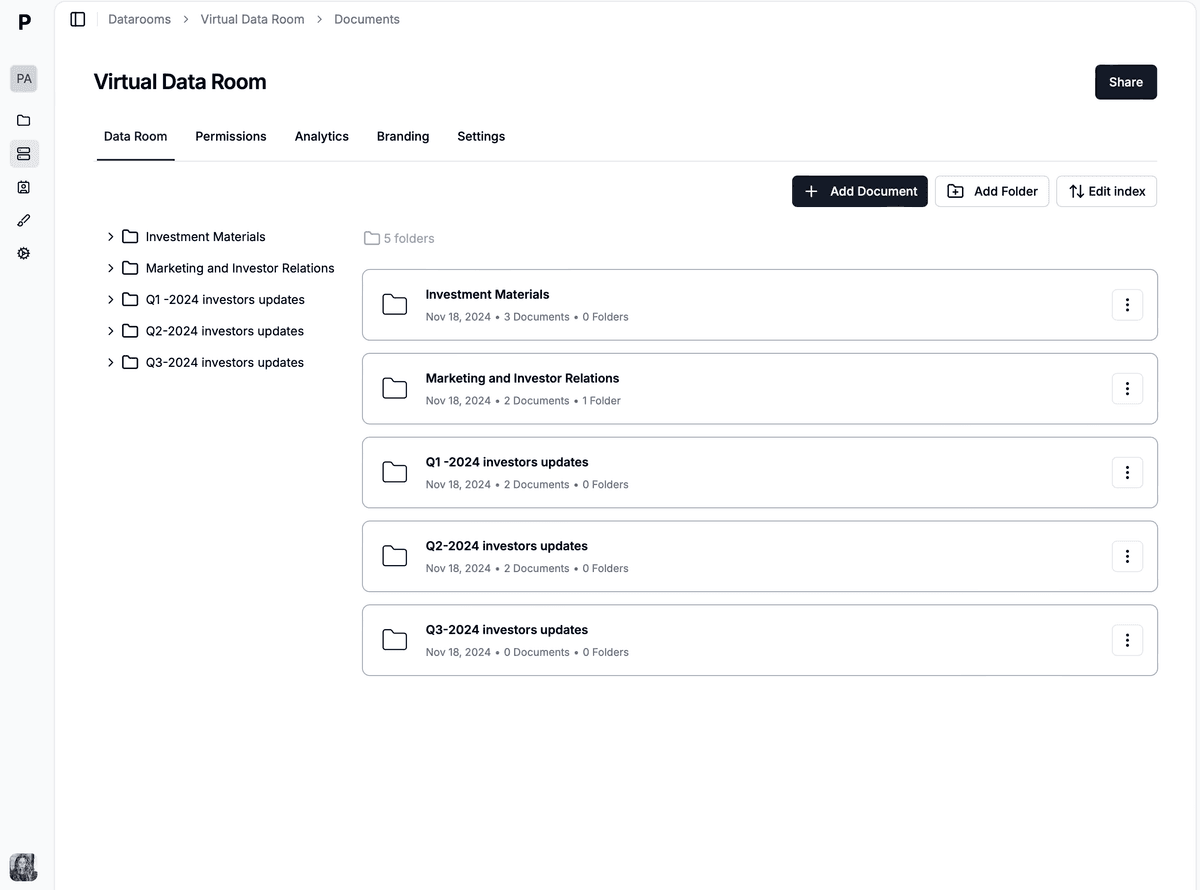
Open Data Rooms and create a new room. Name it by deal code rather than by target company — Project Phoenix — Sell Side rather than Acme Manufacturing Sale. In a confidential process the room title appears in browser tabs, email notifications, and screenshots, and the fastest way to leak a transaction is to name it after the target.
Set a custom domain so counterparties see dataroom.yourcompany.com rather than a generic file host. This reads as cosmetic and is not. For a smaller company selling to a much larger acquirer, or a first-time fund manager raising from institutional LPs, the room is often the first operational artifact the other side sees. A branded, well-indexed room signals that the process is being run properly; a generic share link signals the opposite.
If you are running several deals at once — boutique advisers commonly run 10–15 transactions a year — open a separate room per counterparty rather than separate folders in one room. It keeps permissions, Q&A threads, and audit logs cleanly partitioned per deal, which matters enormously if a dispute surfaces after close.
A Papermark customer at Backtrace Capital structured its €50M Fund I room into six sections. The same layout works for M&A sell-side and growth fundraising, because it maps to how the other side staffs diligence: counsel takes corporate and legal, the finance team takes financial and tax, the integration lead takes HR and commercial.
Resist the urge to invent a bespoke taxonomy. Buyers' advisers work through dozens of rooms a year and navigate a conventional structure on instinct. A clever structure costs them time and costs you goodwill.
| # | Folder | What goes inside |
|---|---|---|
| 1 | Corporate | Certificate of incorporation, cap table, bylaws, board minutes |
| 2 | Financial | Audited statements, management accounts, projections, KPI export |
| 3 | Legal | Material contracts, litigation summary, IP assignments |
| 4 | Product / commercial | Customer contracts, pipeline, pricing, churn cohorts |
| 5 | Team / HR | Org chart, key employment agreements, option plan |
| 6 | Tax & regulatory | Tax returns, filings, licenses, privacy policies |
For M&A-specific indexes, align with the M&A data room guide and the folder structure article. For the document-level list that fills these folders, use the data room checklist 2026.
Upload PDFs and spreadsheets in batch, then index. The discipline that matters here is version control: when you issue a v2 financial model, replace the file in place rather than uploading a second copy. Two models in the same folder is how a buyer ends up modelling from a superseded set of numbers and then re-pricing when they notice.
Naming is the other half. Contract_v3_FINAL.pdf sitting beside contract final signed.pdf forces counsel to open both to determine which governs. Across forty contracts that is a week of legal diligence you paid for and a quiet signal that the company is loosely run.
Upload a one-page index to the root folder listing what is in each section and what is coming in Stage 2. It takes ten minutes and is consistently the highest-leverage thing in the entire setup, because it lets a buyer's team plan their work instead of exploring.
Security in a live deal is not an abstraction about encryption. It is four concrete controls, each answering a specific question.
Granular file-level permissions answer who sees which folders. Stage 1 might be the CIM and summary financials for any screened party; Stage 2 opens customer contracts and audited financials only to shortlisted bidders. In a multi-workstream process you go further and scope by team, so the buyer's legal advisers and tax advisers cannot see one another's activity.
NDA gating answers what happens before the first page loads. Binding acceptance to the link itself means access is granted the moment a party signs, rather than the next morning when someone manually re-issues a link — a delay that routinely costs several days per bidder.
Dynamic watermarking answers what happens if a document escapes. Each viewer's email, IP, and timestamp are stamped onto every page they open. This is what makes a five-bidder auction survivable when four of those bidders — several of them competitors — walk away having read your contracts. Note the honest limit: a downloaded file is legally treated as read and no platform can recall it, which is why downloads are usually disabled for early-stage parties. See dynamic watermarking.
The audit log answers what can you prove afterwards. Every view and download recorded per visitor per session is the record counsel needs if a representation is challenged post-close.
Create separate links per bidder or fund. This is the step teams most often skip, and it forfeits the most valuable output of the whole exercise, because a shared link makes it impossible to attribute behaviour to a party.
Page-level analytics turn the room from a filing cabinet into an early-warning system. The IR team at that ~£20B AUM fund, managing 500+ documents for 2,000+ investors, framed the problem precisely: "We spend an awful lot of time creating an awful lot of content that probably never gets read." What they wanted was slide-level visibility — which documents get opened, which page holds attention, which sections are ignored — so that the next conversation could focus on what the reader actually cared about.
Consider Halden Partners, a hypothetical first-time GP raising a €60M Fund I across roughly 40 LP prospects. The room holds 180 documents in the six-folder structure, with a branded domain and a separate link per LP.
For three weeks the analytics look uniformly discouraging. Most LPs open the teaser, spend four to six minutes, and do not return. Then the pattern breaks. One family office opens the track-record section, returns twice over four days, and spends twenty-six minutes in the deal-by-deal attribution spreadsheet. Two others open the same file and leave inside ninety seconds.
The GP reads that correctly: the attribution detail is the crux for serious LPs, and the two who bounced did not understand it. Rather than sending a generic follow-up to all forty, they record a six-minute walkthrough of the attribution methodology and upload it beside the spreadsheet, then mention it only to the LPs who had opened that file.
Of the eleven LPs who eventually opened the walkthrough, four converted to second meetings and two committed — €14M of the final close. The fund did not raise because of the data room. It raised because the GP stopped guessing which objection to answer.
The mechanics are the same; the emphasis is not. M&A optimises for confidentiality under competition, fundraising optimises for engagement and follow-up.
| Deal type | Typical doc count | Viewer groups | Must-have controls |
|---|---|---|---|
| M&A sell-side | 500–5,000+ | Multiple bidders, staged access | Watermark + per-bidder permissions |
| Series A | 50–200 | 8–15 funds | NDA + deck analytics |
| Fund raise (GP) | 100–400 | LPs + co-investors | Branded domain + sectioned room |
One warning specific to fund raises: LPs expect to download. As the IR team above put it, they "tried restricting downloads before, always get pushback." The standard institutional workflow is one analyst downloading everything for a fifteen-person team and working locally for months. Restricting downloads in an M&A auction is normal; doing it to an LP is friction you will lose.
Everything above maps onto Papermark's Data Rooms plans, which is the setup the 30-minute claim refers to.
Each of the six folders is created in the room directly, and each access tier is a scoped link against that single room rather than a duplicate room — one Stage 1 link for screened parties, one Stage 2 link per shortlisted bidder, and separate links per buy-side workstream. Granular file-level permissions, an email domain allowlist, and email verification are configured per link, so a bidder's outside counsel receives exactly the folders their scope covers and nothing more.
NDA agreements attach to the link so acceptance gates the first page view. Dynamic watermarking stamps viewer identity across every page. Automatic file indexing on Data Rooms Plus builds the table of contents rather than making you maintain it by hand, and the Q&A module keeps diligence questions attached to the document that prompted them instead of scattered across inboxes. After close, data room freeze makes the room immutable and exports it as an archived ZIP with a certificate.
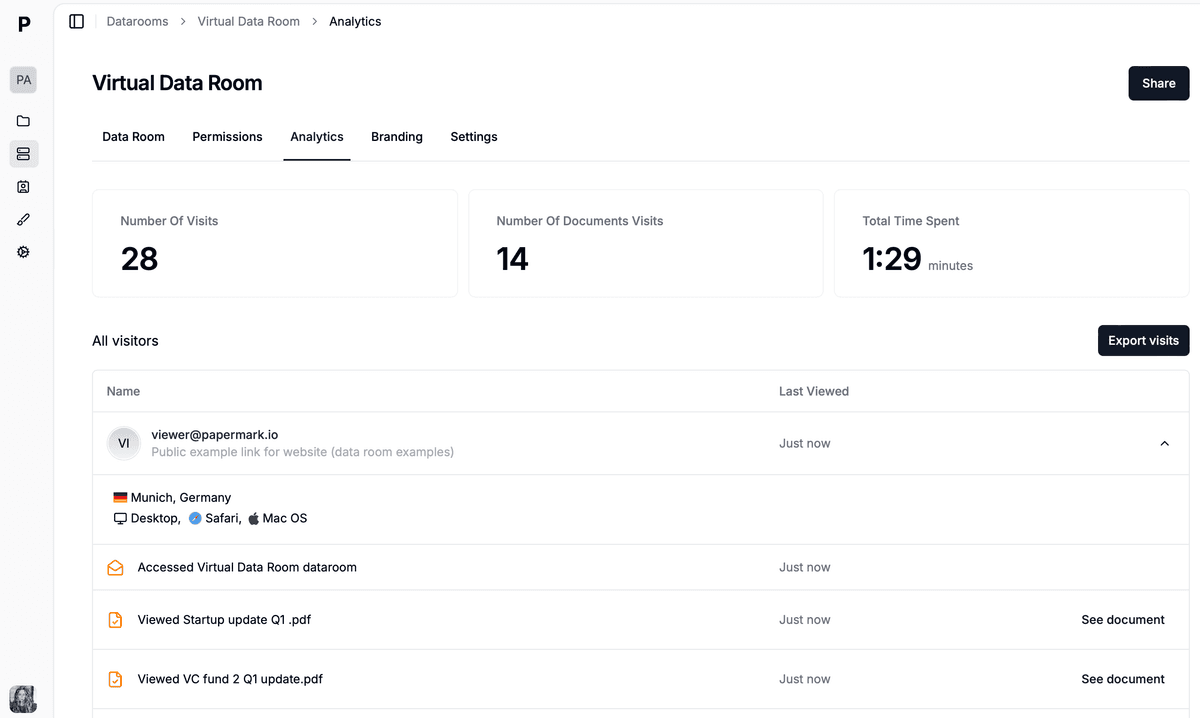
Page-level analytics showing which documents and pages each invited party actually opened.
Pricing is flat rather than per-page: Data Rooms at €99/month (3 team members, unlimited data room visitors, unlimited data rooms and documents, custom domain, dynamic watermark, NDA agreements, granular permissions), Data Rooms Plus at €249/month (5 members, unlimited data room visitors, Q&A module, audit log, automatic file indexing, SOC 2 Type II), and Data Rooms Premium at €549/month (10 members, unlimited data room visitors, AI redaction, full API, SSO, whitelabeling). Data Rooms Unlimited at €999/month removes per-seat charges entirely, so teams that add reviewers mid-deal pay one number regardless of headcount, and it carries every Premium capability including AI redaction. On a 500-document sell-side process that distinction is the difference between a fixed line item and a bill that grows with diligence.
No credit card required.
A 500 Startups data room in 2026: the 22 documents accelerator founders need, cross-border diligence, tiered investor links, and setup from €99/month.

A data room for YC startups in 2026: the 24 documents investors ask for after Demo Day, how it pairs with deck analytics, tiered links, and pricing from €99/month.
One shell script turns a local folder into a structured fundraising data room with per-VC links, email gating, and expiry dates. Papermark CLI cookbook with code.