
File types supported in Papermark
When you're getting ready to use Papermark, it's essential to know what types of documents you can upload and share. Papermark is designed to be versatile and user-friendly, accepting a range of document types to fit various needs. Here's a breakdown of the supported document types:
| Category | File Extensions | Description | Download Only |
|---|---|---|---|
| PDF documents | Portable Document Format | ||
| Spreadsheets | .xls, .xlsx, .xlsm, .csv, .ods | Excel, CSVs with advanced mode for view | |
| Presentations | .ppt, .pptx, .odp, .key | PowerPoint, OpenDocument Presentations, and Apple Keynote | |
| Word Processing | .doc, .docx, .odt | Microsoft Word and OpenDocument Text | |
| Images | .png, .jpg, .jpeg | Common image formats | |
| CAD Files | .dwg, .dxf | Computer-Aided Design files | ✓ |
| Compressed Files | .zip | ZIP archives | ✓ |
| Video Files | .mp4, .mov, .avi, .webm, .ogg | Common video formats | |
| Audio Files | .mp3, .m4a | Audio recordings with native playback and analytics | |
| Email Files | .msg | Outlook email message files | |
| Geographic Data | .kml, .kmz | Google Earth files | ✓ |
| Web Content | Notion URLs | Direct Notion page integration |
1. PDF documents
- Flexibility in size and pages: Whether you have a one-page flyer or a comprehensive report spanning hundreds of pages, Papermark can handle it. PDFs of any size and amount of pages are welcome, making it incredibly convenient for sharing detailed documents without worrying about file size limitations.
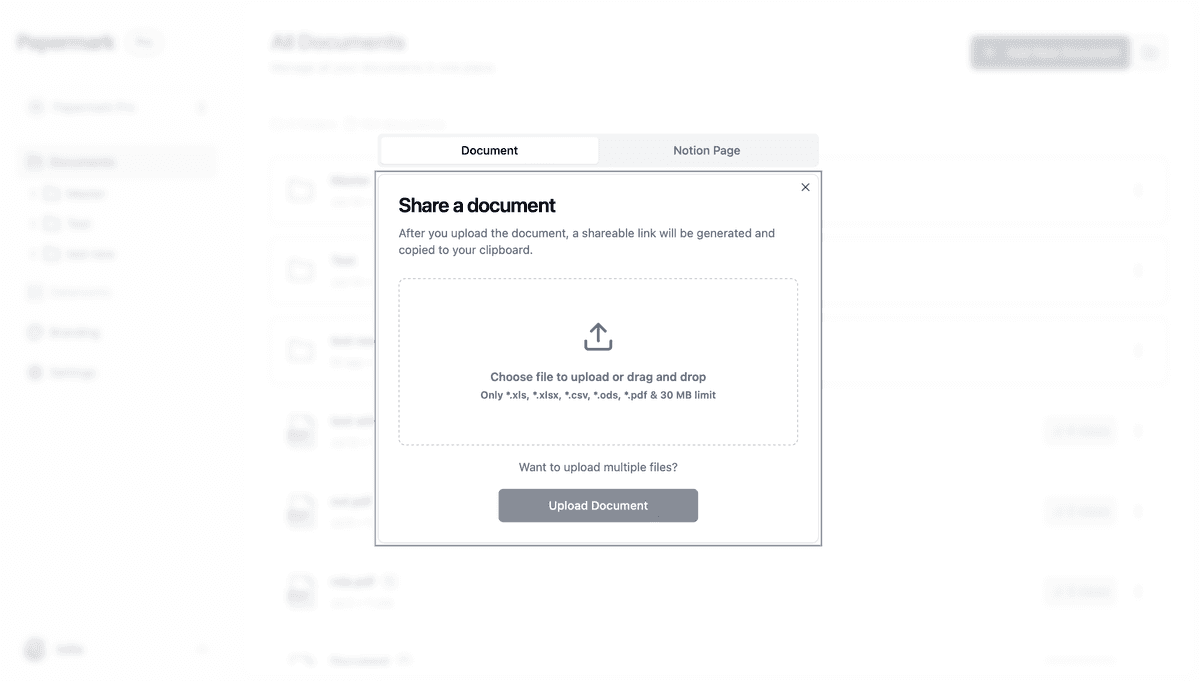
2. Excel, CSV, ODS, XLS, and XLSX documents
- Spreadsheet support: Papermark accepts various spreadsheet formats, including Excel (.xls, .xlsx, .xlsm), CSV, and OpenDocument Spreadsheet (.ods) files.
- Macro-enabled Excel files: Support for .xlsm files allows sharing of Excel files containing macros.
- Flexibility in size and sheets: Each sheet in your spreadsheet is considered separately, allowing for detailed data sharing.

3. Word documents (DOC, DOCX, ODT)
- Microsoft Word and OpenDocument Text: Papermark supports Microsoft Word documents (.doc, .docx) and OpenDocument Text (.odt) files.
- Easy conversion: If you need to convert these to PDF, you can easily do so from Google Drive or Microsoft Word before uploading.

4. PowerPoint and Keynote presentations (PPT, PPTX, ODP, KEY)
- Presentation support: Share your presentations easily with support for PowerPoint (.ppt, .pptx), OpenDocument Presentation (.odp), and Apple Keynote (.key) files.
- Native Keynote support: Upload .key files directly from your Mac without exporting to PDF first. Animations and transitions are preserved.
- Full slide-by-slide analytics: See exactly which slides got attention regardless of the source format.
5. Image files (PNG, JPEG, JPG)
- Image sharing: Papermark also supports common image formats, allowing you to share visual content seamlessly.
6. CAD files (DWG, DXF)
- Engineering and design support: For those in technical fields, Papermark supports Computer-Aided Design (CAD) file formats.
7. ZIP files
- Compressed file sharing: Papermark supports ZIP files, allowing you to share multiple documents in a single compressed package.
- Download-only format: ZIP files are available for download only and cannot be previewed directly in Papermark's viewer.
8. Notion Pages (via Links)
-
Direct Notion integration: If you're a Notion user, you'll appreciate the ability to share your Notion pages directly through Papermark. By simply copying the shareable link from Notion and adding it to Papermark, you can extend the reach of your Notion-created content to a wider audience.
-
Shareable and automatically updates: Notion pages shared via Papermark will be automatically updated if you add new information to the original Notion file.
9. Video files (MP4, MOV, AVI, WebM, OGG)
- Multiple video formats: Share your video content with support for various formats including:
- MP4 (most common web video format)
- MOV (QuickTime movies)
- AVI (Windows video format)
- WebM (open web video format)
- OGG (free open container format)
- Preview support: Videos can be previewed directly in the Papermark viewer, making it easy to share and review video content.
10. Audio files (MP3, M4A)
- Multiple audio formats: Share recordings, podcasts, voice memos, and audio presentations with native playback in Papermark.
- MP3 (the most common audio format)
- M4A (Apple audio format)
- Playback analytics: Track exactly how long each listener engaged with each recording.
- Same access controls as documents: Audio files respect link permissions, watermarking for download protection, and all data room features.
Perfect for podcast pre-release reviews, voice memos for investors, or audio briefings included in a data room.
11. Outlook email files (MSG)
- Native .msg support: Upload Outlook message files directly without converting to PDF first.
- View email content in the browser: The sender, recipients, subject, and body render cleanly inside the Papermark viewer.
- Include in data rooms: Email files behave the same as any other document, including granular permissions and full audit logging.
Perfect for sharing email correspondence as evidence in data rooms during due diligence, legal review, or audit.
12. Google Earth files (KML, KMZ)
- Geographic data support: Share geographic data and custom maps with support for Google Earth file formats:
- KML (Keyhole Markup Language)
- KMZ (Compressed KML files)
- Download-only format: These files are available for download and can be opened directly in Google Earth or compatible applications.
Plans and pricing for file types
Free Plan
- PDF files (.pdf)
- Notion documents (Notion URLs)
- Images (.png, .jpg, .jpeg)
- Spreadsheets (.xls, .xlsx, .xlsm, .csv, .ods)
Pro Plan
All Free plan features, plus:
- Videos (.mp4, .mov, .avi, .webm, .ogg)
- Audio (.mp3, .m4a)
- Presentations (.ppt, .pptx, .odp, .key)
- Outlook email files (.msg)
Business Plan and Enterprise
All Pro plan features, plus:
- CAD files (.dwg, .dxf)
- Geographic data (.kml, .kmz)
- Compressed files (.zip)
Conclusion
Papermark's support for a wide range of document types covers most document sharing needs. Whether you're distributing detailed reports, presentations, spreadsheets, images, or collaborative project documents, Papermark ensures your content is delivered securely and professionally. As Papermark continues to evolve, there may be updates to the types of documents it supports, further enhancing its versatility and utility for users.