
How to set up multiple brands and use them per data room?
One workspace often needs more than one look. An M&A advisor runs deals for different clients, a fund manager shares material for several funds, and a company keeps separate brands for separate products. With multiple brands, you set each look up once and pick it per data room.
What a brand includes
Each brand you create in global branding has its own:
- Logo, banner, brand color and background color
- Layout of the data room
- Advanced settings: call to action button, welcome message and custom link preview (the image, title and description shown when a link is shared on Slack, LinkedIn, X or email)
One brand is your Default. It applies to every document and data room link unless you pick another brand on that room or link.
Step 1: Create a brand
- Log into Papermark and click Branding in the main sidebar.
- Click New brand and give it a name, for example the client or fund.
- Upload the logo and banner, set the colors, and open Advanced settings to add a call to action, welcome message and custom link preview.
- Click Save changes.

Use the selector next to the brand name to switch between your brands and edit each one. Repeat for every brand you need.
Step 2: Pick a brand for a data room
- Open the data room and click Branding in its sidebar.
- In the selector at the top right, choose the brand under Inherit from team brands.
- Click Save changes.
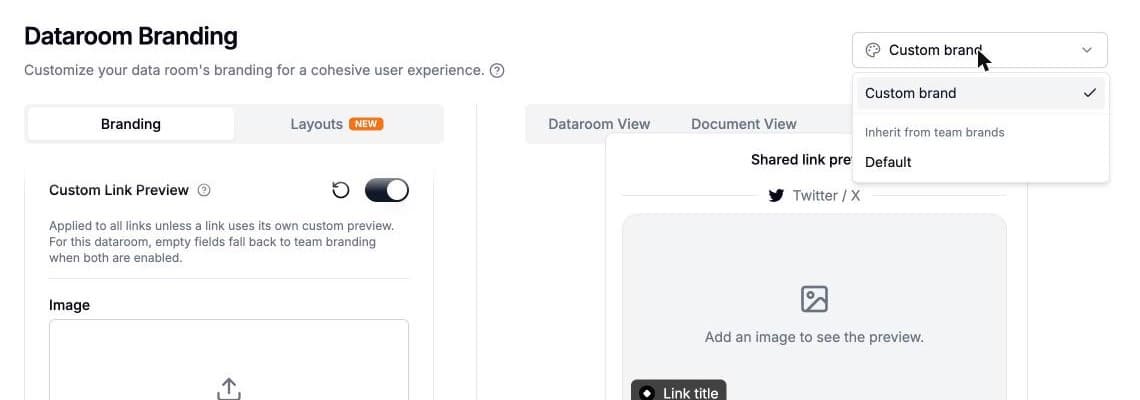
The data room now uses that brand's logo, colors and link preview. Choose Custom brand instead to set this data room up on its own, directly in its Branding tab. See how to customize data room branding.
Step 3 (optional): Fine-tune a single link
A data room brand covers every link to the room. When one link needs something different, for example a different link preview for one investor, change that link's settings or apply a link preset. A link's own settings always win over the data room and the brand.
Which setting wins
- The link: its own custom preview, set in the link settings or a preset.
- The data room: its custom branding, or the team brand picked for it.
- Global branding: your default brand.
Use cases
- M&A advisors: one brand per client, so every buyer sees the client's logo and link preview, not yours.
- Fund managers: one brand per fund for LP updates and fundraising data rooms.
- Companies with several products: one brand per product line, with the company brand as the default.
Frequently asked questions
Related guides
- How to set up global branding
- How to customize data room branding
- How to change social media cards for shared links
- Link presets
- White-label your data room
Need help? Contact support@papermark.com or use the in-app chat.