
Today we are introducing Papermark data rooms: share multiple documents with one secure link.
Until now, Papermark was built around single documents. But our users kept sending us the same request: founders raising a round, advisors running a sale and teams doing due diligence all needed to share a whole set of files, not just one deck. Sending ten separate links and tracking ten separate dashboards does not work when a deal is moving.
So we built a place where all of it lives together.
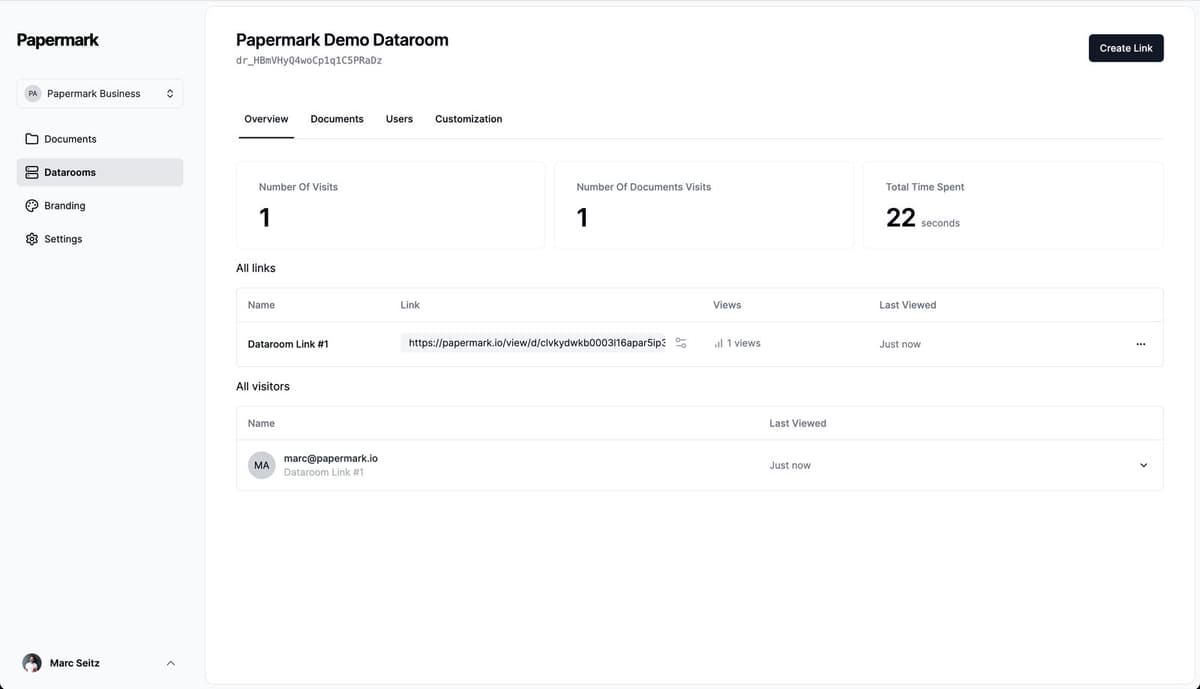
Here is what is included.
1. One link for many documents
Create a data room, add your documents and share the whole room with a single link. Your investor or buyer opens one link and sees everything you have prepared for them, in one place.
All the link settings you know from single documents work on data room links too, such as email protection and verification, passwords, expiry dates, allow and block lists, and whether downloads are allowed. So the room is as protected as each document was before.
You can also create more than one link to the same room. An advisor running a sale can give each bidder its own link, each with its own settings: bidder A gets downloads, bidder B gets view only and a link that expires at the end of the first round. Everyone sees the same room, and every visit is tied to the link it came from.
2. Folders and subfolders
A data room is only useful if people can find things in it. Organize your files in folders and subfolders, the way a due diligence index is usually structured: financials, legal, team, product and so on. Visitors navigate the room through the same structure you set up.
A typical fundraising room might look like this:
- 01 Pitch deck
- 02 Financials: historical numbers, model, cap table
- 03 Legal: incorporation documents, key contracts
- 04 Team
- 05 Product
Today you can also drag a whole folder from your computer into a room and keep its structure, and move folders around later without breaking the links you have already sent.
3. Aggregate analytics
The page-by-page analytics you know from single documents, now across every document in the room. See which documents get attention, which pages people spend time on and where they drop off, without opening each document one by one. More on document analytics.
This is where a room tells you more than a single deck. If a buyer opens the financials folder three times in one week and has not touched the legal folder yet, you know where they are in their review and what questions to prepare for.
4. Visitor tracking and invitations
See who visited the room, which documents they opened and how long they stayed. You can invite visitors to the room by email, and every visit is recorded, so you always have an audit trail of who saw what and when.
When you add new documents to a room, visitors can be notified by email. That keeps everyone on the latest version without you writing a follow-up.
5. Custom branding
Your logo and colors on every data room. Each room can have its own branding, so a fundraising room and a sales room can look different. Read more about custom branding.
6. How to create your first data room, step by step
The flow has grown since this launch, but the basics are the same. This is how it works in Papermark today:
- Create the room. Open All Datarooms in the sidebar and click New Dataroom. Start from Scratch, pick a Template, or use the AI tab to describe your deal and get a suggested folder structure. Give the room a name, for example "ACME Acquisition", and click Create Dataroom.
- Add folders. In the Data Room tab, open Add document and choose Create folder. Repeat for each section of your index. To keep an existing structure, choose Folder and upload a folder from your computer.
- Add documents. Open a folder and use Add document to upload Files, or Add from All Documents to reuse files you already have in Papermark.
- Create a link. Go to the Permissions tab and click Create link. Name it after the person or firm you are sending it to, then set your protection: Require email to view is on by default, and you can add Password protection, an Expiration date and downloads. Click Save link.
- Invite visitors. On the same tab, click Invite via email. Select the link, enter the email addresses (separated by comma, semicolon or new line), add a short personal message if you like and send the invitations.
- Brand the room. In the Branding tab, add your logo and brand color so the room looks like yours.
- Follow the activity. Open the Analytics tab to see who visited, which documents they opened and how long they spent on each page.
Before you send anything, use the link preview to see the room as your visitors will. Our step-by-step guide covers each of these steps in more detail, and inviting visitors explains the email invitations.
Tips for a room people actually use
- Number your folders. "01 Financials" and "02 Legal" keep the order fixed and make it easy to refer to a section on a call.
- One link per party. Separate links make your analytics readable and let you close access for one party without touching the others.
- Start small. Put the documents a first-round investor or buyer needs in the room first, and add the deeper material as the process moves forward.
Who data rooms are for
- Founders raising a round. Share your deck, financials and cap table in one place, and see which investors go deep. See our fundraising data room guide.
- M&A advisors and deal teams. Give buyers one structured room instead of a stream of attachments. More on M&A data rooms.
- Due diligence. One version of the truth for lawyers, accountants and advisors, with a record of every visit. See due diligence data rooms.
What came next
This release was the start of Papermark's move from document sharing to a secure, modern virtual data room for fundraising, M&A and due diligence. A few months later we added file-level permissions and dynamic watermarks, so each group of visitors sees only what they should.
Data rooms are now the most used part of Papermark, and in October 2026 we rebuilt them as Data Rooms 2.0. See current plans on our pricing page.