

datarooms
How to Create a Data Room with Claude in 2026 (Step-by-Step)
Create a data room with Claude in minutes. Connect the Papermark MCP server to Claude Desktop, then prompt it to upload documents and share secure links.
Papermark now ships an official MCP server: @papermark/mcp-server on npm, exposing 43 typed tools that wrap the full Papermark API for data rooms, documents, links, folders, visitors, and analytics. Connect it to Claude Desktop with one JSON snippet, and an AI agent can spin up a data room, bulk-upload documents, mint per-investor links, and read page-by-page view analytics on your behalf. As far as we can tell, Papermark is the first virtual data room provider with a real MCP server, while legacy VDRs like Intralinks, Datasite, and DocSend offer no MCP integration and, in DocSend's case, no public API at all.
MCP (Model Context Protocol) is the open standard that lets an AI agent discover and call tools running outside its own sandbox. A data room MCP server takes the operations you'd normally do in a VDR dashboard (create a room, upload files, configure a share link, check who viewed what) and exposes them as tools an agent like Claude can call directly.
The Papermark MCP server mirrors the Papermark REST API one-to-one. Tool arguments use the same shapes as the API's request bodies, results mirror API responses field-for-field, and nothing is mocked or stubbed. If the API can do it, the agent can do it, which covers the six resources that make up a Papermark account: data rooms, documents, folders, links, visitors, and analytics.
It comes in two transports. The stdio transport (@papermark/mcp-server on npm) runs locally and is the right choice for Claude Desktop and Claude Code, with the bonus that the agent can upload files straight from your disk. The HTTP transport is hosted at mcp.papermark.com/mcp for browser-based clients like claude.ai Connectors and ChatGPT Apps, authenticating via OAuth. Same tools, same shapes, on both.
When Claude connects to the Papermark MCP server, it doesn't see 43 undifferentiated functions. It sees a typed catalog organized around the same six resources as the Papermark data room API: data rooms, documents, folders, links, visitors, and analytics. Each tool carries a name, a description, and a JSON schema for its arguments, and the model reads that catalog the way you'd skim a menu, picking the tool whose schema matches what you asked for. Because the schemas are generated from the API's OpenAPI spec, the agent never guesses at argument shapes the way it would if it were writing raw HTTP by hand.
Grouping matters because it maps how you actually talk to the agent. Ask about setup and the model reaches into the data room and document tools; ask about access and it reaches for links; ask "who read this" and it reaches for visitors and analytics. You never name a tool yourself. You describe the outcome in plain English, and the Model Context Protocol layer turns that sentence into the right sequence of MCP tool calls, each one hitting your Papermark account through your token. The table below is the mental model worth keeping: what each tool category does, a prompt that triggers it, and what comes back.
The split also tells you where the risk lives. The read categories (analytics, visitors, most of documents and data rooms) are safe to hand an always-on agent. The write categories (creating links, uploading documents) are where you scope deliberately, and the destructive corners of each category — deleting a room, a document, or a link — are the ones you keep off an agent's default scope entirely, a point the security section returns to.
| Tool category | Example prompt | What the agent does |
|---|---|---|
| Data rooms | "Create a data room called Acme Series B" | Calls create_dataroom, returns the new dataroom_id the rest of the workflow hangs off |
| Documents | "Upload every PDF in ~/acme/ and put the financials in a Financials folder" | Chains upload_document per file plus folder tools, diffing against what already exists |
| Links | "Make a password-protected link for Sequoia that expires September 30" | Calls create_link with the dataroom_id, password, expiry, and email gate as fields |
| Analytics | "Who from Acme spent the most time on the investor memo?" | Chains get_document_analytics, list_link_views, and get_view_analytics for page durations |
| Visitors | "List everyone who has opened the Series B room and when" | Walks list_visitors and each visitor's view history, returned as prose you can read |
The read tools are where most of the day-to-day value sits, because a VDR is only as useful as the signal it gives you back. The write tools are the ones that replace dashboard clicking. And the destructive tools exist but are deliberately hard to reach, which is the whole point of the scope model.
Connecting the Papermark MCP server to Claude Desktop is a single config edit, not an install flow. There is no SDK to import, no local server to keep running, and no OAuth dance for the stdio transport — you paste a token, restart the app, and Claude can operate your VDR. The whole thing is deliberately quicker than reading the docs for it, and it's the fastest way to see an AI agent create and manage a real data room.
Mint an API token in the Papermark dashboard under Settings, then API Tokens. Scope it to what this agent should be able to do (start read-only if you're just kicking the tires), then add this to ~/Library/Application Support/Claude/claude_desktop_config.json:
Restart Claude Desktop. That's the whole setup: no install step, since npx pulls the package from npm on first launch (about 5 seconds, once). You need Node 24+ on your machine. Verify by asking Claude to "list my Papermark documents", and if anything fails, the Claude Desktop docs map every log message to its fix.
The point of a data room MCP server is that you stop translating intent into clicks. You say what you want in a sentence, and Claude figures out which of the 43 MCP tools to call and in what order. The prompts below are the ones worth memorizing because they cover the full lifecycle of a virtual data room: create it, fill it, share it per investor, measure it, and audit it. Each is a real workflow a founder runs during a raise, not a toy demo.
These are tested prompts, not aspirational demos. Each maps to a chain of MCP tool calls the agent picks on its own. Read them as templates rather than magic words — the agent handles paraphrase fine, so "spin up a room and load these files" reaches the same tools as the exact wording here. What stays constant is the shape: describe the outcome, name the constraints (password, expiry, email gate), and let the Model Context Protocol layer resolve the rest.
"Create a data room called 'Acme Series B', upload every PDF in ~/acme/, and give me one password-protected link."
The agent calls create_dataroom, then upload_document per file, then create_link with the dataroom_id and a password. One sentence replaces about twenty minutes of dashboard clicking. The full walkthrough is in how to create a data room with Claude.
"Sync every PDF in ~/Drive/Acme/ into the 'Acme current' data room. Create it if it doesn't exist, skip files that are already there, and put financial statements in a Financials folder."
The agent checks list_datarooms, creates the room if needed, diffs against list_dataroom_documents, and uploads only what's missing. The prompt is idempotent, so you can re-run it every week as new documents land.
"Make a separate link to the Acme Series B data room for each of these firms: Sequoia, Index, Point Nine. Email verification on, downloads off, expiry September 30."
One create_link call per firm, all pointing at the same dataroom_id. Because analytics are per-link, you learn which firm is actually reading and which partner forwarded it internally. This is the workflow behind why startups track investor engagement.
"How is the investor memo performing? Show overall stats, then tell me who from Acme has been spending the most time on it, and which pages they lingered on."
The agent chains get_document_analytics, list_links, list_link_views, and get_view_analytics for page-by-page durations, then filters by email domain and sorts by time spent. You get an answer in prose instead of a dashboard export.
"Audit my Papermark account. List every data room, the documents in each, the links that exist, and flag any link without a password or expiry date."
The agent walks list_datarooms, list_dataroom_documents, and list_links, then reports open links that should be locked down. Run it once a quarter as a hygiene pass. More patterns like this live in the agent workflows guide.
Picture a solo technical founder opening a seed round on a Tuesday night, deck and financials sitting in a local folder, no interest in learning a VDR dashboard. She opens Claude Desktop with the Papermark MCP server connected on a scoped write token and types one sentence: "Create a data room called 'Nimbus Seed', upload every PDF in ~/nimbus/raise/, and organize the financial model and cap table into a Financials folder." Claude calls create_dataroom, loops upload_document across the folder, spins up the folder, and confirms the room in about twenty seconds. She never sees a settings screen.
Next she describes the outreach: "Make a separate email-gated link for each firm in investors.txt, downloads off, expiry in six weeks." One create_link per firm, all pointing at the same room, each with its own analytics trail. She pastes the URLs into her intro emails and sends the batch before bed.
By Thursday the raise has become an information game, and she reads it from a prompt: "Who's actually engaging with the Nimbus room?" Claude chains the analytics tools and answers in prose — one fund spent eleven minutes on the model and came back twice, another opened the cover slide once. She front-loads her follow-up on the firm the data says is leaning in. When a partner asks for updated numbers, she pushes a new document version and every existing link serves the fresh cut. When she wants a room deleted, she does that herself in the dashboard, not through the agent.
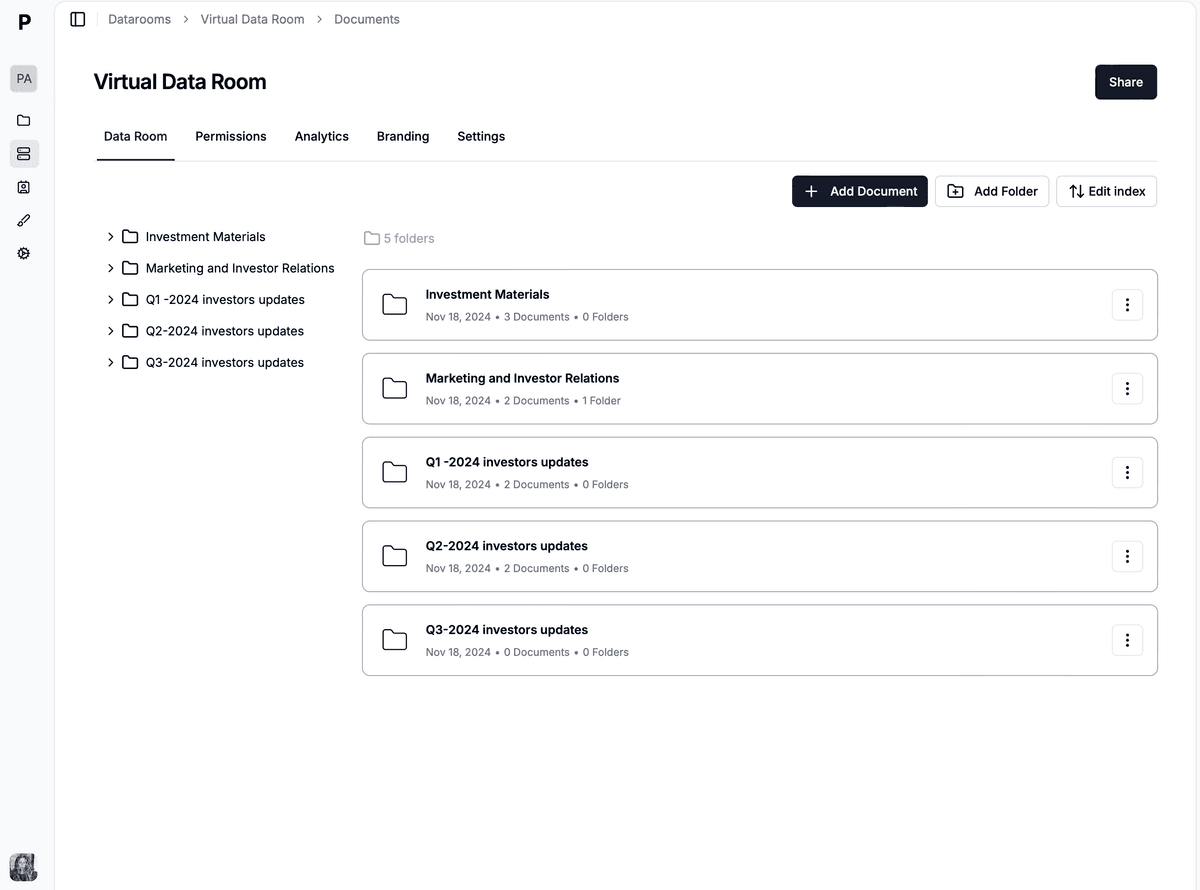
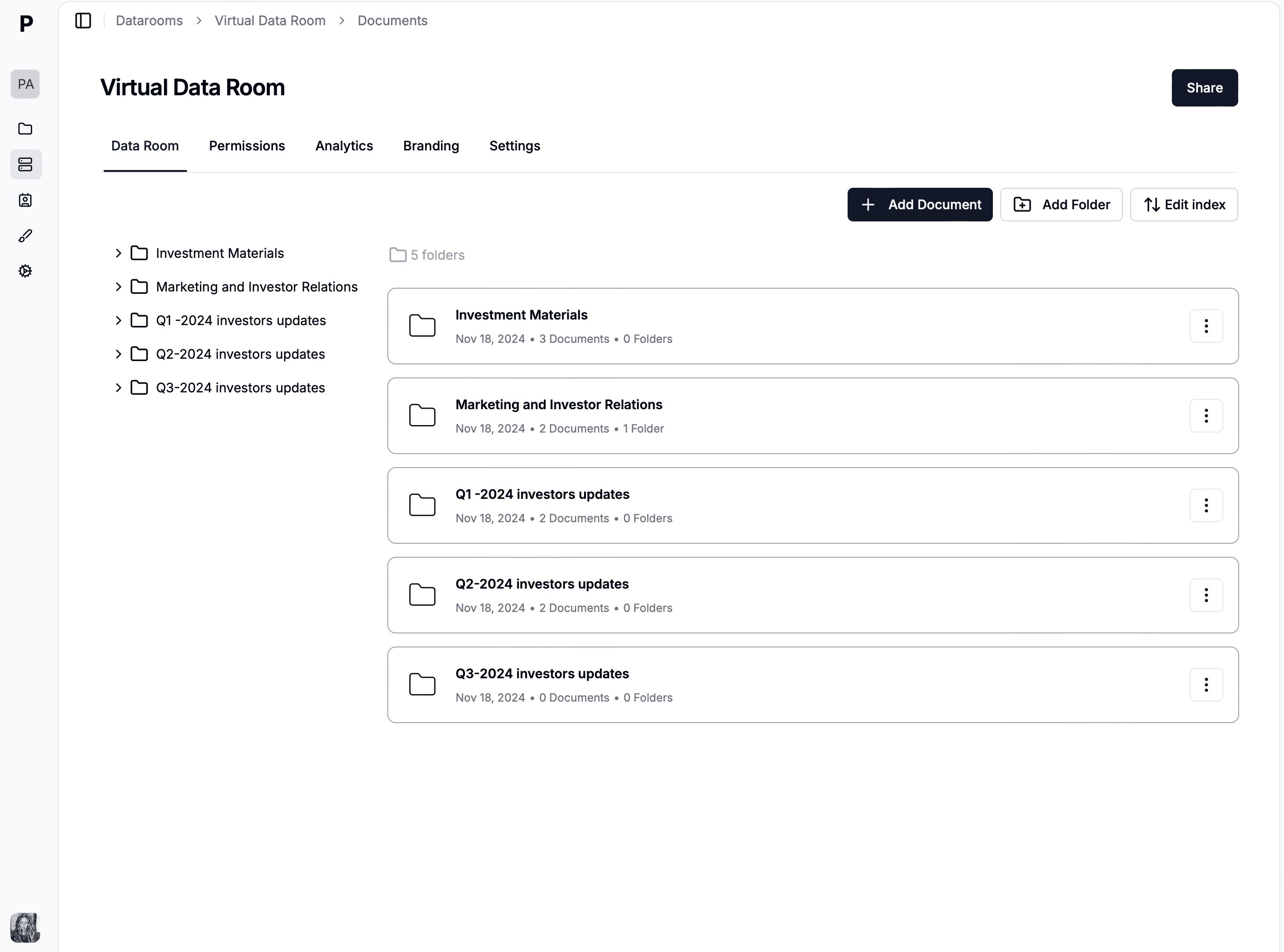
A Papermark data room like the one an AI agent provisions, fills, and shares through the MCP server — while you keep destructive actions in the dashboard.
Handing an AI agent write access to your due diligence documents is a reasonable thing to be nervous about, so the permission model is deliberately boring: the agent acts as you, through your API token, and the token's scopes are enforced server-side on every call. There is no separate "MCP identity" and no side channel.
That gives you three concrete controls. First, a read-only token (documents.read, links.read, analytics.read) produces a read-only agent: every write tool returns 403 forbidden and the agent says so plainly. Second, scopes are granular per resource, so you can allow link creation but not document deletion. Third, tokens are revocable at any time from the dashboard.
Our recommended defaults: give a long-lived assistant a read-only token, mint scoped write tokens per task and revoke them after, and never ask an agent to bulk-delete anything. Deletes are gated by scopes like everything else, but mistakes are unrecoverable, so keep destructive operations in the dashboard or the CLI where you can see exactly what you're doing.
Make that the standing rule: destructive operations stay off the agent's default scope and require a human in the loop. The MCP server does expose delete tools — delete_dataroom, delete_document, delete_link — because the API does, and refusing to wrap them would just be dishonest about what the surface is. But there is a hard line between an agent that can read your analytics all day and an agent that can remove a room, and the scope model draws that line on purpose. A read or write token still can't delete; a delete-capable token is one you mint knowingly, use for a specific pass, and revoke. When a room genuinely needs to come down, you approve that yourself in the dashboard, the same way you'd keep the revocation loop out of AI agent hands in a script. Nothing in this workflow asks you to trust the model with an irreversible action.
The upshot is that an AI agent operating your VDR is never operating on trust — it's operating on a credential whose exact blast radius you chose. That's what makes handing Claude your data room a reasonable thing to do rather than a leap of faith: the worst a read-only agent can do is tell you something you didn't want to hear, and the worst a scoped write agent can do is create a link you can revoke in one click.
Virtual data rooms are one of the least developer-friendly software categories. Datasite and Intralinks sell enterprise contracts starting around $25,000/year with integrations delivered through sales engineering, not self-serve docs. DocSend, despite being owned by Dropbox, has no public API and no developer portal, so an MCP server is structurally impossible for them to offer today. The result: in 2026, no legacy VDR provider gives an AI agent a supported way to operate a data room.
Papermark comes from the opposite direction. The API has 43 operations with an OpenAPI spec, and the MCP server is a thin, honest wrapper over it. Data Rooms plan pricing is transparent at €99/month with a 7-day free trial, and the developer surface (API, CLI, MCP) comes with Business plans and above. If you're comparing providers on this axis, the best virtual data rooms overview shows where each vendor stands.
The Papermark MCP server is one of three ways to reach the same data room, and they share a token and a data model, so nothing you build on one is thrown away when you switch to another. A room Claude creates through the MCP server is byte-for-byte the room the REST API creates or the CLI creates. The question is never which surface is best in the abstract, only which one fits the task in front of you, and getting that right the first time saves you from porting a workflow later.
Reach for the MCP server when the work is conversational and variable — you'd rather describe the outcome to Claude or ChatGPT than write the steps, and you value flexibility over byte-for-byte repeatability. It's the right tool for exploratory analytics ("who's engaging?"), ad-hoc room setup, and any workflow where the exact sequence changes run to run. Reach for the REST API when you're building a backend service that mints links on a schedule or in response to your own app's events, where you want typed responses and explicit retry control. And reach for the CLI when the work is a deterministic script, a cron job, or a CI step you want reproducible to the byte — the folder-in, link-list-out shape that the CLI fundraising cookbook is built around.
In practice most founders live across all three: the MCP server for the daily conversational read, the CLI for the repeatable setup script, and the REST API only when a workflow needs to run inside a service. Because one token spans all of them, you can start by asking Claude and graduate a hot path to code the day it needs to be reproducible, with no migration cost.
The fastest path is the 30-second Claude Desktop setup above, then prompt #1. If you'd rather script than chat, the same API surface is available through the Papermark CLI and the REST API. And if you want to see how far agent workflows go, we built a full due diligence agent with Claude and Papermark as a worked example.
Create a data room with Claude in minutes. Connect the Papermark MCP server to Claude Desktop, then prompt it to upload documents and share secure links.
One shell script turns a local folder into a structured fundraising data room with per-VC links, email gating, and expiry dates. Papermark CLI cookbook with code.
Step-by-step tutorial - connect the Papermark MCP server to Claude and build an agent that assembles a due diligence data room and reports investor engagement.