

datarooms
The Papermark MCP Server: The First Data Room MCP for Claude and ChatGPT
Papermark ships the first MCP server in the data room space. 43 tools for documents, data rooms, links, and analytics, set up in Claude Desktop in 30 seconds.
You can create a complete virtual data room by typing one prompt into Claude. Connect the Papermark MCP server to Claude Desktop, and Claude gets 43 tools to create data rooms, upload documents, build folder structures, and mint secure share links on your behalf. This guide walks you through the full setup (about 2 minutes) and the exact prompts to go from a folder of PDFs on your laptop to a password-protected data room link.
The whole point of creating a data room with Claude is that a job that used to be an afternoon of dashboard clicking collapses into a short conversation. You connect one MCP server, mint one token, and then describe the room you want in plain English. Claude handles the API calls; Papermark handles the security and hosting. Here is the entire path from a laptop folder to a shareable, password-protected virtual data room, and the rest of this guide expands each step with the exact prompts.
create_dataroom for you.If you get stuck at any step, the Claude Desktop setup docs cover every error message and its fix.
Three things: Claude Desktop, Node.js 24 or newer, and a Papermark account. Claude Desktop is Anthropic's desktop app for macOS and Windows, and it supports MCP (Model Context Protocol) servers out of the box. MCP is the open standard that lets Claude discover and call external tools, which is how it talks to Papermark.
Papermark is an open-source virtual data room with page-by-page analytics, dynamic watermarking, and transparent pricing. The Data Rooms plan is €99/month with a 7-day free trial, and the developer surface (API, CLI, and MCP server) is available on Business plans and above.
Why do this with Claude instead of clicking through a dashboard? Speed and repetition. Setting up a fundraising data room by hand means creating folders one by one, uploading files into each, and configuring every link. Claude does all of it from a single sentence, and it can repeat the same setup next quarter without you remembering the steps.
Building a data room with AI is not a novelty; it changes the economics of a task that every founder, banker, and dealmaker does under time pressure. A virtual data room is fundamentally repetitive: the same folder scaffold, the same batch of PDFs, the same per-viewer links with the same security policy, assembled over and over for each deal and each investor. That repetition is exactly what an agentic workflow is good at, and it is exactly what a human is bad at doing consistently at 11pm before a raise. When you create a data room with Claude, the tedium moves to the model and you keep the judgment: what to include, who to grant access, when to close it.
The deeper reason is that the AI data room is not a walled garden. Because Claude talks to Papermark through the Model Context Protocol rather than a bespoke plugin, the same connection that builds the room also reads it back. You do not switch tools to check who opened the financials or to expire a link after a passed investor. One conversation spans setup, sharing, and analytics, which is the part a dashboard splits across five screens. That continuity is why "data room with AI" is more than a faster upload button; it turns the room into something you operate by asking rather than by clicking.
There is a reproducibility angle too, and it matters more than it sounds. A prompt like "set up a standard Series A data room and upload everything in this folder" is a description you can save, tweak, and re-run next quarter or for the next entity. It sits alongside the scripted approach in the Papermark CLI cookbook and the from-scratch walkthrough in how to build a data room in 2026: three doors onto the same underlying system, each suited to a different working style. Claude is the one you reach for when you would rather talk than type commands.
Log in to Papermark and open Settings, then API Tokens. Mint a new token and pick the scopes you want Claude to have. The token starts with pm_live_ and is shown once, so copy it somewhere safe.
Scopes matter here. If you only want Claude to read your account (list documents, pull analytics), mint a token with read-only scopes like documents.read, links.read, and analytics.read. For this guide you need write scopes too, since Claude will create a data room and upload files: add datarooms.write, documents.write, and links.write. Claude can never do more than the token allows, so the token is your permission boundary, not the prompt.
Claude Desktop reads MCP server definitions from one JSON file. On macOS it lives at ~/Library/Application Support/Claude/claude_desktop_config.json. If the file doesn't exist, create it. Add the papermark entry under mcpServers:
If you already have other MCP servers configured, add "papermark": { ... } as a sibling entry instead of replacing the whole block. There is nothing to install manually: npx fetches @papermark/mcp-server from npm the first time Claude Desktop starts it, which takes about 5 seconds once.
Quit Claude Desktop completely and reopen it. In a new chat, click the gear icon in the chat input. Under connected tools you should see papermark with its tool list. To confirm auth works, ask Claude something harmless:
"List my Papermark documents."
If Claude returns your documents, everything is wired up. If not, check the MCP log at ~/Library/Logs/Claude/mcp-server-papermark.log. The two most common failures are a missing or mistyped PAPERMARK_TOKEN (fix the JSON) and npx: command not found (install Node 24+). The install docs have a full troubleshooting table.
Now the fun part. Give Claude one prompt that describes the whole data room:
"Create a Papermark data room called 'Acme Series A' with these folders: 1. Company Overview, 2. Financials, 3. Legal, 4. Team, 5. Product, 6. Market."
Claude calls create_dataroom, then create_dataroom_folder for each folder. That numbered six-folder layout mirrors what investors expect during diligence; if you want to go deeper on structure, see the data room folder structure guide.
You can be as specific or as vague as you like. "Set up a standard fundraising data room for a seed round" also works, and Claude will propose a structure before creating it.
Because the MCP server runs locally on your machine (the stdio transport), Claude can read files straight from your disk. Point it at a folder:
"Upload every PDF in ~/Documents/acme-fundraise/ into the 'Acme Series A' data room. Put anything with 'P&L' or 'balance' in the name into the Financials folder."
Claude calls upload_document per file and attach_dataroom_document to place each one in the right folder. There is no file size limit on the Data Rooms plan, and uploads go directly to storage via presigned URLs, so nothing passes through the model itself. Re-running the same prompt is safe: ask Claude to "skip files that are already there" and it checks list_dataroom_documents first.
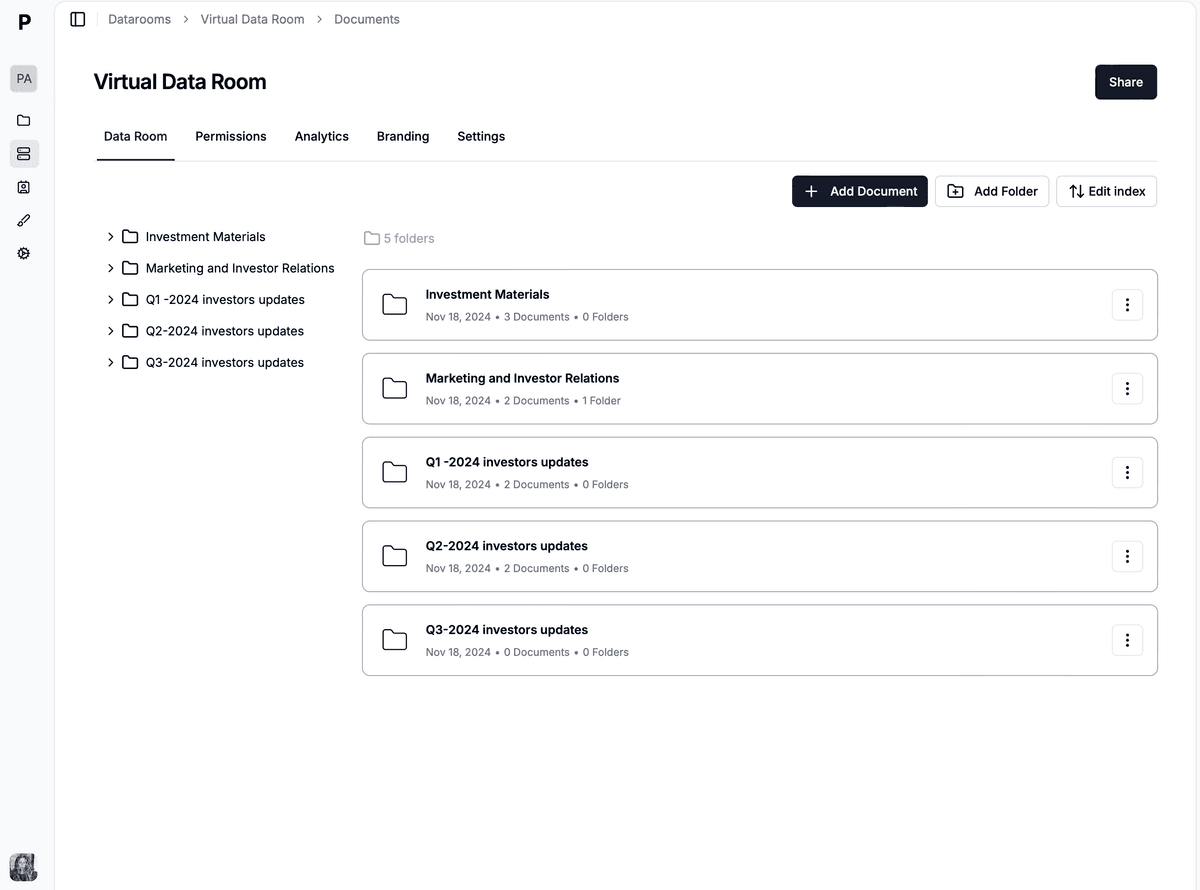
A virtual data room Claude created from a local folder of PDFs, with the numbered fundraising folder structure in place.
A data room is only useful once someone can view it, and this is where link controls matter. Ask Claude:
"Create a share link to the Acme Series A data room with password 'acme-2026', email verification required, downloads disabled, and expiry on August 31, 2026."
Claude calls create_link with password, email_protected, allow_download: false, and expires_at set. You can also ask for dynamic watermarking, which stamps each viewer's email onto every page they see.
The pro move for fundraising: one link per investor.
"Create a separate link to this data room for each of these firms: Sequoia, Index, Point Nine. Name each link after the firm."
Every link points at the same data room, but each gets its own analytics trail. When a partner forwards the deck internally, you see exactly which firm's link was used and who verified their email through it.
Once links are out, Claude becomes your analytics interface. No dashboard digging:
"Who viewed the Acme Series A data room this week, and which documents did they spend the most time on?"
Claude chains list_links, list_link_views, and get_view_analytics to give you per-visitor, per-page engagement. You can go further: "Which investors opened the financials but skipped the legal folder?" is a single prompt. For recurring checks, ask the same question every Monday, or wire it into a scheduled agent using the patterns in the agent workflows guide.
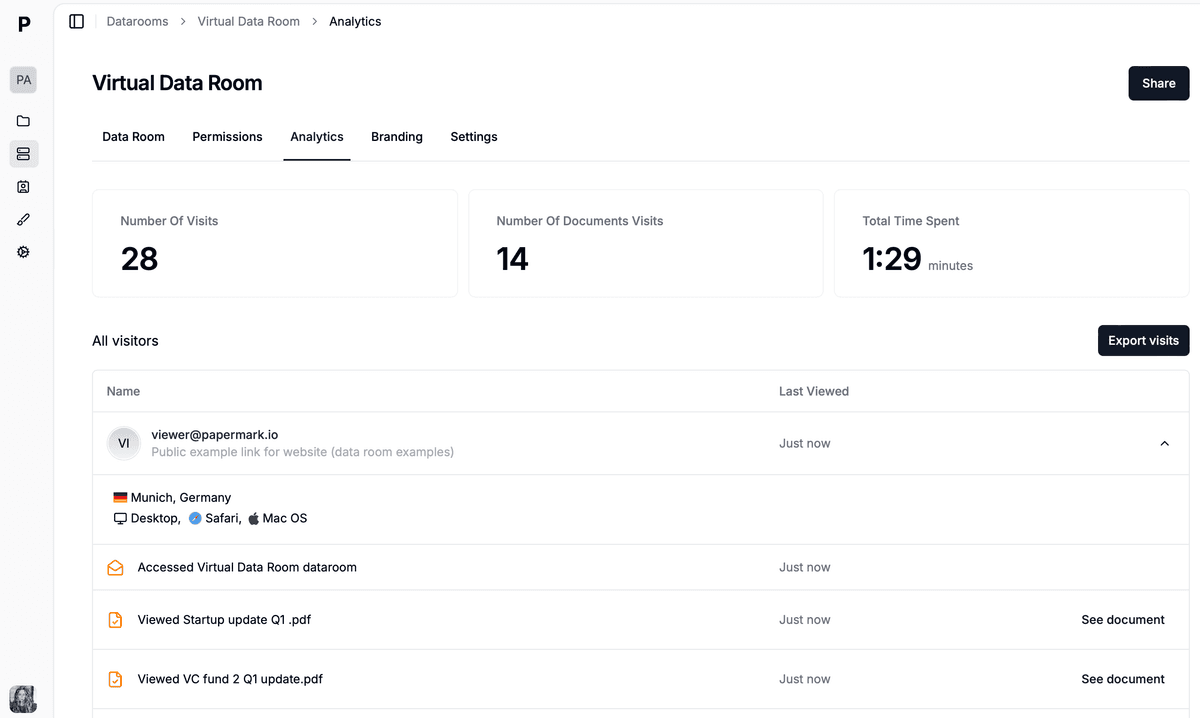
Page-by-page virtual data room analytics Claude reads back through the MCP server, no dashboard tab required.
It helps to see the mapping from what you type to what happens, because the magic of the MCP server is that a single sentence fans out into many API calls you never see. When you create a data room with Claude, each plain-English request is translated into one or more of the 43 tools the Papermark MCP server exposes, and Claude decides which to chain and in what order. You stay at the level of intent ("share this with Sequoia, gated and expiring") while the model handles the mechanics ("call create_link with email_protected and expires_at"). The table below shows the prompts most people use during a raise and what Claude does under the hood for each.
Reading this as a capability map is useful for a second reason: it makes the boundary of the AI data room explicit. Everything in the right column is a Papermark operation with a real security guarantee behind it, not something the model improvises. If a prompt would require a tool your token does not have scope for, Claude simply reports that it cannot, which is the behavior you want from an agent holding the keys to your deal room.
| What you prompt | Tools Claude calls | Result |
|---|---|---|
| "Create a Series A data room with the standard six folders." | create_dataroom, create_dataroom_folder | An empty, structured virtual data room ready for documents |
| "Upload every PDF in this folder into the right sections." | upload_document, attach_dataroom_document, list_dataroom_documents | Files hosted in Papermark and sorted into folders |
| "Make a gated, expiring link for each of these five firms." | create_link | One password- or email-protected link per investor, each with its own analytics |
| "Who read the financials this week and for how long?" | list_links, list_link_views, get_view_analytics | Per-visitor, page-by-page engagement in the chat |
| "Push the new model as a fresh version of the old one." | add_document_version, promote_document_version | Existing links serve the current file; old analytics stay attached |
Notice what is not in the table: nothing that hosts a file, checks a password, or records a view lives in Claude. Those are Papermark's job. Claude is the interface that decides which tool to call and stitches the results into an answer, which is the whole idea behind an agentic workflow built on the Model Context Protocol.
Consider a solo technical founder opening a seed round with no operations help and a Tuesday deadline to get materials to a lead. Her documents already sit in ~/Documents/seed-raise/, roughly sorted but not deal-ready. In Claude Desktop she types one prompt: "Create a Papermark data room called 'Northwind Seed' with the standard fundraising folders, then upload everything in ~/Documents/seed-raise/, putting financial files in Financials and anything legal in Legal." Claude proposes the six-folder layout, she approves, and about a minute later the room exists with every PDF filed. She has not opened a browser.
Next she asks for access: "Create an email-gated link for Amplify Partners that expires August 31, downloads off, and a separate one for the two angels on this list." Claude mints three links, each with its own analytics trail, and prints them back. She pastes them into personalized intros and sends the batch before lunch. What would have been an hour of folder-making and link-toggling in a dashboard took two prompts.
By Thursday the AI data room is earning its keep as an analytics surface. "Who's been in the room, and what did they read?" she asks. Claude reports that Amplify spent eighteen minutes across the model and the cohort tab and returned twice, while one angel never opened the link. She reads that correctly, front-loads her follow-up on Amplify, and when they ask for updated numbers she pushes a new version of the model in one more prompt. The same link keeps working. The entire raise, from a messy folder to a live, tracked, per-investor data room, ran through a handful of sentences to Claude.
No, and it's worth understanding why. Claude is a language model: it can draft your document checklist, suggest a folder structure, and write your investor update, but it cannot host files, enforce passwords, verify viewer emails, or record page-by-page analytics. A virtual data room is infrastructure. What MCP changes is that Claude can now operate that infrastructure for you, so you get the conversational interface plus real access controls underneath.
The same logic applies to generic cloud storage. You could ask Claude to organize files in a shared drive, but Google Drive and Dropbox links lack granular permissions, watermarking, and viewer-level tracking. The comparison in what is a virtual data room covers that gap in detail.
The agent acts as you, using your token, and the token's scopes are hard limits enforced by the API. A read-only token makes every write tool return 403 forbidden, and Claude will simply tell you it isn't allowed. Destructive tools (deleting documents, data rooms, or links) require write scopes on those specific resources, and the MCP docs recommend keeping deletes out of agent hands entirely and doing them in the dashboard instead.
Two practical rules. First, give a long-lived Claude setup a read-only token and mint short-lived write tokens only when you're actively building something. Second, revoke tokens you no longer use from the same Settings page where you created them.
Creating the room is the first day; a real deal runs for weeks, and the advantage of operating a virtual data room through Claude shows up in how cheaply you keep it current. Documents change mid-raise: the model gets a new cut, a contract gets signed, a folder needs reordering. Because the MCP server exposes versioning tools, you handle all of it conversationally. "Replace the financial model with this newer file, keep the same link" pushes a fresh version while every investor's URL keeps working and the old view history stays attached. You never re-send links or rebuild the room; you describe the change and Claude makes it.
When your needs outgrow a conversation, the same operations are available through other doors, because Claude, the CLI, and the REST API all sit on one token and one data model. If you want a reproducible script instead of a prompt, the Papermark CLI cookbook rebuilds this exact workflow in bash. If you are wiring the data room into your own product, the Papermark data room API gives you typed endpoints and full control. And if you want the agent to run diligence on its own rather than just take instructions, the guide to building a due diligence agent with Claude shows how far the agentic workflow goes once the room exists. Whatever you build there inherits the same structure, so nothing you set up in Claude Desktop is throwaway. For the underlying document requirements at each stage, keep the 2026 data room checklist open alongside your prompts.
Creating a data room with Claude takes one config file edit and a handful of plain-English prompts: token, config, restart, then "create a data room called X and upload everything in this folder." The Papermark MCP server handles the 43 underlying API calls, and Papermark handles the security layer that Claude alone can't provide. If you want the deeper technical picture, read the Papermark MCP server launch post or go straight to the docs.
Papermark ships the first MCP server in the data room space. 43 tools for documents, data rooms, links, and analytics, set up in Claude Desktop in 30 seconds.
Set up a data room in Google Drive step-by-step in 2026. Covers folder setup, permissions, limitations, and when to upgrade to a purpose-built VDR.
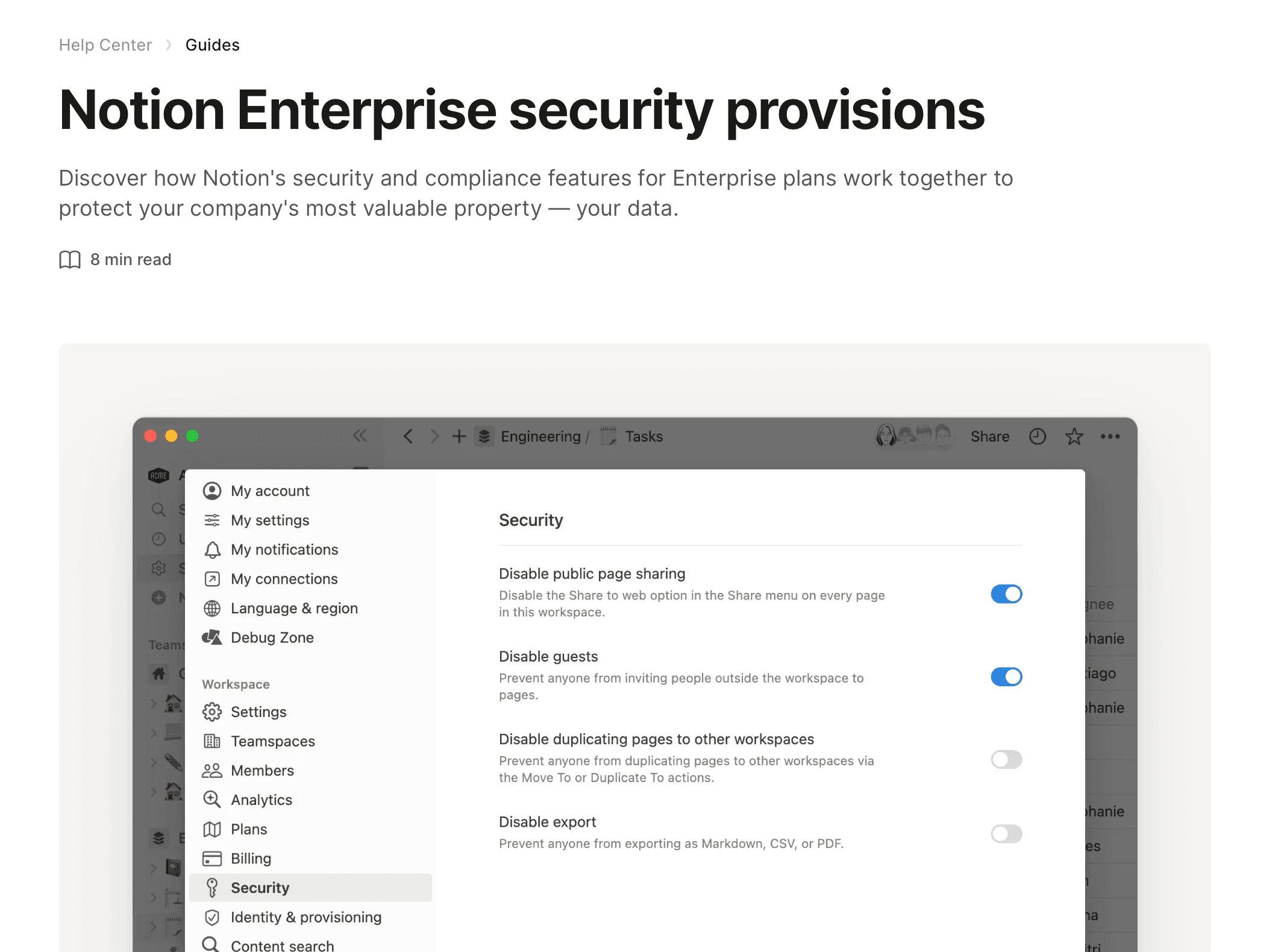
Build a Notion data room in 2026, understand where Notion's sharing breaks for confidential documents, and share it with a custom domain, watermarking, page-level analytics, and link expiry.