
How to share Apple Keynote presentations with Papermark?
If you build your decks in Apple Keynote, you don't have to export to PDF before sharing. Papermark supports .key files natively, preserves animations and transitions, and gives you the same slide-by-slide analytics you'd expect from PowerPoint or PDF.
Keynote support is available on the Pro plan and above.
What Keynote support includes
- Native upload of
.keyfiles (no PDF export step) - Slide previews rendered directly in the Papermark viewer
- Preserved animations and transitions during playback
- Slide-by-slide analytics: time per slide, completion rate, drop-off points
- Works inside data rooms the same way other presentation files do
- Full link permissions: email verification, password, expiration, watermarks
Step-by-step setup
Step 1: Upload your Keynote file
- Log into Papermark.
- Click Documents in the sidebar.
- Click Upload and pick your
.keyfile from your Mac. - Wait for the upload and rendering to finish (a few seconds for most decks).
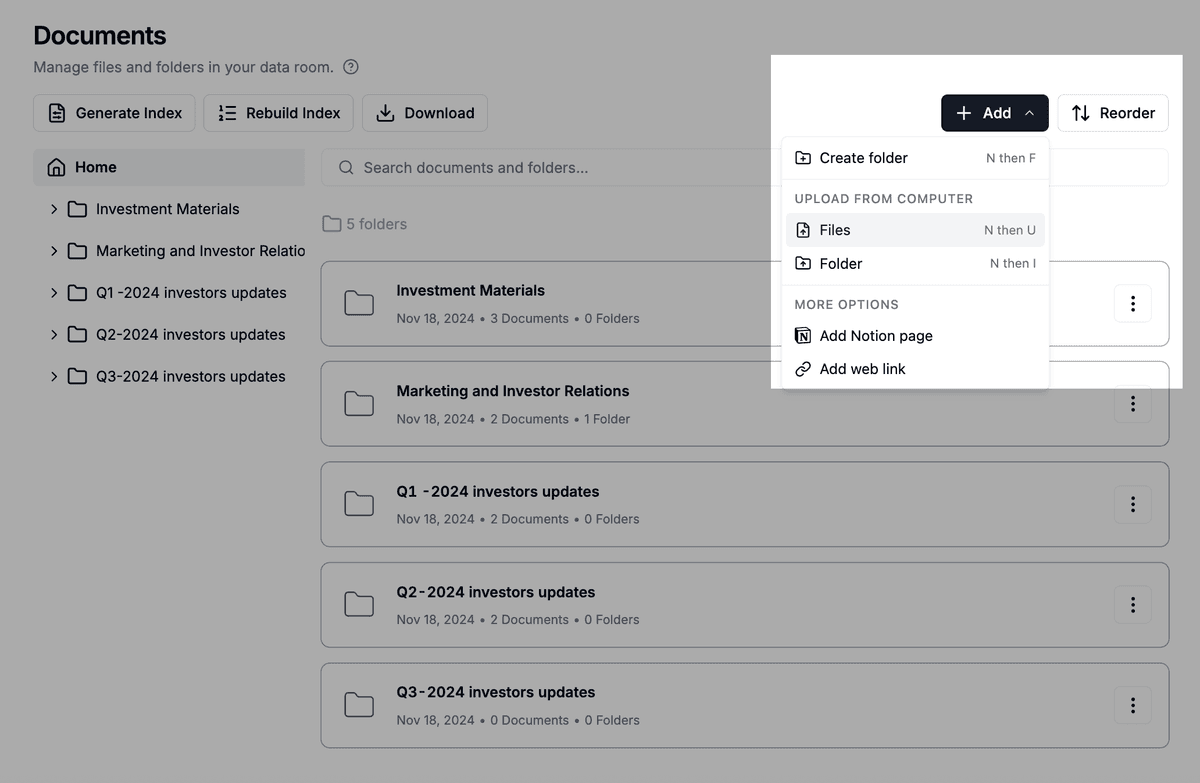
Step 2: Create a shareable link
- Open the Keynote file.
- Click Create link.
- Configure security settings (email capture, expiration, watermark, etc.).
- Save and copy the link.
Step 3: Share with viewers
Viewers open the link and see your deck slide by slide in the Papermark viewer. They can navigate with arrow keys, click through, or enter fullscreen mode for a focused experience.
Slide-by-slide analytics
For every viewer, Papermark tracks:
- Time spent per slide
- Slides viewed in order
- Whether the viewer reached the last slide
- Time stamps for each slide visit
This is more useful than a "total time" metric because you can see exactly which slides held attention. If everyone skipped slide 7, that's a sign to rework it. If everyone re-read slide 14, that's likely where the deal hinges.
For a deeper look, see page-by-page analytics.
Use cases
- Investor pitch decks: send your Series A deck in its native Keynote format and track which investors spent time on the financials versus the team slide.
- Sales decks: share product decks with prospects and use the analytics to time follow-ups.
- All-hands and board decks: share internally with permission controls so the deck doesn't leak.
- Conference talks: send the deck to organizers or attendees and see what they came back to.
Use with a data room
Keynote files can sit alongside other documents in any data room:
- Open your data room.
- Click Add, then Files.
- Pick your
.keyfile. - Set permissions as needed.
The file appears in the file list with a presentation icon and is included in the automatic index file.
Security and protection
Keynote files inherit all standard Papermark security:
- Email verification
- Password protection
- Expiration dates
- Dynamic watermarks with viewer name, email, or IP
- Disable printing to block browser printing
- Disable downloads to prevent local copies
- Granular permissions in data rooms
Frequently asked questions
Related guides
- File types supported in Papermark
- How to present documents in fullscreen mode
- How to track page-by-page analytics
- How to add documents to your data room
Need help? Contact support@papermark.com or use the in-app chat.