
Today we are launching Papermark as a connector in Claude. Your documents and data rooms become something Claude can work in directly: it can build a data room, upload files and new versions, share secure links and tell you who read what, without you leaving the chat.
Until now, connecting Claude to Papermark meant adding our MCP server URL by hand. Now Papermark is listed among Claude's connectors: search for it, click Connect, sign in, and Claude works in your real workspace with your documents, data rooms and analytics. Data rooms are finally becoming agent-native.
1. Connect Papermark in Claude
Setup takes about a minute, with no API keys to copy and nothing to install.
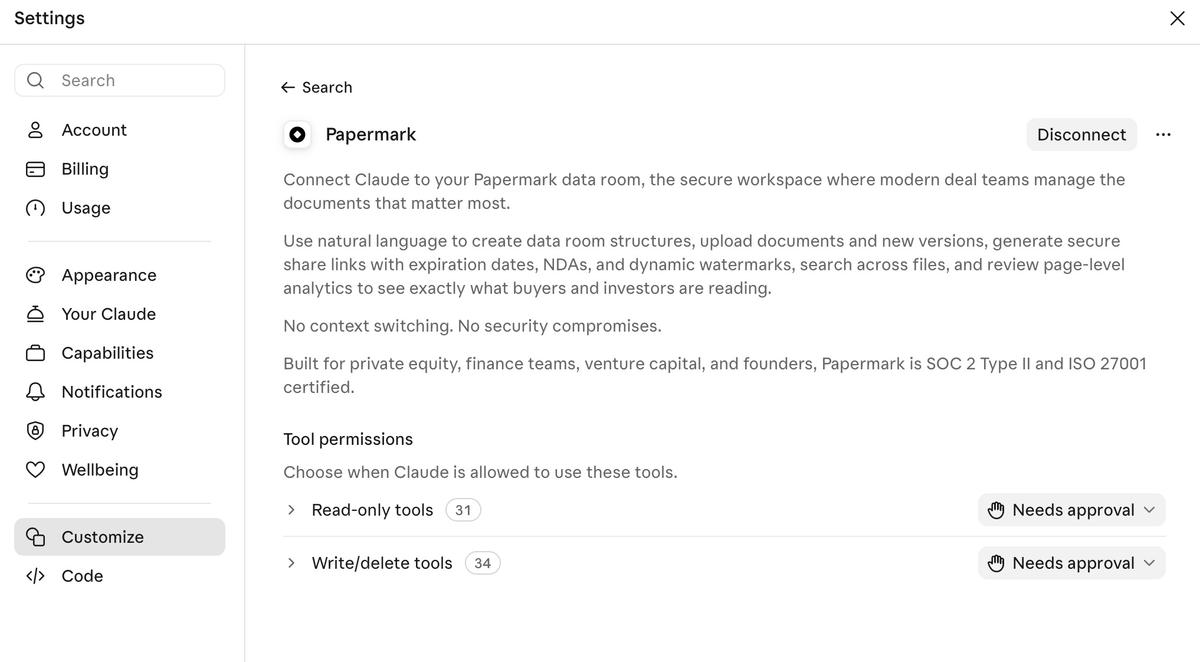
- In Claude, open Settings and go to Customize, then Connectors.
- Search for Papermark and click Connect.
- Sign in to your Papermark account in the browser and approve access to your workspace.
- Back in Claude, start a new chat. Papermark appears in the tools menu under the message box, and Claude uses it whenever a request involves your documents or data rooms.
2. Choose how much Claude can do on its own
Under Tool permissions you decide when Claude may act without asking. The connector has two groups of tools:
- 31 read-only tools. Listing documents and data rooms, searching across files, reading link settings, and pulling document, data room and visitor analytics. Nothing in your workspace changes.
- 34 write and delete tools. Creating data rooms, folders and groups, uploading documents and new versions, creating and updating links, setting permissions and managing brands.
Both start on Needs approval, so Claude shows you every action before it runs. A common setup is to let read-only tools run freely, so questions about your analytics get answered straight away, and keep approval on for everything that writes or deletes.
3. For founders
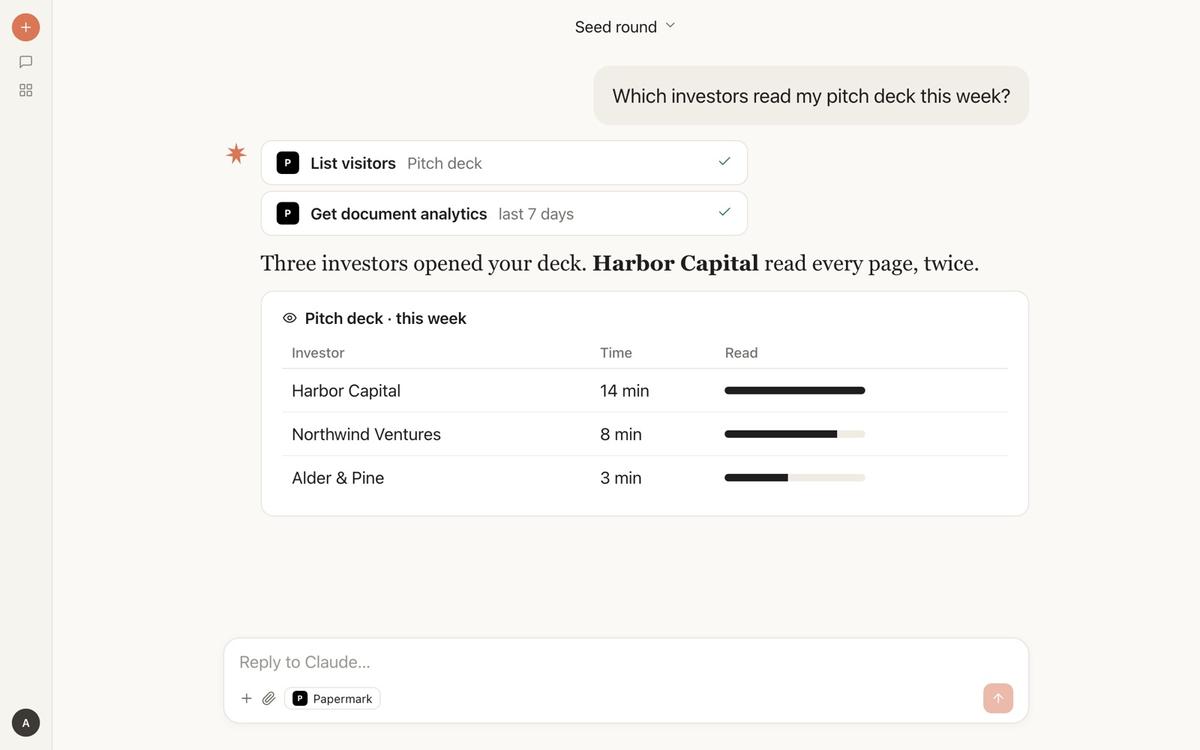
A fundraise is a hundred small tasks around one document. You send the deck to forty investors, wait, and guess who is interested. With the connector, Claude does the busywork and reads the signals for you: it sets up the room, creates a link for every fund and tells you who actually read the deck before you get on the next call.
What you can do:
- Set up your fundraising data room. Claude creates the room with folders for the deck, financials, cap table and legal documents, and uploads the files you attach to the chat.
- Create a link per investor. One tracked link per fund, each with email verification and an expiry date, so every view is tied to a firm.
- See who read the deck. Claude pulls the visitors and page-by-page analytics and tells you who opened it, how long they stayed and where they stopped.
- Open the next stage for interested funds. When an investor reads every page, give them access to the full data room with one message.
- Send new versions without re-sending. Upload the updated deck and every existing link shows it.
Example prompts:
"Set up a data room for our seed round with folders for the pitch deck, financials, cap table and legal docs, and upload the files I attached."
"Which investors read my pitch deck this week?"
"Harbor Capital read every page twice. Create a link to the full data room for them, with email verification and downloads off."
4. For fund managers
Fund managers share with two audiences at once: prospective LPs during a raise and existing LPs every quarter. Both expect a professional, secure room, and both leave signals you want to read. Claude builds the room, keeps the documents current and tells you which LPs engaged.
What you can do:
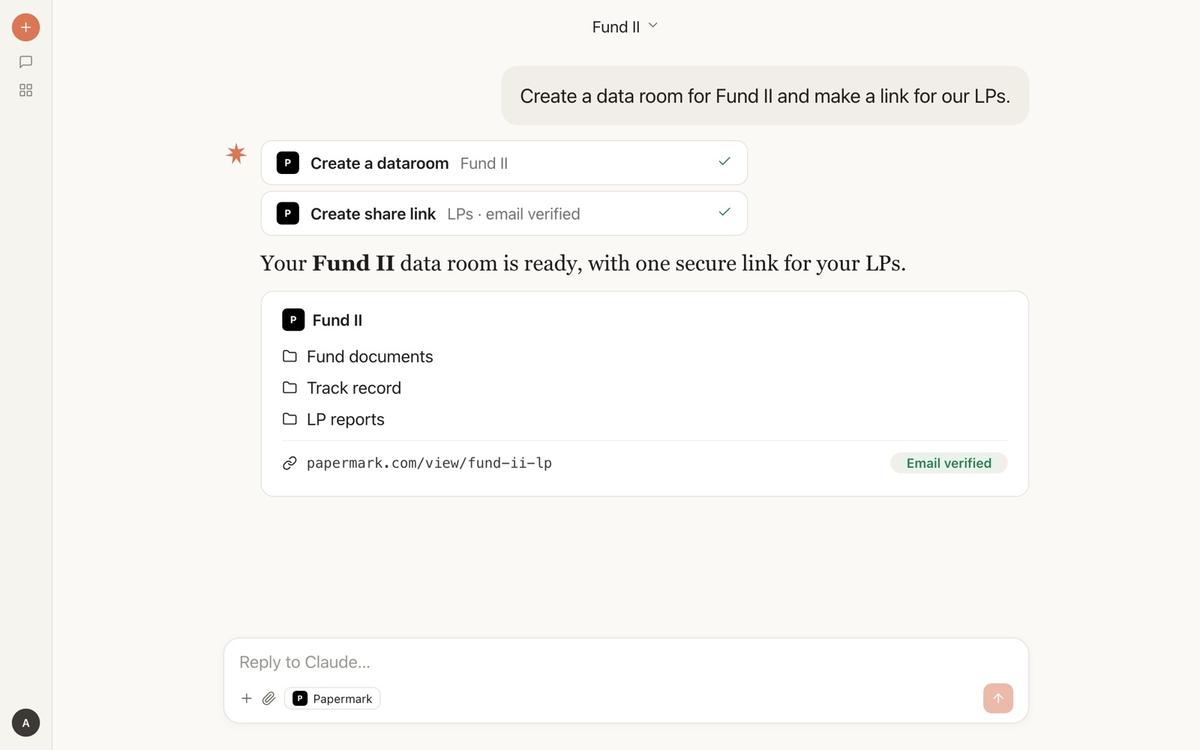
- Build a fund data room in one message. Claude creates the room, folders for fund documents, track record and LP reports, and an email-verified link for your LPs.
- Give different LPs different access. Create a group for anchor LPs who also see the track record, and keep it hidden from everyone else.
- Publish quarterly reports. Upload the Q3 report into the right folder, and every LP with access sees it immediately.
- Follow LP engagement. Ask which LPs opened the latest report, and which prospects spent time on the track record.
- Review portfolio company rooms. When founders share their data rooms with you through Papermark, ask Claude to summarize what is in them.
Example prompts:
"Create a data room for Fund II and make a link for our LPs."
"Upload the Q3 LP report into the LP reports folder and tell me which LPs open it this week."
"Create a group for anchor LPs who can also see the track record folder."
5. For M&A advisors and deal teams
In a sell-side process, the data room is where the deal happens, and engagement is the earliest signal of intent. Advisors spend hours building folder structures, managing access per bidder and pulling activity reports for the client. Claude takes over the mechanics so you can focus on the buyers.
What you can do:
- Build the due diligence structure. Describe the room, for example corporate, financials, commercial, HR, IP and legal, and Claude creates the folders and puts the uploaded files in place.
- Set up one group per bidder. Each buyer gets its own group, link and permissions, so you control exactly what each one sees.
- Open folders round by round. When a buyer reaches the second round, give that group access to the management presentation and customer contracts, without anyone else seeing the change.
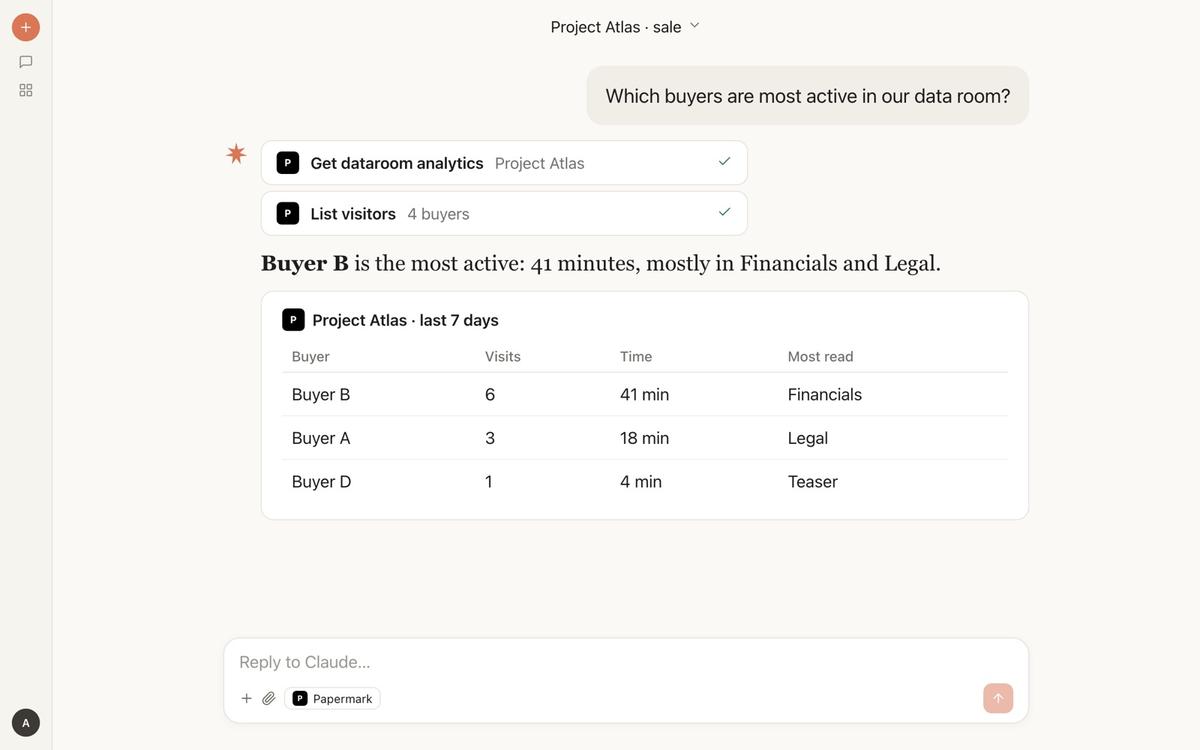
- Find the most active buyers. Claude reads the data room analytics and ranks buyers by visits, time spent and the folders they read most.
- Collect missing documents. Ask the CFO or the client's lawyers to upload files straight into the right folder through a secure upload request.
- Prepare the client update. Ask for a weekly summary of buyer activity, ready to paste into your update to the client.
Example prompts:
"Which buyers are most active in our data room?"
"Buyer B spent 41 minutes in Financials and Legal. Give their group access to the management presentation and the customer contracts folder."
"Which buyers haven't opened the data room since the teaser? List them with their last visit."
6. For sales and customer teams
A proposal sent as an attachment disappears into the prospect's inbox. Sent as a Papermark link, you know when it was opened, who it was forwarded to and which page they lingered on. Claude reads that for you before the next call.
What you can do:
- Share proposals as tracked links. Upload the proposal and get a link per prospect with email verification.
- Prepare for the call. Ask who at the account opened the proposal and which pages they spent time on, such as pricing or security.
- Spot forwarded links. See when new people at the account open the document, a sign the deal is moving internally.
- Keep sales material current. Replace the case study or security overview once, and every link shows the new version.
Example prompts:
"Upload this proposal, create a link for Acme with email verification, and send me the URL."
"Did anyone at Acme open the proposal? Which pages did they spend time on?"
7. For every team: keep links current and secure
Some jobs apply to every workspace, whatever the deal. Claude can update documents everywhere at once and audit your links for gaps.
- Replace a document everywhere. Upload a new version of the board deck and every existing link shows it, with no stale copies in inboxes.
- Check who hasn't read it. Ask which board members or investors haven't opened this month's update.
- Audit your links. Claude lists every link without email verification, a password or an expiry date.
- Tighten a whole room at once. Turn off downloads or add an expiry date on every link to one data room.
"Check all my links and list any without email verification, a password or an expiry date."
"Replace the board deck with this new version and tell me who has viewed the old one."
8. Share what you build in Claude
A memo, a model or an interactive artifact you made with Claude can go out as a tracked Papermark link in the same conversation. Read how to share Claude artifacts for the full walkthrough.
"Upload this investor memo to Papermark, create a link that requires an email, and send me the URL."
9. Built for deal teams
Papermark is the secure, modern data room for private equity, finance teams, venture capital and founders, and it is SOC 2 Type II and ISO 27001 certified. Everything Claude creates through the connector follows the same security and permissions as the rest of your workspace: expiration dates, NDAs, dynamic watermarks and page-by-page analytics.
The connector runs on our hosted MCP server, the same one behind Papermark Agents and the Perplexity Computer connector. Read more about how it works in our MCP server guide.
10. Get started
Don't have a Papermark account yet? It takes a minute.
From first share to closed deal, without leaving Claude.