BlogDocument SharingHow to share Claude artifacts in 2026 (and see who opened them)
How to share Claude artifacts in 2026 (and see who opened them)
·10 min read
Marc Seitz
You can share a Claude artifact five ways: Claude's own Share button, a tracked link through Papermark, a PDF, hosting the code yourself, or team sharing inside your Claude organization. They differ in who can open the link, whether it stays current after edits, and whether you ever learn who read it.
Quick recap
Claude's Share button: the fastest public or invite-only link, with no record of who opened it.
Papermark through the Claude connector: Claude uploads the artifact and returns a link with email capture, expiry and page-by-page analytics.
Export to PDF: a static copy anyone can open, best for formal documents and anything that must not change.
Copy the code and host it: full control over the URL and design, at the cost of your own deployment.
Team sharing in Claude: viewers and editors inside a Team or Enterprise organization, with comments.
Most people start with the Share button and only find its limits when the artifact goes to someone outside their company: an investor, a client, a candidate, a buyer. That is the moment the question changes from "can they open it?" to "did they open it, and for how long?"
1. Three questions that decide how to share a Claude artifact
Every Claude artifact is a single self-contained page: a dashboard, a one-pager, an interactive model, a slide-style walkthrough. Anthropic hosts it on claude.ai, and by default only you can see it. Sharing it is a choice between a handful of paths, and three questions settle which one fits.
The first question is who needs to open it. A teammate who already signs in to the same Claude organization is the easy case. Someone outside your company is different: on Team and Enterprise plans an Owner must first allow external sharing, and some recipients will not have a Claude account at all. If the reader is an investor or a customer, the link also represents you, so the domain, branding and first screen matter.
The second question is whether it needs to stay current. Claude publishes each change as a new version at the same URL, so a link to a live artifact can keep updating. That is ideal for a status board and risky for a proposal, where the reader should see exactly what you sent. A PDF freezes the content; a link can do either.
The third question is whether you need to know who read it. This is where the paths split most. Claude's sharing tools tell you who has access, not who opened the page. When the artifact is a pitch, a quote or a board update, the follow-up depends on knowing that the partner spent four minutes on the revenue chart and skipped the team section.
Way to share
Who can open it
Stays current
Shows who read it
Setup
Claude Share button
Anyone with the link, invited emails, or your organization
Yes, you pick the version viewers see
One click
Papermark via the Claude connector
Anyone you allow, with email check, allow list or access requests
Yes, upload a new version to the same link
Yes, per visitor and per page
Connect once, then one prompt
Export to PDF
Whoever receives the file
No, it is a snapshot
No, unless shared as a tracked link
Print to PDF
Copy the code and host it
Anyone with your URL
Only when you redeploy
Only with your own analytics
Hosting account and a deploy
Team sharing in Claude
Members of your Claude organization
Share menu, Team or Enterprise plan
2. Claude's Share button: fastest, but blind
The built-in option lives in the artifact's page header. Open the artifact on claude.ai, click Share, and choose who can see it. According to Anthropic's Share artifacts help article, Pro, Max and Ultra users can keep an artifact to themselves, send it to anyone with the link, or invite specific people by email. Team plans add sharing with the whole organization, and Enterprise adds groups. Artifacts created in Claude Code work the same way: they start private, and you share them from the same control.
For public links, most artifacts open without the viewer signing in. Email invitations are stricter: the invitee has to sign in with the address you invited, so they need a Claude account, and pending invitations expire after 30 days. On Team and Enterprise plans, public links are off until an Owner turns on External sharing in the organization's artifact settings. Anthropic's help center also notes that some artifacts, such as those that connect to other apps, can't use "anyone with the link".
The Share menu also handles versions well. Each publish becomes a version, and the Claude Code artifacts documentation describes a toggle to always share the latest version or pin a specific one. You can take access away at any time by switching back to "Only you".
What it does not do is report back. Neither help page describes view counts or a list of who opened the link, and a public link carries no email gate, password or expiry. There is also the question of reach: in July 2026, TechCrunch reported that public Claude share links and artifacts were turning up in Google search results. A public link is public, so treat it as such.
The Share button is the right choice for low-stakes, short-lived sharing: a chart for a colleague, a prototype for a friend, a quick explainer you are happy for anyone to find.
3. Share it through Papermark with the Claude connector
The second path hands the artifact to a document sharing platform built for links that matter. Papermark is a secure, fully customizable and developer-friendly platform for sharing documents and data rooms, and it connects to claude.ai as a connector through the Papermark MCP server. Once connected, Claude can upload the artifact and create the link in the same conversation that produced it.
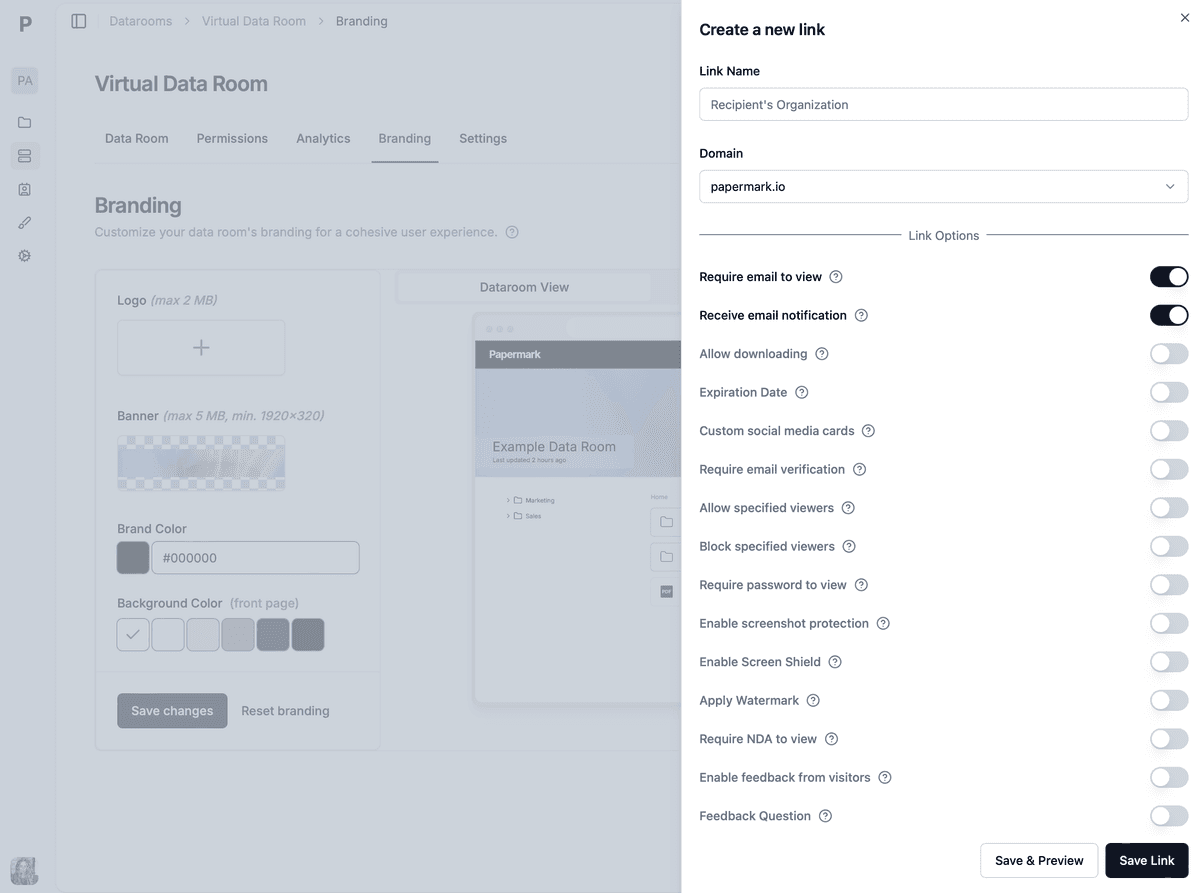
Papermark accepts HTML and Markdown files alongside PDFs, so the artifact's own source file can be shared as it is, not only as a screenshot. The link you get back carries the controls Claude's Share button lacks: an email check before anyone views, an allow list of people or domains, access requests for everyone else, an expiry date, and download permissions. Every visit is recorded, and for PDFs you see how long each visitor spent on each page.
Connecting takes a minute. In claude.ai, open Customize, then Connectors, add https://mcp.papermark.com/mcp, and sign in to Papermark in the browser. You approve access once, and no API key ends up in the chat. The connector exposes 57 tools, covering documents, links, data rooms, visitors and analytics; the Papermark MCP help article lists them.
From there, a single prompt does the work: "Upload this artifact to Papermark as a document called Acme Q3 board update, then create a link that requires email verification and expires in 14 days." A week later, the same chat can ask "Who has opened the Acme Q3 board update link, and which pages did they read?" and Claude reads the answer back from your link's analytics.
Link controls on a Papermark link: email verification, allow list, expiry and download settings.
4. Export to PDF for anything that must not change
A PDF is the most portable version of an artifact. It opens on every device, survives email filters, and cannot change after you send it, which is exactly what you want for a proposal, a term summary or a report that someone will sign off. In Claude, the simplest route is your browser's print dialog on the open artifact: choose Save as PDF, check the page breaks, and save. Claude's Docs, Slides and Design templates also export to PDF directly.
The trade-off is interactivity. Sliders, tabs and live charts become a static picture, so a dashboard artifact loses most of its point. A PDF also gives up any feedback once it leaves your outbox; it can be forwarded without you knowing.
The fix for the second problem is to send the PDF as a link, not an attachment. Upload it to Papermark and you keep the snapshot quality while getting the view tracking back: each visitor's time per page, the date of every visit, and the option to revoke the link if the deal goes quiet. Papermark's Free plan covers up to 50 documents and 50 links with page-by-page analytics, which is plenty for occasional artifacts. If the artifact is a pitch deck, the pitch deck sharing guide covers the investor side in more depth.
5. Copy the code and host it yourself
Every artifact is HTML, CSS and JavaScript under the hood, so you can copy the source and deploy it anywhere: Vercel, Netlify, GitHub Pages or your own server. This is the path for artifacts that are turning into products: a calculator you want on your website, an internal tool with its own domain, a demo that needs your analytics script.
You get full control in exchange for full responsibility. You choose the URL and the design, and the page lives as long as you keep it running. But every edit in Claude means copying and redeploying, nothing updates on its own, and any access control or analytics is yours to build. For a one-off share, it is a lot of work. For a page that is becoming part of your stack, it is the natural next step.
6. Team sharing inside your Claude organization
On Team and Enterprise plans, sharing inside the company is built in. You can give access to specific colleagues or the whole organization, and promote people from viewer to editor so they can ask their own Claude to republish the artifact with changes. Viewers in the organization can comment on the page, and the author's Claude session can read and reply to those threads.
This is the best way to work on an artifact together: a launch plan, a pricing analysis, a review of a pull request. It stops at the edge of the organization, though. Viewers must sign in as members, and nothing here tells you who actually opened the page. Once the artifact is ready to go outside, one of the other paths takes over.
7. A worked example: one artifact, three audiences
Northwind Robotics is a fictional 12-person startup preparing its Series A. The CFO asks Claude to turn the company's metrics export into an interactive artifact: revenue by month, burn, runway under three hiring plans, and a cohort chart. It takes an afternoon of back-and-forth, and the result is better than the spreadsheet it replaced.
The first audience is internal. The CFO shares the artifact with the founders through the Team plan's organization sharing, makes the CEO an editor, and collects comments on the runway assumptions directly on the page. Two rounds of edits later, everyone agrees on the numbers.
The second audience is the board. Board members do not use the company's Claude organization, and the update should reflect the numbers on the day it was sent. The CFO saves the artifact as a PDF, asks Claude to upload it to Papermark, and creates one link that requires email verification. By the next morning she can see that two of the three directors have opened it, and that one spent most of his time on the runway page, so she prepares for that question.
The third audience is investors. Here the CFO wants the interactive version, a separate link per fund, and a clear view of interest. Claude uploads the artifact's HTML file to Papermark and creates eight links, one per fund, each with an expiry date. Over two weeks, the visit history shows which funds came back to the cohort chart more than once. Those are the first follow-up calls. The Share button could have sent the same page, but it could not have told her where to start.
8. Which way to share your Claude artifact
The right path follows from the reader and the stakes. A colleague needs speed, a board needs a fixed record, and an investor or customer needs a link you can control and learn from.
If you are sharing...
Use
Why
A quick chart or prototype with a colleague
Claude Share button or team sharing
One click, and the reader already has access to Claude
Work in progress the team edits together
Team sharing in Claude
Editors, comments and live versions in one place
A pitch, proposal or report for people outside the company
Papermark link via the Claude connector
Email check, expiry, and you see who opened it and for how long
A document that must not change after you send it
PDF, shared as a Papermark link
A fixed snapshot with view tracking and the option to revoke
A tool that is becoming part of your website
Copy the code and host it
Your domain, your design, your analytics
When in doubt, ask what happens if the link reaches the wrong person. If the answer is "nothing much", Claude's Share button is fine. If it is "they see our numbers" or "we lose the deal", use a link with access control.
9. Share Claude artifacts securely with Papermark
Papermark is a secure, fully customizable and developer-friendly platform for sharing documents and data rooms. For Claude artifacts, it adds the three things the built-in sharing does not: control over who gets in, a record of who read what, and a link that looks like your company rather than claude.ai.
Access control. Every link can require an email address or a verified email, restrict access to an allow list of people or whole domains, or switch on access requests so that anyone else has to ask before viewing. Links can expire on a date, block downloads, and carry password protection or dynamic watermarking when the content is sensitive.
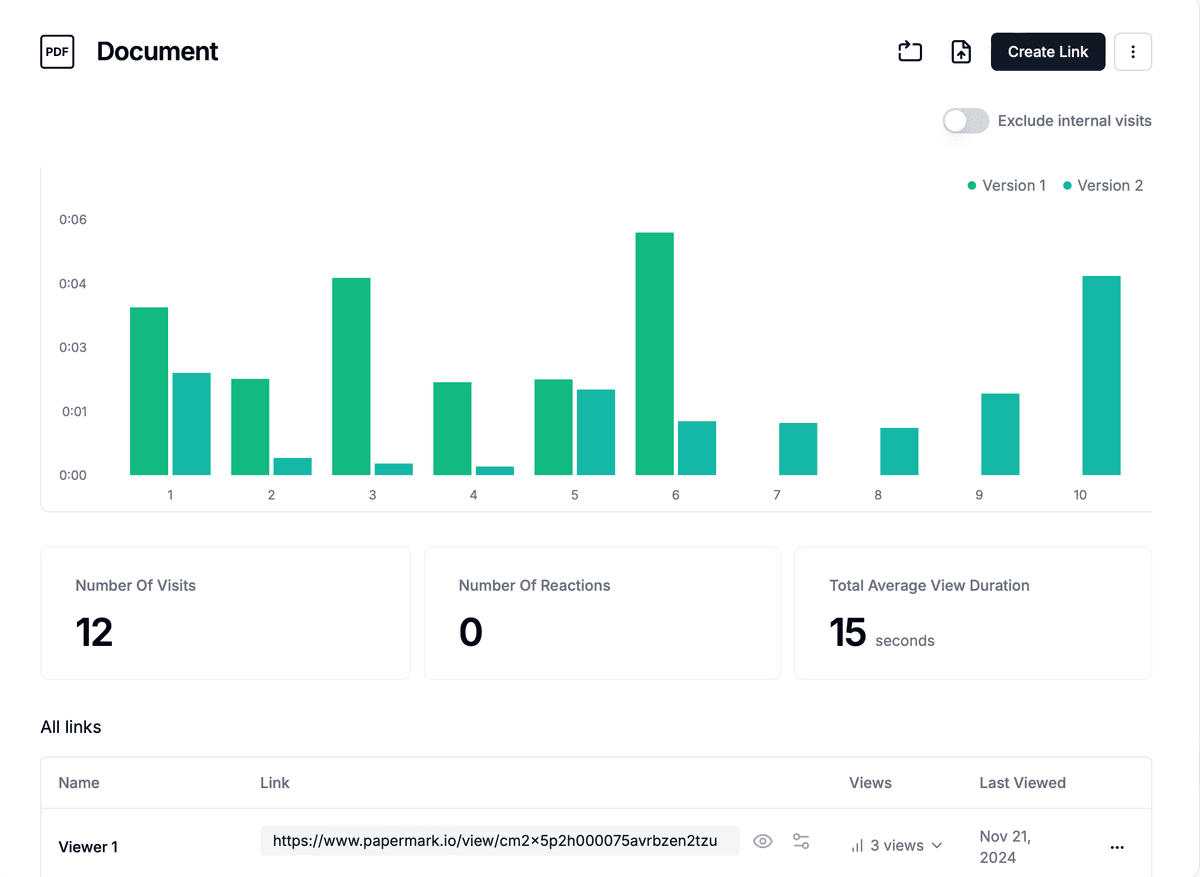
Analytics. Papermark records every visit: who, when, from where, and for PDFs, the time spent on each page. That is the signal for the follow-up, whether the reader is an investor, a customer or a hiring manager. You can read it in the dashboard or ask Claude for a summary through the connector. See document analytics for what is tracked.
One link that stays current. When the artifact changes, upload the new file as a new version of the same document. The link you already sent keeps working and shows the latest version, so there is no "please use this link instead" email.
Your brand. Links can run on your own domain with your logo, colours and link preview, set once in branding and applied to every link.
Page-by-page analytics on a Papermark link: every visitor, every page, and the time spent on each.
What it costs. The Free plan covers up to 50 documents and 50 links with page-by-page analytics. HTML and Markdown files and the MCP server for the Claude connector start on the Business plan, at €79/month or €59/month billed annually. When an artifact grows into a whole set of documents, such as a fundraising or due diligence folder, the same account opens a secure data room.