
Papermark launches on Product Hunt and becomes #1 Product of the Day
Today we are launching Papermark on Product Hunt as the open-source DocSend alternative for secure document sharing. By the end of the day, it was #1 Product of the Day.
Papermark started as a tweet and a weekend side project. We wanted a simple way to share a pitch deck with one link and see who actually read it, without paying for a closed tool that had stopped improving. So we built it in the open, with the code public on GitHub from day one.
Here is what launched.
1. Share any document with one link
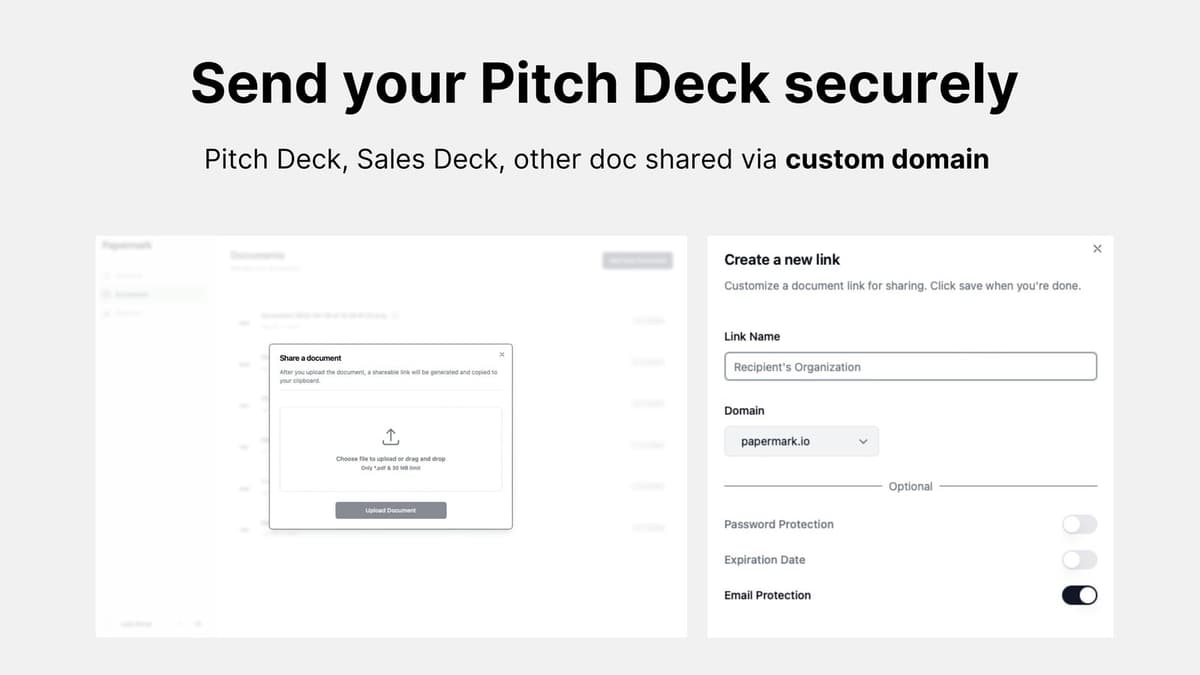
Upload a PDF or a deck and send a link instead of an attachment. You can edit, update or delete a link at any time, so the version your investor sees is always the one you meant to send.
Each document can have as many links as you need, one per investor or one per channel. That way you can see exactly where each view came from.
A short example: a founder sends the same deck to three funds. Instead of one shared link, she creates three links named after each fund. When one of them opens the deck at 11 pm and spends most of the time on the financials slide, she knows exactly who it was and what to talk about on the next call.
At launch the focus was PDFs and pitch decks. Today you can also upload PowerPoint, Word and Excel files, images and videos, and add Notion pages or web links. See the full list of supported file types.
2. Page-by-page analytics
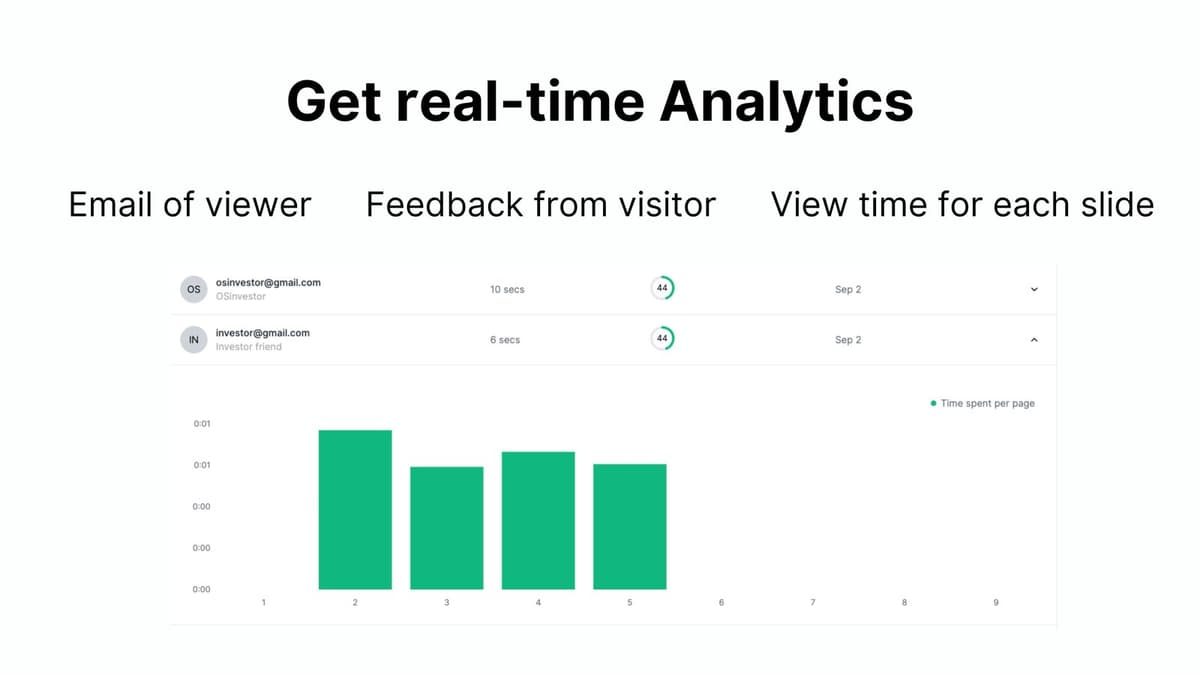
See who opened your document, how long they spent and on which pages. Papermark tracks every page view and its duration, and shows recent visitors in a dedicated table on each document. You also get a notification when someone views your document, so you can follow up while it is still fresh.
Page-level data matters more than a single "opened" event. A reader who spends two minutes on your team slide and skips the market slide is telling you something. With per-page time, you can see which part of your story lands and which part needs work before the next send.
More on how this works today in document analytics.
3. Email and password protection
A link should not be public just because it is a link. Every link can require the viewer's email before they see anything, can be locked with a password, and can be set to expire on a date you choose. You decide who gets in, and for how long.
Here is what each setting does:
- Require email to view: the visitor enters an email address before the document opens, so every visit in your analytics has a name attached. In today's product this is on by default for new links.
- Password protection: the visitor must type the password you set. Share the password through a different channel than the link.
- Expiration date: after the date you pick, the link stops working. The document stays in your account, so you can create a fresh link later.
Settings are per link, not per document. You can give your lead investor a link with no expiry and send a cold outreach link that expires in a week, both for the same deck.
4. Custom domains
Share documents from your own domain instead of ours. With custom domains, your links look like part of your company, which matters when the reader is an investor or a customer.
Today you add a domain once under Settings → Domains, verify it with a DNS record, and then pick it in the Domain field when you create a link. Custom domains for document links start on the Business plan. The custom domain guide walks through the DNS step.
5. Open source
The code is public. You can use the hosted version for free, or self-host Papermark and adapt it to your own needs.
6. How to share your first document, step by step
The app has grown a lot since launch day, but the core flow is the same. This is how it works in Papermark today:
- Sign up at app.papermark.com with your email or Google account.
- Open All Documents in the sidebar and click Add document. Pick a file from your computer, or drag one onto the page.
- Open the document and click Create Link. The link sheet opens.
- Give the link a Link name, for example the name of the fund or person you are sending it to. This name is what you will see in your analytics later.
- Choose your protection. Require email to view is already on. Under Security controls, add Password protection or an Expiration date if you need them, and leave downloads off unless the reader needs a copy.
- Click Save link, copy the URL and paste it into your email, Slack message or LinkedIn DM.
That is it. You do not need to send a new link when your deck changes: upload a new version on the same document and the existing links show the latest one. See document versions.
7. How to read your analytics
Once someone opens the link, the document page fills in:
- At the top you see Number of views, Average view completion and Total average view duration for the document.
- Below it, the All visitors table lists every visit with Name, Link, View Duration, View Completion, Last Viewed and Version.
- Click a visit to open its page-by-page chart and see how long that person spent on each page.
- Check the Link column to see which of your links each view came from.
By default you also get an email each time a link is opened. You can turn this off per link with Receive email notification for each link access. More on what is tracked in viewer analytics.
Tips for your first share
- One link per recipient. It costs nothing and makes every view in your analytics easy to read.
- Follow up on behaviour, not on time. A reader who went back to your pricing slide twice is a better follow-up than one who opened the deck once for ten seconds.
- Keep downloads off by default. Once a file is downloaded, you no longer see what happens to it.
Launch day in numbers
- #1 Product of the Day on Product Hunt
- 776 upvotes from founders, investors and developers
- 246 comments full of questions and feature requests
Most of the questions were about security, self-hosting and what comes next. Marc promised a public roadmap later in the launch week, and we have kept building in the open since.
What came next
Thank you to everyone who supported, commented and shared. Every piece of feedback from launch day went straight into the roadmap.
Three months later we launched again, this time with Papermark AI. In 2024 we added data rooms, and today Papermark is a secure, modern data room for fundraising, M&A and due diligence. You can see every launch on our Product Hunt page, and read how we prepared for this one in how to launch an open source project on Product Hunt.
Looking for a DocSend replacement? See how Papermark compares in our DocSend alternatives overview.