



document-sharing
Which file sharing service allows you to host HTML files in 2026?
Which file sharing service allows you to host an HTML file in 2026? Compare 7 options, from static hosts to a Papermark data room that adds HTML files.
An enterprise file sharing solution is a platform that lets an organization store, share, and govern documents at scale, with encryption, granular access controls, audit trails, and compliance certifications that consumer tools lack. This guide compares the 10 best enterprise file sharing solutions in 2026 on security, analytics, and real pricing, so you can pick the right one without a month of demo calls.
The short version for most teams: use Papermark for everything that leaves the building (client, investor, and partner sharing) because it is the only tool here with page-level analytics, dynamic watermarking, NDA gates, and an optional self-hosted open-source deployment, starting free and moving to €99/month for a full data room. Keep Microsoft 365 or Google Workspace for internal collaboration, add Box, Kiteworks, or Tresorit when you need heavyweight compliance or zero-knowledge encryption. The pattern that wins in 2026 is a dual-tool stack: one platform for internal editing, one purpose-built platform for secure external sharing.
No credit card required.
An enterprise file sharing solution is software that lets a company distribute and control documents across employees, partners, and clients while satisfying security and compliance requirements that consumer products cannot meet. Where a personal Dropbox or Google Drive link is designed for convenience, an enterprise platform is designed for governance: it knows who accessed a file, what they were allowed to do with it, and can prove all of that to an auditor months later. That distinction, control over the entire document lifecycle rather than just the handoff, is what separates enterprise file sharing from ordinary cloud storage.
In practice, enterprises rarely have one file sharing problem. They have two. Internal collaboration (co-editing a financial model, storing team files, versioning contracts) is best served by the tool already bundled with their productivity suite, usually Microsoft 365 or Google Workspace. External sharing (sending an investor a data room, delivering a client proposal, distributing regulated documents to partners) needs a different set of controls entirely: branded presentation, per-recipient tracking, watermarking, and instant revocation. Most of the tools below are strong at one of those jobs and weak at the other, which is why the "dual-tool strategy" recurs throughout this comparison.
The market reflects that split. Legacy secure-transfer tools and general cloud storage keep competing on price and storage, while a newer category (led by Papermark) competes on intelligence: which page did the recipient read, for how long, and can you trace a leak back to a single viewer. When you evaluate enterprise file sharing solutions in 2026, the questions that actually differentiate them are about analytics, watermarking, compliance certifications, and hosting control, not gigabytes.
The table below maps every platform to its entry price, the job it does best, and the one capability that sets it apart. Prices are quoted at the monthly (higher) rate per user or admin unless a vendor only publishes annual pricing, in which case that is noted. Papermark leads the list because it is the only solution that combines enterprise-grade external security with page-level engagement analytics and an open-source, self-hostable core.
| # | Platform | Starting price | Best for | Standout capability |
|---|---|---|---|---|
| 1 | Papermark | Free, then €99/month | External client, investor & partner sharing | Page-level analytics + dynamic watermarking + NDA gates + open source |
| 2 | Box | $20/user/month | Regulated-industry compliance | HIPAA, FedRAMP, FINRA, PCI DSS certifications |
| 3 | Microsoft OneDrive / SharePoint | $6/user/month | Microsoft 365 organizations | Native Office co-authoring + Entra ID conditional access |
| 4 | Google Drive (Workspace) | $8.40/user/month | Cloud-native internal collaboration | Best-in-class real-time editing |
| 5 | Dropbox Business | $18/user/month | Cross-platform file sync | Smart Sync local storage optimization |
| 6 | Citrix ShareFile | $18.15/user/month | Professional services workflows | Client portals, e-signatures, request lists |
| 7 | Egnyte | $22/user/month | Hybrid cloud + on-premises | Only true on-prem + cloud bridge, ransomware detection |
| 8 | Kiteworks | $25.50/user/month | Governance & managed file transfer | Private data network, CMMC-aligned, MFT + secure email |
| 9 | Tresorit | $14.50/user/month | Maximum privacy | Swiss-hosted zero-knowledge encryption |
| 10 | Nextcloud | Free (self-hosted) | Data sovereignty & self-hosting | Open-source, deploy on your own infrastructure |
I compared these ten platforms on the criteria that actually decide an enterprise purchase, not on storage size, which is essentially commoditized in 2026. Each tool was assessed against four dimensions and cross-checked with public pricing pages and third-party review data (G2, Capterra, TrustRadius) verified in September 2026.
Document security covers encryption (AES-256 at rest, TLS in transit, or zero-knowledge), watermarking, screenshot protection, granular permissions, and revocation. Analytics measures how deeply a platform tracks engagement, from a basic "file opened" log up to page-by-page dwell time per viewer. Compliance looks at certifications (SOC 2 Type II, ISO 27001, GDPR, HIPAA, FedRAMP, FINRA) and hosting options. Value compares feature breadth against transparent, published pricing rather than sales-gated quotes.
The single biggest differentiator in this set is analytics. Every platform can store and share a file securely. Only Papermark and, to a lesser extent, ShareFile give you engagement intelligence on external documents, and only Papermark surfaces true page-level data. Everything else, from Box to Google Drive, treats a shared file as a black box once it leaves your account. For a fuller pricing-only breakdown, see the virtual data room cost guide and the best file sharing software roundup.
The matrix below shows which security and intelligence features each platform includes out of the box. It makes the analytics gap obvious: dynamic watermarking and page-level engagement tracking, the two features enterprises most often ask for when sharing sensitive documents externally, are near-universally absent outside Papermark.
| Feature | Papermark | Box | OneDrive | Google Drive | Dropbox | ShareFile | Egnyte | Kiteworks | Tresorit | Nextcloud |
|---|---|---|---|---|---|---|---|---|---|---|
| Page-level analytics | Basic | |||||||||
| [Dynamic watermarking](/dynamic-watermarking) | Limited | |||||||||
| Screenshot protection | ||||||||||
| NDA / e-sign gate | ||||||||||
| Custom domain / branding | Limited | Limited | Limited | Limited | ||||||
| SSO / SAML | Limited | |||||||||
| Self-host option | ||||||||||
| Open source |
Here are the 10 best enterprise file sharing solutions in 2026, ranked by how well they handle secure sharing, analytics, compliance, and transparent pricing.
Website: papermark.com
Pricing: Free plan available. Data Rooms from €99/month (7-day free trial). Self-hosting via the open-source codebase. Custom Enterprise plan for SSO and advanced compliance.
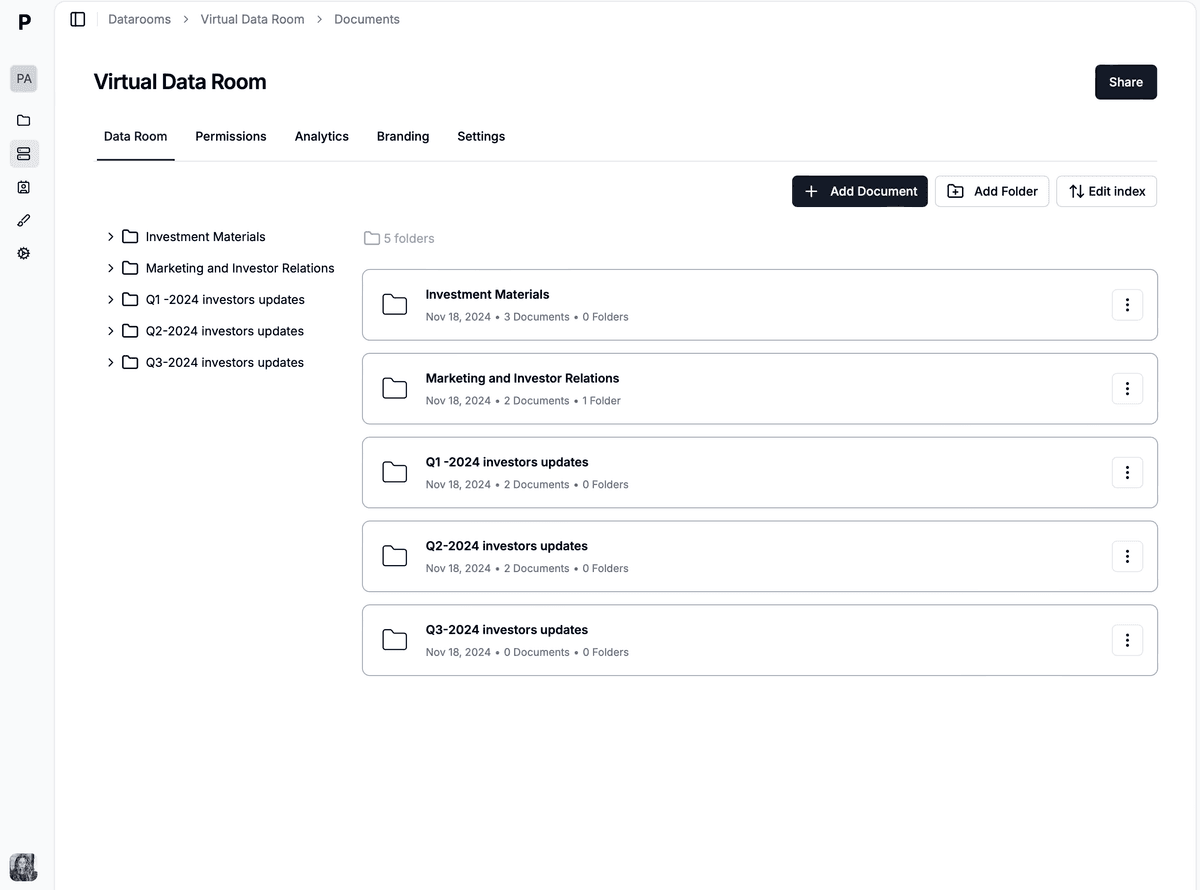
Papermark is an open-source, secure document sharing and data room platform built for the moment a file leaves your organization. You upload a document or a whole folder, get a branded link on your own custom domain, and every recipient's activity is tracked page by page: who opened it, which pages they read, how long they spent, and whether they forwarded it. That engagement intelligence is the feature enterprises most often say is missing from Box, Dropbox, and Google Drive, and it is native to every Papermark plan.
Security is where Papermark closes the gap with legacy virtual data rooms at a fraction of the cost. Dynamic watermarking stamps each viewer's email, IP, and timestamp onto every page to deter and trace leaks; screenshot protection and view-only mode block casual capture and downloads; and NDA gates require acceptance before any file opens. Access is controlled per link and per recipient, so you can revoke a viewer instantly or expire a link on a deadline. Because Papermark is open source under an AGPL license, security-conscious teams can also self-host the entire platform for full data sovereignty, something no other tool on this list except Nextcloud offers.
Papermark suits any enterprise that shares sensitive material externally: fundraising and M&A data rooms, client proposals, board decks, sales collateral, and regulated document distribution. It is GDPR, HIPAA, and CCPA compliant, with SOC 2 Type II and EU (Frankfurt) hosting available on higher plans. Real customers use it exactly this way, from emerging VC funds running LP data rooms to manufacturers distributing technical documents to field teams.
Before the feature-by-feature detail, it helps to see the external-sharing use case in practice. Medusa, a fast-growing open-source e-commerce platform, uses Papermark to distribute marketing materials and run sales prospecting, tracking exactly which prospects engage with which documents rather than sending untracked attachments.
The same pattern shows up across segments. A first-time VC fund manager described the core pain most enterprises hit with generic cloud storage:
"We spend an awful lot of time creating an awful lot of content that probably never gets read, and we have no visibility into which slides investors actually engage with."
That is the exact gap Papermark's page-level analytics close, and it is why teams replacing Intralinks, DocSend, or a shared Google Drive folder tend to consolidate external sharing onto a single purpose-built platform.
Website: box.com
Pricing: Business $20/user/month, Business Plus $33/user/month, Enterprise $47/user/month (monthly billing, 3-user minimum). Enterprise Plus and Advanced are custom-quoted.
Box is the compliance heavyweight of enterprise file sharing. Its Enterprise tiers carry an unusually deep certification stack, including HIPAA, FedRAMP, FINRA, PCI DSS, SOC 1/2/3, and ISO 27001, which makes it a default in healthcare, financial services, and government where an IT team hands you a long compliance checklist. Box Shield adds classification-based access policies, data loss prevention, and threat detection, and the platform integrates with 1,500+ enterprise apps.
The trade-offs are cost and complexity. The admin console is built for a dedicated IT department, not a founder, and there are no engagement analytics: Box can tell you who accessed a file but not how they engaged with it page by page. Advanced compliance features require the Enterprise or Enterprise Plus tiers, pushing real per-seat cost toward $47/user/month and up.
Website: microsoft.com
Pricing: Included in Microsoft 365 Business plans, from $6/user/month (Basic) to $12.50 (Standard) and $22 (Premium), billed annually; monthly billing is higher.
If your company already pays for Microsoft 365, OneDrive and SharePoint are effectively free, and the real-time co-authoring in Word, Excel, and PowerPoint remains excellent. Microsoft Entra ID (formerly Azure AD) conditional access gives IT strong governance over internal files, and version history plus Purview retention cover compliance for documents that stay inside the tenant.
Where the Microsoft stack falls short is external sharing. A OneDrive link sent to an outside investor looks like a generic consumer link: no branding, no watermarking, no page-level tracking, and a permissions dialog that confuses recipients. SharePoint's inherited permissions are notoriously hard to reason about, and neither tool tells you whether a client actually read page 12 of your proposal. For internal work Microsoft is hard to beat; for external professional sharing, most teams pair it with Papermark.
Website: workspace.google.com
Pricing: Business Starter $8.40/user/month, Business Standard $16.80, Business Plus $26.40 (flexible monthly plan); annual billing is $7 / $14 / $22. Business tiers cap at 300 users.
Google Drive, part of Google Workspace, still sets the standard for real-time collaboration: dozens of people can edit a Doc, Sheet, or Slides deck simultaneously with no friction. The enterprise features are solid too, with context-aware access, DLP, Vault retention, and 6,000+ integrations, and every 2026 tier now bundles Gemini AI.
The external-sharing weakness mirrors OneDrive. Sharing a confidential deck from Drive looks like sharing from a personal Gmail account: no custom branding, no watermarks, and no page-level engagement data. You often cannot tell whether a recipient even opened the file, let alone which pages held their attention. Drive is the right home for internal, cloud-native collaboration, but it is not an external document intelligence platform.
Website: dropbox.com/business
Pricing: Standard $18/user/month, Advanced $30/user/month (monthly billing, 3-user minimum). Enterprise is custom-quoted.
Dropbox pioneered cloud file sync, and its engine is still best-in-class. Smart Sync shows every team file in Finder or Explorer while only downloading what you open, which saves meaningful local storage. Dropbox Transfer handles files up to 100 GB, version history runs to a year on Advanced, and the mobile apps are polished.
For enterprise external sharing, though, Dropbox has not evolved much. A Dropbox link to a client looks identical to a personal one: no branding, no analytics, and security limited to a basic password. At $18 to $30/user/month you pay enterprise prices for what is fundamentally a consumer product with an admin console added. It excels at reliable sync; it is not a document-intelligence or governance platform.
Website: sharefile.com
Pricing: Advanced $18.15/user/month, Premium $28.60, Virtual Data Room $77 (monthly billing; 3-user minimum, 5 for VDR).
Citrix ShareFile is purpose-built for professional services, and it shows. Client portal templates, built-in e-signatures, document request lists, and Outlook integration feel designed by someone who has worked in an accounting or law firm. The Premium tier supports HIPAA, FINRA, and SEC compliance workflows, and the dedicated Virtual Data Room plan adds granular permissions, watermarking, NDA enforcement, and real-time audit trails for M&A, audits, and litigation.
The cost stings and the interface feels dated. At $18.15 to $77/user/month, ShareFile is one of the pricier options here, and its VDR tier still lacks the page-level engagement depth of a modern platform. For firms with complex approval workflows it is hard to match; for teams that mainly need branded, tracked external sharing, Papermark delivers the analytics and watermarking at a lower, flat cost.
Website: egnyte.com
Pricing: From $22/user/month (Business, billed annually); Enterprise Lite $39 and higher tiers $48+, custom for large deployments.
Egnyte occupies a genuinely unique niche: it is the only platform here that bridges on-premises storage and the cloud in a single interface. If your architecture or engineering firm keeps hundreds of gigabytes of CAD files on a local NAS but wants cloud access and backup without migrating everything, Egnyte handles that seamlessly. Its ransomware detection monitors file-behavior patterns and can freeze suspicious activity before encryption spreads.
The setup requires hands-on IT involvement, and the interface is built for administrators rather than end users, so it is a poor fit for teams without dedicated IT. Egnyte is also not specialized for polished external sharing: it governs storage and access well, but does not offer branded rooms or page-level engagement analytics.
Website: kiteworks.com
Pricing: Business from $25.50/user/month (5 to 100 users, files up to 2 GB, 1 TB storage). Enterprise is custom-quoted by user count and hosting location.
Kiteworks consolidates secure email, file sharing, web forms, managed file transfer (MFT), and SFTP into a single "private data network" governed by zero-trust, NIST-CSF-aligned policies. It centralizes audit logs, classification, and access control across every channel, which is why it is common in defense supply chains and heavily regulated enterprises. The Enterprise package supports the majority of CMMC 2.0 Level 2 practice requirements, plus FIPS 140-2 validation, next-gen DRM, and BYOK.
Kiteworks is governance-first, not experience-first. It is priced and packaged for compliance teams, the Business tier caps files at 2 GB, and it lacks the page-level analytics and branded external rooms that revenue teams want. Enterprises typically deploy it as the compliant transport layer and pair it with a purpose-built tool for client-facing document intelligence.
Website: tresorit.com
Pricing: Business plans from $14.50/user/month; Enterprise is custom-quoted (typically 50-user minimum).
Tresorit is the choice for encryption purists. Its Swiss-hosted, zero-knowledge architecture means even Tresorit's own engineers cannot access your files, which is a hard requirement for some law firms handling privileged communications and healthcare organizations under strict privacy rules. It adds DRM-style controls (expiry, download limits) and encrypted email attachments on top.
The trade-off for that encryption is fewer integrations by design, noticeable performance overhead on large files, and basic collaboration compared to Google or Microsoft. Tresorit protects data at rest and in transit extremely well, but it offers no page-level engagement analytics, so you gain privacy at the cost of visibility into how recipients actually use documents.
Website: nextcloud.com
Pricing: Community edition free (self-hosted, no user limit). Enterprise from €71.29/user/year (100-user minimum), scaling down per seat at higher volumes.
Nextcloud is the leading open-source, self-hosted file sync and collaboration platform. Because you run it on your own infrastructure, no third party ever touches your data, which appeals to public-sector bodies, universities, and privacy-driven enterprises. It is extensible with 200+ apps, integrates with existing storage and directory systems, and the paid Enterprise subscription adds hardening, SLAs, and support.
Nextcloud is a general collaboration platform rather than a purpose-built external-sharing tool. It can be configured for secure sharing, but out of the box it lacks dynamic watermarking depth, screenshot protection, and page-level analytics, and self-hosting requires engineering resources to run and patch. Where a team wants open-source control and dedicated external document intelligence, self-hosted Papermark is the closer fit; Nextcloud wins when the goal is a broad, sovereign collaboration suite.
No single platform is best at both internal collaboration and external sharing, so the smartest enterprises in 2026 run two tools deliberately rather than forcing one to do both jobs badly. Internally, they use whatever ships with their productivity suite (Microsoft 365 or Google Workspace) for real-time editing, team storage, and day-to-day documents. Those tools are already paid for and their co-authoring is genuinely excellent.
For everything that leaves the building, they use a purpose-built external platform. This is where branded presentation, per-recipient tracking, watermarking, NDA gates, and instant revocation matter, and where consumer-grade links quietly leak information and offer zero visibility. Papermark is the most common pick for this layer because it adds page-level engagement intelligence that neither Microsoft nor Google provides.
The economics work in your favor: an internal seat costs roughly $6 to $22/user/month, and Papermark for external sharing starts free and moves to €99/month flat for a full data room, far below what legacy VDRs like Intralinks or Datasite charge on per-page models. The return is not just security, it is intelligence. Knowing that an investor spent eight minutes on your financials and twelve seconds on the team slide changes how you follow up, and that is the kind of signal a shared folder can never give you. For deeper background, see the secure file sharing guide and encrypted file sharing.
The most frequent mistake is buying on storage and price alone. Gigabytes are commoditized; what separates these tools is analytics, watermarking, compliance, and revocation. Teams that optimize for the cheapest cloud storage often discover a year later that they cannot answer "who read page 12 of the disclosure, and when," which is exactly the question an auditor or an investor-relations lead needs answered.
A second mistake is using one tool for both internal and external work. A generic Google Drive or Dropbox link is fine inside a trusted team, but the moment it goes to a client, an investor, or a regulator, the lack of branding, watermarking, and per-recipient tracking becomes a liability. "Anyone with the link" is one click away from oversharing, and shadow-sharing is invisible to compliance.
The third mistake is accepting sales-gated pricing without modeling total cost. Custom-quote and per-page platforms routinely run two to ten times their initial estimate once overages and add-ons land. Wherever possible, prefer transparent, flat, published pricing (Papermark, Box, Dropbox, ShareFile publish rates) so budgeting is predictable and procurement is fast.
For the external half of the dual-tool stack, Papermark is built specifically for enterprise file sharing that has to be secure, branded, and measurable. You share a single document or a full virtual data room on your own custom domain, and Papermark tracks engagement at the page level: which recipient opened the file, which pages they read, how long they lingered, and whether the link was forwarded. That intelligence is what turns file sharing from a blind handoff into a feedback loop, and it is native to every plan rather than an enterprise add-on.
On the security side, Papermark covers the controls enterprises ask for most. Dynamic watermarking stamps each viewer's email, IP, and timestamp onto every page so a leaked document traces back to one recipient; screenshot protection and view-only mode stop casual capture and downloads; NDA gates require acceptance before any file opens; and access is revocable per link and per recipient in one click. Papermark is GDPR, HIPAA, and CCPA compliant, offers EU (Frankfurt) hosting and SOC 2 Type II on higher plans, and, because it is open source, can be fully self-hosted for organizations that require complete data sovereignty. For a security-first comparison, see secure file sharing and the security overview.
Pricing stays transparent and flat: a free plan for basic document sharing, Data Rooms from €99/month with a 7-day free trial and five team members, and a custom Enterprise plan for SSO and advanced compliance. Compared with per-seat cloud storage that lacks analytics, or per-page legacy VDRs that lack transparency, Papermark gives regulated and revenue teams enterprise-grade external sharing without enterprise-grade lock-in.
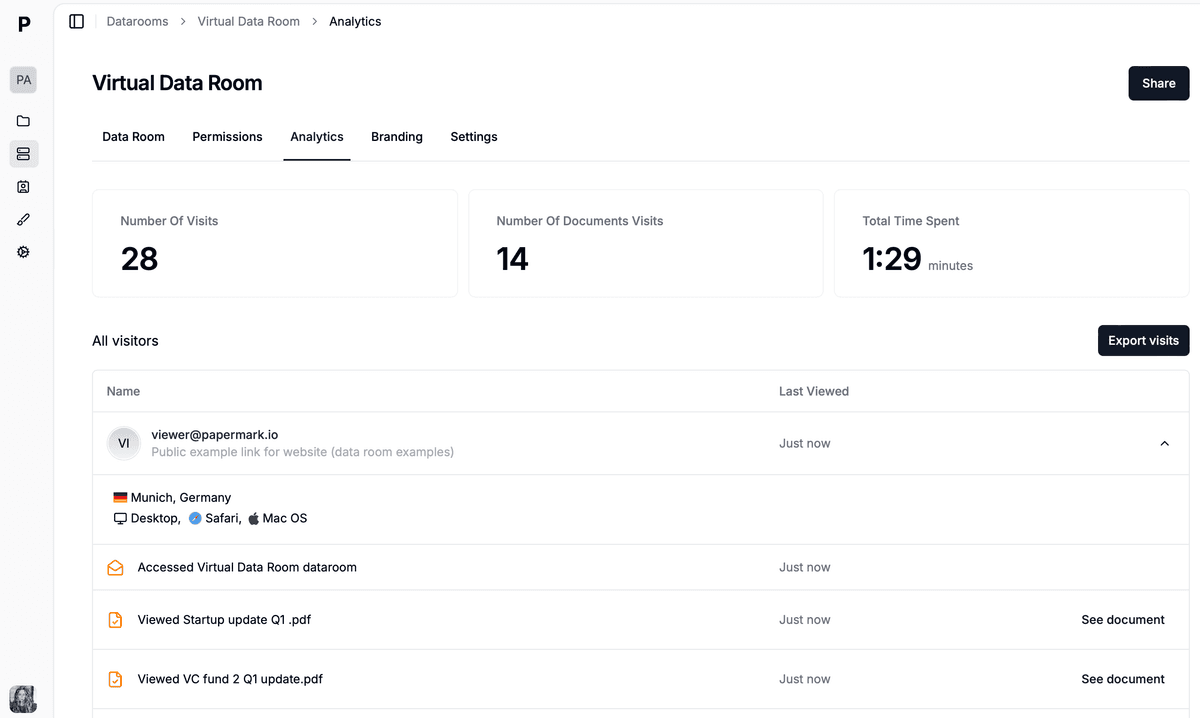 Papermark page-level analytics show which recipient read which page of a shared enterprise document, and for how long.
Which file sharing service allows you to host an HTML file in 2026? Compare 7 options, from static hosts to a Papermark data room that adds HTML files.
10 secure file sharing tools for accountants in 2026, ranked by encryption, client portal, audit trail, and free-plan availability. Includes Papermark, ShareFile, Tresorit, Box, OneDrive.
Encrypted file sharing in 2026 - how AES-256 + TLS 1.3 actually works, the 7 tools worth comparing, and when you should upgrade to a virtual data room instead.