
How visitors can download specific folders from a data room?
Visitors don't always want everything. Sometimes a buyer only needs the financials folder, or counsel only needs the legal subfolder. Folder downloads let visitors grab a specific part of a data room as a single archive, with the folder structure preserved.
Folder downloads are available on the Data Rooms plan and above. Downloads must also be enabled on the link.
What folder download does
When a visitor downloads a folder:
- Every file inside (and inside its subfolders) is included
- The folder hierarchy is preserved inside the archive
- Files they don't have access to are skipped automatically
- A progress indicator shows the packaging status
- Watermarks are applied to documents if the link has watermarking enabled
- The download is protected by OTP if bulk download with OTP is enabled
The result is a .zip archive with the same structure as the data room, so visitors can navigate it offline exactly the way they navigate it online.
Step-by-step: enable folder downloads
Folder downloads are part of the standard download experience. To enable them:
- Log into Papermark and open your data room.
- Go to the Links tab.
- Open the link settings.
- Toggle Allow downloads on.
- Optionally, enable Email verification to power the OTP flow.
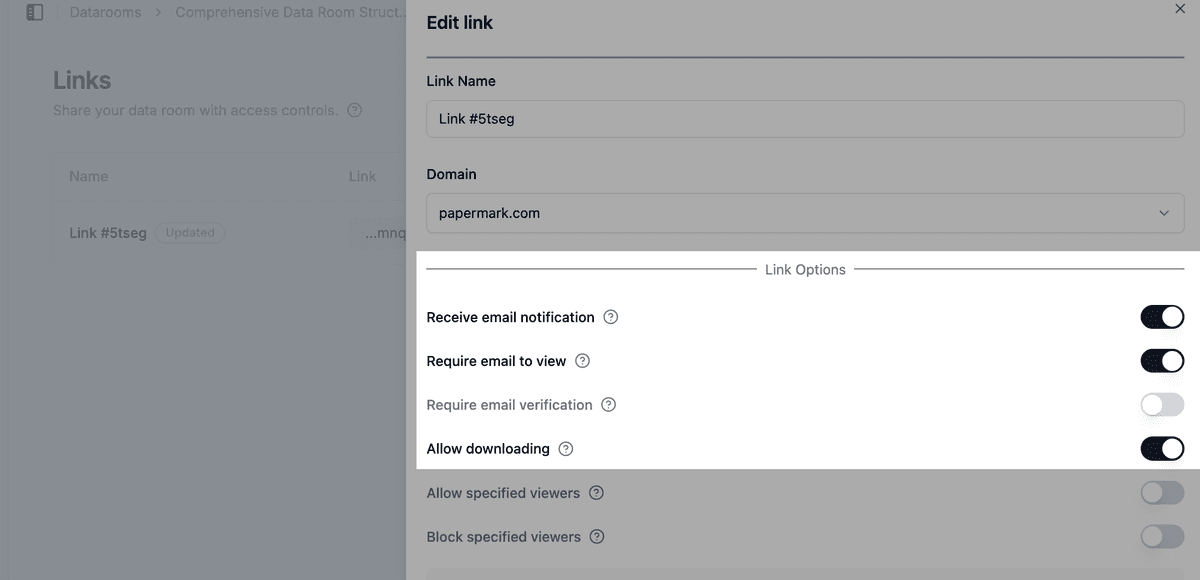
- Save the link.
Once downloads are enabled, every visitor on this link can download folders, subfolders, or individual files.
Visitor flow: how to download a folder
This is what your visitors do:
- Open the data room link and verify their email.
- Navigate to the folder they want to download.
- Click the three-dot menu on the folder, or check the box next to the folder name.
- Click Download.
- Enter the one-time password (if OTP is enabled).
- The archive downloads to their browser with the folder structure intact.
For an end-to-end view of the download experience, see bulk downloads with OTP.
Folder download vs. full data room download
| Feature | Folder download | Full data room download |
|---|---|---|
| Who triggers it | Any visitor with download access | Admin only |
| Scope | One folder and its subfolders | Entire data room |
| OTP required | Yes, if enabled on the link | No, admin only |
| Watermarks | Applied per link settings | Optional |
| Use case | Visitors grabbing what they need | Owners archiving the room |
For admin-side full data room downloads, see how to download an entire data room (admin only).
How permissions are respected
Folder downloads automatically exclude files the visitor doesn't have access to. If a folder contains 50 documents but the visitor has access to only 30, the archive contains just those 30, organized into the same subfolders.
This relies on:
- Granular file permissions per file
- Visitor groups per group
- Default permissions for new documents per upload
The visitor sees no indication that other files exist beyond what they're allowed to access.
Use cases
- Buyer counsel: download just the legal folder for offline review.
- Financial advisors: pull the financials folder during a due diligence session.
- Auditors: grab a specific section of evidence for an audit working paper.
- Investors: download only the materials relevant to their decision (deck, financials, cap table).
Frequently asked questions
Related guides
- How to bulk download documents with OTP verification
- How to allow file downloads from your data room
- How to download an entire data room (admin only)
- Audit logs
Need help? Contact support@papermark.com or use the in-app chat.