
Papermark ranks in the top 1% of fastest-growing companies on Stripe
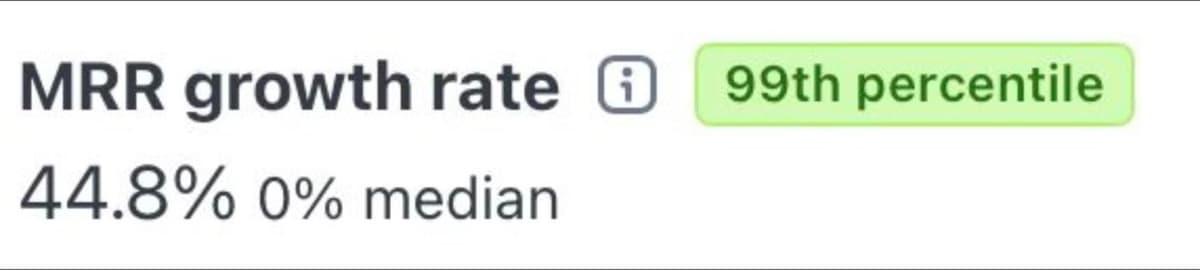
Stripe released a new beta feature that benchmarks your growth against similar companies. When we checked our numbers, Papermark was in the top 1% of fastest-growing companies on Stripe.
We are a team of two founders, fully bootstrapped, and we share our numbers in public. Seeing Papermark in the same group as companies we have followed and admired for years was a big moment for us.
A benchmark is not a goal in itself. But it is a useful check: are we growing because the market is growing, or because people actually choose Papermark? This number told us the second one is true.
1. What Stripe compared us against
Stripe groups you with companies of a similar size and model, then ranks your MRR growth rate inside that group. Our cohort:
- ARR range: $100k to $500k
- ARPU: $100 to $500
- Customers: B2B
Papermark landed in the 99th percentile for MRR growth in that cohort.
The cohort matters. We are not compared with companies ten times our size, or with consumer apps that charge a few dollars a month. We are compared with B2B products at a similar stage, selling to similar buyers. That makes the result a fair read on how fast Papermark is growing right now.
2. What we shipped on the way, month by month
Most of the growth came from one decision: turning Papermark from a document sharing tool into a secure, modern data room.
Here is what that looked like in 2024, one release at a time.
March
- Folders and subfolders: organize documents by deal or topic without breaking any link you already sent.
- Page previews: see page thumbnails on the analytics graph, so you know which page held a reader's attention.
- Links to specific pages: send an investor straight to the page you want to discuss.
- Visitor tags and filters for internal visits: tell verified visitors and your own team apart from real readers.
April
- We launched Papermark data rooms, so you can share many documents with one link and track every visitor. See the release note.
- Visitors who downloaded are now tagged, so you know who has a copy of a file.
- Feedback questions at the end of a document, set per link.
June
- Excel, CSV, ODS and Google Sheets support, with analytics for each sheet.
- A new onboarding flow that lets you start with a data room right away.
- Security updates: better password handling, email verification and visitor notifications.
July
- Bulk file uploads that resume if your connection drops, so a full deal folder goes up in one go.
- One-click agreements: ask visitors to accept an NDA before they see anything.
- Branding preview and preview links: check how a room looks before you send it, without adding a view to your analytics.
- Data room improvements, including duplicating a room for the next deal.
August
- Drag and drop, with bulk moving and deleting of documents.
- Custom order for the document index, so a buyer sees files in the order you choose.
- More visitor analytics: device, document version and page thumbnails for each visit.
- The move to app.papermark.com, with every existing link still working.
September
- File-level permissions and dynamic watermarks: give each group of visitors access to specific files, and mark every page with the viewer's details.
- Reusable link presets, so new links start with your settings.
- PowerPoint and Word support next to PDF and Excel.
Every release is listed in our changelog.
3. What customers use it for
Founders use Papermark to share pitch decks and run a data room for their round. Deal teams use it for M&A and due diligence, where they need to control who sees which file. Sales teams use it to send proposals and see which pages a buyer actually read.
The common thread: the documents matter, and the sender wants to know what happens after they hit "send". That is why page-by-page analytics, permissions and watermarks keep coming up in customer calls.
4. What drove the growth
- Shipping almost every day. Data rooms, granular permissions, watermarks and a new onboarding flow all shipped in 2024.
- Listening to customers. Every support request is answered by a founder.
- Building in public. Monthly updates on LinkedIn and X bring new users and keep us accountable.
None of these is a growth hack. They are habits. Answering support ourselves means we hear about a missing feature on Monday and can ship it by Friday. Sharing our numbers in public means people follow the journey and try the product.
5. How we build in public, step by step
People often ask what "building in public" means for us in practice. Here is the routine behind this benchmark.
- Share real numbers. We post revenue and growth, not only launches. This Stripe benchmark is one example.
- Post a monthly update on LinkedIn and X. Each update covers what we shipped, what the numbers did and what we want to try next.
- Answer every support request as founders. Iuliia and Marc read every message. Most feature requests come from these conversations.
- Ship the small things fast. If a customer asks on Monday and the change is small, it can be live by Friday.
- Write it down in the changelog. Every release gets a note in our changelog, so customers can see what changed and when.
- Repeat next month. The habit matters more than any single post.
The loop is simple: customers tell us what is missing, we ship it, and we tell everyone what we shipped. Each update brings new people to the product, and some of them send the next feature request.
6. What we learned
Two founders can compete in a market that has been led by large, slow incumbents for years. Speed is the advantage: short feedback loops, no meetings about meetings, and a product that changes every week.
We also learned that customers are happy to pay for a data room that is fast to set up and simple to use. Papermark is self-serve: sign up, build a room, share a link.
7. How to set up a data room today
If you want to try what our customers use, this is how a data room comes together in Papermark.
- Create the room. Sign up and choose a data room in onboarding. See how to create a data room.
- Add folders and files. Build a folder structure, for example Financials, Legal and Team, then bulk upload or drag and drop your documents.
- Add your branding. Upload your logo and colors, and check the result in the branding preview.
- Set permissions. Create groups for each party and choose which files each group can see. See groups and granular permissions.
- Protect the link. Turn on email verification, an NDA before access and a dynamic watermark.
- Share and follow up. Send one link, then see who opened which file and how long they spent on each page.
8. What's next
Next goal: $1M ARR.
We will keep doing the same things: ship, talk to customers and share what we learn. If you are preparing a fundraise or a deal, see our plans and pricing or start a data room today.