
How to cancel your Papermark plan?
You can cancel your Papermark subscription at any time from your team billing settings. Cancellation is self-service, takes about a minute, and you keep access until the end of the current billing period.
Cancelling your plan does not delete your account or your data. To remove your account entirely, see how to delete your account.
Before you cancel
Consider these alternatives first - they often solve the underlying need without losing access:
- Pausing your plan keeps your account active without billing. See how to pause your plan.
- Freezing a data room stops activity and billing impact for that specific room while keeping it intact. See how to freeze a data room.
- Downgrading to a lower tier preserves access to most features at a lower cost. See how to select the right plan.
Step 1: Open billing settings
- Log into Papermark.
- Click your team name in the top-left, then Settings.
- In the left sidebar, click Billing.
You'll see your current plan, billing cycle, next charge date, and payment method.
Step 2: Click "Cancel subscription"
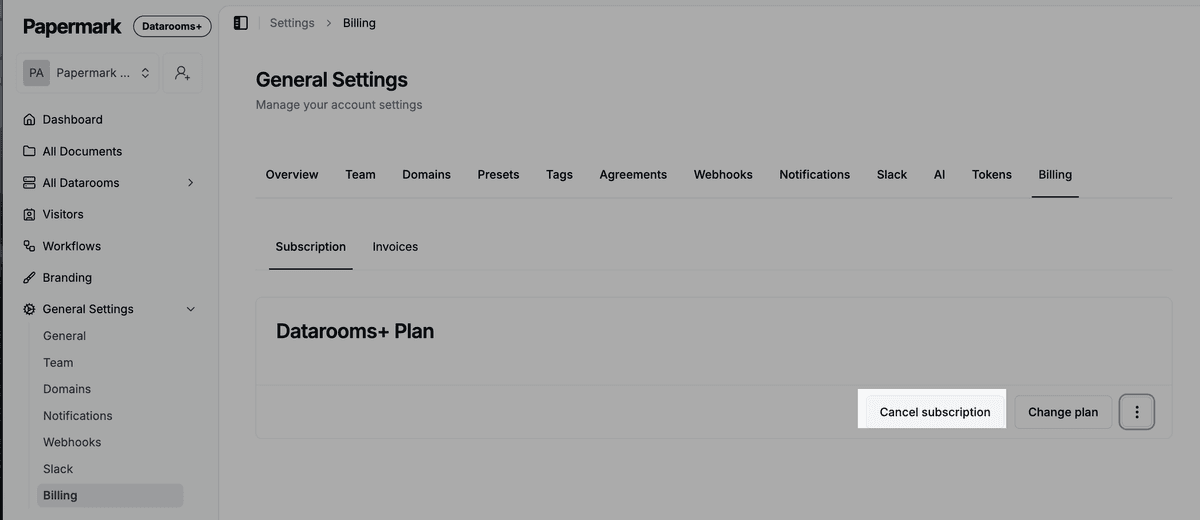
- Scroll to the Current plan section.
- Click Manage subscription to open the billing portal.
- Click Cancel plan.
- Confirm the cancellation reason (optional).
- Click Confirm cancellation.
You'll receive a confirmation email with your cancellation date.
What happens after cancellation
| Item | What happens |
|---|---|
| Access to paid features | Continues until the end of your current billing period |
| Your data rooms and documents | Stay intact and accessible |
| Active links | Continue working until the end of the billing period |
| Analytics and audit logs | Stay accessible during the active period |
| Team members | Stay on the team until downgrade |
| After period ends | Account moves to the free tier; paid features become read-only |
You will not be charged again. No refund is issued for the unused portion of the current period; you keep using paid features until the period ends.
Step 3 (optional): Export your data
Before the billing period ends, export anything you want to keep using these tools:
- Export data room visits
- Export document visits
- Download data room as admin
- How to export Papermark analytics
For programmatic exports, use the Papermark API or the CLI.
How to reactivate
If you cancelled in error, or want to come back, you can reactivate at any time:
- Log into Papermark.
- Go to Settings, Billing.
- Click Reactivate plan or Upgrade.
- Pick the plan and billing cycle.
Your data rooms, documents, links, analytics, and team members reappear with full access. Nothing was deleted - cancellation only removed billing.
Frequently asked questions
Related guides
- How to pause your Papermark plan
- How to freeze a data room
- How to select the right plan
- Invoices and billing history
- How to delete your account
Need help? Contact support@papermark.com or use the in-app chat. We're happy to walk you through options before cancellation.