How to control document access during a deal: 2026 permission matrix
·12 min read
Marc Seitz
The best way to control document access during a deal is to put the documents in a secure data room, give each party its own group with least-privilege permissions, keep sensitive files view-only with dynamic watermarks, require verified email identity, log every action, and revoke access the moment a party exits. Papermark runs exactly that setup, and this guide gives you the permission matrix and the 7 steps to build it.
Quick recap
Document access control in a deal means deciding, folder by folder, which party can see, download or never see each document, and changing that as the deal moves from teaser to close.
Five controls do the work: group-based least-privilege permissions, view-only and download restrictions, dynamic watermarking, verified identity (email verification, NDA gate, allow-lists), and audit logs with instant revocation.
Least privilege means every party starts with no access and gets only the folders its role needs at the current stage.
Competing bidders each get their own group, so they never see each other's names, activity or documents.
A permission matrix maps folders (rows) against parties (columns) and is the single document your deal team agrees on before the first invite goes out.
Access widens by stage: teaser, NDA and CIM, IOI and management presentation, LOI and confirmatory diligence, then signing to close.
No control stops a phone photo. Watermarks make a leak traceable, which is why they belong on every sensitive folder.
Papermark includes groups, granular file-level permissions, dynamic watermarking, NDA gating and email verification on the Data Rooms plan at $99/month, with unlimited data room visitors.
1. What is the best way to control document access during a deal?
Use a secure data room with one permission group per party, a "no access" default, view-only plus dynamic watermarks for sensitive files, verified identity on every link, an audit log, and revocation the moment a party leaves the process. That sentence is the whole method. Everything else in this guide is how to apply it without slowing the deal down.
The reason this works is that a deal is not one audience. A sell-side process might have eight bidders who signed the NDA, three who made the shortlist, one who has exclusivity, and around them a ring of lawyers, accountants, lenders and sometimes a clean team. Each of those parties needs a different slice of the same document set at a different time. Email and shared drives give you one permission set per file. A virtual data room gives you as many as you have parties.
Document access control is also what makes a process defensible afterwards. When a losing bidder later launches a competing product, or a buyer claims after closing that a liability was never disclosed, the question is always the same: who saw what, and when? A data room with per-party groups and a log answers it in minutes. If you are still choosing a platform, our comparison of the best virtual data rooms covers permissions, pricing and bidder management across the main providers.
2. The 5 controls that matter (and what each one stops)
Five controls make up document access control in any serious deal room. Each one stops a specific failure, and none of them is enough alone. The order below is the order you should configure them in.
Control 1: group-based, least-privilege permissions
Group-based permissions mean you grant folder and file access to a named group ("Bidder A", "Buyer counsel", "Clean team") rather than to individuals one by one. Least privilege means each group starts with no access and receives only what its role needs at the current deal stage.
What it stops: the wrong party opening the wrong folder, and one bidder seeing another bidder's existence. What it doesn't stop: misuse by someone who legitimately has access. In Papermark, granular permissions are set per group on every folder and file, with separate view and download rights.
Control 2: view-only, download and print restrictions
View-only access lets a reviewer read a document in the browser without saving a copy. Turning off download on financials, customer contracts and HR files is the single biggest reduction in leak risk you can make, because a downloaded file can never be recalled.
What it stops: files leaving the room in bulk. What it doesn't stop: screenshots and photos of the screen, which is why the next control exists.
Control 3: dynamic watermarking
Dynamic watermarking stamps each viewer's email, IP address and the date and time across every page they open. Each session produces a different watermark, so any copy that surfaces later points to one person and one session. Our guide to watermarking documents for potential acquirers covers the exact watermark text to use.
What it stops: anonymous leaks. What it doesn't stop: the leak itself. A watermark deters and traces, it doesn't prevent.
Control 4: verified identity (email verification, NDA gate, allow-lists)
Verified identity means nobody reaches a document without proving who they are. Email verification sends a one-time code to the address the visitor enters, an NDA gate requires acceptance before the first page loads, and an allow-list limits a link to named emails or a buyer's domain.
What it stops: forwarded links being opened by strangers, and fake emails producing a clean watermark. What it doesn't stop: an authorised reviewer sharing their screen. In Papermark, NDA gating and email verification are link settings.
Control 5: audit logs and instant revocation
An audit log records every view, download and access attempt by visitor, document and time. Revocation means you can deactivate a link or group the moment a bidder drops out or exclusivity ends.
What it stops: a departed party keeping access, and disputes about what was disclosed. What it doesn't stop: use of what was already downloaded, which is why Control 2 comes first.
Control
What it stops
What it doesn't stop
Papermark setting
Group-based least privilege
Wrong party in wrong folder
Misuse by an authorised reviewer
Permissions > Groups > File permissions
View-only, no download
Bulk export of files
Screenshots and phone photos
Download right per folder or file
Dynamic watermarking
Anonymous leaks
The leak itself
Dynamic watermarking toggle on the link
Verified identity
Forwarded links, fake emails
Screen sharing by a verified viewer
Email verification, NDA, allow-list
Audit log and revocation
Lingering access, disclosure disputes
Files already downloaded
Analytics, audit log, deactivate link
Granular permissions: each group gets its own view and download rights on every folder and file.
3. Permission matrix template for an M&A data room
A data room permission matrix is a grid of folders (rows) against parties (columns), where each cell states the access level. It is the one document the seller, the banker and counsel should agree on before anyone is invited, because every later access decision is just an edit to it.
The template below is built for a sell-side process with two bidders in the shortlist, buyer counsel and a clean team. Copy it, rename the columns for your deal, and add one column per extra bidder. The cells use three access levels that map directly to data room settings: No access, View (in the browser, watermarked) and View + download (watermarked on download). The deal team has admin rights across the room.
Permission levels legend
No access means the folder doesn't appear for that group at all, so the group can't even see that it exists. View means the group can read in the browser with a dynamic watermark on every page, and cannot save a copy. View + download means the group can also download, and the downloaded PDF carries the same watermark. Admin is reserved for your own team members who manage the room.
Roles
Deal team is the seller, its banker and its counsel. Buyer group A and B are the commercial and financial reviewers of each shortlisted bidder, one group per bidder. Buyer counsel is the external law firm of the bidder in confirmatory diligence. Clean team is a small group of outside advisers allowed to see competitively sensitive data (customer pricing, unredacted contracts) that the buyer's own staff must not see.
#
Folder
Deal team
Buyer group A
Buyer group B
Buyer counsel
Clean team
1
Corporate and cap table
Admin
View
View
View + download
No access
2
Financial statements and model
Admin
View
View
View + download
No access
3
Customer contracts (redacted)
Admin
View
View
View
No access
4
Customer pricing and unredacted contracts
Admin
No access
No access
No access
View
5
HR and compensation (anonymised)
Admin
View
View
View
No access
6
IP and technology
Admin
View
View
View + download
No access
7
Tax
Admin
View
View
View + download
No access
8
Litigation and compliance
Admin
View
View
View + download
No access
9
Board minutes and privileged advice
Admin
No access
No access
No access
No access
Two rules sit outside the grid. First, competing buyer groups never see each other's activity, questions or documents, so Buyer group A has no way to learn that Buyer group B exists. Second, every "View" and "View + download" cell assumes the group's link has dynamic watermarking switched on. If you rename, split or add folders, rebuild the matrix before you change any permission, so the document stays the source of truth. For the folder structure itself, start from our data room index template.
4. Which controls to turn on at each deal stage
Access in a deal widens in steps, and each step has its own default. The table below is the stage-by-stage version of least privilege: who gets in, what they can do, which gates they pass, and what triggers revocation.
At the teaser stage almost nothing is confidential, so the goal is just to capture who opened it. From the NDA onwards, identity and watermarks become mandatory, because the CIM is the first document that names the company and its numbers. By the IOI round the list shrinks to five to ten parties, and each gets its own group. After the LOI, one or two bidders remain and their counsel may need downloads for confirmatory work. At close, the room is frozen and archived as the disclosure record.
Stage
Who gets access
Permission default
Required gates
Revocation trigger
Teaser
Wide buyer list
View only
Email capture
Not needed
NDA and CIM
Signed buyers
View only, watermarked
NDA gate and email verification
Buyer passes or misses IOI date
IOI and management presentation
Shortlist of 5 to 10
View only, model view only
One group per bidder
Not invited to round 2
LOI and confirmatory diligence
1 to 2 bidders
Download per folder for counsel
Group plus domain allow-list
Exclusivity ends
Signing to close
Buyer and counsel
Archive
Existing groups
Freeze the room at close
Freezing the room locks access and exports a tamper-evident archive. In Papermark, room freeze is available on Data Rooms Plus and above. For the full sale timeline these stages sit in, see the sell-side M&A process and the competitive bidding process guides.
This is the procedure, in order. Each step names the Papermark setting, so you can follow along in the product. The whole setup takes about an hour for a room of a few hundred documents.
Step 1: map parties and roles before uploading
Write down every party that will touch the room: bidders, their advisers, lenders, your own advisers, any clean team. Then fill in the permission matrix from Section 3 with your folder names. Doing this before the upload forces the conversation about who sees customer pricing and compensation at a point where nobody is waiting for access.
Step 2: build the folder index
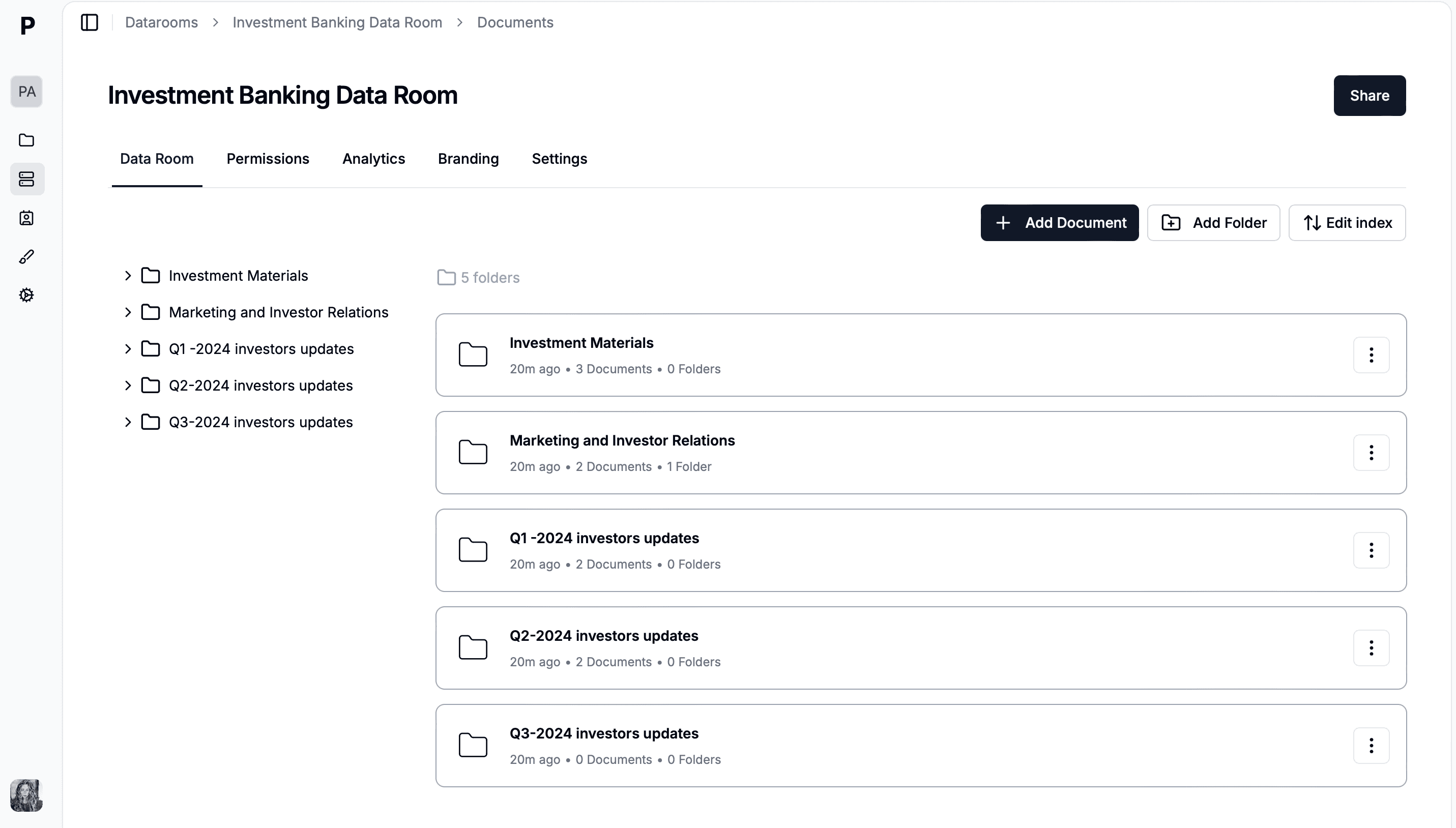
Create the top-level folders that match the matrix rows, and upload into them. Keep the most sensitive material (unredacted contracts, pricing, compensation) in its own folders rather than mixed in, because permissions are cleanest at folder level. In Papermark you can drag a whole folder tree into the data room and it keeps the structure.
Step 3: create one group per bidder and set a restrictive default
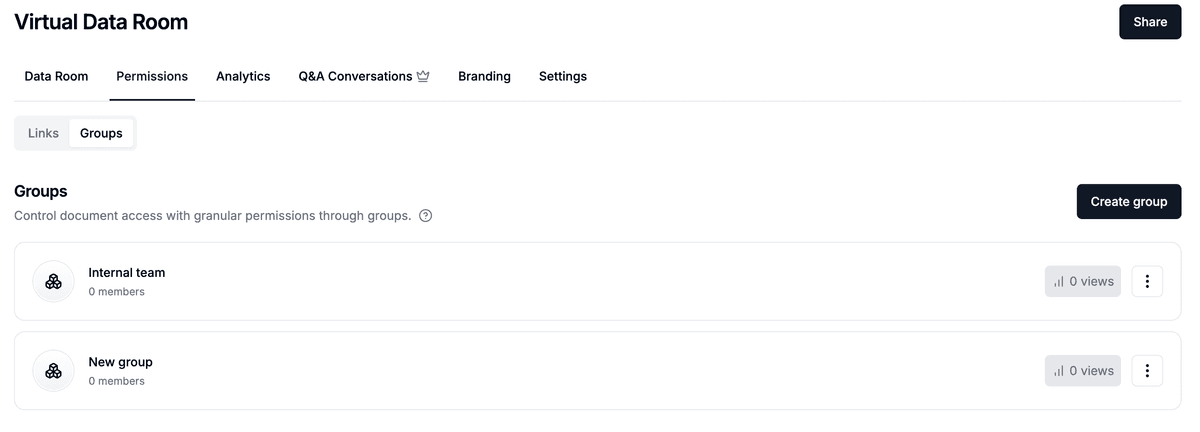
In Papermark, open the data room, click Permissions, switch to the Groups tab and click Create group. Create one group per bidder, one for each adviser team and one for the clean team. Every group gets its own link automatically. Don't turn on "Share entire data room" for any external group, so each one starts from no access.
Creating a group per bidder: each group gets its own link and its own permissions.
Step 4: grant access folder by folder
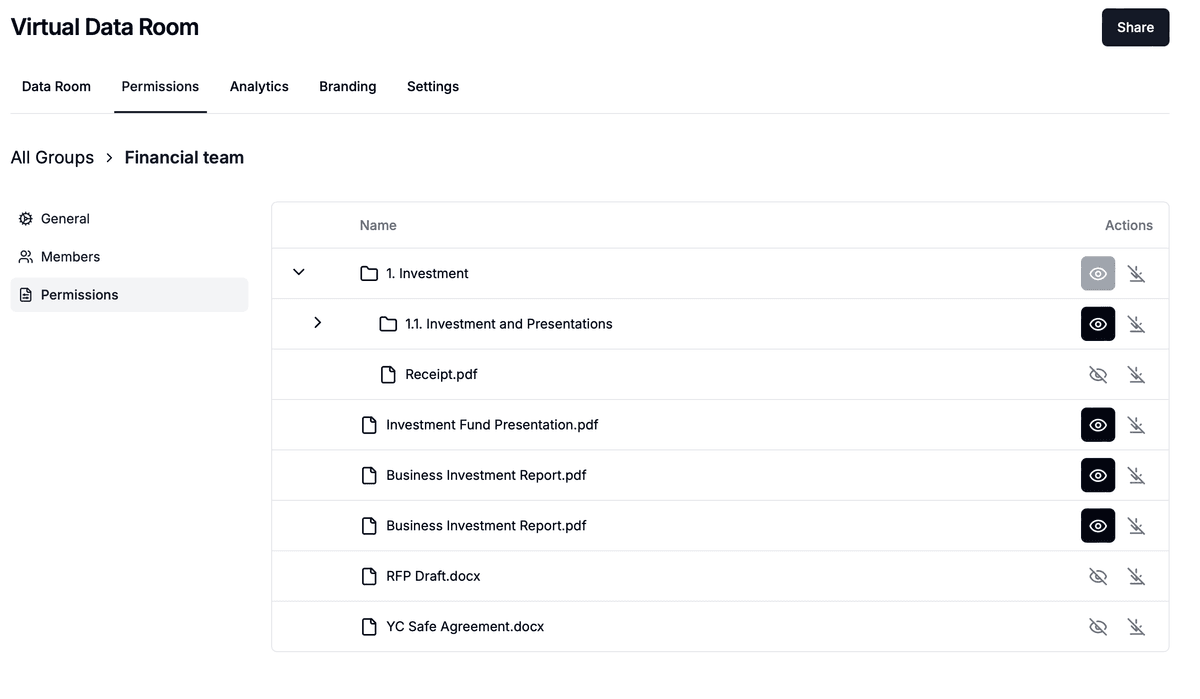
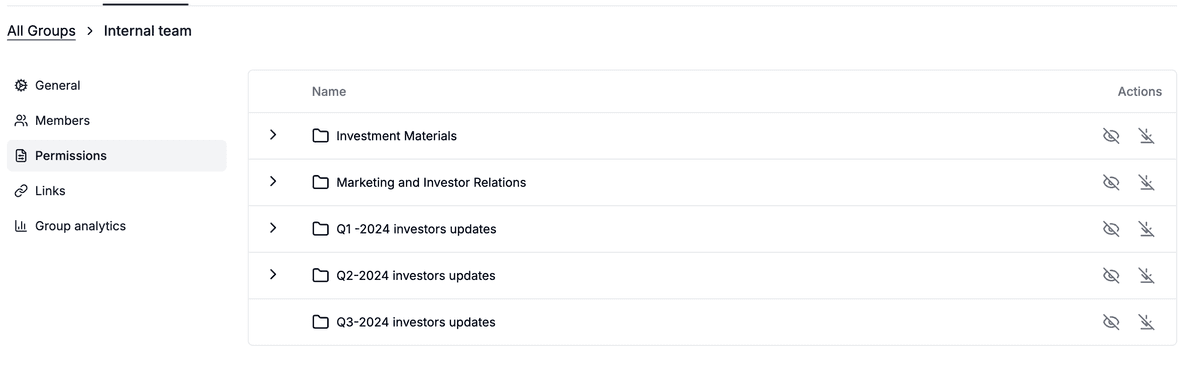
Open each group's File permissions tab and tick view, and where the matrix says so download, for each folder and file. Folder permissions cascade to subfolders and files, and you can override a single file, which is how you keep one pricing schedule locked inside an otherwise open contracts folder.
File permissions per group: view and download are set separately for every folder and file.
Step 5: turn on watermarking, NDA gate and email verification before inviting anyone
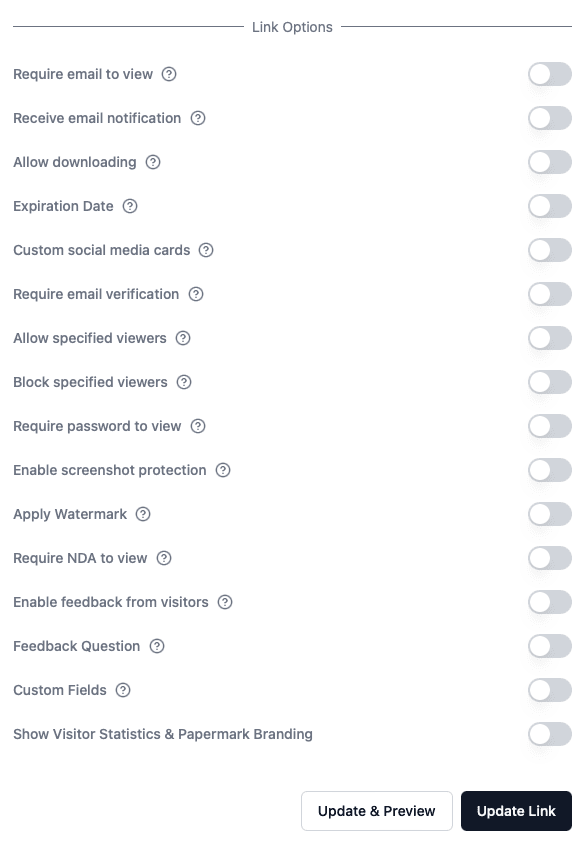
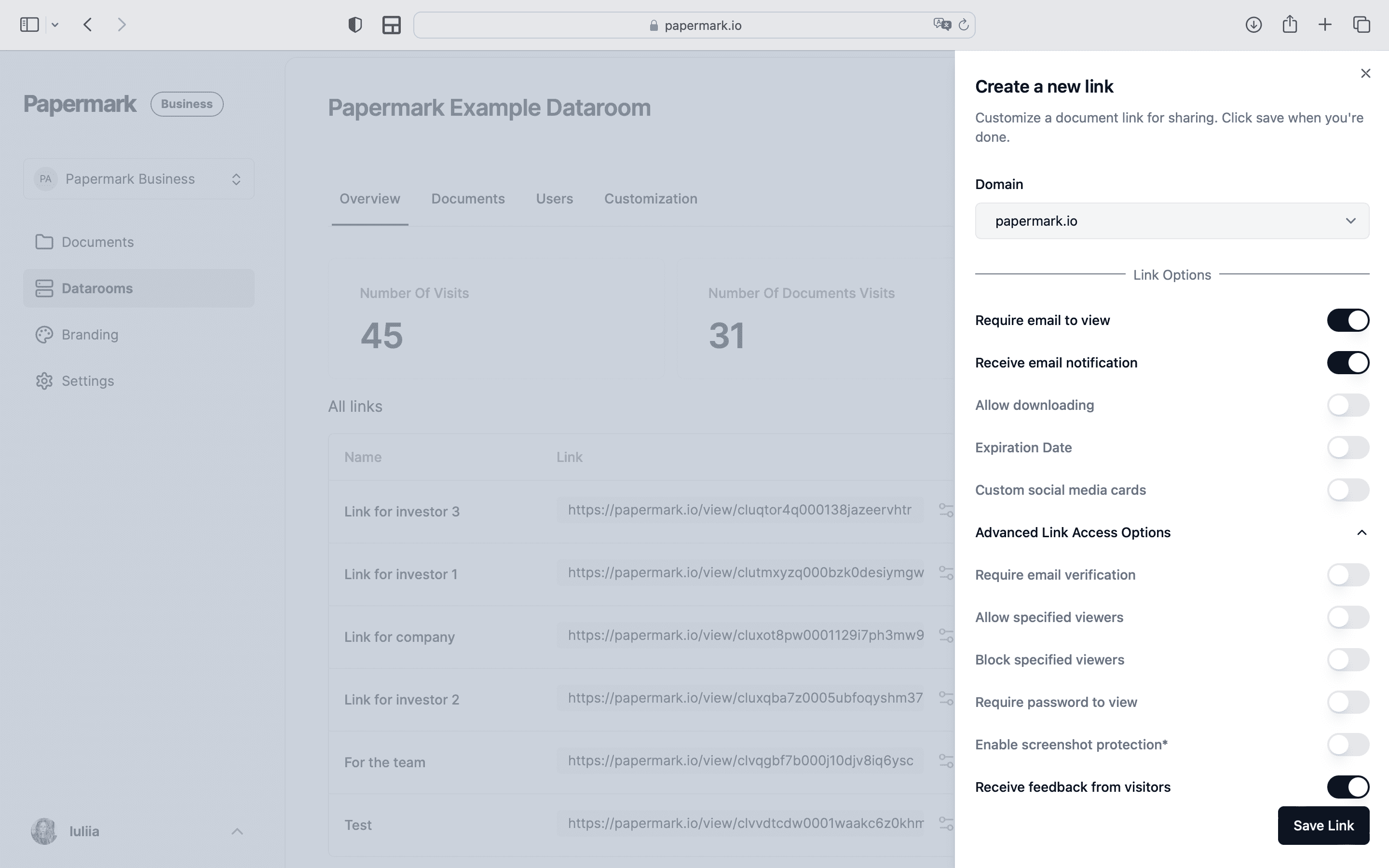
Open the group's Access link settings and switch on email verification, the NDA agreement, dynamic watermarking and, where the matrix allows no downloads, leave downloads off. Add an expiry date that matches the IOI or LOI deadline. On the group's Members page, add named emails or a @buyerfirm.com domain so only that firm's people get in. Screenshot protection adds a further deterrent on desktop.
Link settings: email verification, NDA, watermarking, expiry and download control live on each group's link.
Step 6: test as a fake reviewer
Before the first real invite, add a colleague's address to each group and open the link as them. Check three things: the folders that should be hidden are invisible, the watermark shows the test email and time on every page, and downloads behave as the matrix says. Ten minutes of testing here prevents the most common failure, which is a whole bidder seeing a folder meant for the clean team.
Step 7: invite, then review the audit log weekly
Send the invites from the group's Members page. Then assign one person to review activity every week: who opened what, who downloaded, and which bidder has gone quiet. Page-by-page analytics show reading time per document, and on Data Rooms Plus the audit log records every access event for export. Our guide to tracking buyer engagement covers what those signals mean.
Papermark is our #1 VDR provider for M&A transactions right now. In two deals we used custom branding, dynamic watermarking, and granular permissions.
Groups created for each bidder, adviser team and the clean team
No external group shares the entire data room; folders granted one by one
Download off for financials, contracts and HR
Dynamic watermark on every group link (email, IP, date and time)
Email verification on every link
NDA agreement attached
Link expiry set to the IOI or LOI deadline
Domain allow-list for each buyer firm
Tested as a dummy reviewer in each group
Audit-log review owner and cadence assigned
6. What access controls cannot stop
Access controls reduce leak risk, they don't remove it. A reviewer with view rights can photograph a screen with a phone, take notes, or remember a number, and no data room can prevent that. Stating this plainly matters, because a seller who believes the room is leak-proof tends to over-share early.
Screenshot protection blocks casual capture in desktop browsers, but mobile browsers can't reliably detect screenshots, so on phones the protection is limited. Papermark's confidential view, which shows only part of the page at a time, is the main mobile mitigation. Watermarks are what close the gap: any photo or screenshot still carries the viewer's email, IP address and timestamp, which turns an anonymous leak into an NDA breach with a named source.
The practical answer is to stage information so the most sensitive data arrives late and to few people. Customer names and pricing go to the clean team only, compensation is anonymised until the LOI, and the full model stays view-only until confirmatory diligence. Controls protect each stage, and staging limits what any single breach can expose.
7. How access control maps to ISO 27001, SOC 2 and least-privilege guidance
Deal-room access control isn't just good practice, it lines up with the security standards your buyer's IT team will ask about. ISO/IEC 27001:2022 Annex A and the SOC 2 Trust Services Criteria both require least-privilege access, controlled access rights and logging, and NIST SP 800-53 names least privilege as control AC-6.
Standard and control
What it requires
Deal-room equivalent
ISO 27001:2022 A.5.15 Access control
Rules for access based on business need
Permission matrix agreed before invites
ISO 27001:2022 A.5.18 Access rights
Grant, review and remove access rights
Groups per party, revoke on exit
ISO 27001:2022 A.8.3 Information access restriction
Restrict access to information per policy
No access by default, folder grants
ISO 27001:2022 A.8.15 Logging
Record and review activity logs
Audit log reviewed weekly
SOC 2 CC6.3
Role-based access with least privilege
One group per role and stage
NIST SP 800-53 AC-6
Least privilege
Minimum folders per stage
Papermark is SOC 2 Type II and ISO 27001 certified. The security page has the reports and the hosting details. Certification covers the platform, while the matrix and the stage defaults are the controls you operate on top of it.
8. When a bidder drops out: revocation checklist
When a bidder passes, misses a deadline or loses exclusivity, revoke the same day. Lingering access is the most common gap in otherwise well-run rooms, because nobody owns the step.
Deactivate the group's link so no member can open the room again. In Papermark this takes effect immediately.
Export that group's activity from analytics (and the audit log on Data Rooms Plus) and file it with the deal records.
Note the watermark details for the group: the emails and link name that appear on their pages, so any later leak can be matched.
Confirm the NDA's return-or-destroy clause in writing with the bidder's counsel, covering anything they downloaded.
Update the permission matrix to show the group as closed, with the date.
9. Worked scenario: Halvard Systems runs a six-bidder process
Halvard Systems, a hypothetical 120-person industrial software company, is sold through a boutique bank. The banker builds the room with 412 documents in nine folders and fills in the permission matrix before uploading anything. Six bidders sign the NDA, and each gets its own group with view-only access to the CIM and summary financials, watermarked with email, IP address and time. Email verification and the NDA gate sit on every link, and each link expires on the IOI date.
Four bidders submit IOIs. The two that don't are revoked the same afternoon, their activity is exported, and their counsel confirm destruction under the NDA. The remaining four get the financial model and redacted customer contracts, still view-only. After management presentations, one strategic buyer wins exclusivity. Its counsel receives a new group with download rights on corporate, tax, IP and litigation, and a three-person clean team from an outside accounting firm gets the unredacted customer pricing that the buyer's own product team never sees.
Three weeks into confirmatory diligence, a page from the customer list appears in a trade forum. The watermark shows a clean-team email and a timestamp, the log confirms the session, and the matter is settled under the clean-team agreement in days instead of becoming a dispute that threatens the deal.
Halvard Systems: 412 documents by widest access level
412documents
View for all shortlisted bidders238 · 58%
CIM, financials, redacted contracts, IP
Download for buyer counsel only104 · 25%
Corporate, tax, litigation
Clean team only41 · 10%
Customer pricing, unredacted contracts
Deal team only29 · 7%
Board minutes, privileged advice
Worked scenario. Most of the room is view-only for shortlisted bidders; the material that decides price is restricted to counsel or the clean team.
10. Data room for controlling document access during a deal
A data room for controlling document access during a deal has to do four things at once: isolate each party, keep sensitive files inside the browser, tie every view to a verified person, and let you change all of it in minutes as the deal moves. Generic file sharing does one or two of these. A purpose-built secure data room does all four on the same document set.
Papermark is a secure, fully customizable, and developer-friendly data room for modern dealmakers. Groups give each bidder its own link and permission set, granular file-level permissions separate view from download on every folder and file, dynamic watermarking stamps email, IP address, date and time on every page, and NDA gating plus email verification sit on every link. There's no per-viewer charge: unlimited data room visitors are included on every plan, which matters when each bidder brings a dozen advisers. Teams that automate room setup can use the public API, CLI and MCP server (Papermark agents), and AI redaction is available on Data Rooms Premium and above.
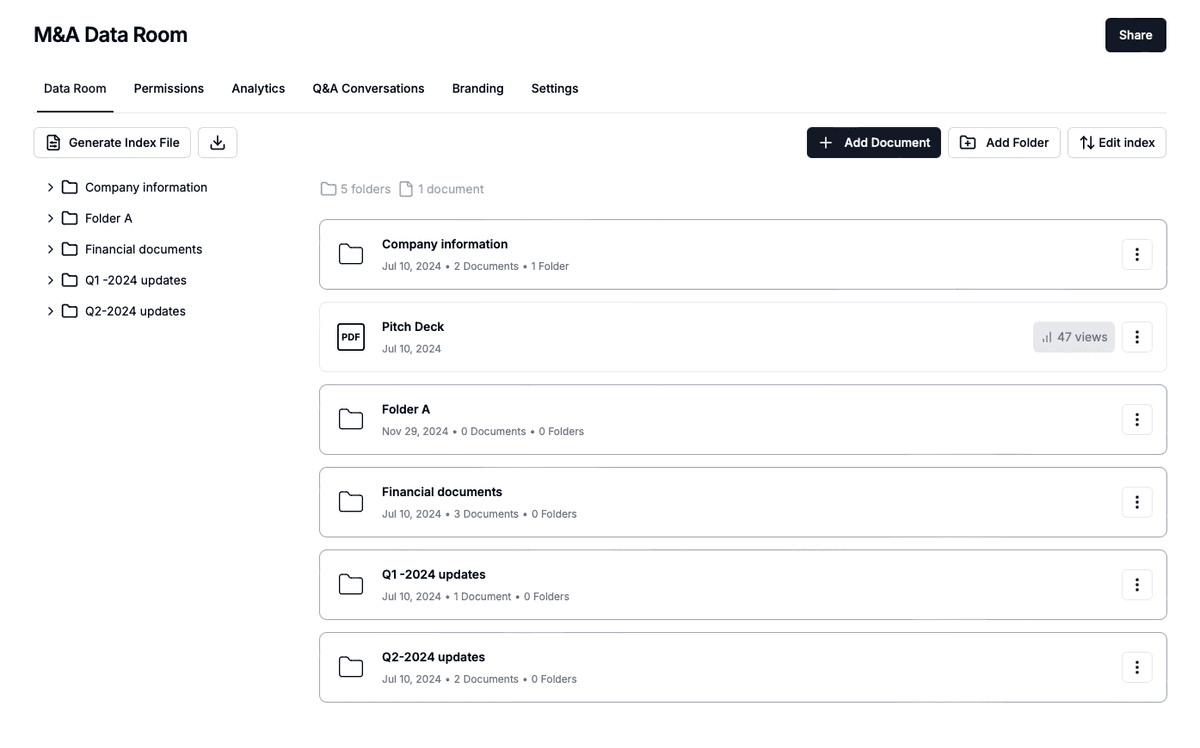
A Papermark M&A data room: one document set, one group per bidder, access scoped per stage.
Why you need a data room for controlling document access
Three facts make the case. A downloaded file can never be recalled, so the only real control is keeping it in the browser. Bidders are often competitors, so the fact that a rival is in the process is itself confidential, and only per-party groups hide it. And the disclosure record outlives the deal, so a log of who saw what is worth more after closing than during it. A data room for controlling document access is the tool that handles all three.
What it costs
The Data Rooms plan is $99/month with a 7-day free trial and includes 3 team members, unlimited data room visitors, unlimited data rooms, groups, granular file-level permissions, dynamic watermarking, NDA agreements and a custom domain. Data Rooms Plus at $249/month adds the audit log, Q&A, room freeze and 5 team members.