



security
How to Create Dynamic Watermarks on PDF Documents (2026 Guide)
Step-by-step guide to creating dynamic watermarks on PDF documents in 2026 - per-session viewer email, IP, and timestamp on every page.
To watermark documents sent to potential acquirers, use a dynamic watermark that stamps each buyer's verified email, IP address and the date and time on every page, applied automatically by a secure data room such as Papermark, rather than one static "CONFIDENTIAL" stamp. Combine it with an NDA gate, view-only access and an activity log, and every page of your CIM, financials and data room becomes traceable to one person.
{{email}}, {{date}}, {{time}}, {{link}} and {{ipAddress}}.The safest way to watermark documents for potential acquirers is a dynamic watermark: recipient-specific text (buyer email, firm, IP address, date and time) applied automatically each time a page is opened, inside a data room that also gates access with an NDA and email verification. A static "CONFIDENTIAL" banner tells a reader the document is sensitive, but it can't tell you who leaked it.
The difference matters because of how a sale process works. A CIM goes to every party that signs the NDA, which in a broad auction can be dozens of firms, and each firm forwards it to partners, associates and advisers. If the same static PDF reaches all of them, a copy that turns up at a competitor or in the press is anonymous. If every page carries the viewer's email and a timestamp, the same copy points to one person in one session, which turns a vague suspicion into an NDA breach claim.
Leaks are also expensive in ways that go beyond the deal. IBM's Cost of a Data Breach Report 2025 puts the global average cost of a breach at $4.44 million. In a sale process the bigger cost is usually commercial: a leaked CIM tells competitors, customers and employees that the company is for sale before the seller is ready.
A watermark for a potential acquirer should identify the person, the firm and the session, and carry a short legal notice. Keep it readable: tiled, at an angle, light grey and mostly transparent, so reviewers can still work with the numbers underneath.
For a static watermark added in Acrobat or Word, one copy per buyer:
CONFIDENTIAL. Provided exclusively to [Acquirer Name] under NDA dated [date]. Project [Codename]. Do not copy or distribute.
For a dynamic watermark in a data room, where the variables fill in for each viewer:
CONFIDENTIAL {{email}} {{ipAddress}} {{date}} {{time}} {{link}}
Name each buyer's link after the firm (for example "Bidder A - Northwind Capital"), so the {{link}} variable prints the buyer firm on every page without a separate copy per firm. A good starting appearance is tiled, 45 degrees, light grey, and 75 to 85 percent transparent.
Static fields are typed once and are the same for every viewer of a link, such as the confidentiality notice and project codename. Dynamic fields change per viewer and per session. The table shows which field does what.
| Field | Why include it | Papermark variable |
|---|---|---|
| Viewer email | Identifies the individual | {{email}} |
| Buyer firm | Identifies the bidder | {{link}} (name the link after the firm) |
| IP address | Forensic trail for the session | {{ipAddress}} |
| Date and time | Ties a leak to a session | {{date}} {{time}} |
| Confidentiality notice | Legal deterrent | Static text |
| Project codename | Avoids naming the company | Static text |
The date and time render in the viewer's local format, so a reviewer in London and one in New York see their own clock. Use a project codename rather than the company name in the watermark, because the watermark is the most visible text on any leaked page.
Every method of watermarking documents for acquirers falls into one of three options. Which one fits depends on how many buyers you are sending to and whether you need to know who opened what.
| Method | Unique per buyer? | Survives download? | Tracks who opened? | Effort for 20 buyers | Best for |
|---|---|---|---|---|---|
| Static watermark in Acrobat or Word | Only with 20 separate copies | Yes, but removable | High | 1 or 2 buyers, one-off | |
| Dynamic watermark in a data room (Papermark, Datasite, Intralinks) | automatic | PDFs and images in Papermark | page-level | Low | CIM and diligence with many buyers |
| Watermarked tracked link (Papermark links, DocSend Advanced) | Depends on settings | Low | Teaser or CIM only |
A static watermark is burned into the file before you send it. In Adobe Acrobat, open the PDF and go to Edit a PDF > Watermark > Add (older versions: Tools > Edit PDF > Watermark > Add), type the text, set opacity to 20 to 30 percent and rotation to 45 degrees, and save one copy per buyer with that buyer's name. In Word, use Design > Watermark > Custom Watermark before exporting to PDF.
This works for one or two buyers. It breaks down at scale, because 20 buyers means 20 files to produce, name and track, and static watermarks can often be removed with PDF editing tools. You also learn nothing about whether the buyer opened the document. Our guides to adding a watermark to a PDF and inserting a watermark in Word cover the menus in detail.
A data room renders the watermark when each page is opened, using the verified identity of the viewer. You upload the CIM and diligence files once, give each buyer a group or link, and every page each person sees carries their own email, IP address and time. In Papermark, it's one toggle on the link plus a line of text with variables. Enterprise VDRs such as Datasite and Intralinks offer the same feature on quote-based contracts.
This is the method that scales. It costs the same effort for 5 buyers or 50, and it works together with the other controls a deal needs: NDA gating, email verification, view-only access and per-buyer groups. The full Papermark setup is in Section 4.
A tracked link is a single document shared as a URL rather than an attachment, with the watermark and analytics applied to that link. It suits the early stage, when you're sending a teaser or the CIM and don't yet need a full room. In Papermark, create a link on the document, switch on email verification and dynamic watermarking, and send one link per buyer. DocSend offers watermarks on its Advanced plans.
The limit is scope: once the buyer moves into diligence, you need folders, groups and permissions, so the CIM link becomes the first folder of a data room rather than a separate tool.
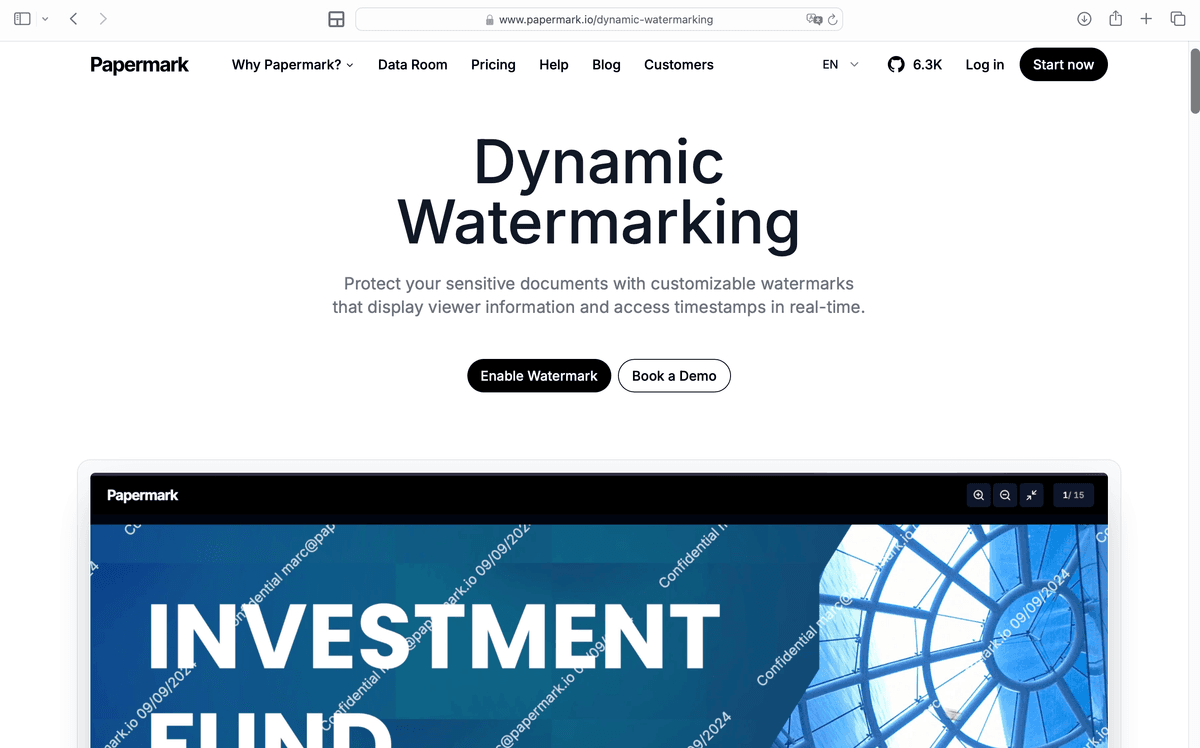
A dynamic watermark renders the viewer's details on every page at view time.
This procedure follows the Papermark document watermark help article. It takes about 10 minutes for the first buyer and under a minute for each one after that.
Create a data room for the deal and upload the CIM, the financial summary and any diligence folders. Upload Word, Excel and PowerPoint files as PDFs if buyers will be allowed to download them, because only PDF and image downloads carry the watermark.
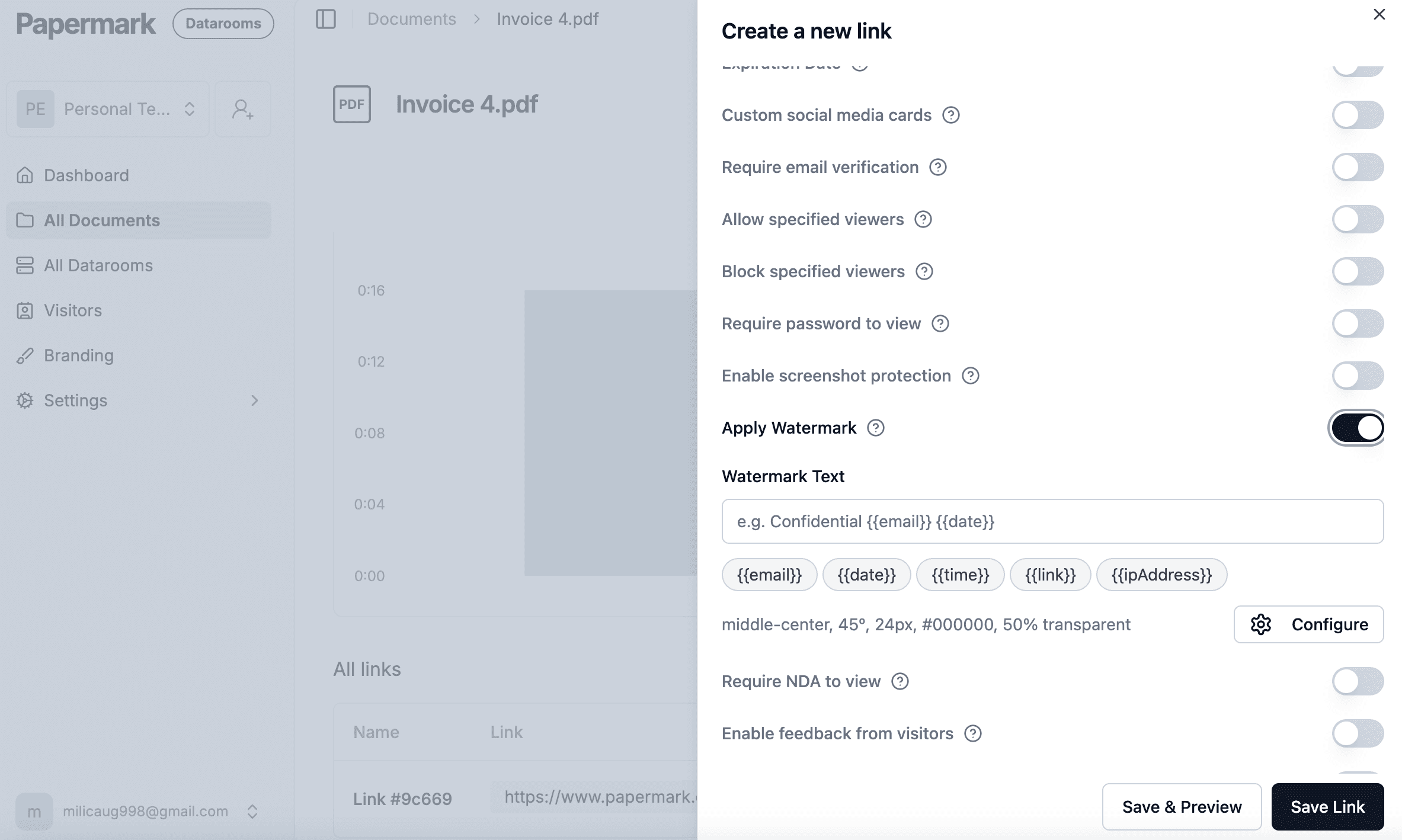
Open the link (or the group's Access link) and switch on Dynamic watermarking. In Watermark Text, type your notice and click the variable buttons to insert {{email}}, {{date}}, {{time}}, {{link}} and {{ipAddress}}. Click Configure to set Tiled, Position, Rotation, Text Color, Font Size and Transparency. The defaults are 45 degrees, 24px, black and 50 percent transparent; lighter grey and more transparency read better on financial tables.
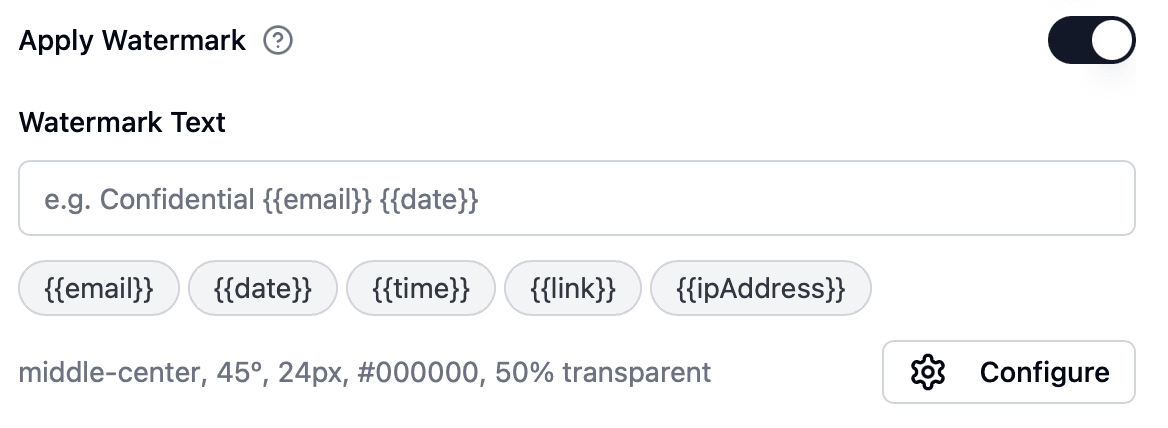
Watermark text with the five dynamic variables in Papermark's link settings.
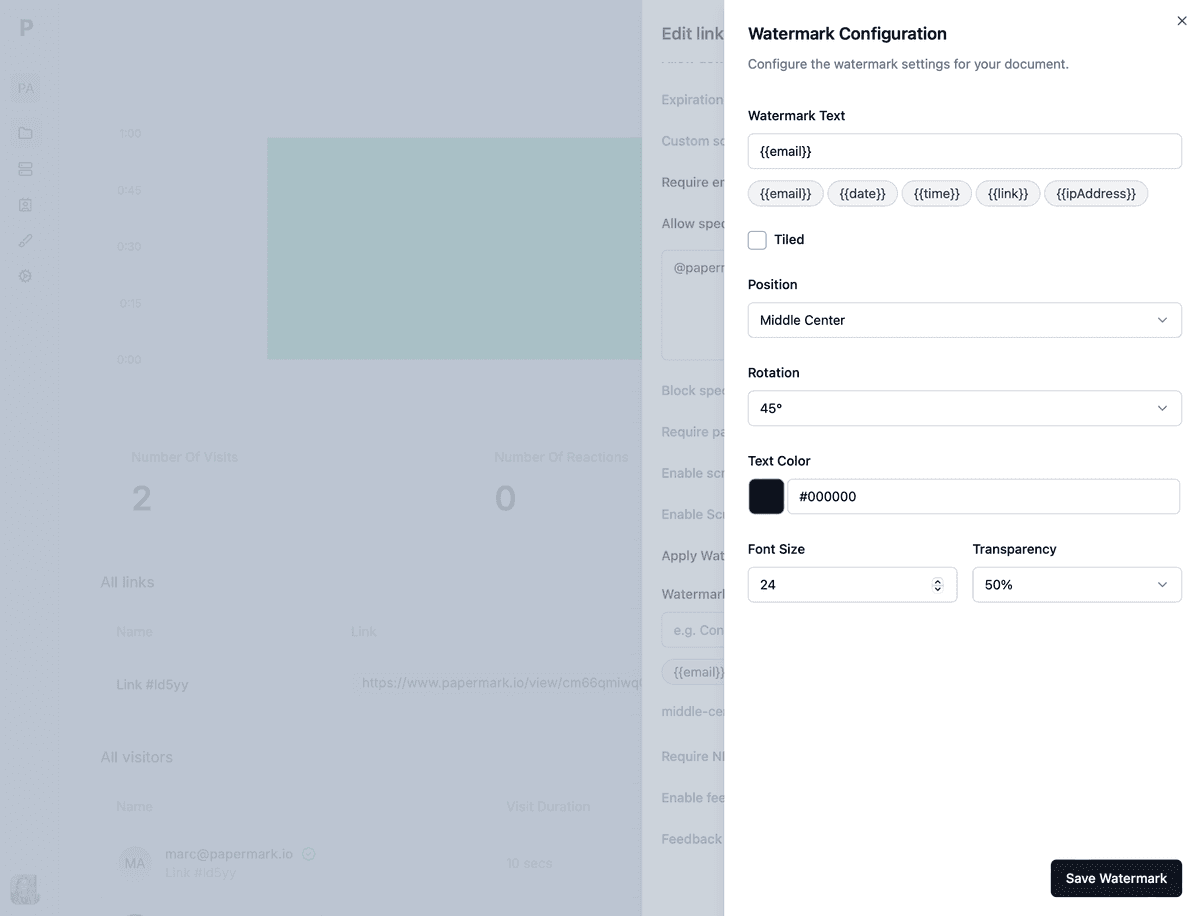
Configure: tiling, position, rotation, color, font size and transparency.
On the same link, switch on Require email verification so each viewer confirms their address with a one-time code, and attach your NDA with NDA gating. Verification is what makes the watermark trustworthy: nobody can type a fake email and get a clean copy.
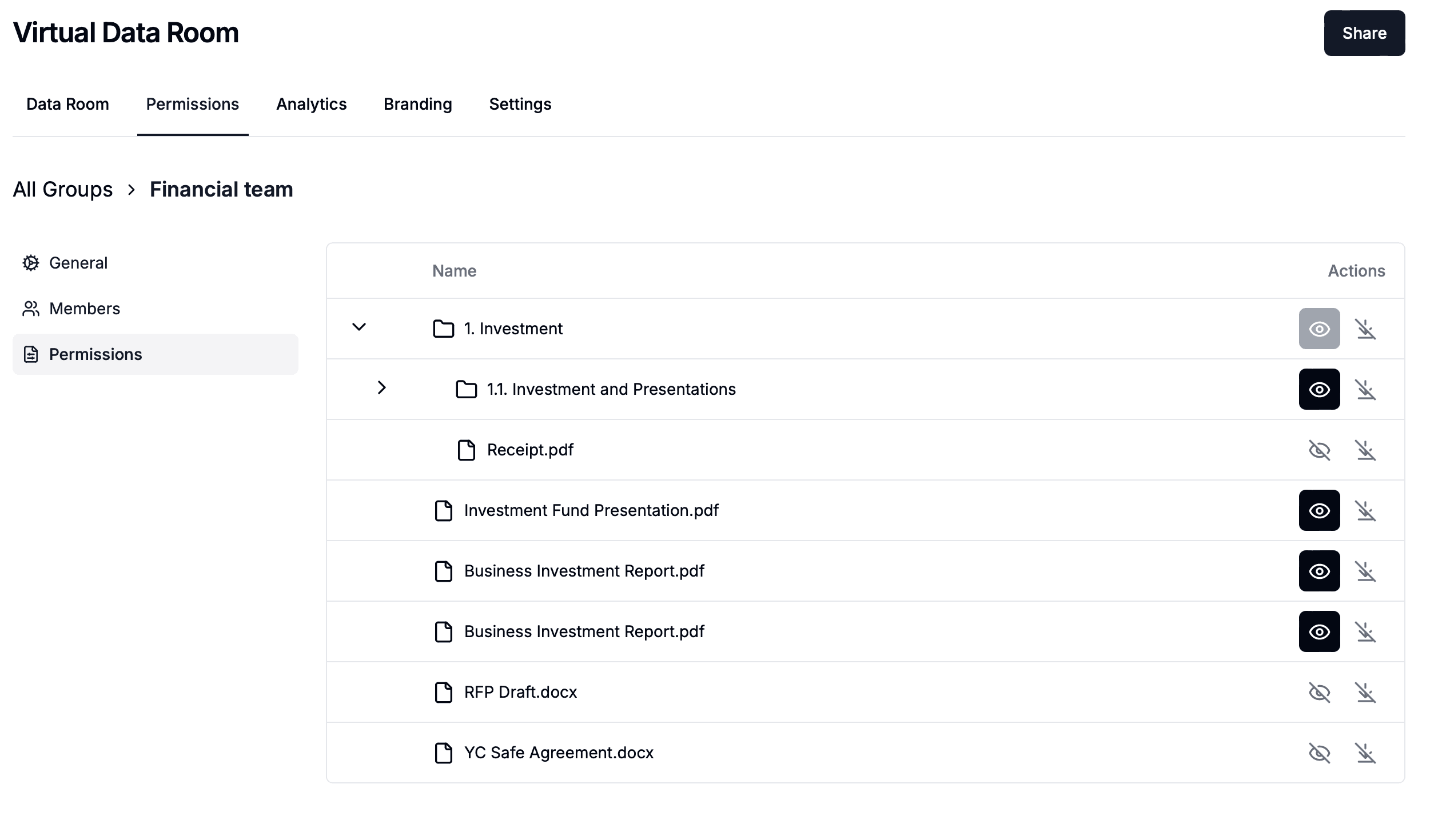
Create a separate link per buyer firm, or in a data room one group per bidder under Permissions > Groups, and name it after the firm. Add the buyer's named emails or @buyerfirm.com domain on the group's Members page. Per-buyer links keep bidders isolated and make {{link}} print the firm on every page. Our data room permission matrix shows which folders each group should see.
For the CIM and financials, leave downloads off so pages stay in the browser. If buyer counsel needs files in confirmatory diligence, allow download on those folders only: downloaded PDFs and images carry the same watermark. Screenshot protection adds a deterrent on desktop.
Open the link in a private window with a colleague's email. Check that the watermark appears on every page, that the email, IP, date, time and link name fill in, that the text doesn't hide numbers in tables, and, if downloads are on, that the downloaded PDF carries the watermark too.

The test buyer's view: every page carries their email and session time.

Papermark is our #1 VDR provider for M&A transactions right now. In two deals we used custom branding, dynamic watermarking, and granular permissions.
Tyler
Watermarks should get stricter as the documents get more sensitive. A good default is to watermark everything from the NDA onwards and tighten download rights stage by stage.
At the teaser stage, a watermark is optional because the teaser is anonymous, but a tracked link still tells you who opened it. With the CIM, turn on the dynamic watermark, email verification and the NDA gate, keep download off, and send one link per buyer. In the data room round, every group link carries the dynamic watermark and downloads stay off for financials, contracts and HR. In confirmatory diligence, buyer counsel can download specific folders, and the downloaded PDFs keep the watermark.
| Stage | Watermark | Download | Gates |
|---|---|---|---|
| Teaser | Optional | Off | Email capture |
| CIM | Dynamic, every page | Off | NDA and email verification |
| Data room (IOI round) | Dynamic on every group link | Off for sensitive folders | One group per bidder |
| Confirmatory diligence | Dynamic, also on downloads | Counsel only, per folder | Group plus domain allow-list |
For the wider distribution plan, see how to share a CIM with multiple buyers and how to send confidential documents to a buyer.
Watermarks deter and trace, they don't prevent. A buyer with view access can still photograph the screen with a phone, and the photo will carry the watermark, which is the point: the leak now has a name and a timestamp attached.
Static watermarks added in Acrobat are part of the file and can often be removed with PDF editors, and anyone who receives the file can strip or crop them. Dynamic watermarks in a data room are rendered per session in the browser and drawn into downloaded PDFs, so there's no clean master copy for a viewer to share. Screenshot protection helps on desktop, but mobile browsers can't reliably detect screenshots, so treat mobile as the weaker channel.
If a watermarked page does leak, match the email, IP address and time on the page against the activity log, confirm the session, and hand the evidence to counsel for the NDA claim. Our leak investigation workflow walks through those steps.
Fennick Robotics, a hypothetical 80-person warehouse automation company, runs a sale with a boutique bank. The banker uploads the CIM once to a Papermark data room and creates 18 links, one per buyer firm that signed the NDA, each named after the firm. Each link has email verification, the NDA gate and a dynamic watermark reading CONFIDENTIAL Project Kestrel {{email}} {{ipAddress}} {{date}} {{time}} {{link}}, tiled and light grey, with download off.
Fourteen firms open the CIM in the first week. Analytics show that six of them read the unit economics section closely, which tells the banker where the IOIs will come from. Two weeks later, a slide from the CIM is posted in a private industry chat. The watermark shows an associate's email at one of the 18 firms, a Tuesday evening timestamp and the firm's link name. The log confirms the session. The bank revokes the link the same hour, the firm's counsel confirms destruction under the NDA, and the process continues with 17 buyers and no doubt about the source.
Worked scenario. Every link carried a dynamic watermark; engagement data showed which buyers were serious before the IOI date.
A data room for watermarking documents sent to acquirers does more than stamp text on a page. It ties every watermark to a verified email, keeps sensitive files inside the browser, separates each buyer into its own link or group, and records who read what. That combination is what turns a watermark from a warning into evidence.
Papermark is a secure, fully customizable, and developer-friendly data room for modern dealmakers. Dynamic watermarking with 5 variables, NDA gating, email verification, per-buyer groups, granular file-level permissions and page-by-page analytics all sit on the same link. Unlimited data room visitors are included on every plan, so a buyer firm can bring all its advisers at no extra cost. Teams that build rooms programmatically can use the public API, CLI and MCP server (Papermark agents), and AI redaction is available on Data Rooms Premium and above. To compare platforms first, see the best virtual data rooms and our roundup of document watermark software.
The Data Rooms plan is $99/month with a 7-day free trial, and includes dynamic watermarking, NDA agreements, groups, granular permissions, a custom domain and 3 team members.
No credit card required.
Step-by-step guide to creating dynamic watermarks on PDF documents in 2026 - per-session viewer email, IP, and timestamp on every page.
Entrepreneurship through acquisition in 2026: four search models, SBA financing up to $5M, an 8-step process, and the data room for an ETA acquisition.

How to send confidential company documents to a buyer without losing control in 2026: a 6-step secure document sharing process and an 11-point checklist.