BlogData RoomsIntroducing Data Rooms advanced features (2026)
Introducing Data Rooms advanced features (2026)
·3 min read
Marc Seitz
A few big updates just landed in Papermark Data Room. We shipped seven advanced data room features that take Papermark from a secure document sharing tool to a full deal room for M&A, fundraising, and due diligence: branded layouts, signatures, downloadable archives, team collaboration, a due diligence request list, Q&A, and programmatic access through our API, MCP server, and CLI.
Every feature below is live now on the Data Rooms plan (€99/month, 7-day free trial). Here's what each one does and where it fits in your workflow.
Quick recap of the new features
#
Feature
What it does
1
Data room layouts
Branded layouts, CTAs, hidden document trees, and banner media
2
Signatures
Send and sign NDAs, term sheets, and SOWs with full audit trails
3
Downloadable archive
OTP-protected snapshot of your data room for closings and audits
4
Team collaboration
Give teammates management access to specific data rooms only
5
Due diligence request list
A structured checklist both sides can track in real time
6
Q&A
Manage diligence questions with permissions, threads, and audit logs
7
API, MCP & CLI
Run your data room programmatically and let AI agents operate it for you
1. Data room layouts
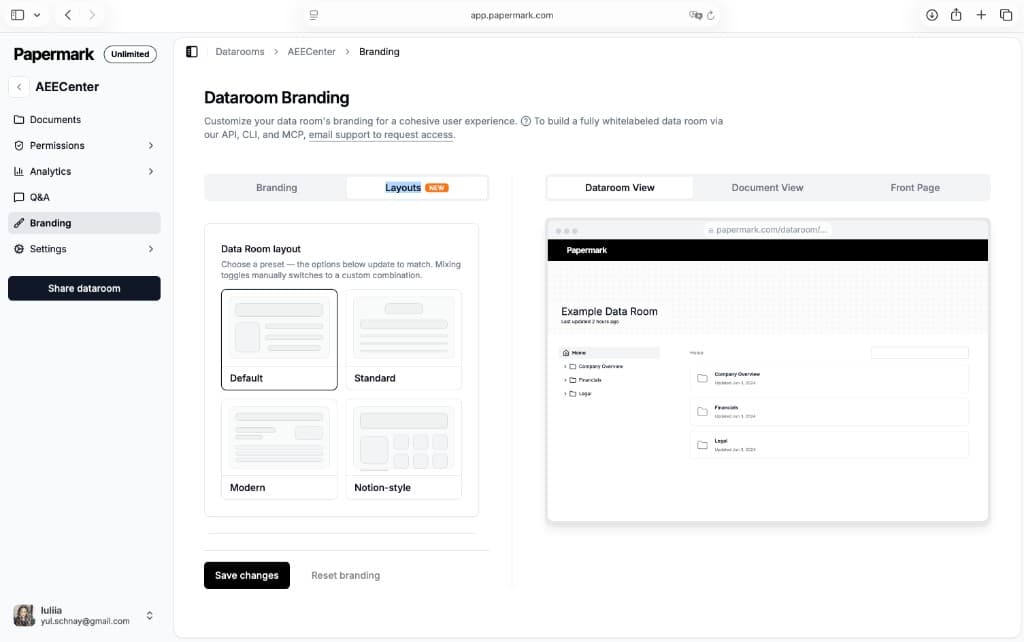
Customize how your data room looks before anyone opens a single document. With data room layouts, you control the first impression: add your logo and brand colors, write a welcome message, embed a video, and set up call-to-action buttons that guide visitors where you want them to go.
You can also hide the document tree so visitors see a clean landing experience instead of a wall of folders, and add banner media at the top of the room for context. It's the difference between sending a generic file link and handing over a branded deal room. See the full data room layouts guide for every preset and setting.
This is ideal for investor data rooms where you want to set the narrative before due diligence begins. Branding applies globally across every document and room, and you can still customize each data room individually or serve it from your own custom domain.
2. Signatures
Require viewers to sign before they can open your documents, with signing built directly into Papermark. The most common use is an NDA before access, but you can upload any agreement as a PDF and place the fields a viewer needs to complete.
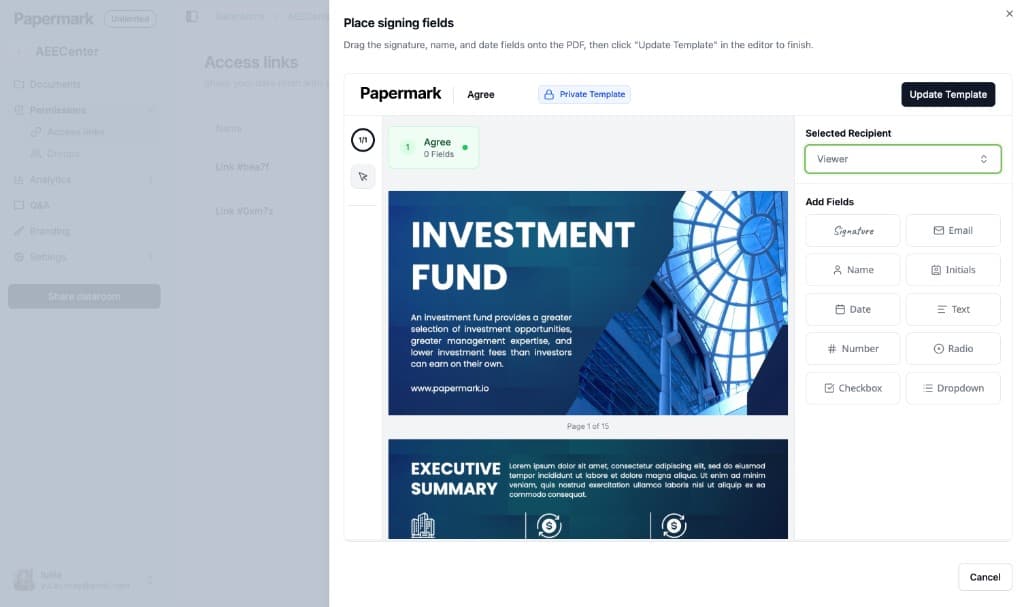
You build a signing template by dragging fields onto the document (signature, name, email, initials, date, text, and more) and assigning them to the viewer. When someone opens a gated link, they sign inside Papermark before they see a single page.
The screenshot above shows NDA signing with fields: you drag signature, name, and date fields onto the document, assign them to the recipient, then click Update Template to send it for signing.
Turn on "Require NDA to view" on a link to connect your agreement. Each signature is tracked with the signer's name, email, and timestamp, the signed PDF is saved alongside your documents, and acceptance is linked to your page-by-page analytics. Signing is available on the Data Rooms plan, so the legal record lives next to the documents it protects. See the full require NDA before viewing guide for setup.
3. Downloadable archive
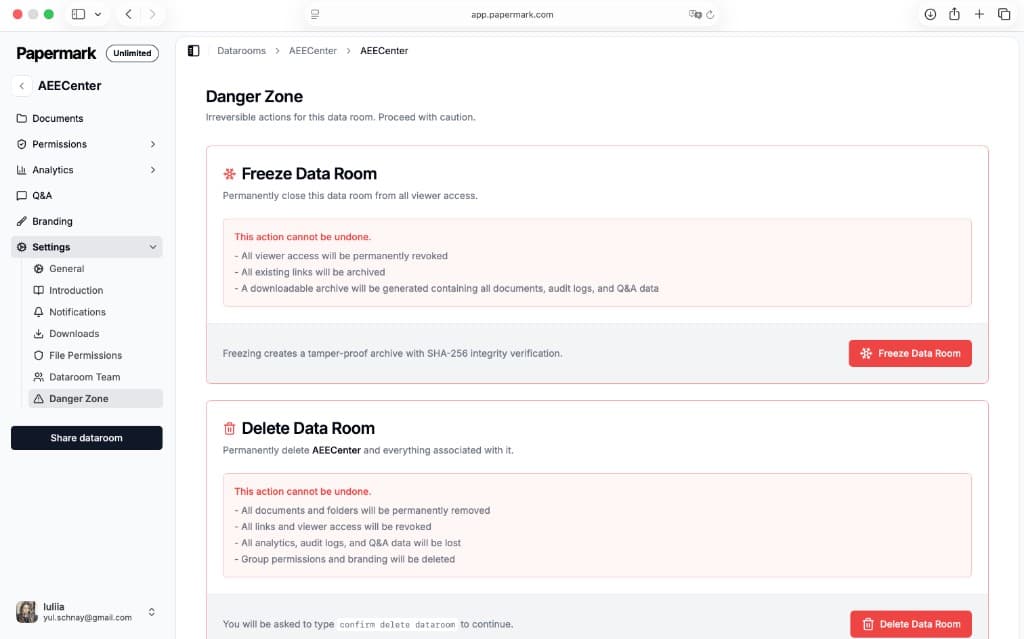
When a deal closes, freeze your data room to generate a complete, downloadable archive in one step. Freezing permanently closes the room to viewers and packages everything into a single archive: all documents, the full audit log, and your Q&A data.
The archive is tamper-proof, sealed with SHA-256 integrity verification, so you or an auditor can prove the contents haven't changed since the deal wrapped. Existing links are archived and viewer access is revoked, leaving you with a clean, verifiable record.
This is built for closings, audits, and compliance. Instead of forwarding files one by one, you hand counterparties or auditors a single archive of the room as it stood at that moment. Viewers can also download the room (or a folder) as a ZIP anytime while it's live. See the data room download and archive guide for the full walkthrough.
4. Team collaboration
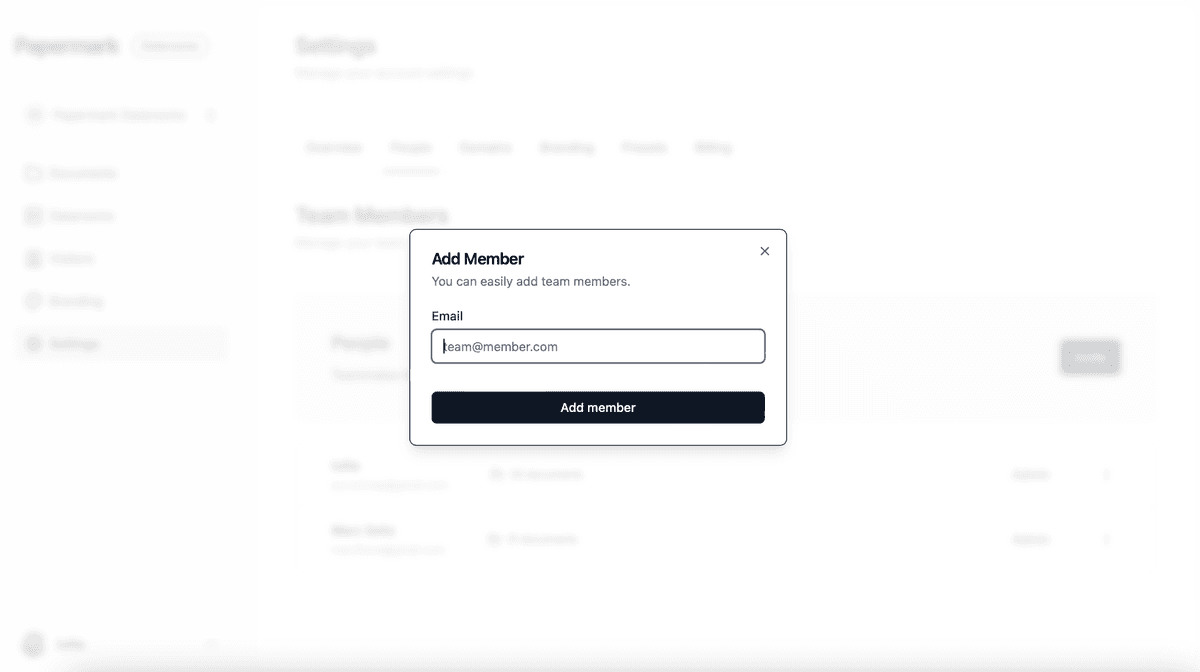
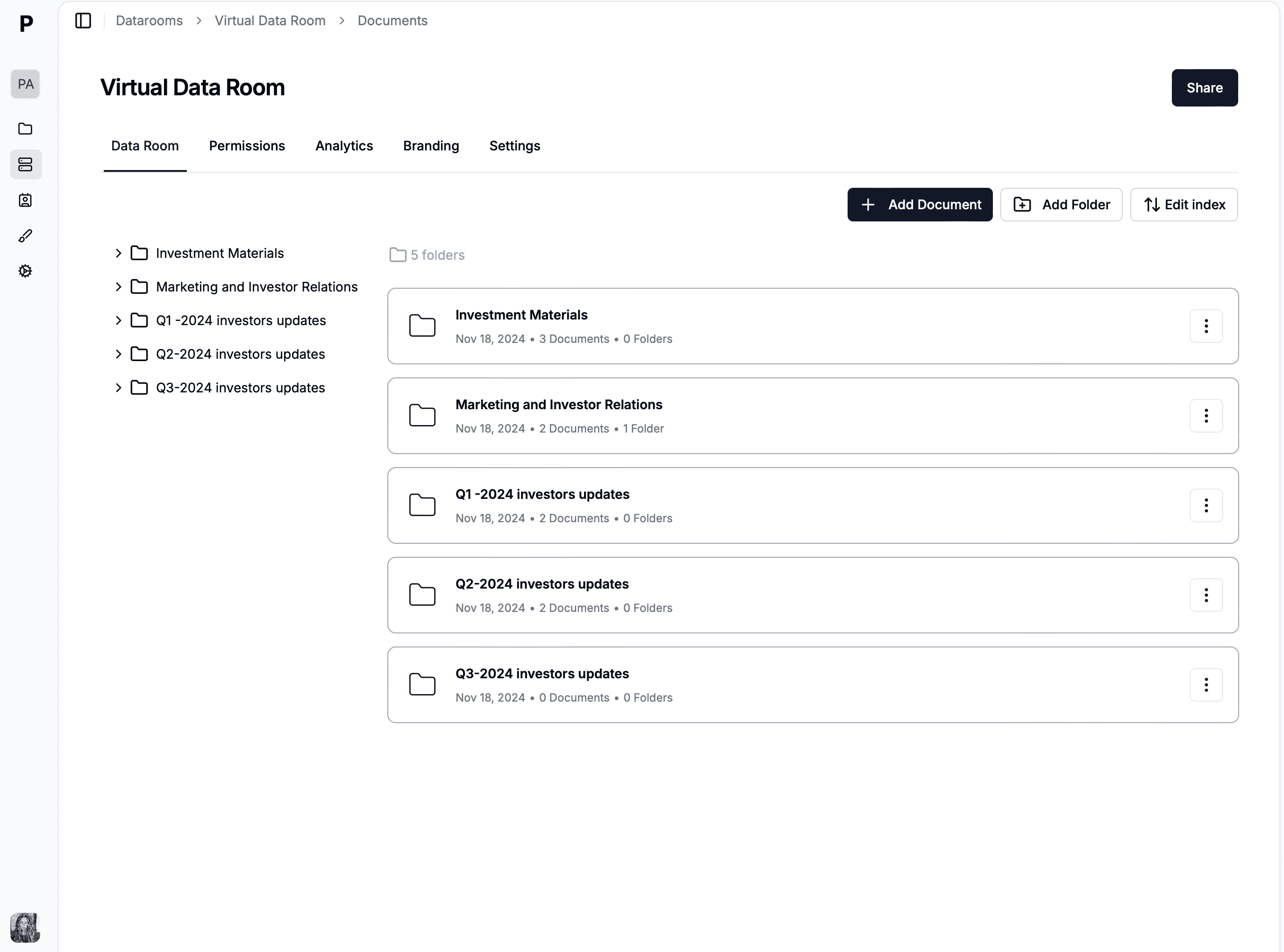
Give teammates management access to specific data rooms without exposing every deal. Invite people by email, assign roles, and scope their access so a colleague working on one transaction never sees the rooms for others.
This keeps sensitive deals separated while letting your team share the workload. Different members can manage documents, respond to questions, and review analytics for the rooms they're assigned to.
Combined with granular permissions and visitor groups, you get a clean separation between your internal team (who manages the room) and external visitors (who only see what you share with them). See the full team roles guide for setup.
5. Due diligence request list
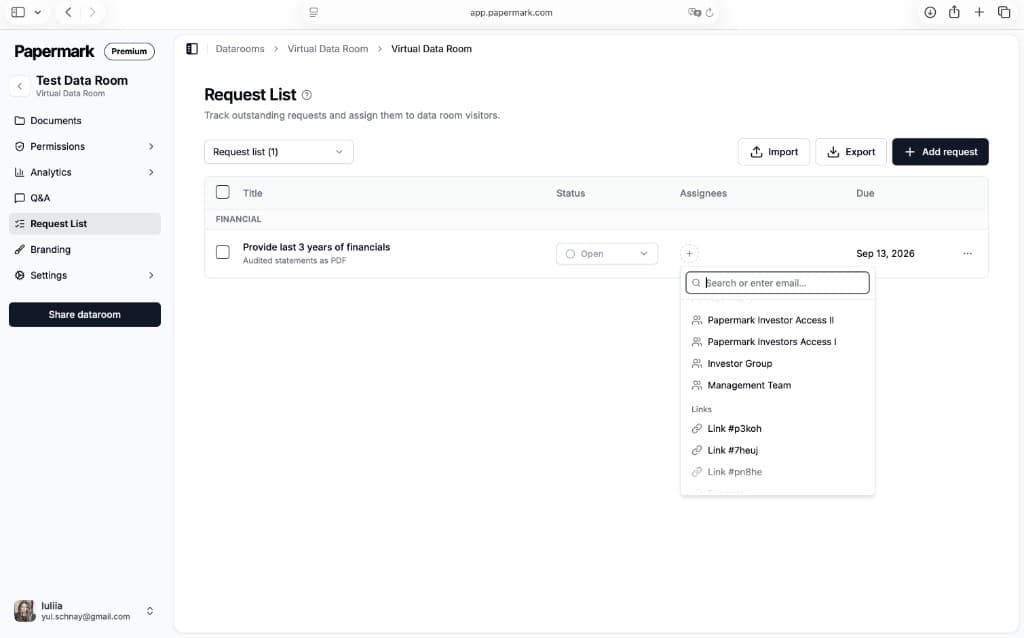
Share a structured checklist so both sides can track requested and submitted documents in one place. Instead of chasing missing files over email, you build a request list and watch each item move through Open, In progress, Submitted, and Completed.
Group requests by category (Financial, Legal, and so on), give each one a title, a short description, and a due date, then assign it to a visitor group or a specific link. You can import a list to get started fast and export it to share status with your team.
This replaces the messy spreadsheet most teams use to run diligence. Both sides know exactly what's been requested, what's been delivered, and what's still missing, which keeps the process moving and the timeline honest. See the full request list guide for setup.
6. Q&A
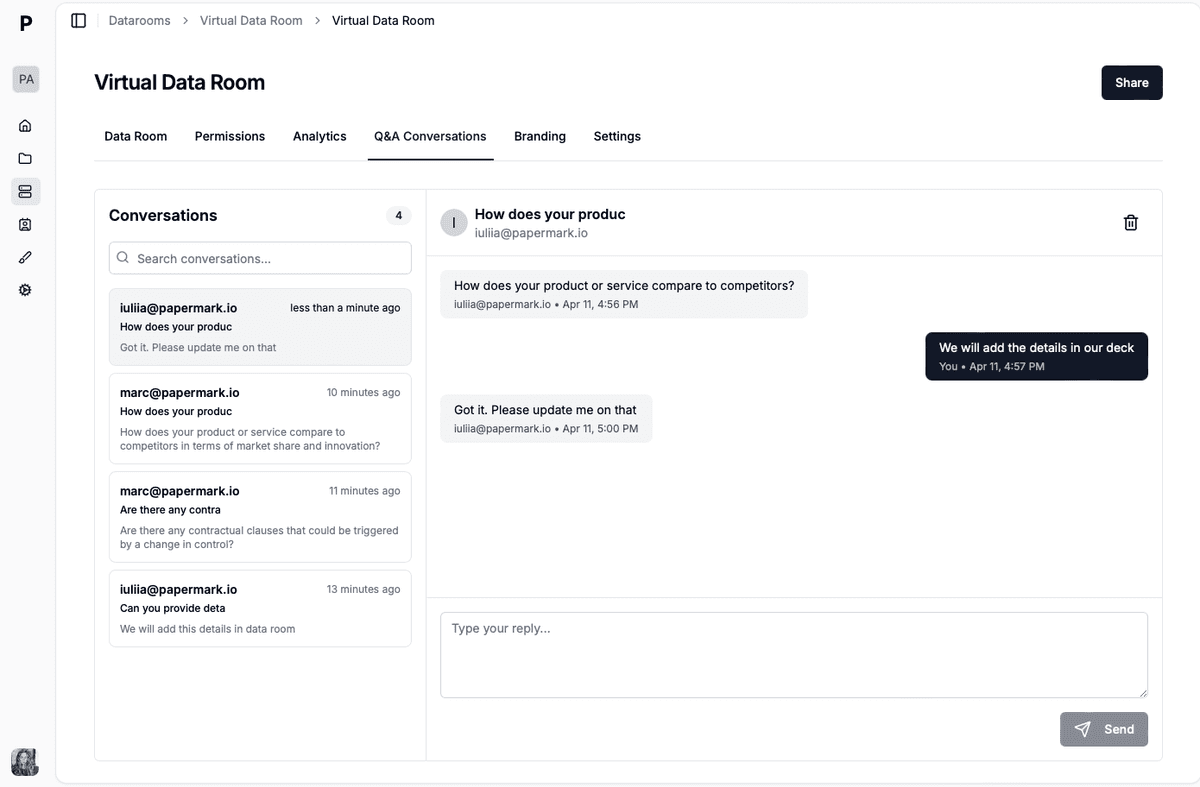
Manage due diligence questions with permissions, threaded discussions, and a complete audit log. Buyers and investors ask questions directly in the data room, and you route, answer, and track every thread from your dashboard, no more scattered email chains.
You control who can ask and who can see answers. Publish your best responses so all viewers see the same answer to common questions, which cuts down on repetitive back-and-forth, or keep threads private to a single group.
Every question and answer is logged with timestamps, so you have a defensible record of what was disclosed during diligence. It's the same workflow enterprise VDRs charge five figures for, built into the Data Rooms plan. See the full Q&A conversations guide for setup.
7. API, MCP, and CLI
Run your entire data room programmatically with three developer surfaces: a REST API, an MCP server, and a command-line interface. Together they let you provision rooms, upload documents, mint links, and pull analytics without ever opening the dashboard.
The REST API builds and manages data rooms straight from your own code, and the Papermark CLI runs bulk and scripted actions from your terminal. The MCP server lets AI agents operate your data room over the Model Context Protocol, so tools like Claude, Cursor, and ChatGPT can create rooms, organize files, and answer diligence questions for you.
This is what turns Papermark from a product you click through into infrastructure you can automate. Start with the AI agents page and the MCP server guide, then wire in the API and CLI for the rest of your workflow.
Build your data room in minutes
No credit card required
Page by page analytics
Unlimited documents & folders
Custom domain & branding
Dynamic watermarks
Granular permissions
NDA & agreements
Activity notifications
SOC 2 & ISO 27001 certified
More advanced data room features
The seven features above are the headline additions, but they sit on top of a deep data room toolkit. Other advanced features worth knowing:
Granular permissions: control access down to individual files and folders, per viewer or per group.
Visitor groups: bundle viewers into groups and set document permissions for the whole group at once.
Dynamic watermarking: stamp every page with the viewer's email, IP, and timestamp to deter leaks.
These seven features round out Papermark as a complete virtual data room. Layouts and signatures handle the front end of a deal (first impression and legal gating), team collaboration and the request list run the middle (managing access and collecting documents), and Q&A plus the downloadable archive cover the end (answering diligence and closing the record). The API, MCP server, and CLI sit across the whole lifecycle so you can automate any of it.
All of it sits on top of Papermark's core: dynamic watermarking, granular permissions, page-by-page analytics, transparent flat-rate pricing, and an optional open-source self-hosted deployment.