




mergers-and-acquisitions
Secure document sharing with a buyer in 2026: share access, not files
How to send confidential company documents to a buyer without losing control in 2026: a 6-step secure document sharing process and an 11-point checklist.
To share confidential financials with potential buyers securely, sign an NDA first, release the numbers in stages (ranges in the teaser, summary financials in the CIM, full detail only after a letter of intent), redact what buyers don't need yet, and share through a secure data room such as Papermark with per-buyer access, view-only files, dynamic watermarks and an audit log. Never send financials as email attachments.
No credit card required.
Secure file sharing for business sales is different from everyday document sharing because the recipient is a counterparty, not a colleague. A potential buyer may walk away, may already compete with you, or may be a financial sponsor that owns a competitor in its portfolio. Every number you send survives the deal whether or not it closes.
Financials carry more risk than any other part of the data room. A three-year P&L tells a competitor your gross margin. Revenue by customer tells them who to call. Payroll tells them who to hire away. Once a spreadsheet leaves your inbox as an attachment, you cannot take it back, you cannot see who it was forwarded to, and you cannot prove later what was disclosed and when.
That is why experienced sell-side advisers treat financial disclosure as a staged process rather than a single upload. The buyer earns more detail as their commitment rises: first a signed NDA, then an indication of interest (IOI), then a letter of intent (LOI) with exclusivity. At each step, the seller decides what the buyer now needs to make the next decision, and holds back the rest.
The tooling question follows from the process. If you plan to release financials in four stages to a dozen buyers, you need a way to give each buyer exactly its stage, change that access without resending files, and see what each buyer has opened. That is what a virtual data room does and what email, password-protected PDFs and shared drives don't. The rest of this guide covers the sequence, the redactions and the settings, in that order.
No buyer should see a single real number before two things happen: they have signed a non-disclosure agreement, and you have checked that they are a credible buyer. The teaser is the only exception, because it is anonymised and contains ranges, not figures.
Screening protects your time as much as your data. A buyer who cannot show proof of funds or a financing plan is unlikely to close, and every extra party with your financials is one more potential leak. Your adviser should know within one call whether the buyer is strategic or financial, how the deal would be funded, and whether the buyer or its portfolio competes with you.
A standard mutual NDA is often too thin for a sale process. These are the clauses that matter most when the information is financial. This is a draft list, not legal advice, so have counsel adapt it to your jurisdiction:
In a data room, the NDA can sit in front of the documents. An NDA gate on the link means the buyer accepts or signs before the first file opens, and the acceptance is logged with a timestamp. Our guide to NDA compliance in a virtual data room covers the mechanics.
Screening works best as a short checklist your adviser runs before the NDA is countersigned:
When the buyer is a competitor, competition law also limits what you can share before closing. The FTC's guidance on avoiding antitrust pitfalls during pre-merger negotiations and due diligence warns against exchanging current pricing, customer-specific and cost data between competitors without safeguards such as clean teams and aggregation. Ask counsel where that line sits for your deal.
The core rule is that detail follows commitment. At each stage, release the financials a buyer needs to make its next decision and nothing more. The table below is the stage-by-stage disclosure sequence most lower and mid-market sell-side processes follow, with the data room setting that matches each stage.
| Stage | Share | Hold back | Data room setting |
|---|---|---|---|
| 1. Teaser | Revenue and EBITDA ranges, growth band, industry | Company name, customers, exact figures | Email-verified link, download off |
| 2. CIM after NDA | 3-year summary P&L, adjusted EBITDA and add-backs, KPIs | Customer names, payroll detail, tax returns | NDA gate, per-buyer link, watermark, view only |
| 3. IOI and management meetings | 24 to 36 months of monthly P&L, balance sheet, AR/AP aging, anonymised concentration | Unredacted contracts, bank statements | One group per shortlisted buyer, view only, watermark |
| 4. Confirmatory diligence after LOI | Tax returns, bank statements, general ledger, payroll, QoE support, customer data | Competitor-sensitive data outside the clean team | Buyer group plus counsel group with download, audit log review |
The teaser is a one or two-page summary that lets a buyer decide whether to sign an NDA. It names the industry, the region, and ranges such as "revenue $12M to $15M, EBITDA margin 18% to 22%". It should not let a reader identify the company. Share it as an email-verified link with download disabled, so you know who opened it.
The confidential information memorandum (CIM) carries the first real numbers: a three-year summary P&L, adjusted EBITDA with each add-back explained, and the KPIs that drive value (recurring revenue, retention, gross margin). Send each buyer its own link behind the NDA gate, with a dynamic watermark on every page. Our guide to the confidential information memorandum covers what goes inside.
Buyers who submit an IOI in your range get the monthly detail they need to firm up a valuation: 24 to 36 months of monthly P&L, the balance sheet, receivables and payables aging, and customer concentration with names replaced by letters. Put these in a "Financials, round 2" folder visible only to the shortlisted groups.
After exclusivity, the winning buyer gets everything its accountants need for the quality of earnings review: tax returns, bank statements, the general ledger, payroll and the source data behind each add-back. This is when downloads may open for the buyer's counsel and QoE provider, still watermarked. The due diligence request list shows what the buyer will ask for, and financial due diligence explains how they will use it.
Redaction is not about hiding problems. Anything material must be disclosed before signing, or it becomes a warranty claim later. It is about timing: some data is only needed once a buyer is exclusive, and some personal data never needs to be shown in identifiable form at all.
Always redact a disclosure copy, never the original. Keep the source file untouched in your own records and upload a separate version to the data room. Check that the redaction is real: a black box drawn over text in a PDF editor can often be copied out underneath, so use a tool that removes the text.
| Document | Before LOI | After LOI |
|---|---|---|
| P&L and balance sheet | Share, summarised | Share in full |
| Tax returns | Withhold | Share with buyer and counsel |
| Bank statements | Withhold | Share, mask account numbers |
| Customer list and revenue by customer | Anonymise (Customer A, B, C) | Reveal, via clean team if competitor |
| Payroll | Aggregate by role | Individual, minus personal identifiers |
| General ledger and invoices | Withhold | Share, strip bank details |
| Forecasts and budget | Share with stated assumptions | Share model, view only unless counsel |
Financial models deserve a separate check. Excel files leak through hidden tabs, hidden rows, cell comments, named ranges pointing to other workbooks, and document properties that show the author and file path. Before upload, unhide everything, delete what the buyer shouldn't see, clear comments, and run the document inspector. If you need to keep formulas private, upload a values-only copy or a PDF export.
Security settings for financial documents come down to four questions: who is this person, what can they see, can you trace what they do with it, and is the platform itself sound. The checklist below covers all four and maps them to the principles regulators use.
The FTC's Start with Security guide and its Safeguards Rule summary both stress access controls, multi-factor authentication, encryption and monitoring. NIST SP 800-53 names the core one as least privilege (control AC-6): every person gets the minimum access their task needs. Staged disclosure is least privilege applied to a sale.
Every link should require email verification, so a buyer proves they control the address they typed with a one-time code. Add the NDA gate on top, and where you know the buyer's domain, an allow-list so only addresses at that firm can get in.
Each buyer gets its own group with its own folder permissions. Financial folders stay view-only until the LOI. Every link gets an expiry date tied to your process deadline, such as the IOI or LOI date.
Dynamic watermarks stamp the viewer's email, IP address and date on every page, so a leaked screenshot names its source. Page-level analytics and an audit log record who opened which file, for how long, and whether they downloaded it.
The provider should encrypt data at rest and in transit and hold independent certifications. Papermark uses AES-256 encryption at rest and TLS in transit, is SOC 2 Type II and ISO 27001 certified, and offers EU hosting in Frankfurt. Details are on the security page.
| Control | Principle | Setting |
|---|---|---|
| Signed NDA logged before access | Accountability | NDA gate on every buyer link |
| Each buyer in its own group | Least privilege | Group per buyer, folder permissions |
| Financial folders view-only | Least privilege | Download off until LOI |
| Verified identity | Authentication | Email verification, domain allow-list |
| Traceable copies | Monitoring | Dynamic watermark: email, IP, date |
| Time-boxed access | Least privilege | Link expiry at IOI or LOI deadline |
| Activity record | Logging | Audit log reviewed weekly |
| Same-day revocation | Access review | Disable group when a buyer exits |
| Sound platform | Encryption | AES-256 at rest, TLS in transit, SOC 2 Type II, ISO 27001 |
The financial model is the file buyers want most and the one sellers worry about most. It shows how you think about the business, and a working model can be reused by a buyer long after they walk away.
Until the LOI, share the model view-only. Buyers can read the numbers in the browser viewer and ask questions, but they cannot take the workbook into their own systems. If a buyer needs to run scenarios before the LOI, offer a model walkthrough with your adviser instead of the file.
After the LOI, enable download only for the people who genuinely need the live file, usually the buyer's QoE accountants and counsel, and put them in their own group. In Papermark, the dynamic watermark persists in downloaded files, so even a downloaded copy carries the name of the person who took it. Keep a note of which version each group received, so later questions refer to the same numbers.
Email attachments fail every test that matters for financials: you can't revoke them, you can't see who opened them, and every forward creates an untracked copy. Shared drive links are better for internal work but were built for collaboration, not for controlled disclosure to outside parties. A secure data room is built for exactly this job.
| Method | Revoke access | Per-buyer watermark | Page-level tracking | Fit for financials |
|---|---|---|---|---|
| Email attachment | ||||
| Password-protected PDF | Static only | Teaser only | ||
| Google Drive or Dropbox link | Partial | Limited | Low-sensitivity only | |
| Secure data room (e.g. Papermark) |
If you are still choosing a provider, our comparison of the best virtual data rooms covers pricing models, bidder management and compliance. For the wider shift from files to links, see how to send confidential documents to a buyer without losing control.
This is a hypothetical scenario that shows the process end to end. Northgate Facilities is a founder-owned commercial cleaning and maintenance company with $15M of revenue and $2.4M of adjusted EBITDA. Its adviser runs a sale process with 12 buyers: 7 private equity firms, 3 strategic acquirers and 2 search funds. One strategic acquirer competes directly in two of Northgate's regions.
The teaser goes out as a verified link to all 12. Ten sign the NDA. Each gets its own group in the data room with the CIM and a three-year summary P&L, watermarked and view-only. The competitor's NDA includes a clean-team clause.
The analytics show a clear split within two weeks. Four buyers spend more than 20 minutes on the summary P&L and come back to it at least twice. Three open the CIM once and leave within five minutes. The adviser prioritises calls accordingly, and six IOIs arrive. Four are in range and move to round 2, which opens a "Financials, round 2" folder to those four groups only: 36 months of monthly P&L, the balance sheet, AR aging and customer concentration with names replaced by letters.
Hypothetical scenario. Most financial files are released only after the LOI, to the one buyer that signed it.
The six buyers that didn't advance have their groups disabled the same day, so their links stop working. After the LOI, the winning private equity firm's group gets the remaining 44 files, and a separate counsel and QoE group gets download rights. When the competitor asks to see revenue by named customer before an LOI, the adviser declines and points to the clean-team clause. Northgate's customer list never leaves the room in identifiable form until exclusivity.
The most common mistake is sending the full financial pack to every buyer at the start. It feels efficient and signals openness, but it gives losing bidders, including competitors, your complete numbers for nothing in return. Staging costs a few extra days of setup and protects you for years.
The second is emailing "just the P&L" to one buyer who asks nicely. The attachment is now outside your control, and if that buyer forwards it to a lender or co-investor, you will never know. Every exception should go through the same room as everyone else.
The third is uploading working files. Hidden Excel tabs, tracked changes in Word and PDF metadata have exposed more confidential data in deals than any hack. Build disclosure copies and inspect them.
The fourth is forgetting to revoke. Buyers who drop out at the IOI stage still have live links unless someone switches them off. Name one person on the deal team who owns revocation, and do it the day a buyer exits.
The fifth is ignoring what the activity data tells you. A buyer who asks for a call but has never opened the monthly P&L is not ready for a management meeting. The buyer engagement tracking guide shows how to read those signals.
A data room for sharing financials with buyers does three jobs at once: it gives each buyer exactly its stage of disclosure, it makes every copy traceable, and it records who saw what. Papermark is a secure, fully customizable, and developer-friendly data room for modern dealmakers, with page-by-page analytics, dynamic watermarking, unlimited data room visitors and transparent pricing.
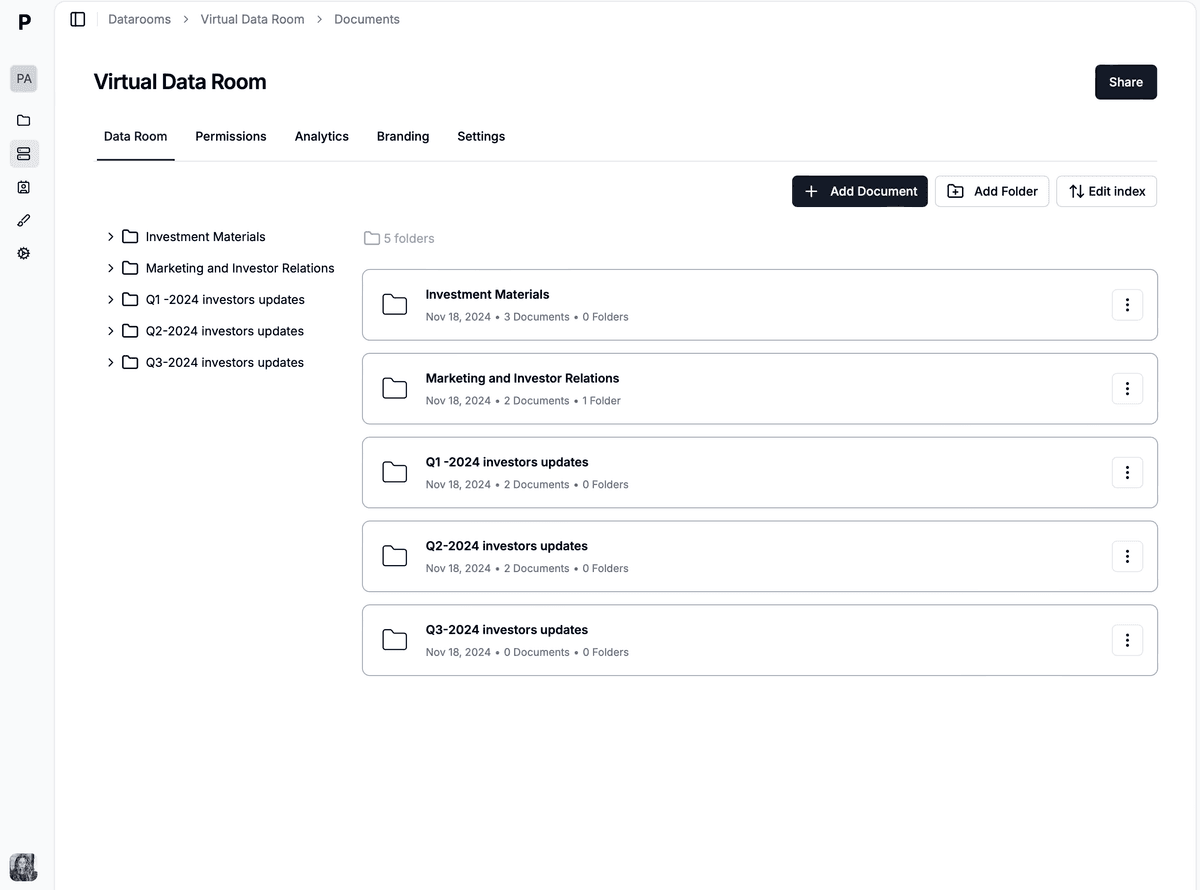
One data room holds every stage of financial disclosure, with access scoped per buyer.
A sale process puts your most sensitive numbers in front of several counterparties at once, and at least some of them won't buy. You need to give each buyer a different slice of the same document set, change that slice as the process moves, and prove afterwards what each one saw. Email and shared drives can do none of these reliably.
The data room also protects your negotiating position. When a buyer raises a point in week six, the audit log shows whether they opened the relevant schedule in week one. When a buyer goes quiet, the analytics show whether they stopped reading or are simply slow to reply.
Create a single data room for the transaction and build folders that mirror your stages: "1. Teaser and CIM", "2. Financials, round 2", "3. Confirmatory diligence". Upload disclosure copies, never working files. Unlimited documents and storage mean you never trim the confirmatory set to fit a plan.
Create a group for each buyer and set granular permissions at folder and file level. Round 1 groups see only the first folder. When a buyer advances, you open the next folder to that group, without sending a new file.
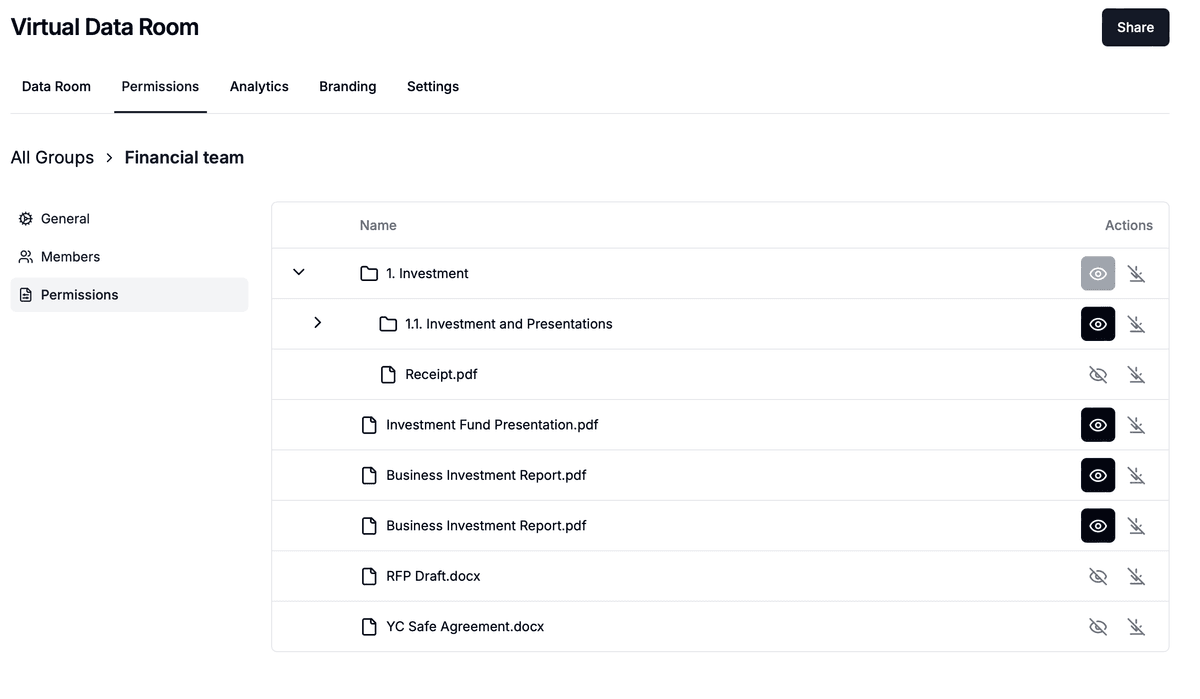
Folder permissions per buyer group keep round 2 financials hidden from round 1 buyers.
Turn on email verification so every viewer proves their identity with a one-time code, add a domain allow-list where you know the buyer's firm, and attach your NDA. The NDA agreement is signed or accepted before the first page loads, and signing is powered by Documento.
Switch financial folders to view-only and turn on dynamic watermarking, which overlays the viewer's email, IP address and date and time on every page. Add screenshot protection on the most sensitive schedules. Set a link expiry that matches your IOI or LOI deadline.

Every page carries the viewer's identity, so a leaked screenshot points back to its source.
Page-by-page analytics show which buyer opened which financial file, for how long, and how often they returned. Use it before every call. When a buyer drops out, disable its group and the links stop working immediately. At close, Data Rooms Plus and above can freeze the room into a tamper-evident archive.
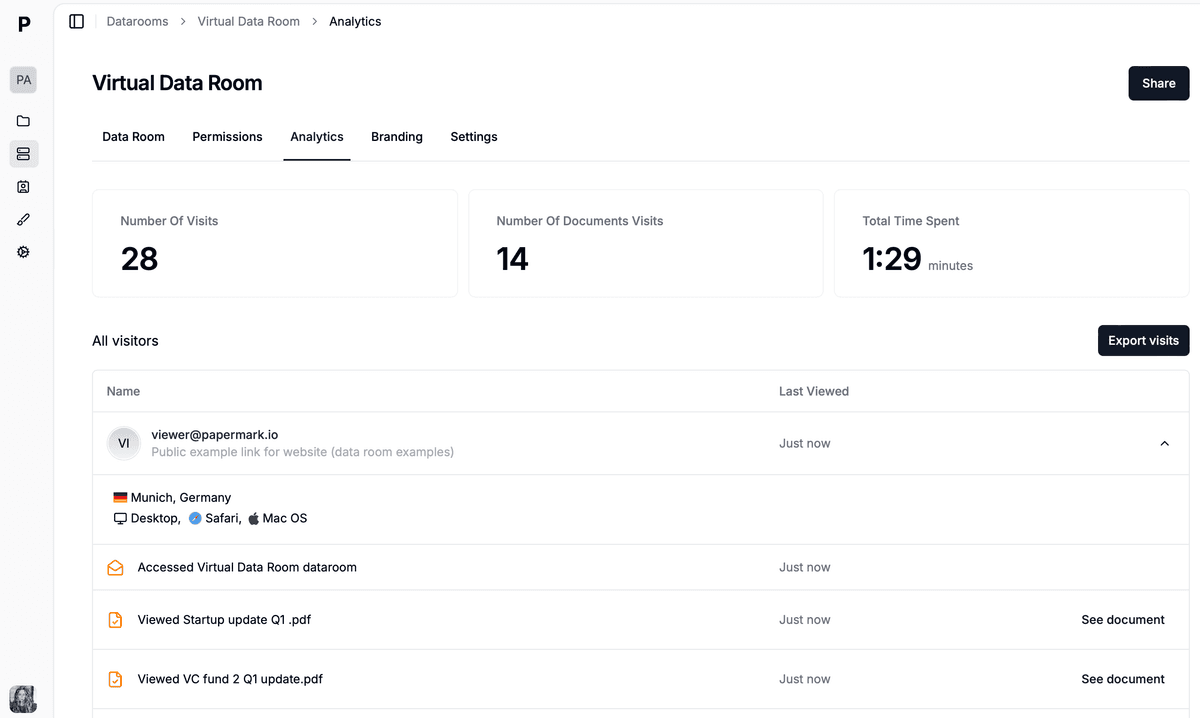
Per-buyer analytics show who is actually working through the monthly P&L.

Papermark is our #1 VDR provider for M&A transactions right now. In two deals we used custom branding, dynamic watermarking, and granular permissions.
Tyler
The Data Rooms plan is $99/month with a 7-day free trial and includes 3 team members, unlimited data room visitors, unlimited data rooms and documents, a custom domain, dynamic watermarking, NDA agreements and granular file-level permissions. The Q&A module and data room freeze are on Data Rooms Plus and above, and AI redaction is on Premium and above. Teams that want to automate rooms can use the public API, CLI and MCP server. Papermark is also open source, with self-hosting available. Legacy VDRs such as Intralinks and Datasite usually quote per deal.
How to send confidential company documents to a buyer without losing control in 2026: a 6-step secure document sharing process and an 11-point checklist.

How to track which buyers actually read your deal documents in 2026: per-buyer links, 7 signals, a 10-point score and document tracking software.
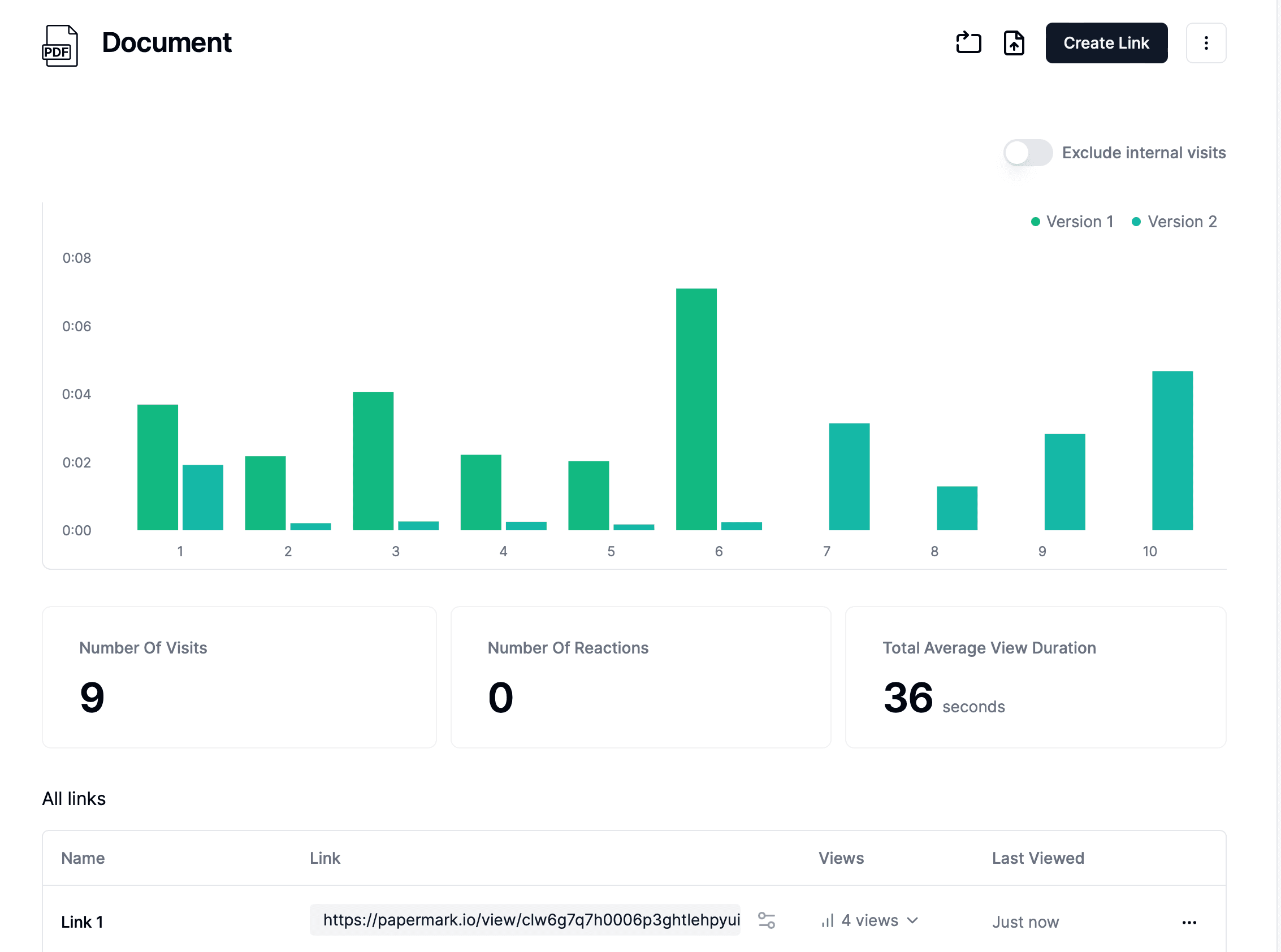
Secure file sharing in 2026. An 8-step setup with password gating, NDA enforcement, dynamic watermarking, expiration, and a full audit trail for sensitive documents.