
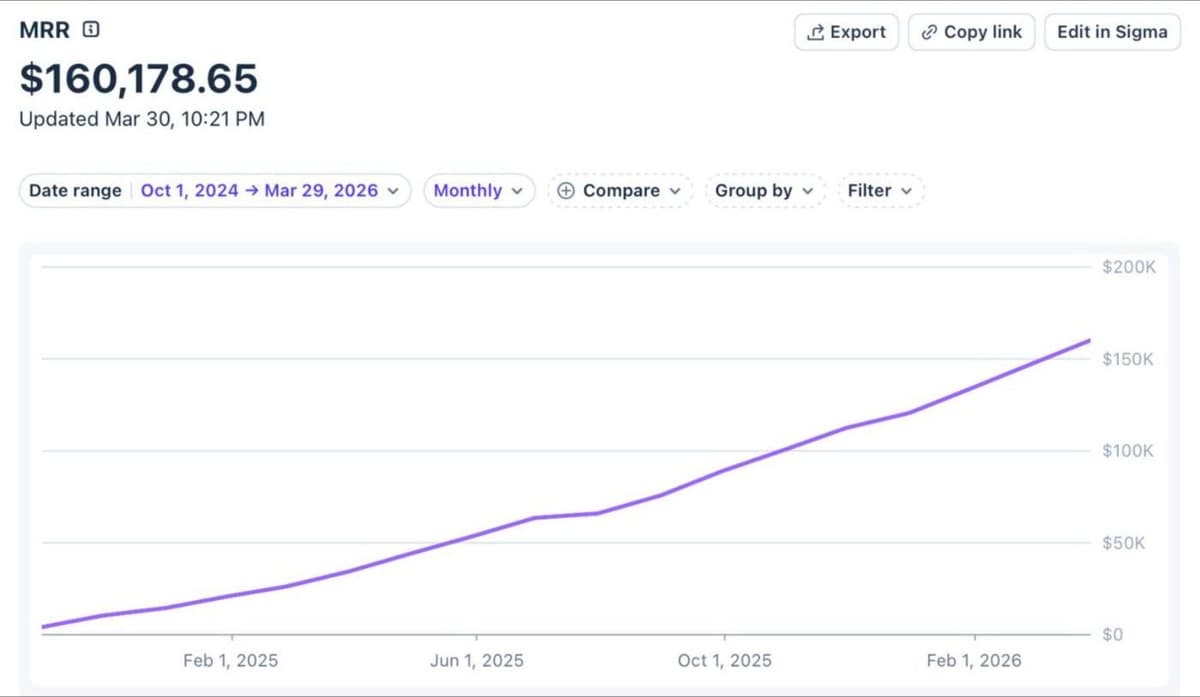
Papermark has reached $2M ARR.
It took us 18 months to reach our first million, and six more months to reach the second.
We are still two founders with no outside funding. What changed is who finds us: more deal teams, and more companies that need enterprise controls from day one.
1. Data rooms became the core product
Most new customers now come to Papermark for a secure data room for fundraising, M&A or due diligence. Single-document sharing is still there, but the data room is where deals happen.
So we kept making rooms faster to start and easier to run: data room invitations, tags for data rooms, links as files inside a room, renaming documents in place and upload notifications when someone adds files.
We also made it easier to follow a deal without opening Papermark. The native Slack integration sends a message when someone views your documents, now also to private channels. And with Keynote, audio and more file types supported, almost anything a deal team uses can go straight into the room.
2. Enterprise features
Larger teams asked for the controls their IT and legal teams expect. In the last six months we shipped:
- SAML SSO and SCIM, so teams can connect their identity provider and sync users automatically
- visitor groups, to organize buyers, sellers, advisors and counsel by role or access level
- a new data room introduction page with your logo, a welcome message and a video
- bulk downloads with one-time-passcode verification
Read more about how we protect your documents on our security page.
3. AI and agents
AI data room generation creates a folder structure for you from a short description, with templates for M&A due diligence, fundraising, real estate and legal. Improved AI agents answer questions across documents faster and with more precise citations, and help set up rooms in seconds.
The goal is simple: less time on folders and permissions, more time on the deal.
4. Six months, release by release
Here is everything above in the order it shipped, with what each release does for a deal team.
October 2025
- Custom welcome messages: greet visitors with context before they open a document.
- Hide the branding banner for a cleaner viewer.
November 2025
- Keynote support and fullscreen presentations: pitch decks look the way you designed them.
- Excel advanced mode per document: turn the interactive spreadsheet view on only where you need it.
- Data room invitations: invite people by email, each with a personal link you can revoke on its own.
- Checkbox custom fields: ask visitors to confirm terms on the access screen.
- Tags for data rooms: sort many rooms by deal, client or stage.
- An invoices page for your own billing records.
December 2025
- AI data room generation: describe the deal, get a folder structure to start from.
- Links as files: put an external link, such as a company website or a video hosted elsewhere, inside the room next to your documents.
January 2026
- A link expiration indicator, so you see which links are about to expire.
February 2026
- A data room introduction page with your logo, a welcome message and a video.
- Slack notifications in private channels, with filters by domain.
- Bulk downloads with one-time-passcode verification.
- Rename documents in a data room without uploading them again.
- SAML SSO and SCIM for enterprise teams.
- Upload notifications and upload visibility: know when a visitor adds files, and decide who else can see them.
- Visitor groups: buyers, sellers, advisors and counsel, each with shared permissions.
- Viewer background color and auto-generated slugs for custom domains.
March 2026
- Visitor notification settings: choose when you hear about visitor activity.
- Improved AI agents for questions across documents.
- Duplicate link properties: copy a link with all its settings for the next party.
- Excel advanced preview and lazy page loading: large files open faster.
- Clearer bulk upload progress, with the option to cancel single items.
5. Q1 2026 in numbers
- 8.7% month-over-month MRR growth
- 367 new customers in the quarter
We still share our journey in public, and every support request is still answered by a founder.
6. What we learned
The second million came three times faster than the first. Every data room is shared with investors, buyers, lawyers and advisors, so every deal shows Papermark to people who will run deals of their own.
We also learned that enterprise does not have to mean slow. SSO, SCIM and audit-ready controls can be set up in minutes, just like the rest of the product.
7. How we went from $1M to $2M, step by step
We did not change how we work for the second million. We applied the same habits to a bigger product.
- Follow where customers already are. New customers came for data rooms, so most of what we shipped went into the room: invitations, tags, groups, the introduction page.
- Build enterprise controls into the product. SSO and SCIM are configured in Settings, with presets for major identity providers, so IT teams can roll Papermark out through the tools they already use.
- Cut setup time. AI data room generation gives you a starting folder structure in seconds, so the first hour goes into the deal, not into folders.
- Bring updates to where the team works. Slack notifications mean a deal team sees activity without logging in.
- Let every deal show the product. Each room is opened by investors, buyers, lawyers and advisors. A clean viewer and a branded introduction page are the first thing they see.
- Keep answering support and sharing in public. Every support request still goes to a founder, and we still post our numbers.
8. How to get started
This is how a team can set up a data room with the features above.
- Create a data room, empty, from a template or with AI. See how to create a data room.
- Add folders and files. Review the suggested structure, then bulk upload your documents.
- Add an introduction page with your logo, a welcome message and a video. See the introduction page guide.
- Create visitor groups and set permissions, so every party sees only its folders. See groups and granular permissions.
- Invite people by email. See how to invite visitors.
- Connect Slack to follow activity. See how to connect Slack.
- On the Enterprise plan, turn on SSO and SCIM. See SAML SSO and SCIM.
9. What's next
More for deal teams, more for agents, and the same speed. You can see every plan on our pricing page and every release in our changelog.
Overnight success, two and a half years in the making. Keep building.