
Papermark reaches $3M ARR in 28 months, fully bootstrapped
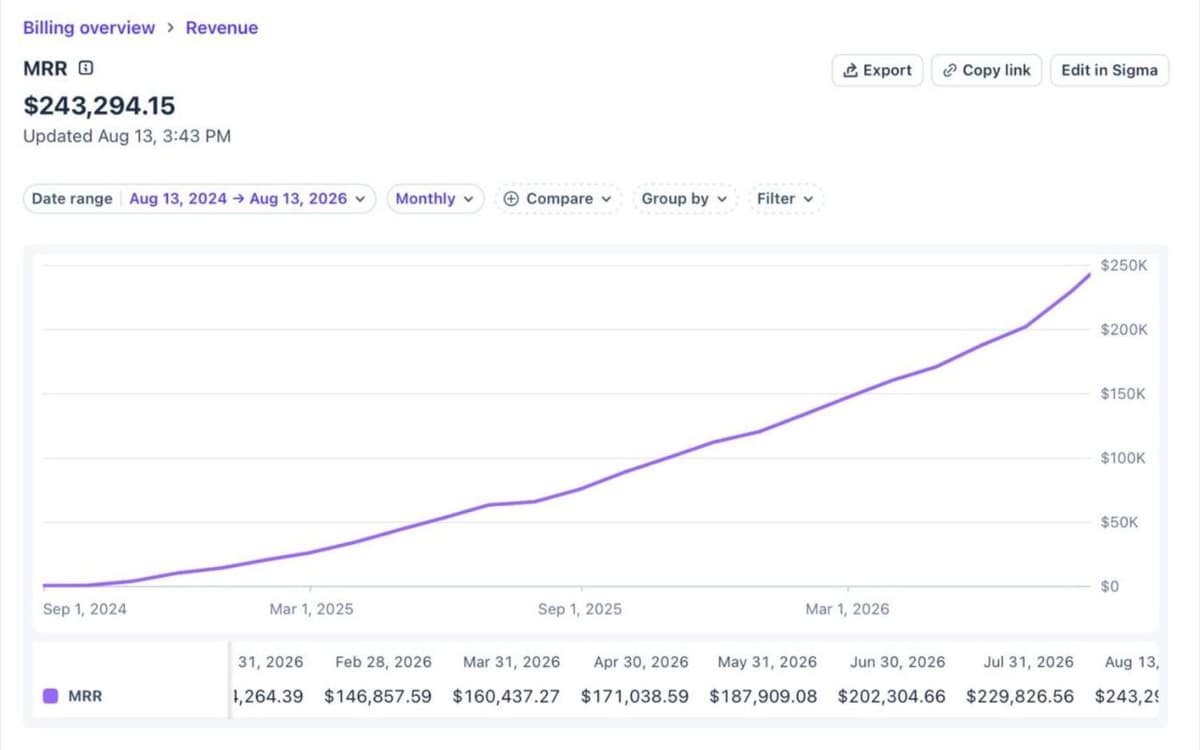
Today Papermark reached $3M ARR. Two people. 28 months. Fully bootstrapped.
We build Papermark, the secure, modern data room for fundraising, M&A and due diligence, as a team of two founders with no outside funding. Every milestone so far has come from customers who chose to pay for what we built. Here is how we got from zero to $3M.
1. 18 months to $1M ARR
The first million took the longest. In January 2025 we set ourselves a public challenge to reach $1M ARR in 2025, crossed $500k in April and reached $1M ARR in September 2025, 18 months in.
A big part of that growth came from one shift: customers moved from sharing single documents to running whole deals in data rooms.
What we shipped in that period, and why it mattered to deal teams:
- Data rooms (April 2024). One link for many documents, with analytics across the whole room. A founder no longer had to send ten separate links to an investor.
- Groups with file-level permissions and watermarks (September 2024). Different visitor groups could see different folders, and every page could carry the viewer's details. This is what made Papermark usable for M&A, where each bidder should only see its own slice of the room.
- Link presets (September 2024). Default settings for new links, so a team stops setting up the same protections by hand for every investor.
- A new data room layout and automatic index files (February and March 2025). Content, permissions, analytics, branding and settings each got their own place, and large rooms got an index that buyers and their advisors could navigate.
- Q&A conversations and file requests (April 2025). Questions and uploads moved into the room instead of long email threads.
- NDA agreements and detailed data room analytics (May 2025). Visitors accept an NDA before they see anything, and the team sees which documents each visitor opened and for how long.
- Multi-region storage (June 2025). Teams could keep their documents in the region their compliance rules require.
2. Six more months to $2M ARR
The second million took six months. By the time we reached $2M ARR in March 2026, data rooms had become the core product, and most new customers came to Papermark for fundraising, M&A or due diligence.
For larger teams, we shipped SAML SSO and SCIM so banks, law firms and funds could roll Papermark out through their identity provider.
The rest of that period was about running a deal from start to finish inside the room:
- Slack integration (September 2025). View notifications land in the channel where the deal team already works, so nobody has to refresh a dashboard.
- Data room invitations (November 2025). Invite specific people by email with their own access link, instead of copying links into separate emails.
- AI data room generation (December 2025). Describe the deal and get a complete folder structure to start from.
- An introduction page and bulk downloads with OTP verification (February 2026). Visitors get a branded welcome that explains the room, and downloading many files at once requires a one-time code sent by email.
- Visitor groups (February 2026). Organise visitors by deal role or organisation, then grant access, send invitations and read analytics per group.
3. Four more months to $3M ARR
The third million took four months. July alone added $26k in MRR, and we ended the month with 1,737 paying customers.
What shipped between April and July 2026:
- Notification settings and visitor upload notifications (April 2026). Each team member chooses which notifications to get and how often, and the team hears straight away when a visitor uploads a file.
- A new data room sidebar (April 2026). All data room tools in one navigation, so the team finds content, permissions and analytics faster.
- Download an entire data room as an archive and freeze data rooms (April 2026). At the end of a deal, teams keep a complete copy of the room, or close it to every viewer and keep an archive of documents, audit logs and Q&A as a record of the process.
- Upload permissions for multiple folders (April 2026). Control where visitors can upload across many folders at once.
- Request lists (June 2026). Track outstanding due diligence requests inside the room, assign them to visitor groups or links, and set due dates. See the request list guide.
- Papermark Agents (June 2026). A full API, a CLI and an MCP server, so an AI agent can create a room, upload files, set permissions and read analytics.
On X, I summed it up in one line: "$3M ARR day! 2 people team. 28 months. Fully bootstrapped." Three years ago I would not have believed I would build a company that thousands of customers choose to pay for.
4. What did not change
The core focus is still our customers. We still reply to every support request ourselves, and we ship to production almost every day.
We also still share our numbers in public, the same way we did at $100k to $500k ARR on Stripe. It keeps us accountable and it brings us new customers.
5. What did change
- Tens of thousands of teams have signed up
- Millions of data rooms and documents have been viewed
- Billions in deal volume now run through Papermark ($55B and counting)
- July alone added $26k in MRR, with 1,737 paying customers at the end of the month
Our customers trust us with their most confidential deals: a founder's seed round, a fund's LP reporting, a sell-side M&A process. That trust is the greatest joy of building Papermark, and the reason we keep investing in security, granular permissions and page-by-page analytics.
6. Next stop: $10M ARR
$1M took 18 months, $2M six more and $3M four more. The next goal is $10M ARR, still bootstrapped and still with customers first.
If you are about to raise, sell a company or run due diligence, you can set up a data room in under a minute and see every plan on our pricing page.
7. How to start a data room
Here is how to set up your first room today, step by step.
- Start the trial. Sign up and choose the data room option during onboarding. Papermark offers a free 7-day data room trial, and the Data Rooms plan is $99/month after that.
- Create the room. Start empty, pick a template for fundraising, M&A due diligence or LP reporting, or describe your deal and let AI generate the folder structure. See how to create a data room.
- Upload and organise. Drag files in with bulk upload and sort them into folders such as Financials, Legal, Team and Product. You can add documents at any time without breaking links you have already shared.
- Brand it. Add your logo, brand colour and, if you want, a custom domain and an introduction page.
- Set up access. Create a group for each type of visitor, open File permissions and choose which folders each group can view and download. See groups and granular permissions.
- Create links. For each link, choose the protections you need: Require email to view, Require email verification, Password protection, an Expiration date, Dynamic watermarking and an NDA agreement.
- Share and follow up. Send the link, or invite people by email from the room. Then read page-by-page analytics to see who opened what, and follow up with the visitors who are actually reading.