
How to secure a data room for M&A due diligence
On the buy side, you are not the one selling, but you still end up holding a large amount of someone else's confidential information. The target sends contracts, financials, HR files and IP records, often in batches and often by email. Your own legal, financial, tax and technical advisors each need their slice of it, and your lenders need enough to approve the financing. Each of those transfers is a place where the target's data can leak, and you are bound by the NDA you signed with the seller.
This guide walks through the Papermark data room controls that matter most for buy-side due diligence, in the order you would set them up.
Quick recap: data room security best practices
- Give colleagues access to this deal only with the Data Room Member role
- Track what you asked the target for with the request list
- Let the target upload directly with file requests
- Organize the room by workstream and generate an index
- Give each advisor workstream its own group
- Verify every visitor's email and restrict advisors by domain
- Redact personal data before sharing with lenders
- Watermark every page with the viewer's email and date
- Control downloads, and require a one-time password for bulk downloads
- Replace updated files without sending new links
- Keep advisor questions inside the room with Q&A
- Keep an audit trail of who saw what
- Freeze the room at close
Data room security features for M&A due diligence
These are the controls that do most of the work in a buy-side diligence room. The rest of this guide shows how to set each one up.
- Request list: track every document you asked the target for, with status, owner and due date.
- File requests: the target uploads straight into the right folder, instead of sending attachments by email.
- Groups and granular permissions: legal, financial, tax, technical advisors and lenders each see only their own folders.
- Team roles and Data Room Member: deal colleagues work in this room without seeing anything else in your workspace.
- AI redaction: remove names, emails and account numbers before documents go to lenders or wider advisor teams.
- Dynamic watermarking: each page shows the viewer's email and date, so any leaked copy of the target's material can be traced.
- Audit logs: a record of who viewed and downloaded which documents, which helps you show you handled the target's data as the NDA requires.
- Freeze data room: at close, end all access and keep an archive of documents, audit log and Q&A.
1. Give colleagues access to this deal only
Buy-side teams often run several deals at once, and many colleagues (integration leads, finance, legal, HR) only need one of them.
- Use team roles so only the deal lead can create links, change permissions or invite outsiders.
- Invite internal colleagues as Data Room Member. They can work in the rooms they are assigned to and see nothing else in your workspace, including other deals in your pipeline. See how to invite team members.
- If your company uses an identity provider, connect SAML SSO and SCIM so access ends automatically when someone leaves.

2. Track what you asked the target for
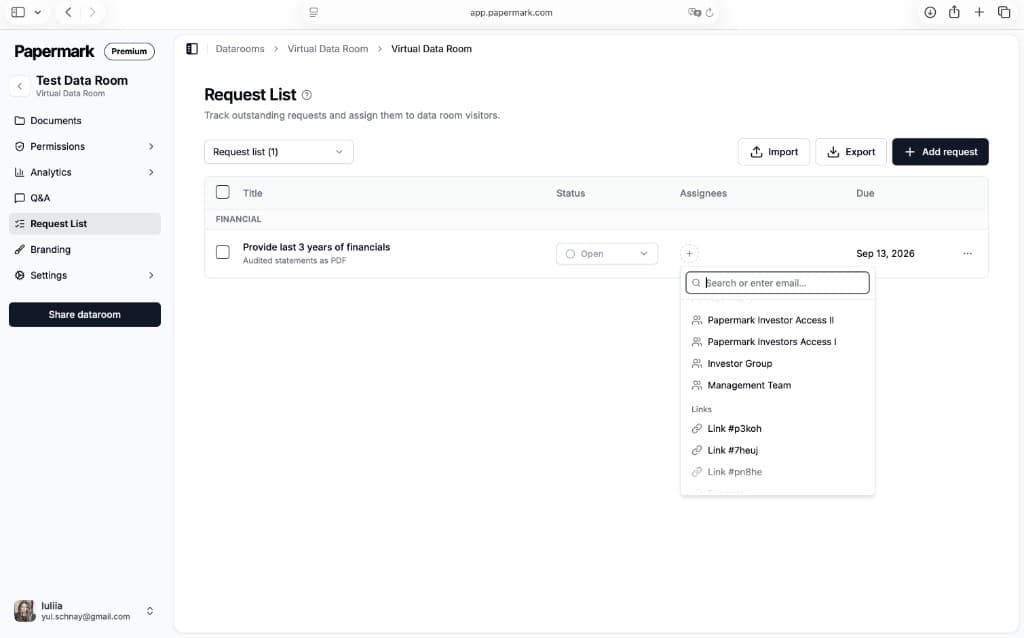
Diligence runs on a request list, and on the buy side it is usually yours. Use the data room request list to log each request (for example "all customer contracts above a set annual value" or "IP assignment agreements for current engineers"), assign it to the right workstream, set a due date and track its status. Your advisors and the target see the same list, so nobody chases requests in email threads.
3. Let the target upload directly
Turn on file requests so the target's team uploads documents straight into your room, into the folder you choose. This keeps the target's files out of inboxes and personal drives on both sides.
- Use upload notifications so the relevant workstream knows when new files arrive.
- Use upload visibility to decide who sees new uploads, so material lands with your deal team first before advisors or lenders see it.
4. Organize the room by workstream and generate an index
Set up one top-level folder per workstream (corporate, financial, tax, commercial, HR, IP and technology, real estate, environmental), mirroring the request list. Then:
- Turn on index generation so advisors can download a numbered index of the room and reference documents by number in their reports.
- See how automatic file indexing numbers folders and files.
A consistent structure makes it easy to see gaps against the request list and to give each workstream access to exactly its folders.
5. Give each advisor workstream its own group
Create a group for each workstream: your law firm, your accountants, tax advisors, technical or IT consultants, insurance advisors and lenders. Then use granular file permissions to decide, folder by folder: On the other side, the seller's advisors set up their own room for a sell-side M&A process.
- which folders each group can see
- whether each group can view only, or also download
Your tax advisors do not need the HR files, and your IT consultants do not need the financing documents. Set default permissions for new documents so files the target uploads later stay hidden until you assign them.
6. Verify every visitor's email and restrict advisors by domain
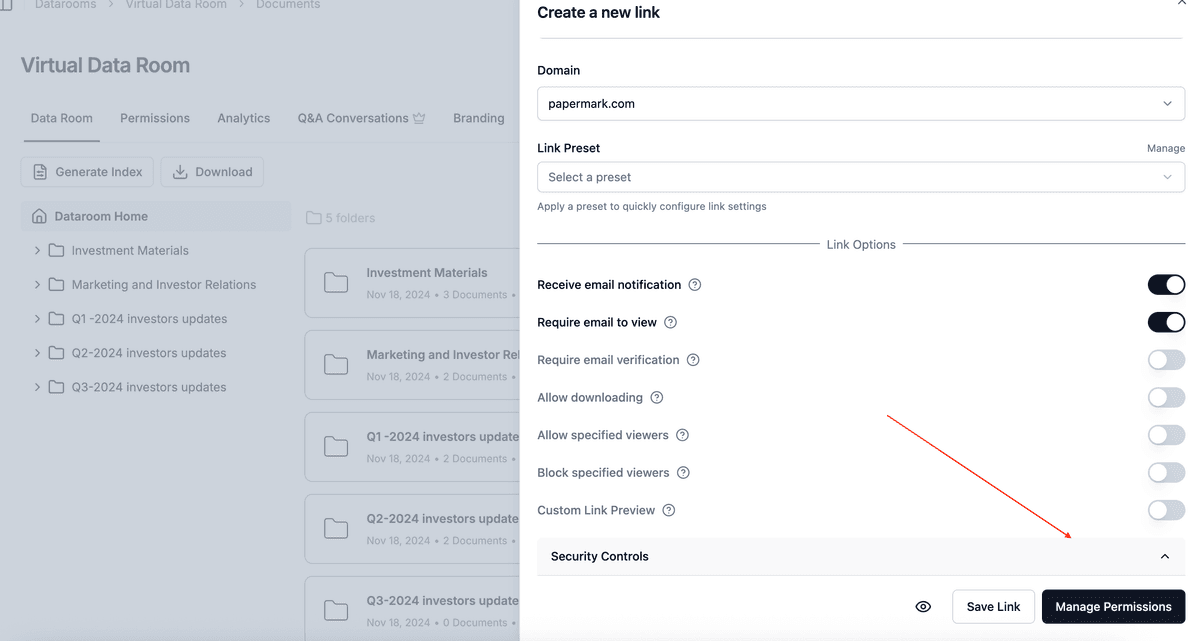
- Turn on email verification on every link. Visitors receive a one-time code by email, so a forwarded link does not open the room.
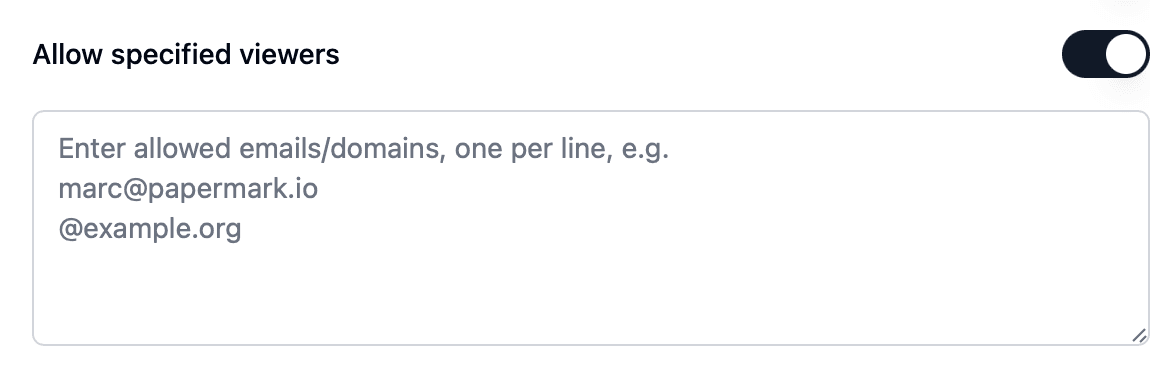
- Add an allow list to each group's link with that firm's email domain, for example
@yourlawfirm.com, so only people at that firm can get in. - If the seller's NDA requires it, attach your own confidentiality terms to lender or consultant links with NDA agreements. Acceptance is recorded with email and timestamp.
7. Redact personal data before sharing with lenders
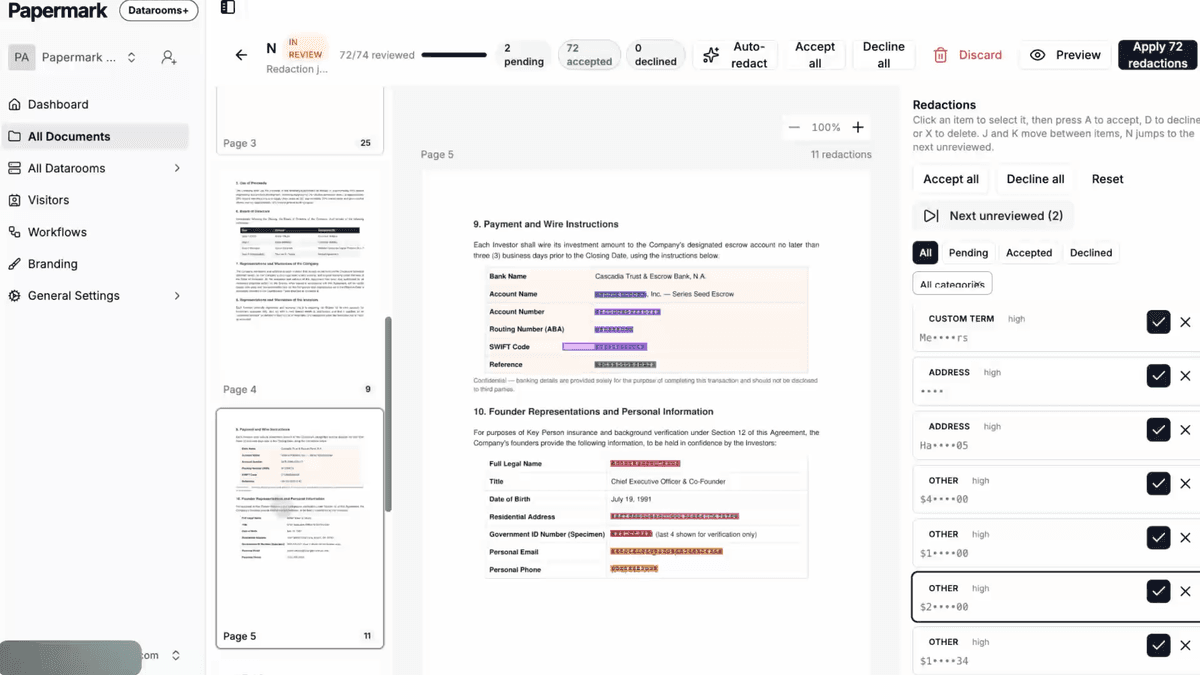
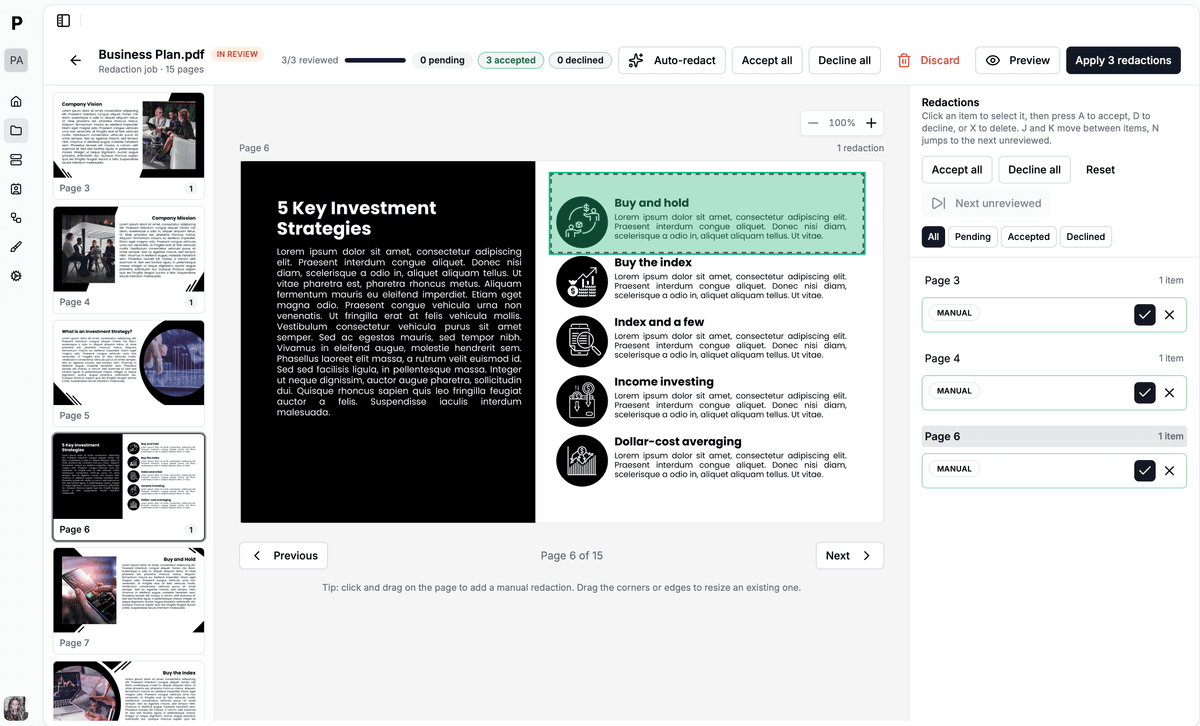
Target documents are full of personal data: employee contracts, payroll files, customer contacts, pension records. Your lenders and some advisors do not need it. Use AI redaction to find and black out names, emails, phone numbers and account numbers before those documents go into a lender-facing folder. This limits your GDPR exposure as a recipient of the target's data.
8. Watermark every page
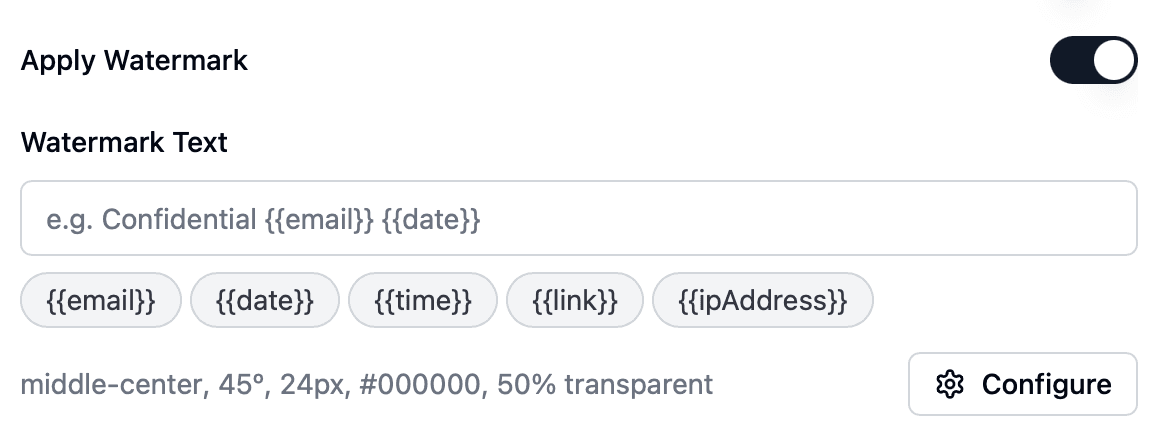
Enable a dynamic watermark on every advisor and lender link, for example Confidential {{email}} {{date}}. If one of the target's documents turns up somewhere it should not, the watermark shows which visitor it came from. See dynamic watermarking.
9. Control downloads
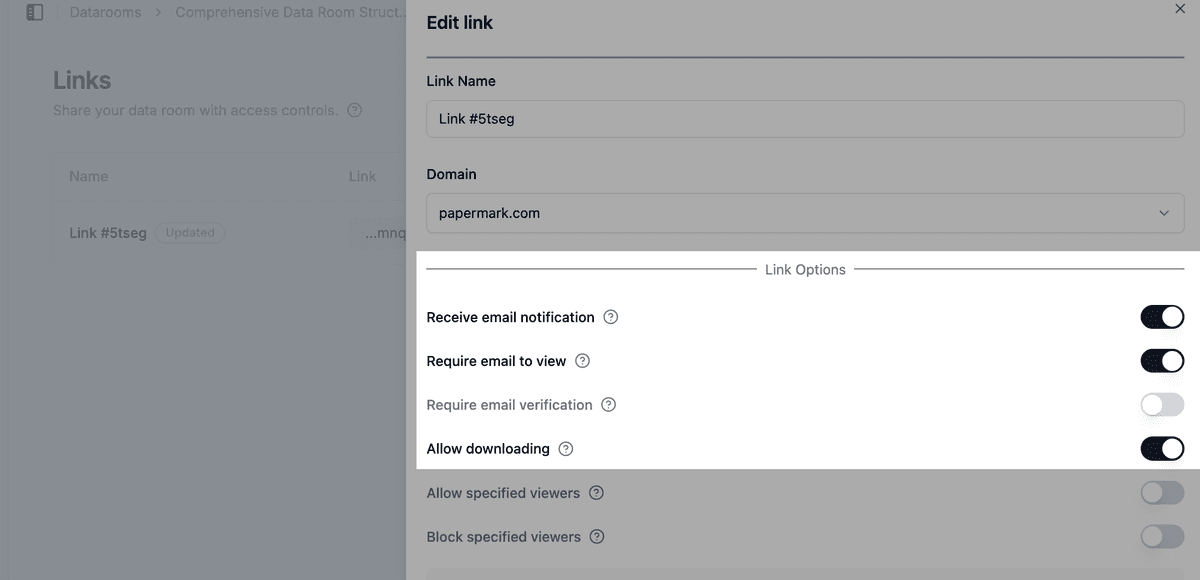
Your law firm and accountants usually need offline copies to write their reports. Lenders and most consultants do not. Allow downloads only for the groups that need them. See how to allow downloads from a data room.
If you allow bulk downloads, OTP-verified bulk downloads send a one-time password to the visitor's verified email before the ZIP is built, so a forwarded link cannot be used to pull the whole room.
10. Replace updated files without sending new links
Targets often send updated versions: a revised management account, a corrected cap table, a newly signed contract. Upload them as new document versions. The link stays the same, everyone sees the current file, and you avoid "final_v3" copies circulating among advisors.
11. Keep advisor questions inside the room
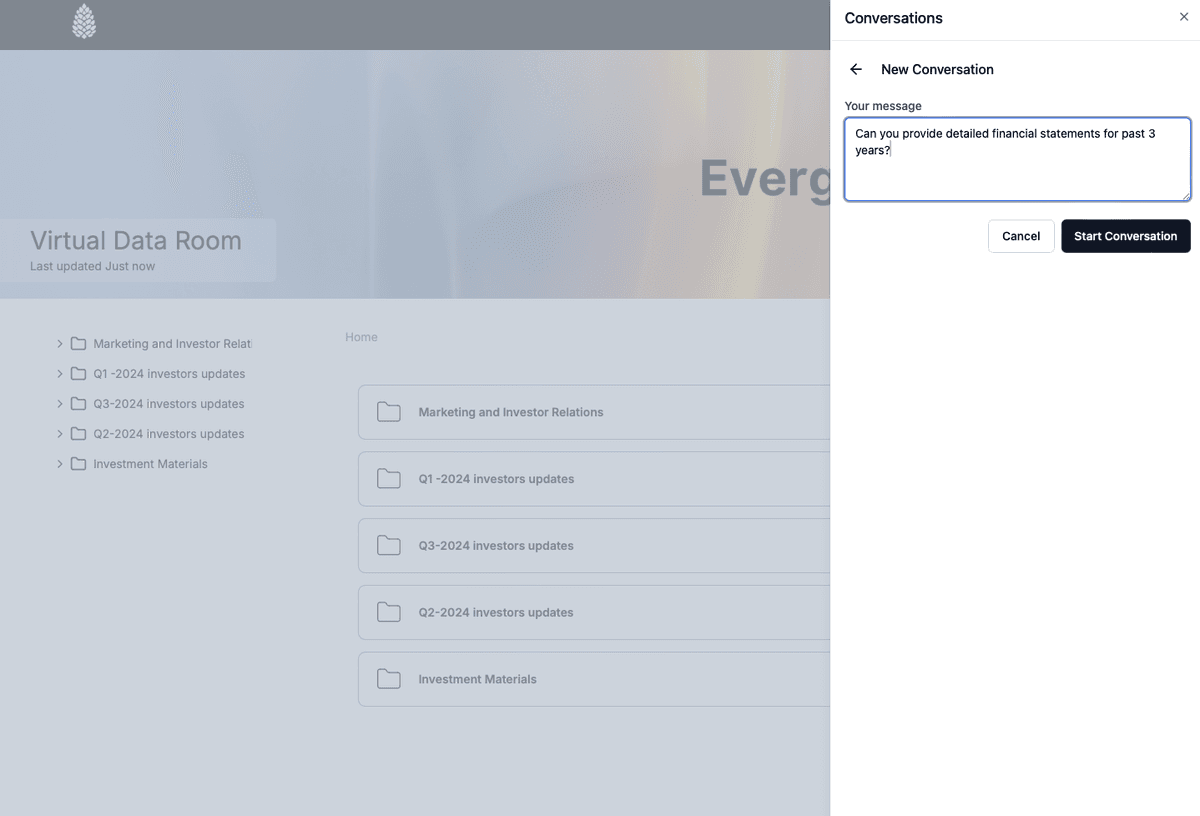
Use Q&A conversations so your advisors raise questions next to the document they refer to. The deal team can collect follow-up questions for the target in one place, and answers stay inside the room's access controls instead of in scattered email threads.
12. Keep an audit trail
- Audit logs record views, downloads, email verifications and NDA acceptances. If the seller asks how its information was handled, you can show exactly who saw what.
- Data room analytics show whether each workstream has actually reviewed its folders before reports are due.
- Export data room visits to CSV for your deal file.
13. Freeze the room at close
When the deal closes, or you walk away, freeze the data room. Freezing permanently ends all access for advisors, lenders and the target, archives every link and generates an archive of the documents, the full audit log and all Q&A, with a SHA-256 hash. If a warranty claim comes up later, you have a verifiable record of what the target disclosed during diligence.
Recommended setup by phase
| Phase | Who gets access | Settings |
|---|---|---|
| Setup | Deal team and internal colleagues | Data Room Member role, workstream folders, default permissions set to hidden, index generation |
| Collection | Target's team | Request list, file requests, upload notifications, upload visibility limited to deal team |
| Advisor review | Legal, financial, tax and technical advisors | One group per workstream, email verification, allow list, watermark, downloads only for report writers, Q&A |
| Financing | Lenders | Own group, AI redaction on shared documents, NDA if required, no downloads, watermark |
| Close | Deal team only | Expire advisor and lender links, export audit logs, freeze the room |
Some controls depend on your plan. See pricing for what each plan includes. To see how Papermark compares with other providers, look at the best virtual data rooms for due diligence and the data room for due diligence.
All Papermark features used in this guide
| Feature | How to set it up |
|---|---|
| Team roles and Data Room Member | Manage team roles |
| SAML SSO and SCIM | Set up SSO and SCIM |
| Request list | Use the request list |
| File requests | Enable file requests |
| Upload notifications | Get notified about uploads |
| Upload visibility | Control who sees new uploads |
| Index generation | Enable index generation |
| Groups and granular permissions | Groups and granular permissions |
| Default permissions for new documents | Set default permissions |
| Email verification | Require email verification |
| Allow list | Create an allow list |
| NDA agreement | Require an NDA before viewing |
| AI redaction | AI redaction |
| Dynamic watermark | Add a dynamic watermark |
| Download permissions | Allow downloads from a data room |
| OTP-verified bulk downloads | Bulk downloads with OTP |
| Document versions | Document versions |
| Q&A conversations | Q&A conversations |
| Audit logs | Audit logs |
| Data room analytics | Detailed data room analytics |
| Freeze data room | Freeze a data room |