
How to secure a data room for private equity LP fundraising
When a venture capital or private equity fund raises from limited partners, the data room stays open for months, often from the first LP meeting through first close and on to final close. It holds the private placement memorandum (PPM), the limited partnership agreement (LPA) and its drafts, track record and portfolio data, team bios, compliance policies and answers to due diligence questionnaires. Visitors include pension funds, endowments, family offices, funds of funds, placement agents, LP consultants and each LP's legal counsel. Every one of them expects you to control and document who saw what.
This guide walks through the Papermark data room controls that matter most for fund raising with LPs, in the order you would set them up.
Quick recap: data room security best practices
- Require an NDA before the first page loads
- Verify every visitor's email before they see anything
- Create one group per LP (or per LP type) with its own permissions
- Restrict access by domain for each LP and its advisors
- Watermark every page with the viewer's email, date and IP address
- Use document versions for the PPM and LPA drafts
- Handle due diligence questionnaires in Q&A
- Collect LP documents with the request list
- Control downloads, and require a one-time password for bulk downloads
- Limit who on your team can open the room with roles and the Data Room Member role
- Choose where files are stored for data residency
- Keep the room running through first and final close, with links that end on time
- Watch activity with analytics and audit logs
- Freeze the room after final close
Data room security features for LP fundraising
These are the controls that do most of the work in an LP data room. The rest of this guide shows how to set each one up.
- NDA agreement: every LP and advisor accepts your confidentiality agreement before viewing, and Papermark records who accepted and when.
- Groups and granular permissions: give each LP or LP type its own group, and decide folder by folder what they can see or download.
- Email verification: visitors confirm a one-time code sent to their inbox, so a forwarded link does not open the room.
- Dynamic watermarking: each page shows the viewer's email, date or IP address, so a leaked PPM or track record can be traced.
- Document versions: replace the PPM or LPA with the latest draft, and every LP sees it on the same link.
- Q&A conversations: answer due diligence questionnaire follow-ups inside the room, with a full record.
- Audit logs: a record of views, downloads, email verifications and NDA acceptances for your compliance file.
- Storage region: choose where files are stored when LPs or regulators require data residency.
1. Require an NDA before the first page loads
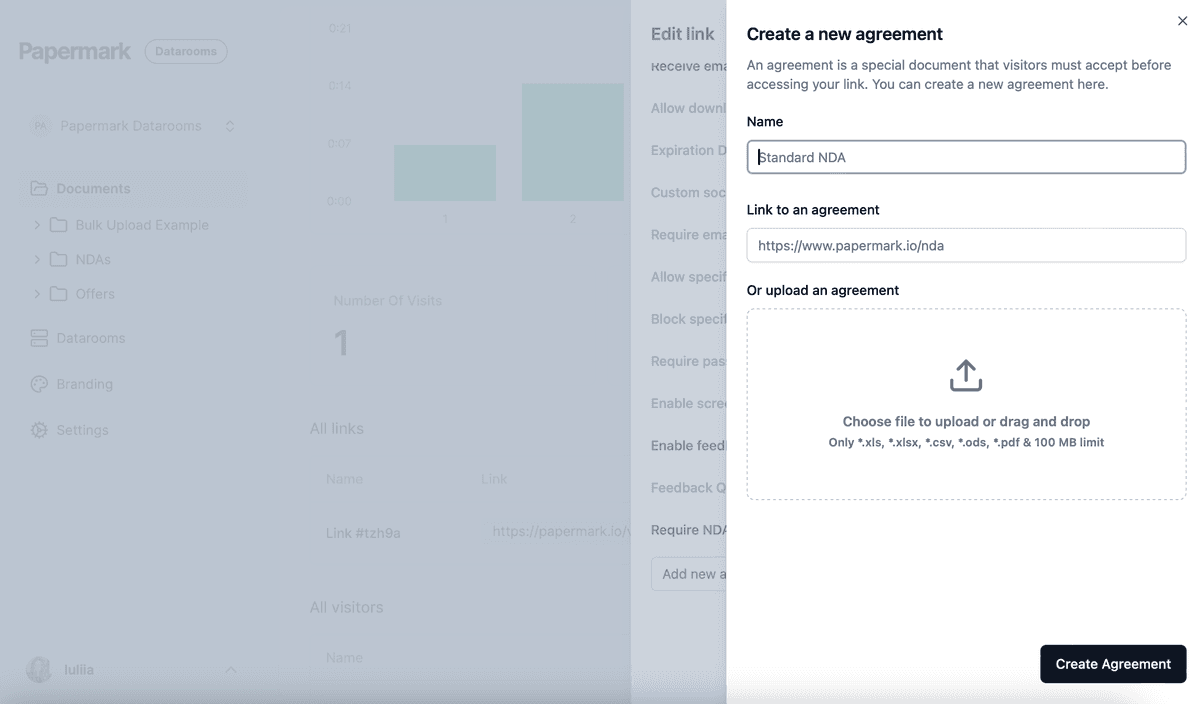
Your PPM, track record and portfolio company data are confidential, and LPs expect to sign an agreement before seeing them. Attach your confidentiality agreement to every link with NDA agreements. Each visitor accepts it before viewing, and the acceptance is recorded with their verified email and a timestamp. This matters when an LP's investment committee, consultant and counsel join at different times. You can add agreements once and reuse them on every link.
2. Verify every visitor's email
Turn on email verification on every link. Visitors receive a one-time code by email before the room opens, so a link forwarded inside or outside an LP's organization cannot be used by anyone without access to that inbox. Every NDA acceptance and every view in your audit log is then tied to a verified person.

3. Create one group per LP
Create a group for each LP you are in serious conversations with. For a large raise, you can group smaller LPs by type (for example, family offices, funds of funds, high-net-worth individuals). Then use granular file permissions to decide, folder by folder:
- which folders each group can see, for example the PPM and track record for everyone, and side letter drafts only for the LP they concern
- whether each group can view only, or also download
Add placement agents and LP consultants as their own groups, so you can give them the materials they need and remove them when their role ends. Set default permissions for new documents so a new draft or side letter stays hidden until you share it on purpose. Read more on granular permissions.
4. Restrict access by domain
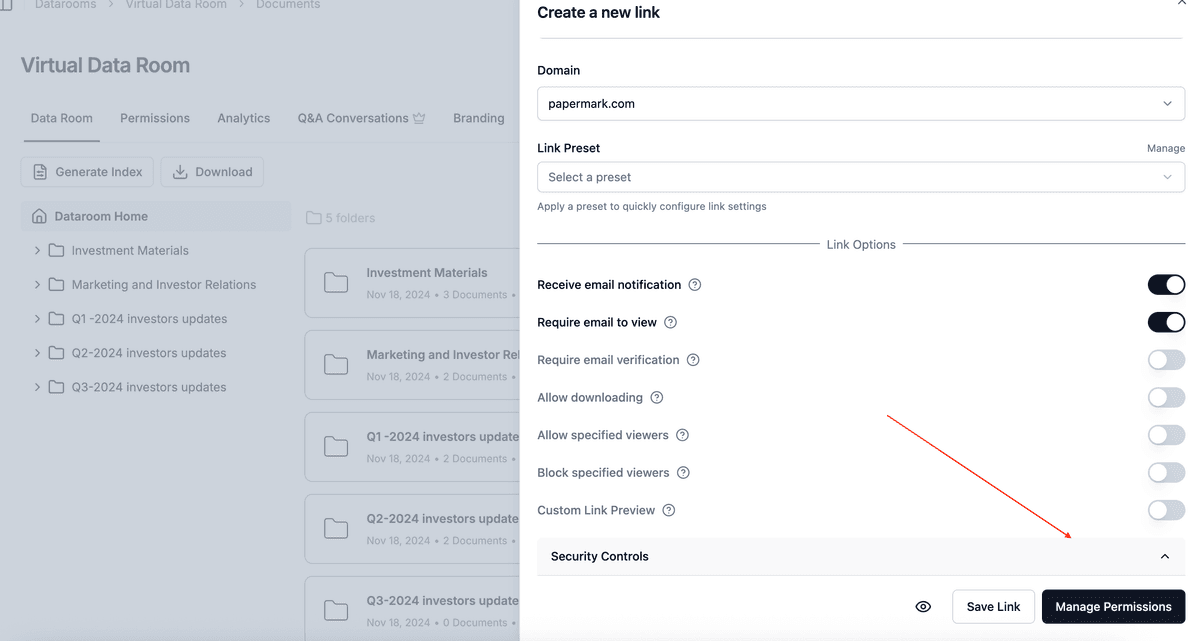
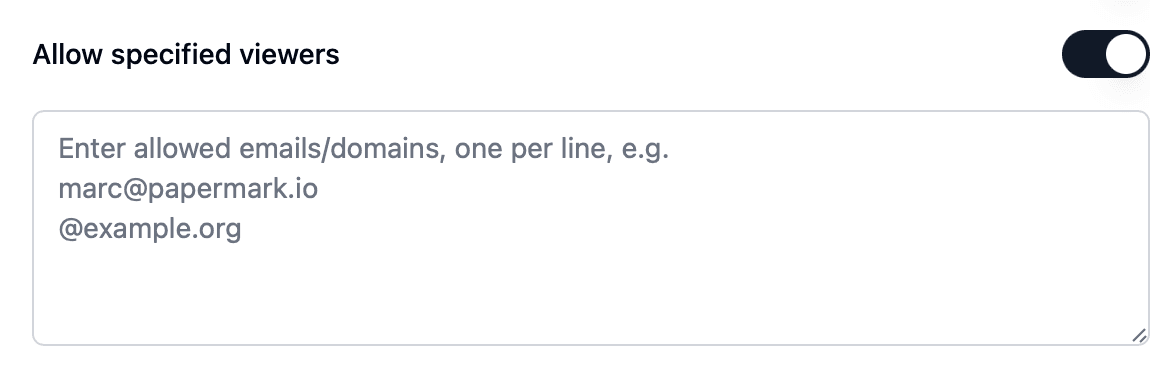
- On each LP's link, add an allow list with the LP's domain and its counsel's and consultant's domains, for example
@pensionfund.organd@lpcounsel.com. - Add competing managers and parties you do not want in the room to a block list, or to a global block list so they are blocked on every link in your workspace.
When someone is denied access, Papermark sends you an email, so you see attempted access.
5. Watermark every page
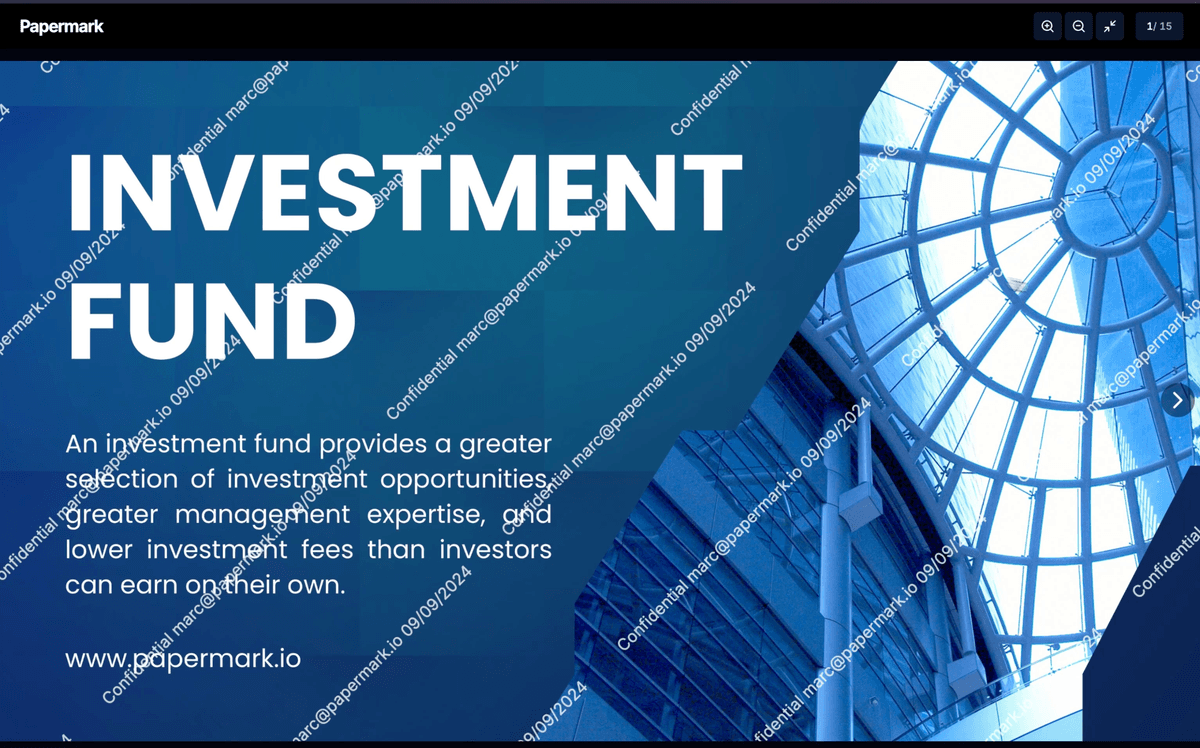
Enable a dynamic watermark on every link. Papermark stamps each page as it is viewed with the details you choose, for example Confidential {{email}} {{date}} {{ipAddress}}. Track record and portfolio data are easy to pass on, and a watermark shows whose copy it was. See dynamic watermarking.
6. Use document versions for the PPM and LPA drafts
The PPM, LPA and subscription documents go through several drafts during a raise, often driven by comments from lead LPs and their counsel. Upload each new draft as a new document version of the same file. LPs open the same link and always see the current draft, and you avoid the classic mistake of an LP commenting on an outdated LPA. Keep earlier drafts out of the room unless counsel asks for them.
7. Handle due diligence questionnaires in Q&A
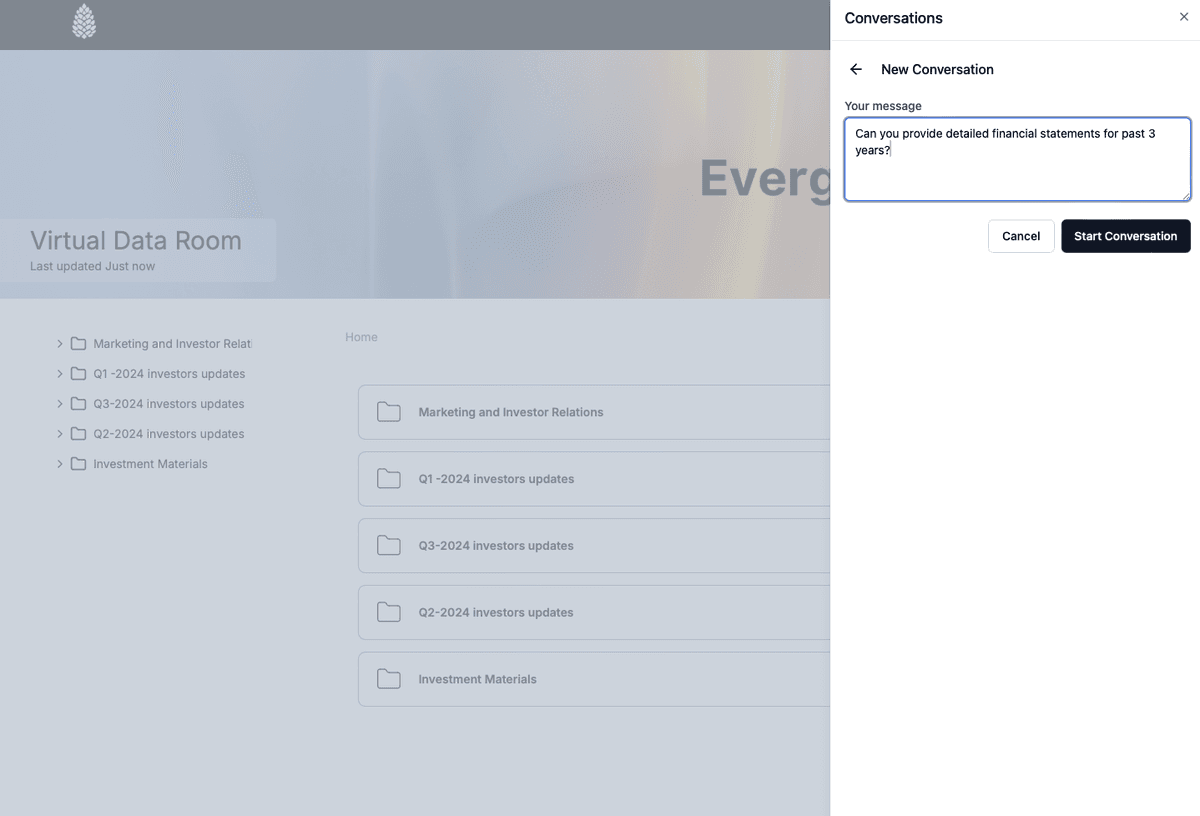
LPs and their consultants send long due diligence questionnaires (often based on the ILPA template) and follow up with many questions. Use Q&A conversations so follow-ups are asked next to the relevant document, instead of in scattered email threads. Questions and answers stay inside the room's access controls, and you keep a complete record of what each LP asked and what you answered. Upload the completed questionnaire to the LP's folder so the answer and the source documents sit together.

8. Collect LP documents with the request list
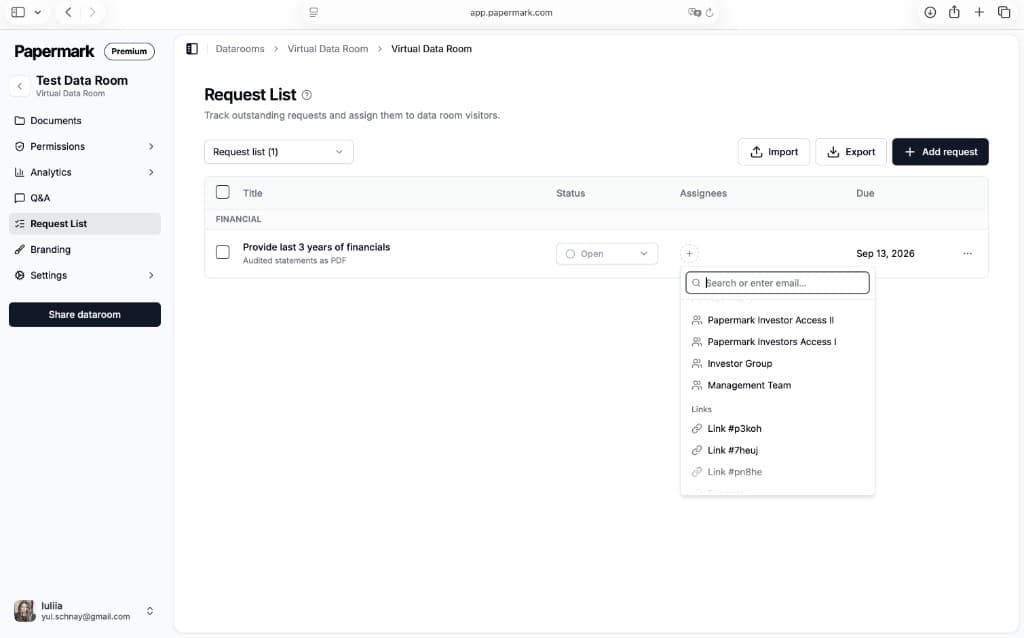
Closing requires documents from LPs too: subscription agreements, investor questionnaires, KYC and AML documents, tax forms. Use the request list to track what you need from each LP, with statuses and due dates, and file requests so LPs upload directly into the room instead of emailing sensitive identity documents.
9. Control downloads
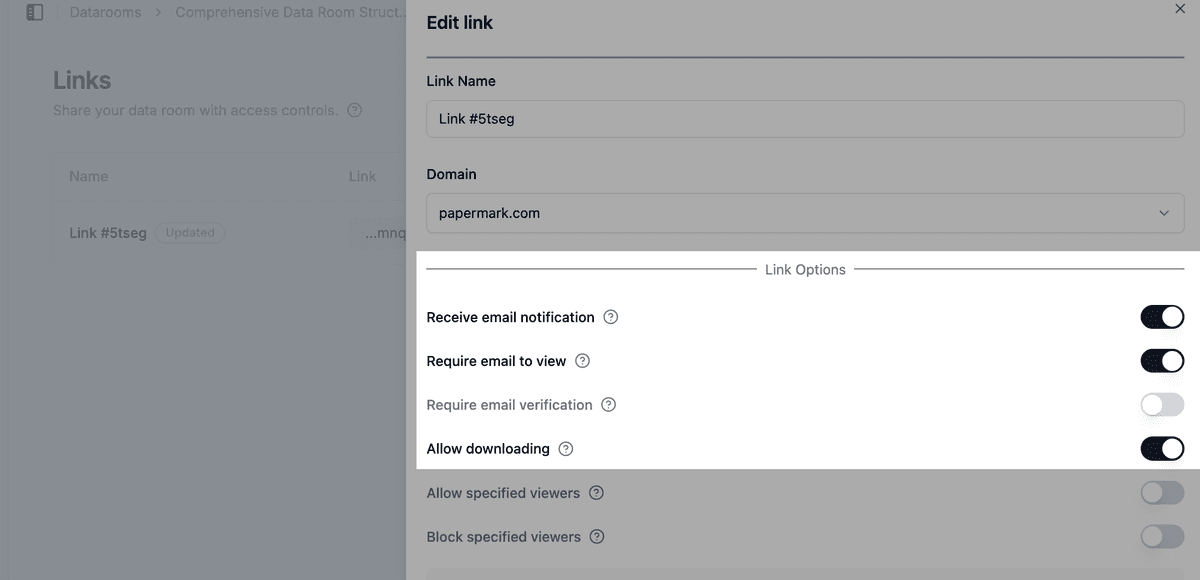
Keep downloads off by default. LPs' legal counsel usually needs offline copies of the LPA and subscription documents, so allow downloads for those groups only. See how to allow downloads from a data room.
If you allow bulk downloads, OTP-verified bulk downloads send a one-time password to the visitor's verified email before the ZIP is built. For the track record and portfolio data, you can also turn on screenshot protection and disable printing.
10. Limit who on your team can open the room
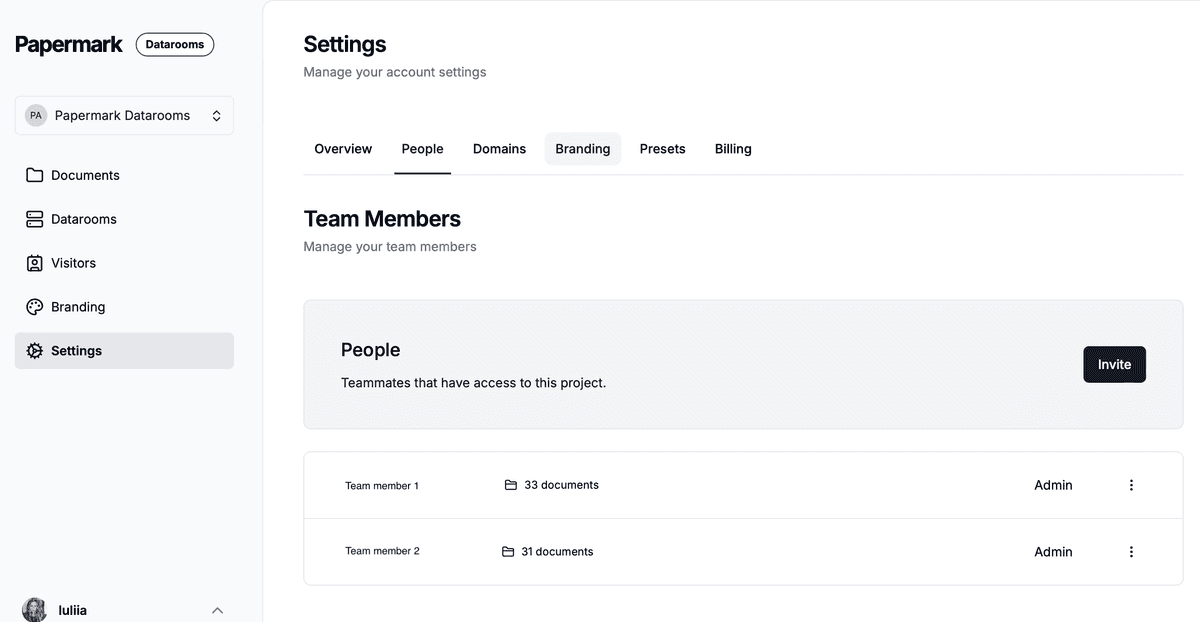
Investor relations, the partners, fund counsel and the fund administrator may all need access, but not everyone at the firm should see draft side letters or LP-specific terms.
- Use team roles so only investor relations and the partners leading the raise can create links and change permissions.
- Invite the fund administrator or outside counsel as Data Room Member. They can work inside the rooms they are assigned to and see nothing else in your workspace. See how to invite team members.
- If your firm uses an identity provider, connect SAML SSO and SCIM so access ends automatically when someone leaves.
11. Choose where files are stored
European LPs and some institutional investors ask where their data and your fund documents are stored. Pick your storage region before you upload anything, especially before LPs start uploading KYC documents. This also supports your GDPR compliance.
12. Keep the room running through first and final close
An LP room is long-lived. Rather than one expiry date for the whole room, set an expiration date on each LP's link that matches where they are: a short date for prospects who have not engaged, and a date past final close for LPs who are committed or still in diligence. Before each close, review your links and disable those for LPs who declined and placement agents whose mandate ended.

13. Watch activity
- Data room analytics show which LPs opened the PPM, the track record and the LPA, and for how long. An LP that read the track record closely but never opened the LPA may need a follow-up.
- Audit logs record views, downloads, email verifications and NDA acceptances, which you need for your compliance file and for regulators.
- Export data room visits to CSV for your records.
- Exclude internal visits so your own team does not distort the numbers.
14. Freeze the room after final close
After final close, freeze the data room. Freezing permanently ends all visitor access, archives every link and generates an archive of the documents, the full audit log and all Q&A, with a SHA-256 hash so you can prove later exactly what each LP was shown. Use a new room for ongoing LP reporting. Portfolio companies raising their own rounds can follow the startup fundraising setup.
Recommended setup by phase
| Phase | Who gets access | Settings |
|---|---|---|
| Pre-marketing | Target LPs and placement agents | Email verification, NDA, watermark, no downloads, fund overview and track record only |
| Due diligence | Interested LPs, consultants and counsel | One group per LP, allow list by domain, PPM and LPA with document versions, Q&A for questionnaires |
| First close | Committed LPs and their counsel | Downloads for counsel only, OTP bulk downloads, request list for subscription and KYC documents |
| Final close | Remaining LPs, then your team only | Disable links for declined LPs, export audit logs, freeze the room |
Some controls depend on your plan. See pricing for what each plan includes. To see how Papermark compares with other providers, look at the best virtual data rooms for financial deal management, or at Papermark's VDR for private equity and VDR for venture capital.
All Papermark features used in this guide
| Feature | How to set it up |
|---|---|
| NDA agreement | Require an NDA before viewing |
| Email verification | Require email verification |
| Groups and granular permissions | Groups and granular permissions |
| Default permissions for new documents | Set default permissions |
| Allow list | Create an allow list |
| Block list and global block list | Create a global block list |
| Dynamic watermark | Add a dynamic watermark |
| Document versions | Document versions |
| Q&A conversations | Q&A conversations |
| Request list | Use the request list |
| File requests | Enable file requests |
| Download permissions | Allow downloads from a data room |
| OTP-verified bulk downloads | Bulk downloads with OTP |
| Screenshot protection | Screenshot protection |
| Disable printing | Disable printing |
| Team roles and Data Room Member | Manage team roles |
| SAML SSO and SCIM | Set up SSO and SCIM |
| Storage region | Choose your storage region |
| Link expiration | Set an expiration date |
| Data room analytics | Detailed data room analytics |
| Audit logs | Audit logs |
| Freeze data room | Freeze a data room |